

You are minutes away from an urgent business call or a critical deadline when you reach for your device, only to find your iPhone screen not responding to touch. It’s a moment of high-stakes frustration, especially when you can’t even unlock the phone to secure a final backup. You’ve likely already tried the generic advice to clean the display, yet the glass remains stubbornly frozen and unresponsive.
We understand that your device is more than just hardware; it’s your professional lifeline. It’s exhausting to deal with technical failures that stall your productivity and put your data at risk. You need a solution that respects your time and your privacy, moving beyond basic restarts to address the root cause of the glitch.
This guide reveals the professional fixes for 2026 to restore your iPhone whilst protecting your sensitive information. We’ll walk you through the essential diagnostic steps for the latest iOS 26.5.2 firmware and explain how to identify if you require a precision hardware repair. From immediate DIY resets to secure, on-site specialist support, you’ll find the clear path to getting your mobile life back on track.
Key Takeaways
- Learn to distinguish between a temporary software freeze and a hardware digitiser failure using the simple ‘Reachability’ diagnostic test.
- Discover why your iPhone screen not responding to touch might be caused by electrical interference from external accessories or specific cleaning errors.
- Understand how to interpret ‘Panic Full’ system logs to confirm if your device requires a professional hardware intervention.
- Compare the logistical benefits of on-site specialist repairs against traditional retail wait times to ensure your data remains secure and your downtime is minimised.
- Identify the specific hardware safeguards, such as raised-lip cases and high-grade tempered glass, that protect your screen from future impact shocks.
Why is my iPhone screen not responding to touch?
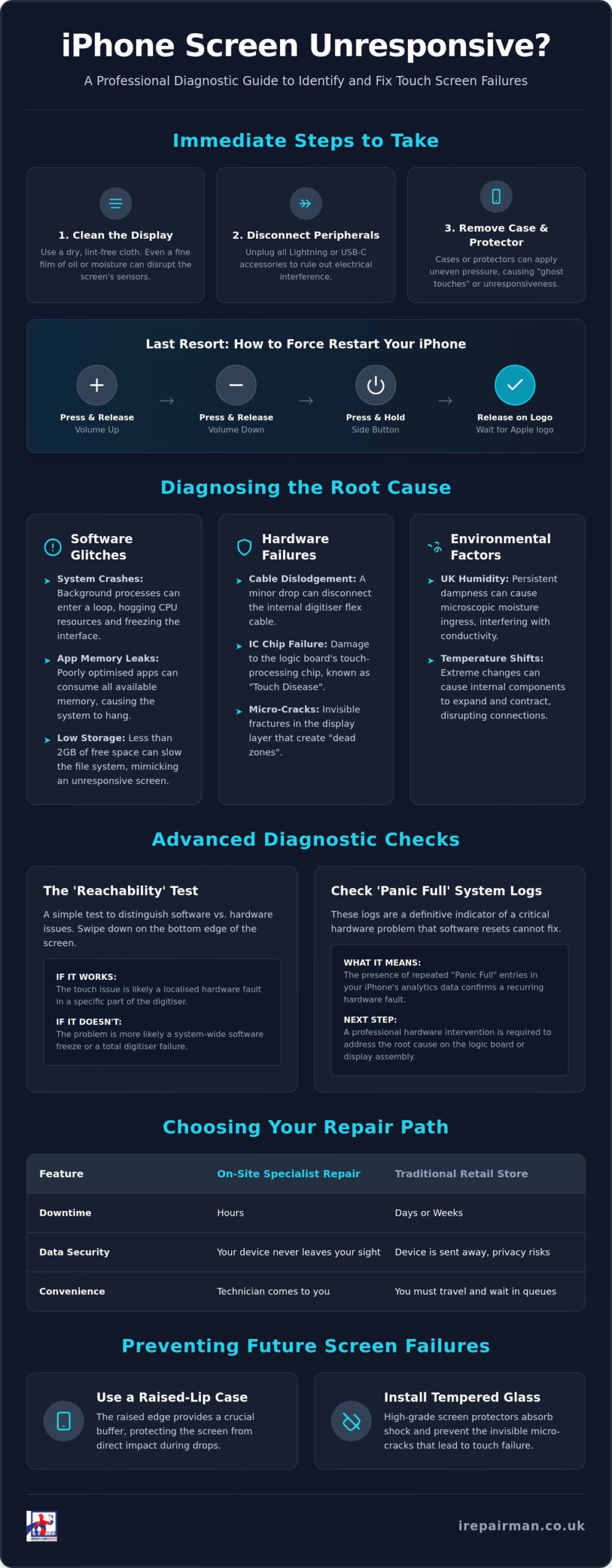
Modern iPhones rely on a sophisticated stack of sensors known as capacitive touchscreen technology. This system works by detecting the electrical charge from your fingertips to register a command. When you find your iPhone screen not responding to touch, it’s rarely a simple case of “broken glass.” Instead, it’s a failure in the delicate handshake between the digitiser, the OLED panel, and the device’s processor. Identifying whether you’re facing a total system freeze or an intermittent hardware failure is the first step toward a resolution.
A total freeze often mirrors a software crash where the entire interface hangs. Intermittent response, however, suggests the digitiser layer is struggling to translate your physical movements into digital data. You might also encounter “ghost touching,” where the device opens apps or types messages on its own. This erratic behaviour is usually a sign of physical sensor degradation or internal pressure on the display assembly, rather than a software glitch.
Environmental factors play a surprisingly large role, particularly for those living in the UK. London’s persistent dampness and high humidity can lead to microscopic moisture ingress, which interferes with the electrical conductivity of the screen. Similarly, extreme temperature shifts, such as moving from a cold winter morning into a heated office, can cause the internal adhesive layers to expand and contract. This physical stress can temporarily or permanently disrupt the connection between the screen and the logic board.
Common software triggers for touch failure
Sometimes the hardware is perfect, but the software is overwhelmed. System-level crashes are often triggered by background processes that have entered an infinite loop, hogging the CPU and preventing it from prioritising touch input. Memory leaks in your favourite apps can also cause the user interface to hang indefinitely. We frequently find that devices with nearly full storage suffer the most; when an iPhone has less than 2GB of available space, the file system slows down, leading to significant lag that feels like an unresponsive screen.
Hardware culprits beyond the glass
If your screen is pristine but unresponsive, the issue is likely hidden beneath the surface. Common hardware failures include:
- Digitiser flex cable dislodgement: Even a minor drop without a crack can jar the internal connector loose, severing the touch data path.
- IC chip failure: Known in the industry as “Touch Disease,” this involves the logic board’s touch-processing chips becoming desoldered or damaged.
- Micro-cracks: Tiny fractures in the OLED or LCD layer, often invisible to the naked eye, can kill touch sensitivity in specific “dead zones” across the display.
Immediate steps to fix an unresponsive iPhone screen
When you are staring at an iPhone screen not responding to touch, the instinct is often one of panic. You can’t even slide the bar to turn the device off normally. Before assuming the worst, start with the physical environment. Clean the display thoroughly with a dry, lint-free cloth. Avoid spraying any liquids directly onto the glass; moisture can easily seep into the speaker grilles or the charging port, turning a touch issue into a far more complex hardware crisis. Even a microscopic film of oil or sweat can disrupt the capacitive sensors.
Next, disconnect all peripherals. USB-C and Lightning accessories can occasionally cause grounding issues or electrical interference that confuses the digitiser. If you’re using a third-party case or a thick screen protector, remove them immediately. These can apply uneven pressure to the edges of the OLED panel, tricking the sensors into thinking a finger is permanently held down. If these external factors aren’t the culprit, you must move to a hardware-level override to break the software deadlock.
How to Force Restart your iPhone (2026 Guide)
If the ‘Slide to Power Off’ prompt is unresponsive, a standard shutdown is impossible. For all modern devices, including the latest iPhone 17 and older models back to the iPhone 8, the sequence is specific and requires precise timing. Quickly press and release the Volume Up button. Immediately press and release the Volume Down button. Finally, press and hold the Side button. You must keep holding it even after the screen goes dark. Only release the button once the Apple logo appears. This process forces the touch-driver software to reload from scratch, often resolving deep system-level hangs.
Addressing the ‘Ghost Touch’ phenomenon
Ghost touching, where the phone seems to operate itself, often stems from static buildup or microscopic debris trapped under the frame’s edge. If the screen is acting erratically, try a soft reset of your settings. Navigate to Settings, then General, and select Transfer or Reset iPhone. Choose Reset and then Reset All Settings. This won’t delete your photos or messages, but it will recalibrate the touch-response data. If the erratic behaviour persists after a clean and a reset, it’s likely that a professional iPhone screen repair is required to address a failing digitiser or a loose internal connection.
Software vs. Hardware: Identifying the root cause
Determining the exact reason for an iPhone screen not responding to touch is essential to avoid unnecessary costs and data loss. You should start by isolating the physical area of failure. If the screen is partially functional, use the ‘Reachability’ feature by swiping down on the bottom edge of the display. This brings the top of the interface down; if you still cannot interact with those buttons in their new position, the fault lies with the software. If you can interact with them now but not when they are at the top, you have a physical ‘dead zone’ on your digitiser.
Deep-seated hardware issues often leave a digital trail in your system logs. By navigating to Settings, Privacy & Security, and then Analytics Data, you can search for ‘Panic Full’ entries. These logs are generated when the iPhone’s kernel detects a hardware component that isn’t responding correctly. If these logs appear frequently, no amount of software updating will fix the problem. You should also consider the catalyst; a recent drop or exposure to London’s damp weather can cause internal corrosion or cable displacement that won’t show up as a crack on the surface glass.
External factors can also mimic hardware failure. If you notice your iPhone screen not responding to touch only whilst the device is plugged into a wall socket, the issue is likely electrical noise from a faulty or non-certified charging cable. This interference disrupts the capacitive field of the screen, making it impossible for the digitiser to read your inputs accurately. Always test the device whilst it’s unplugged to rule out this common environmental glitch.
The ‘Drop without a Crack’ scenario
Structural damage isn’t always visible. Even if your device looks pristine, a sharp jar can cause the internal digitiser flex cable to partially unseat from the logic board. This leads to erratic behaviour or a screen that works only when pressure is applied to a specific spot. To understand more about how internal components are protected by the device’s frame, see our guide on iPhone back glass replacement for structural insights. A professional technician can often open the device and secure these connections without needing a full screen replacement.
When a software restore is necessary
If your hardware appears sound, the issue may be a corrupted touch driver within iOS. Recovery Mode allows you to reinstall the operating system whilst attempting to keep your data intact. However, if this fails, a DFU (Device Firmware Update) is the final software step, which completely erases the device. Because of the high stakes involved with your personal and professional data, it’s wise to book a professional on-site fix before wiping your phone. A specialist can verify the hardware integrity first, ensuring you don’t lose your data for a problem that a simple cable adjustment could solve.
Professional repair options in London and the UK
Once you’ve confirmed that your iPhone screen not responding to touch isn’t a software glitch, the next hurdle is the logistics of the fix. For many professionals, the traditional route involves booking a Genius Bar appointment, which can often mean waiting several days for a slot in Central London. This downtime is unacceptable in a corporate environment where every hour of disconnection has a tangible cost. Independent specialists have filled this gap by prioritising speed and flexibility without compromising on technical excellence. They understand that a phone isn’t just a gadget; it’s a critical business tool. If you need urgent assistance wherever you are in the capital, finding a reliable phone repair near me London service that comes directly to you is the most efficient solution available in 2026.
Data security is a paramount concern when handing over a device. A professional screen replacement should never require you to share your passcode. Technicians can verify the success of a touch-response fix using the emergency dialler or the ‘Reachability’ test from the lock screen. This ensures your private messages, corporate emails, and financial apps remain entirely discreet whilst the hardware is restored. This commitment to privacy is what separates a high-end service from a standard high-street shop.
If you are based outside the capital, a UK-wide pick and return service offers a seamless alternative. Your device is collected by a secure courier, repaired in a controlled environment, and returned often within 24 to 48 hours. This model, often supported by specialists like My Cellphone Repairs, provides the same level of accountability as an in-person visit, backed by a commitment to long-term reliability. It’s a logistical solution designed to meet you exactly where you are, whether that’s at home or in a regional office.
On-site vs. Mail-in: Which is right for you?
Emergency on-site repairs are the gold standard for busy individuals. Whether you are facing a lockout at Heathrow or a frozen display in a Canary Wharf boardroom, having a specialist come to you eliminates travel time and immediate stress. For non-urgent iPad or Samsung repairs, a secure mail-in service remains a cost-effective choice. To manage multiple devices for your team, learn about corporate phone repair London for business fleets.
Quality of parts: OEM vs. High-Quality Aftermarket
The market is flooded with varying grades of glass. A cheap aftermarket panel often lacks the precision needed for a capacitive touchscreen, leading to a recurring iPhone screen not responding to touch. Professional-grade parts ensure that critical features like True Tone and Face ID remain fully operational. Choosing a partner who takes personal accountability for the components they install is vital for your peace of mind. For a detailed breakdown of what to expect, review the phone screen repair cost UK for 2026.
To restore your device today with a service that meets you where you are, book your professional iPhone screen repair now.
Preventing future screen failures and next steps
Securing your device against future failure is as much about physical protection as it is about software hygiene. Once you’ve navigated the immediate crisis of an iPhone screen not responding to touch, your focus should shift toward long-term reliability. High-grade tempered glass is a non-negotiable investment. Unlike cheap plastic films, premium glass protectors are engineered to maintain the precise capacitive sensitivity required by the latest OLED panels whilst absorbing the force of direct impacts. This ensures that a minor tumble doesn’t result in a shattered digitiser or a frozen interface.
Your choice of case is equally critical for structural integrity. Look for designs featuring ‘raised lips’ that extend beyond the plane of the screen. These edges act as a buffer during side-impact shocks, which are the primary cause of internal flex cable dislodgement. Whilst the glass might remain intact, the internal handshake between the screen and the logic board can be severed by the vibration of a corner drop. A robust case provides the mechanical damping needed to keep these delicate connections secure.
Data resilience is the ultimate safety net. The stress of an unresponsive display is magnified when you realise your most recent backup was months ago. Set your device to perform automatic iCloud backups every night whilst charging. For those handling sensitive corporate data, a weekly local encrypted backup to a MacBook or PC provides an extra layer of security. If you ever face a hardware lockout again, you’ll have the peace of mind that your professional life is safe, regardless of the screen’s behaviour.
Maintaining your device’s health
Environmental care is often overlooked. Rapid temperature shifts can lead to internal condensation, which is particularly troublesome in the damp UK climate. Try to avoid leaving your phone in direct sunlight or in a cold car overnight. On the software side, stay current with the latest releases, such as the July 2026 security update, iOS 26.5.2. These patches often include subtle touch-driver optimisations that prevent the system-level hangs discussed earlier. For those using larger devices, our iPad repair London guide offers specific care instructions for tablet-sized digitisers.
Ready for a professional solution?
If your touch issues recur intermittently despite your best efforts, it’s time for a definitive assessment. iRepairMan London eliminates the logistical headache of traditional repair shops by bringing the repair centre directly to your doorstep, office, or even a local coffee shop. We provide a discreet, high-end service that respects your schedule and your data privacy. Every complex touch-response diagnostic is backed by a ‘no-fix, no-fee’ promise, ensuring you only pay for successful, lasting results.
Don’t let a failing screen disrupt your productivity any longer. Book your on-site iPhone screen repair in London now and restore your device to its peak performance today.
Restore your mobile lifeline today
An iPhone screen not responding to touch is a significant disruption, yet it doesn’t have to result in data loss or days of professional downtime. By distinguishing between temporary software hangs and physical digitiser failures, you can take the most efficient route to a resolution. Protecting your device with high-grade tempered glass and maintaining regular backups remains your best defence against future technical failures.
Since 2015, iRepairMan London has provided a discreet and professional alternative to traditional repair models. With over a decade of expert experience, we operate as a specialist B2B Phone Repair HUB for London businesses whilst offering a UK-wide pick and return service for ultimate convenience. We treat every device with individual care, ensuring your professional and personal data remains secure throughout the entire process.
Don’t let a frozen display stall your progress. Book Your Professional On-Site iPhone Repair in London now and let our experts return your device to peak performance. You’re just one step away from a seamless, functional mobile experience once again.
Frequently Asked Questions
Can I fix an unresponsive iPhone screen without a computer?
Yes, you can often resolve this by performing a force restart using the physical buttons on your device. This hardware-level override reboots the operating system and reloads the touch drivers without needing an external connection. If the issue is caused by a software deadlock or a minor system hang, this simple sequence usually restores full functionality immediately.
Why does my iPhone screen only stop responding in certain apps?
This behaviour typically indicates a software-specific conflict or a memory leak within that particular application. If your iPhone screen not responding to touch only occurs in one app, try deleting and reinstalling it from the App Store. If the problem persists across multiple apps, it may be a broader iOS stability issue that requires a system update or a professional diagnostic.
Is it safe to use a screen with ‘ghost touch’ behaviour?
It is highly inadvisable to continue using a device that exhibits ghost touching as it poses a significant risk to your data. The device may unintentionally delete files, send sensitive messages, or enter the wrong passcode until you are permanently locked out. Seeking a professional repair quickly is the only way to prevent these erratic commands from causing lasting damage to your digital life.
How much does it cost to fix an iPhone screen that isn’t responding in the UK?
Repair costs in the UK vary based on your specific model and the quality of the replacement components used. Older devices are generally more affordable to service, whilst the latest iPhone 17 series requires precision OLED panels that sit at the higher end of the price spectrum. You should always choose a provider that offers transparent pricing and a clear warranty on their workmanship.
Will a force restart delete my photos or data?
No, a force restart is simply a hard power cycle and will not affect any of your stored photos, messages, or files. It’s a safe troubleshooting step that forces the processor to shut down and reboot when the software interface is frozen. It is entirely different from a factory reset, which wipes the device’s memory.
What should I do if my iPhone screen is unresponsive after a water splash?
Power the device off immediately and avoid plugging it into a charger. Even a small amount of liquid ingress can cause a short circuit in the digitiser connectors, leading to an iPhone screen not responding to touch. Do not rely on the rice myth; instead, seek a professional internal cleaning to remove moisture before permanent corrosion sets in.
Can a faulty charger cause an iPhone screen to stop responding to touch?
Yes, non-certified or damaged charging cables can introduce electrical noise that interferes with the capacitive sensors of your display. This interference disrupts the screen’s ability to detect the electrical charge from your fingertips. If your touch response returns to normal the moment you unplug the cable, the charger is the culprit and should be replaced immediately.
How long does a professional iPhone screen replacement take on-site?
Most professional on-site screen repairs are completed within 30 to 60 minutes. A specialist technician arrives at your home or office with all the necessary tools and parts, allowing you to resume your schedule with minimal disruption. This efficiency is ideal for corporate clients who cannot afford the downtime associated with traditional mail-in services or retail appointments.



