

A fleet phone failure can interrupt work long before it becomes a major IT issue. Corporate mobile phone fleet repair in London can cover handset and tablet faults, with repairs arranged on-site across London or through a convenient pick-and-return service; turnaround depends on the fault and the parts required. The practical answer is to match the repair route to the device, the team’s location and how quickly staff need it back in service.
It’s reasonable to want a clear time estimate and minimal disruption when several devices need attention. This guide explains which repairs may be suitable for business fleets, what affects service times, how repair arrangements work across London and what to consider when planning replacements. You’ll also see how batch repairs and collection options can help keep office and remote teams moving, and where a specialist repair service like iRepairMan London fits when phones or tablets need professional attention.
Key Takeaways
- Match each handset fault to the right repair route, from screen or back-glass damage to tablet repairs.
- Plan turnaround around the fault, parts needs and whether devices can be repaired on-site or sent through a pick-and-return service.
- Central London businesses can arrange repairs at a practical workplace location, while remote teams can use UK-wide collection and return.
- Use a consistent process to log faults, prioritise essential devices and decide when repair or replacement best suits the team.
- For bulk maintenance, a dedicated business repair service can help coordinate batches and reduce disruption across the organisation.
Mobile phone and handset repair services
Fleet repairs can cover damaged screens, cracked back glass and charging faults, as well as other handset problems. Choose the repair route according to the device, the fault, its location and how essential it is to daily work.
Fleet contract options and minimum volumes
UK businesses can arrange repairs individually or group devices into a planned batch. An individual booking suits an isolated issue, such as a cracked screen. Batching several devices can make coordination and administration simpler. Before booking, set out the repair scope, handover process, reporting needs and warranty terms.
There is no single minimum volume for every fleet arrangement. A repair service should be able to handle occasional faults as well as larger batches, so a small number of urgent repairs can be managed without holding up the wider process.
Warranty terms should state which repair work and parts are covered, how long cover lasts and what exclusions apply. A parts guarantee is separate unless the written terms include it, so review both before approving repairs.
A screen replacement and a charging fault involve different work and parts. Record each device’s model, reported fault and repair outcome together in the fleet register.
Data privacy starts with controlled access to each handset. Before repair, follow your organisation’s process for backing up business information, removing access credentials where appropriate and recording the device handover. An encrypted, no-access repair protocol can help protect stored data while technicians complete the work.
For a lost or damaged handset, record its assigned user, model and fault before arranging repair. This helps the fleet manager identify which devices need urgent attention and which can wait.
Collection and return arrangements
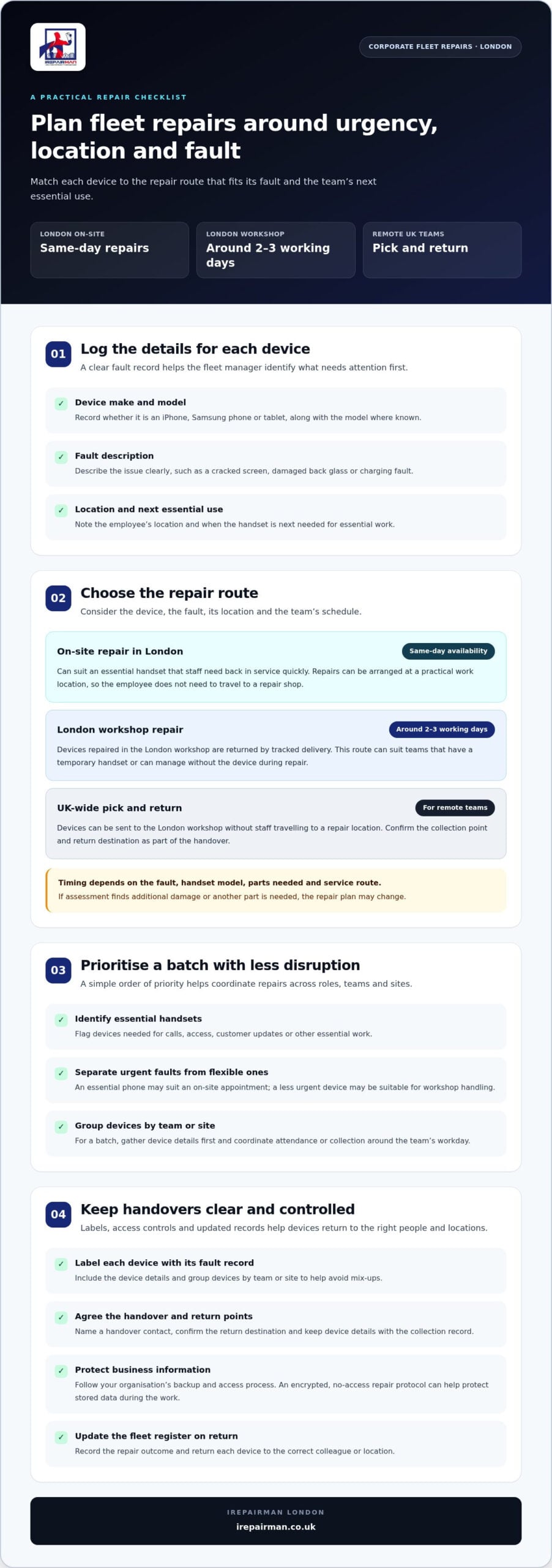
To arrange a London repair, prepare a device list with each handset’s model, fault and location. Name a handover contact and confirm where the devices should be returned, such as an office reception. For teams elsewhere in the UK, iRepairMan London’s pick-and-return service provides a way to send devices to its London workshop without staff travelling to a repair location.
Group devices by team or site and label each one with its fault record. Confirm the return destination, then update the asset register when the devices come back. This helps avoid mix-ups between colleagues and locations.
For example, a Central London office might have a smartphone with a cracked screen and another device with a charging fault. Separate labels keep each device’s fault details clear, while one collection point simplifies the handover.
On-site repair suits teams that cannot spare time to send devices away. Pick and return can suit remote staff or repairs that need workshop handling. Choose based on the device, repair task and workplace schedule.
Express repair times
Repair timing depends on the fault, handset model, parts and service route. An iPhone screen repaired on-site follows a different schedule from a device sent to a workshop. For a fleet manager, the useful question is which option will return an essential handset to work soonest.
iRepairMan provides same-day on-site repairs in Central London and across its London service area. This can help when a staff member relies on one phone for calls, access or customer updates. A technician can attend a practical work location, such as an office, so the employee does not need to travel to a repair shop. The fault and required parts determine the work involved.
Workshop repairs follow a separate route. Devices repaired in the London workshop are returned by tracked delivery in around 2-3 working days. This suits teams that can issue a temporary handset or manage without the affected device during the repair. The tracked return also gives the business a clear handover point for its asset records.
To prioritise a fleet repair, provide these details when arranging service:
- The handset make and model, such as an iPhone or Samsung phone.
- A clear fault description, such as a cracked screen or charging port failure.
- The employee’s location and the device’s next essential work use.
These details help distinguish urgent faults from devices that can go through workshop repair. A cracked screen on a phone needed for a client meeting, for example, may suit an on-site appointment. A less urgent device can be sent for workshop handling, particularly if staff have spare handsets to use.
Parts availability and fault complexity affect the schedule. Replacing a screen differs from diagnosing a phone that will not charge. If assessment reveals additional damage, the repair plan may need to change to account for more work or another part. Plan staff cover around that possibility rather than promising a fixed return time.
For a batch, gather device details before booking and identify which handsets are essential to key roles. A clear priority order helps coordinate attendance or collection around the team’s workday. Central London offices can arrange on-site repairs, while teams elsewhere in the UK can use pick and return. Choose the route that fits each device’s fault and location.
For an urgent London handset fault, on-site phone repair can reduce travel and workplace disruption. For workshop repairs, tracked return provides a defined route back to the business.
London-based repair providers
London businesses can choose between on-site repairs and collection for workshop handling. The right arrangement depends on staff locations, device faults and the service commitments the organisation needs.
Corporate fleet repair services
A corporate repair service can coordinate handset faults across departments, sites and remote teams. The process may include fault logging, bookings, collections and return records. Compare how it handles an urgent phone as well as a batch of devices. For example, a finance team may prioritise a staff member’s work handset over a spare.
London represented 15.1% of the UK broken phone repair company list as of 19 September 2026. That figure describes company listings, not repair capacity or service quality. London also had 47 recorded broken phone repair company records as of September 2026. These counts show a busy local market, so service fit matters more than provider numbers alone.
On-site business phone repairs
On-site mobile phone repairs bring the work to the business, so staff do not need to travel. Arrange a handover point, such as reception or an office, and identify the affected employee. This can reduce time away from work when an iPhone screen is cracked or a Samsung handset has a charging fault.
Before an appointment, list each device model, fault and work location. A team split between Bloomsbury and Euston Road, for example, can group devices by site. This makes access and handover clearer for staff and technicians.
Business repair service-level agreements
Business service-level agreements set out commitments between a provider and an organisation. Review the written terms for booking responses, repair updates, collection and return arrangements, warranty coverage and escalation contacts. These details help fleet managers plan cover when a key handset is unavailable.
Do not assume an agreement guarantees a repair completion time unless the written terms say so. A cracked screen and a fault requiring further diagnosis involve different work. Match the commitments to your operational needs, and record what the business and repair team are each responsible for.
For a London office, compare on-site attendance with workshop collection using the same criteria: device, fault, location and business priority. A City team may prefer repairs at its premises, while a remote employee may need collection and return. Assign one internal contact to coordinate handovers and keep asset records current.
Before booking, prepare a device schedule with each user, model, fault and site. This gives the repair team a clear starting point and helps the organisation track every handset from handover to return. Keep repair terms and progress updates with the fleet register.
Mobile fleet troubleshooting and replacements
A repeated fault across several handsets may point to a shared issue rather than unrelated damage. Log each device’s model, user, symptom and location. If several phones stop charging at one office desk, for example, compare their cables and sockets before booking individual repairs. A clear record helps the fleet manager spot patterns and prioritise devices affecting essential work.
Record visible damage separately from problems that need diagnosis. A cracked screen is straightforward to note, but a phone that restarts, drains quickly or fails to charge can have several causes. Record when the fault occurs and what the user was doing. For a Samsung handset with intermittent charging, note whether the issue follows the device or happens only with one cable.
Use a consistent troubleshooting sequence before marking a device as unusable:
- Record the make, model, assigned user and exact fault.
- Check whether a different suitable cable or power source changes the symptom.
- Note any visible screen damage, loose connection or recent change in behaviour.
- Separate devices needing urgent attention from those with a working temporary alternative.
These checks can help distinguish an accessory issue from a handset fault, and give the technician useful context beyond a report such as “phone broken”. Do not open a handset or attempt component repairs at the office. Record what you observe and leave internal diagnosis to a suitably equipped repair professional.
Deciding whether to repair or replace a handset is an operational choice. Consider the fault, device condition, role and availability of a usable spare. A cracked screen on a phone used for customer calls may need prompt repair; repeated faults may call for a longer-term replacement decision. Compare the disruption of repairing the device with the work involved in moving the user to another handset.
Replacement does not have to mean buying a new handset immediately. A business may reassign an organisation-owned spare, move the user’s work to another approved device or arrange procurement through its existing process. Before transferring a user, follow internal procedures for accounts, work applications and business data. Keep the asset register updated with the device’s status, assigned user and repair history.
Review recurring faults during routine fleet checks. If several devices have similar screen damage or charging problems, look at handling, storage and charging practices at the affected site. For example, inspect cable condition and device placement in a shared charging area. This helps teams decide whether repair, redeployment or replacement best suits each handset.
Corporate mobile phone fleet repair services in London
For a business with staff across Central London, coordinating repairs is as important as fixing the handset. A shared process helps teams route devices, track progress and return repaired phones to the right workplace. Start by assigning a fleet manager to gather reports from each office, reception or coworking space.
Group requests by site and handset type before arranging a repair batch. A Mayfair office, for example, might report several iPhones while a nearby team uses Samsung phones. One device schedule lets the repair team see each model, fault, user and work location. Keep a separate record for every handset to prevent repair instructions being mixed up.
Set priorities according to business use, not just the order faults are reported. A phone used for client calls or staff coordination may need attention before a spare. Ask team leads to identify essential handsets and available alternatives, giving the fleet manager a clear basis for scheduling repairs around operational needs.
For businesses with several London sites, choose a handover method that suits each location. Office reception can coordinate a technician visit or device handover; a remote employee may need collection and return instead. Record the site contact, access instructions and return destination for every handset, especially when devices move between the City, Bloomsbury and the West End.
Keep repair approvals straightforward. Give the fleet coordinator authority to approve routine work, and refer unusual faults or repeat repairs to the relevant operations lead. A cracked screen may follow the standard process, while a handset with recurring charging problems may need review before further work is arranged.
A useful fleet repair record includes:
- Device make, model, assigned user and business location.
- Reported fault and the date it was logged.
- Repair status, handover details and return destination.
- Any follow-up action, such as updating the asset register.
A shared record gives operations and IT teams a consistent view without relying on separate email threads. If an iPhone moves from a City office to a colleague in Mayfair, update its assigned user and location during the handover. Clear ownership also tells staff where to report a new fault.
Review the repair process after each batch. Look for repeated faults by handset model, office or work pattern, then adjust storage, charging or handling practices where appropriate. Recurring screen damage at one site, for instance, may prompt a review of how phones are carried during shifts. A documented process helps London teams coordinate future repairs with less disruption.
IRepairMan London: iPhone Screen Repair
iRepairMan London can help businesses with damaged iPhone screens and back glass, faulty iPads or Samsung phone repairs. For a handset that staff rely on each day, arrange an assessment and choose the repair route that fits the device and workplace.
Repairs can be arranged at a Central London business address, helping staff avoid unnecessary travel. Most repairs and replacement parts are covered by a 12-month warranty. Share the handset model, fault and preferred location when arranging service, so the repair can be planned around your team’s needs.
Contact iRepairMan London to discuss a business handset repair or visit irepairman.co.uk.
Set your fleet’s next repair in motion
Turn your team’s device records into a clear repair plan. Choose a point of contact, group affected handsets by location and record each fault. This gives your business a practical starting point for corporate mobile phone fleet repair in London, whether one employee’s device needs attention or several teams report faults.
Before booking, decide who can approve repair work and where staff should hand over devices. A clear internal process helps colleagues report faults consistently and keeps decisions moving without unnecessary delays.
Review the plan with your fleet manager and identify the first device that needs attention. Then arrange the repair route that fits its fault and location.
Contact iRepairMan London to discuss your business repair requirements. A clear first step can help your team get back to work with confidence.
Frequently Asked Questions
What are corporate phone fleet repair turnaround times in London?
Turnaround depends on the repair route, handset fault and parts required. For a useful schedule, tell the repair team which devices are business-critical and note any meeting, shift or service deadline they affect. Arrange an authorised staff contact for handover, and plan how employees will access work accounts while their usual phones are being repaired. This helps your operations team manage disruption without assuming a completion time.



