

A cracked iPad screen can need a glass replacement, but if the LCD beneath it is damaged, that may need replacing too. If you’re thinking, “Help, my toddler has cracked my iPad screen,” the repair price depends on the iPad model and the extent of the damage, and is given after a quote request. Loose or sharp glass can also pose a safety risk, so keep the iPad away from little hands.
It’s understandable to want a quick fix, but pressing on the screen or attempting a repair without experience can make the damage worse. This guide explains what affects an iPad screen repair, how a professional replacement works, and why screens crack, from drops and impacts to pressure on the glass. You’ll also find practical steps to contain loose fragments temporarily and limit further damage while you arrange a lasting repair.
Key Takeaways
- Compare repair estimates by looking at your iPad model and the type of screen damage, not just the headline figure.
- Learn what a professional replacement involves and why glass damage and display damage can call for different repairs.
- Spot common causes of cracked screens and make simple changes to reduce the risk of another impact.
- Use careful temporary measures to contain loose cracks, and keep the iPad away from children if the glass is sharp or shedding fragments.
- Find out when a professional iPad repair is the safer next step than attempting a screen repair yourself.
How much does it cost to replace an iPad screen?
Use the iPad model and visible damage to understand which repair work may be needed. Glass, display condition and cover terms all affect your next step.
-
Compare replacement options by model
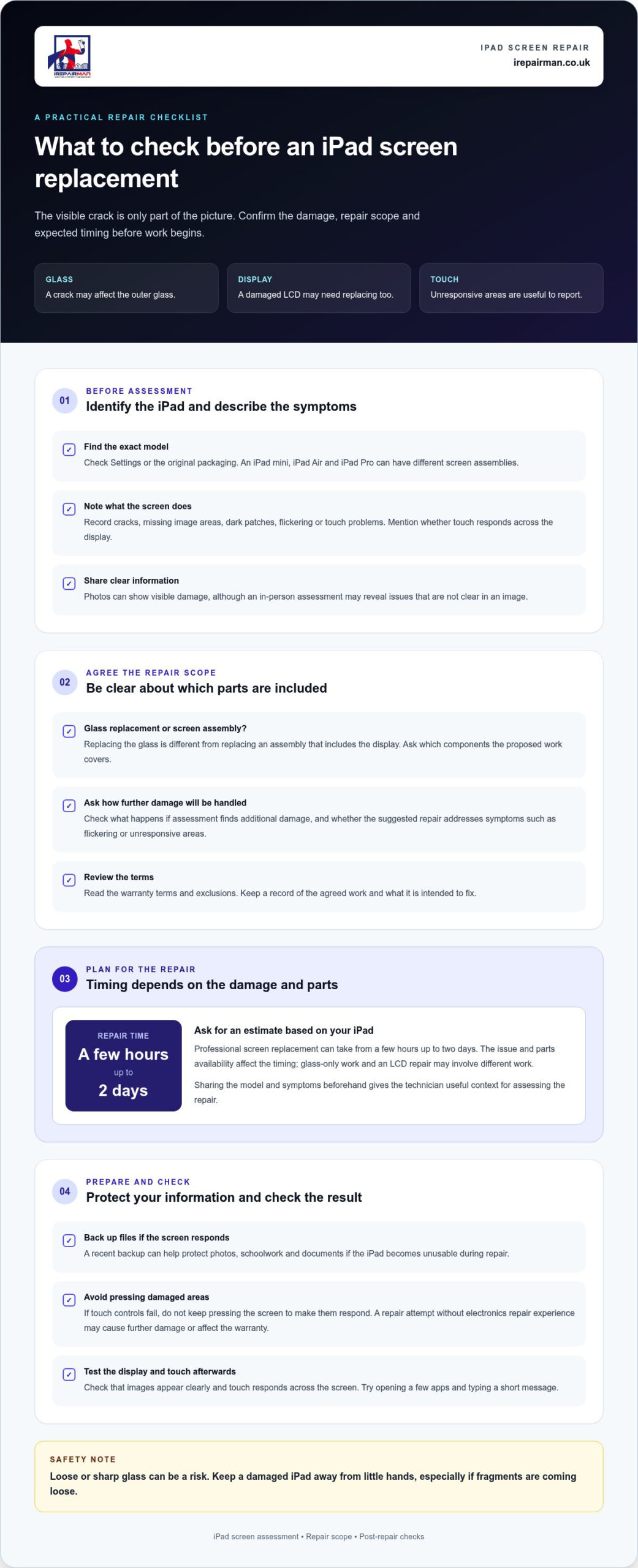
Identify your exact iPad model before comparing repair options. An iPad mini, iPad Air and iPad Pro have different screen assemblies, so information for one model may not apply to another. Find the model name in Settings or on the original packaging, then share it when arranging a repair.
Describe how the screen looks and behaves. For example, note whether touch controls respond across the display or images appear distorted. These details help distinguish surface glass damage from a problem affecting the display beneath it.
-
Check third-party repair work
Before booking a repair with iRepairMan London, confirm what the work includes. Replacing the glass differs from replacing a screen assembly that includes the display. Make sure you understand which components are covered and what happens if assessment reveals further damage.
Review the repair terms, including the warranty and any exclusions. Ask how the screen will be assessed and whether the proposed work addresses symptoms such as flickering or unresponsive areas. Comparing the scope of work, rather than just the service description, makes it easier to understand what the repair involves.
-
Request a personalised assessment
Share the model name and describe the damage clearly. Mention cracks, missing image areas, dark patches or touch problems. Photos can help show the visible condition, but an in-person assessment may reveal issues that aren’t apparent in an image. Ask the repairer to explain whether the glass, display or both need attention.
Extended warranty or accidental-damage service options are subject to the terms of your specific plan. Check your plan documents for any applicable service charges and repair conditions. Home insurance may cover accidental iPad screen damage if your policy includes accidental-damage cover. Read the policy wording for relevant exclusions and claim requirements.
Before agreeing to repair work, make sure the assessment explains which parts are involved and which symptoms the repair is intended to address. If the display still works, note any faults before handing over the device, such as unresponsive touch areas or discoloured images. This gives you a useful reference when checking the iPad afterwards.
Professional iPad screen replacement
A professional assessment can identify whether the glass, display, or both need attention. In the UK, repair time depends on the damage and parts availability.
-
Arrange professional screen replacement
Choose a professional repair rather than attempting the work yourself unless you have electronics repair experience. An iPad screen can be difficult to remove and replace, and an inexperienced repair attempt may damage the device or affect its warranty. Describe the impact and visible symptoms clearly so the technician can assess the repair needed.
A damaged LCD may need replacing alongside the glass because it displays the image. Ask what the assessment covers and whether the proposed work addresses both components if needed.
-
Check the repair turnaround time
Ask how long the repair is expected to take and what could affect that timing. Professional iPad screen replacement can take from a few hours up to two days, depending on the issue and parts availability. A glass-only repair and a repair involving a damaged LCD may require different work.
Share the iPad model and symptoms before arranging a repair. This gives the technician useful context when assessing the work and helps you plan for the time your device will be unavailable.
- Prepare the iPad for assessment. If the screen still responds, back up important files before handing over the device. A recent backup can help protect photos, schoolwork and documents if the iPad becomes unusable during repair. If touch controls fail, don’t keep pressing damaged areas to make them respond.
Write down any symptoms beyond the crack, such as missing image areas, flickering or touch-response problems. Mention whether the iPad was dropped or struck. These details help distinguish visible glass damage from faults that may involve other screen components.
- Agree on the repair scope before work begins. Confirm whether the proposed replacement covers the glass, display or both, and ask what happens if assessment reveals additional damage. Keep a record of the agreed work and warranty terms, so you know what the service covers after collection.
After repair, check that the display shows images clearly and that touch controls respond across the screen. Try opening a few apps and typing a short message. If you need a professional assessment for a cracked tablet, arrange iPad screen repair rather than attempting a repair without the right experience.
Common causes of cracked iPad screens
Consider where the crack starts and what happened beforehand. The pattern may help identify the likely cause and prevent another impact.
- Protect the iPad from drops. A fall from a sofa, kitchen counter or child’s chair can send impact through the glass. Even a short drop onto a hard floor may leave a chip or spreading crack, especially if a corner lands first. Keep the iPad on a stable surface, away from the edge, and use a case that covers its corners.
Check the case after a fall. A loose fit or split corner may no longer cushion another impact. Replace a damaged case and avoid balancing the tablet on a cushion, where it can slide onto the floor.
- Keep small hands from dropping or bending it. Toddlers can grab an iPad by one edge, carry it unevenly or drop it while moving between rooms. A device resting across a child’s lap may also fall when they stand. Give young children a stable place to use it, such as a low table, and supervise them.
After use, put the tablet out of reach instead of leaving it on a sofa or bed. A toddler climbing onto furniture can knock it down, even when the iPad isn’t being used.
- Prevent pressure on the screen. Sitting on an iPad, leaning on it or placing a heavy book over it can stress the glass. A tablet squeezed into an overfilled school bag may also take pressure from lunch boxes or books. Store it in a separate compartment, with the screen facing away from hard objects.
Don’t stack items on a closed cover. A cover can reduce everyday scuffs, but a heavy object can still press on the display, particularly when the iPad is trapped underneath.
- Watch for edge and corner impacts. A knock against a table leg or door frame can chip the glass near its border. That small chip may become a longer crack with further handling. Inspect the corners after a collision, and avoid carrying the iPad loosely alongside keys, toys or other hard objects.
Choose a case with raised edges around the screen and protected corners. This can help prevent the glass from striking a flat surface directly during a fall, though it cannot prevent every type of damage.
- Reduce scratches that can weaken the surface. Sand or grit caught between an iPad and another object can scratch the glass. For example, placing the tablet face-down on a gritty café table may leave marks. Wipe the surface with a soft, clean cloth and keep the screen separate from keys or loose toys.
A tempered glass protector can help guard against scratches and some impacts. Check it regularly. If it’s chipped or lifting, replace it rather than assuming it will fully protect the screen.
Temporary ways to contain screen cracks
Use temporary measures only to contain loose fragments and limit contact with the cracked surface. They won’t repair the iPad glass or make a damaged screen safe for a toddler to handle.
- Switch the iPad off and move it out of reach. Place it on a stable surface, away from children, pets and food. Don’t press the cracked area or run your fingers across it to check for loose pieces. A crack can have sharp edges, and extra pressure may loosen more glass.
If the iPad feels hot, looks swollen or behaves unusually, stop using it and keep it away from soft furnishings. Don’t try to open the device or push fragments back into place.
- Check for loose glass without touching the crack. Look at the screen in good light and note whether any fragments have come away. Keep children away from the area, then use a soft brush or folded paper to gather loose pieces from the surrounding surface. Avoid picking fragments up with bare fingers.
Put collected glass into a sturdy container, not an open bin where someone could reach it. Don’t wipe across the screen with a cloth. Fibres can catch on an exposed edge and spread fragments.
- Cover the screen only if the surface is stable. A clear screen film or tempered glass protector may help hold small fragments in place when applied gently. Don’t press hard, force a protector over raised glass or use one if pieces are already lifting. Stop if fitting it spreads the crack or dislodges glass.
A protector is a short-term barrier, not a repair. It won’t restore touch response or protect a damaged display, and a loose protector can create another edge for fingers to catch on.
- Use a case to limit handling. If the iPad fits into its case without pressure on the screen, keep it there while moving it. Don’t squeeze the case shut or place it screen-down. A case can help shield the edges, but it can’t seal a cracked surface or secure every fragment.
Carry the iPad carefully with both hands, keeping the damaged screen away from people. Avoid putting it in a crowded bag with keys, toys or books that could rub or press against the screen.
- Back up important files and arrange repair. If the display and touch controls still work, save photos, documents and schoolwork while handling the iPad gently. Don’t continue using it if cracks are spreading, glass is shedding or the display is difficult to see. Tell the repair technician what temporary covering you used so they can remove it carefully.
Keep the iPad out of your toddler’s reach until the damaged screen has been assessed and repaired. Temporary covering may reduce contact with fragments, but it doesn’t remove the risk from broken glass.
Can you use an iPad with a cracked screen safely
A cracked iPad screen may have sharp edges, so a working display doesn’t prove it’s safe. Take these steps before deciding whether to use it.
- Check for loose or sharp glass without touching it. Look across the screen in good light. If fragments are lifting, the crack reaches an edge or glass has come away, stop using the iPad. Keep it away from children and pets. Don’t run a finger over the crack to test its sharpness.
Even a small chip can catch skin or clothing. If you see fragments on a table or floor, keep people away and gather them carefully without sweeping a hand across the screen.
- Stop using the iPad if the display or touch controls behave unusually. Dark patches, flickering, lines or unresponsive areas can make everyday tasks difficult. For example, a child may tap repeatedly on an unresponsive area, adding pressure to damaged glass.
Don’t keep pressing the screen to test it. If the display obscures text or controls, switch the device off if you can do so safely, then place it on a stable surface.
- Keep the device away from toddlers. A cracked screen can expose sharp edges, and small hands may press or pick at the damaged area. Put the iPad somewhere secure, not on a sofa, low table or bed where a child can reach it.
If a child has already handled the tablet, check their hands for cuts and carefully remove any visible glass from nearby surfaces. Seek appropriate medical help for an injury that needs attention.
- Don’t rely on a protector to make severe damage safe. A screen film or tempered glass protector may help hold small fragments in place, but it can’t repair broken glass or make a damaged display safe to use. Avoid fitting one over raised or shifting pieces, as pressing it down could loosen more glass.
A case may protect the edges during careful movement, but it won’t remove the risk from exposed shards. Don’t carry the iPad loose beside keys or toys, which may catch on the damaged screen.
- Arrange repair if glass is loose or the screen affects use. Until then, limit handling and keep the iPad switched off if it’s difficult to use safely. If the display still works and no glass is loose, back up important files without pressing on the crack, then stop using the iPad if the damage spreads.
For a damaged iPad screen that’s sharp, shedding glass or difficult to operate, arrange an iPad repair rather than letting a toddler continue using it.
IRepairMan London: iPhone Screen Repair
iRepairMan London repairs iPad screens, including cracked screens, as well as iPhone screens. Same-day on-site repairs can help reduce disruption, with service arranged at a convenient location such as home, work or school in Central London.
Share the iPad model and describe the visible damage when arranging an assessment. A technician can determine whether the glass, display or both need attention. Each repair comes with a 12-month warranty, and an encrypted, no-access data safety protocol helps protect your privacy during the repair process.
If a cracked iPad is disrupting your day, contact iRepairMan London to arrange a repair.
Make a clear next move for your iPad
If you’re thinking, “Help, my toddler has cracked my iPad screen,” focus on having the device assessed rather than relying on a temporary covering. Before arranging a repair, note the iPad model and describe any display or touch problems. Keep the device away from your child if glass is loose. These details give the repair team a useful starting point.
iRepairMan London repairs iPads, iPhone screens and iPhone back glass. Share what happened and how the screen behaves so the repair can address the issue you’re facing. There’s no need to keep testing a cracked screen if it has sharp edges or is difficult to use.
Take the next step at a pace that suits you. Contact iRepairMan London to discuss your repair and move towards a safer, usable device.
Frequently Asked Questions
How much will it cost?
The repair needed depends on your iPad model and the damage. Find the model name in Settings, then note symptoms such as flickering, dark patches or unresponsive touch controls. A technician can use those details to assess whether the issue appears limited to the glass or affects the display too. This helps you understand the work involved before deciding how to proceed.
Is there a service guarantee?
Check the repair paperwork for the warranty terms, including which repaired fault is covered and how to report it if it returns. Keep a copy of the service record and note the symptoms you noticed before the repair. That makes it easier to describe a recurring issue clearly. Remember that damage caused by a separate accident is different from a fault with the original repair.
Where can I get service?
In Central London, iRepairMan London repairs iPads. On-site service means you can arrange a repair at a suitable location within our coverage zone. When you get in touch, share your area, iPad model and screen symptoms to help the team guide the next step.
How should I safely handle an iPad with a cracked screen?
If your toddler has cracked your iPad screen, keep the device out of their reach and avoid pressing or rubbing the damaged area. If you need to move it, hold the case rather than the screen, and keep it separate from keys, toys and other hard objects. Don’t leave it on a low table or sofa. If glass is loose, stop handling the iPad and arrange a professional assessment.
How much do UK third-party iPad screen repairs cost?
The work needed depends on your iPad model and the condition of its glass and display. Ask what the proposed repair includes and whether it addresses symptoms such as flickering or unresponsive touch controls. Check the service terms and warranty details too. Comparing the repair scope helps you understand whether different services address the same problem, rather than just the visible crack.



