

What if an iPad 9th gen screen replacement didn’t mean travelling across London or rearranging your day? A cracked or unresponsive display can disrupt study, work and everyday tasks. Before booking, it helps to know how a professional repair is arranged and what to prepare.
iRepairMan London provides on-site iPad repairs in Central London, with appointments at your home, workplace, school or a café. If you prefer a workshop repair, your iPad can be repaired at the London workshop and returned by tracked delivery in around 2-3 working days. This guide explains what to expect, how to prepare your device and how to choose the service route that suits your plans.
iRepairMan London has served London customers since 2015. Repairs include post-repair checks, an encrypted, no-access data safety protocol and a 12-month warranty on the repair work. You’ll find practical steps for describing the fault, arranging an assessment and understanding what happens before your iPad is returned.
Key Takeaways
- Cracks, touch problems or a hard-to-read display are reasons to arrange an assessment. Symptoms alone can’t confirm the cause.
- For an iPad 9th gen screen replacement, identify your model and describe the damage so the repair team has useful information before the assessment.
- Choose an on-site appointment at home, work, school or a café in Central London, or use the London workshop with tracked return delivery.
- Back up important information where possible before handing over your iPad, and note any issues you’d like assessed.
- Understand the assessment, repair and testing steps before choosing the service route that fits your day.
IPad 9th gen screen replacement: when does a damaged display need repair?
A cracked display can make reading, tapping and carrying your iPad awkward. If parts of the screen are difficult to see or touch response is unreliable, even simple tasks can become frustrating. Arrange an assessment to find out what’s causing the problem and which repair is appropriate.
Which iPad screen problems should prompt an assessment?
Ask for a professional assessment if you notice visible cracks, lines or unusual patches, flickering, or areas that don’t respond when tapped. Before booking, note when the problem started and whether it affects one area or the whole screen. These details give the technician a useful starting point, but they don’t replace an inspection.
If the damage creates a handling concern, such as sharp or loose glass, stop using the iPad and avoid touching the damaged area. Tell the repair team about the condition when arranging service. A technician can assess the device and explain the appropriate repair route. Symptoms alone cannot confirm that screen replacement is the right fix or determine the outcome.
Why confirm the model before arranging a screen repair?
Check your iPad’s details before booking so the repair team can identify it accurately. If the screen still works, open Settings > General > About and look for the model information. Share the model name or number along with a clear description of the damage. If you can’t access Settings, say so when arranging the assessment rather than guessing.
Identifying the model helps the team consider the appropriate repair route. The iPad (9th generation) overview provides background on this model, but your device details and a technician’s assessment are more useful when arranging an individual repair. Don’t rely on appearance alone to identify it.
For an iPad 9th gen screen replacement in Central London, tell iRepairMan what you can see and whether touch response has changed. A technician assesses the iPad before advising on the next step, so you can understand the proposed repair route without trying to diagnose the cause yourself.
What happens during an iPad 9th gen screen replacement?
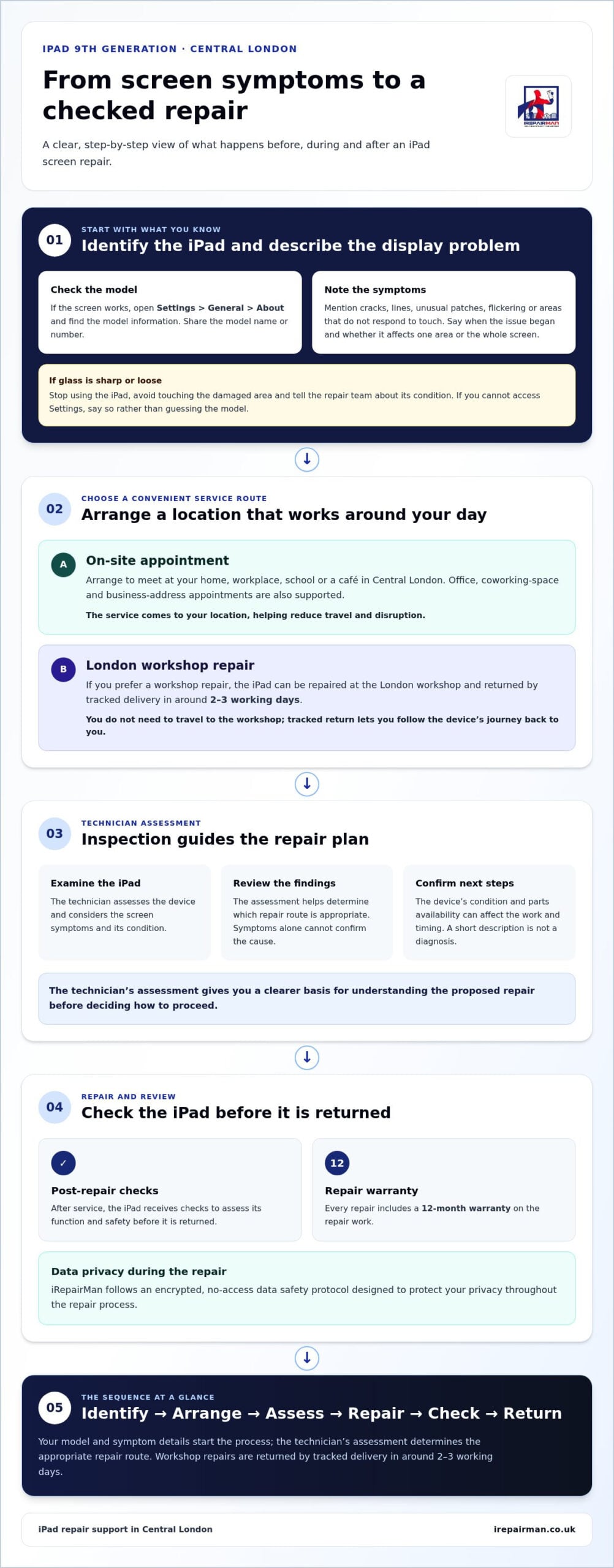
The repair journey starts with identifying the iPad and describing the problem. Next, you arrange an appointment, the technician assesses the device and the repair is followed by checks. The assessment guides the recommended route; the device needs to be examined before a repair plan or outcome can be confirmed.
From booking to technician assessment
When arranging an iPad 9th gen screen replacement, share the model details and describe what you can see or feel, such as cracks, display changes or parts of the screen that don’t respond to touch. You can arrange an appointment at a convenient Central London location, including your home, workplace, school or a café.
At the assessment, the technician examines the iPad and uses the findings to guide the repair plan. The device’s condition and parts availability can affect the next steps and timing. A short description alone can’t provide a reliable diagnosis, so the assessment gives you a clearer basis for deciding how to proceed.
In short: identify your iPad, describe the screen symptoms, arrange a convenient appointment and let the assessment guide the repair.
Testing, data privacy and repair cover
Post-repair checks help assess the iPad’s function and safety before it’s returned. They allow the device to be reviewed after service, while the assessment remains the basis for deciding what repair is suitable.
Your personal content matters. iRepairMan follows an encrypted, no-access data safety protocol designed to protect your privacy during the repair process. For a wider perspective on repair, the World Intellectual Property Organization discusses international right to repair discussions and their relationship with intellectual property.
Every repair comes with a 12-month warranty on the repair work. The assessment, post-repair checks and warranty give you clear information about the service and repair cover.
Ready to arrange an assessment? Explore iPad repair support and share your model, the screen symptoms and a location that suits you.
Choosing an iPad 9th gen screen repair option in Central London
You can arrange an iPad 9th gen screen replacement without planning your day around a trip to a repair shop. iRepairMan offers on-site support across Central London, as well as repair at its London workshop with tracked return delivery. Choose based on where you’d like the repair handled and what works around your plans.
When is on-site iPad repair the convenient choice?
An on-site appointment can reduce travel and disruption. A technician can meet you at home, work, school or a café in Central London. If you’re balancing meetings or study, you can arrange a practical location instead of setting aside time to cross the city. iRepairMan also supports customers at offices, coworking spaces and business addresses.
Repair timing depends on the service requirements, the technician’s assessment and parts availability. On-site support brings the service to you, while the assessment determines the work needed and how it can be arranged.
When might workshop repair and tracked return suit you?
If you’d prefer a workshop repair, your iPad can be repaired at iRepairMan’s London workshop and returned by tracked delivery in around 2-3 working days. You don’t need to travel to the workshop. Tracked return lets you follow the device’s journey back to you.
Outside Central London, UK-wide secure pick-and-return logistics provide another option for individuals and teams at remote offices. School and education teams arranging support for multiple iPads can read iPad repair for schools across the UK.
To choose a route, consider where you’d like the repair handled and how you want the iPad returned. On-site service brings support to a convenient Central London location; workshop repair includes tracked delivery after the work. In either case, the device is assessed first, and the repair plan and timing depend on its condition and service requirements.
How to prepare your iPad before screen replacement
A little preparation can make your iPad 9th gen screen replacement easier to organise. You don’t need to take the device apart or diagnose the fault. Note the model, describe what’s happening and choose a practical appointment location.
What should you do before the appointment?
Before arranging service, write down the exact iPad model and make a short note of the screen problem. Include when you first noticed it and, if you know, how it started. For example, say whether the display became difficult to read after a drop or whether touch response changed gradually. These details help the technician understand what to assess, without treating your description as a diagnosis.
If the iPad is usable and you’re able to do so, back up important information before handing it over. This is a sensible precaution, not a reason to attempt technical steps you’re unsure about. If you can’t back it up, tell the team when arranging the repair.
For an on-site appointment, keep the iPad accessible and agree a practical meeting place, such as your home, workplace or a café. If you’re using the workshop route, have the device details and a clear description of the damage ready when arranging service. Sharing useful information in advance helps make the assessment more straightforward.
What if the iPad cannot be used normally?
You can still describe the problem when booking if touch response is unreliable or the display is difficult to read. Explain which areas are affected and mention anything you can observe without repeatedly testing the screen. If cracked glass makes the device awkward or unsafe to handle, stop using it and let the repair team know.
Don’t press on cracked glass or attempt a DIY repair based on instructions that may not suit your device. Unnecessary handling or unverified repair steps can cause further problems. Leave the inspection to a technician, who can assess the iPad and advise on the repair route.
If you’re arranging repairs on behalf of a school or education team, see UK-wide iPad repair for schools for information tailored to education requirements.
Ready to arrange an assessment? Arrange your iPad screen repair and share the model, symptoms and a convenient appointment location.
Book iPad 9th gen screen replacement with iRepairMan
Ready to move ahead? Identify your iPad, describe the screen damage and choose the service route that suits your location. iRepairMan provides on-site iPad repairs across Central London, with secure UK-wide pick-and-return logistics for customers elsewhere. Same-day availability depends on the appointment and repair requirements, so arrange a time that works for you and allow for the assessment to guide the next steps.
Arrange a convenient repair in Central London
iRepairMan is a mobile repair service, so you can arrange on-site support at home, work, school or a café. Similar to how trade specialists and field technicians organise mobile workflows with Repair-CRM, structured scheduling and dispatch systems allow technicians to arrive promptly with the right equipment. When booking, share the iPad model, the symptoms you’ve noticed, your location and a preferred appointment time. These details help the team plan the visit and reduce disruption to your day.
A technician assesses the device before advising on the repair route. iRepairMan’s certified technicians follow an encrypted, no-access data safety protocol, and post-repair checks help assess the iPad’s function and safety. Every repair comes with a 12-month warranty on the repair work, giving you clear information about repair cover as well as the assessment process.
To arrange your iPad repair, describe the damage and share where and when an appointment would suit you.
Need a UK-wide collection and return option?
If you’re outside Central London, iRepairMan’s secure UK-wide pick-and-return service lets you arrange a repair without travelling to a workshop. The device is collected for repair and returned through the service. Read more about the UK-wide pick-and-return repair process and logistics.
For your iPad 9th gen screen replacement, share the model and describe what’s wrong with the display. Choose an on-site appointment in Central London or arrange UK-wide pick and return. The device assessment guides the repair plan, with timing shaped by the appointment and repair requirements.
Choose a repair route that fits your day
A cracked, unresponsive or difficult-to-read display deserves an assessment, not guesswork. For an iPad 9th gen screen replacement, identify your model, describe the symptoms and choose the route that suits you: on-site support in Central London or workshop repair with tracked return.
Before handing over your iPad, back up important information where possible and note any issues you want the technician to assess. Certified technicians, an encrypted, no-access data safety protocol and post-repair safety testing help provide reassurance throughout the repair. Every repair also comes with a 12-month warranty on the repair work.
You don’t need to plan a journey to a repair shop to take the next step. Arrange your iPad screen repair with iRepairMan and share your device model, the damage you’ve noticed and a convenient location. The team will assess your iPad and guide you through the repair plan.
Frequently Asked Questions
Can an iPad 9th generation screen be replaced?
Yes, iRepairMan repairs iPads, including the 9th generation. A technician first assesses the device and its screen symptoms, then advises on the suitable repair route. Cracks, display irregularities or unreliable touch response are useful details to share when arranging service, but they don’t confirm the fault or determine the outcome. You can arrange on-site support in Central London or use the workshop and tracked return option.
How long does an iPad 9th gen screen replacement take?
Timing depends on the device assessment, repair requirements, parts availability and appointment arrangements, so the completion time is determined by the repair. For the London workshop route, repairs are returned by tracked delivery in around 2-3 working days. This describes the workshop and return journey, not a guaranteed repair duration. Share your iPad model and symptoms when arranging service to help the team plan the next steps.
Can I get an iPad screen replaced at home in Central London?
Yes, iRepairMan provides on-site iPad repair support across Central London, including appointments at home. You can also arrange to meet a technician at work, school or a café, avoiding a separate trip to a repair shop. When booking, provide your location, preferred appointment time and a description of the screen problem. Appointment timing and completion depend on the repair requirements and assessment.
Should I back up my iPad before screen replacement?
Back up important information before handing over your iPad if it’s usable and you’re able to do so. A backup is a sensible precaution, particularly if you rely on the device for study, work or personal records. You don’t need to attempt complicated preparation or continue using an iPad that feels unsafe to handle. If you can’t back it up, mention this when arranging the repair.
Will my iPad data be accessed during a screen repair?
iRepairMan follows an encrypted, no-access data safety protocol for repairs, designed to safeguard your privacy rather than give technicians access to your personal content. If your iPad remains usable, you can back up important information before the appointment as an additional precaution. You can also raise any data-handling concerns when arranging service so you understand the process before the device is assessed.
Does an iPad 9th gen screen repair come with a warranty?
Yes. Every iRepairMan repair comes with a 12-month warranty on the repair work. A technician assesses the iPad before advising on the repair route, and post-repair safety testing helps check the device after service. The assessment determines what work is appropriate for your iPad’s condition.
Can I send my iPad for screen replacement from outside London?
Yes, iRepairMan offers secure UK-wide pick-and-return logistics, so customers outside Central London can arrange iPad repair without travelling to a workshop. The device is collected for repair and returned through the service. Share the iPad model and describe the screen damage when arranging the repair, and the team will guide you through collection and return for your location.



