

A broken work phone can interrupt a sales call, delay a reply and leave an employee without an essential tool. Keeping your sales team connected with fast repairs starts with a practical response: arrange help that can reach your Central London workplace, so the employee may not need to travel for support.
When a team relies on phones to speak with customers and colleagues, even a short disruption can affect the working day. This guide explains what to do when a device fails, how repair decisions can affect productivity and operating costs, and which symptoms may point to a component fault.
It also covers support for businesses maintaining several devices, including on-site repairs and convenient pick-and-return services across Central London. Whether one salesperson’s phone has failed or your organisation needs a coordinated repair process with iRepairMan London, these steps can help you decide what to do next.
Key Takeaways
- Set a clear response process for a broken work phone, including who reports the fault and how the employee stays reachable.
- Assess downtime alongside repair needs: delays can disrupt customer conversations, follow-ups and team workflows.
- Learn which signs may point to a worn or damaged component, and why diagnosis matters before deciding on replacement.
- Spot common device and connectivity issues early so your team can distinguish a phone fault from a wider connection problem.
- Prioritise repairs according to each device’s role, the disruption caused and the practical repair option available.
1. Emergency and out-of-hours breakdown support
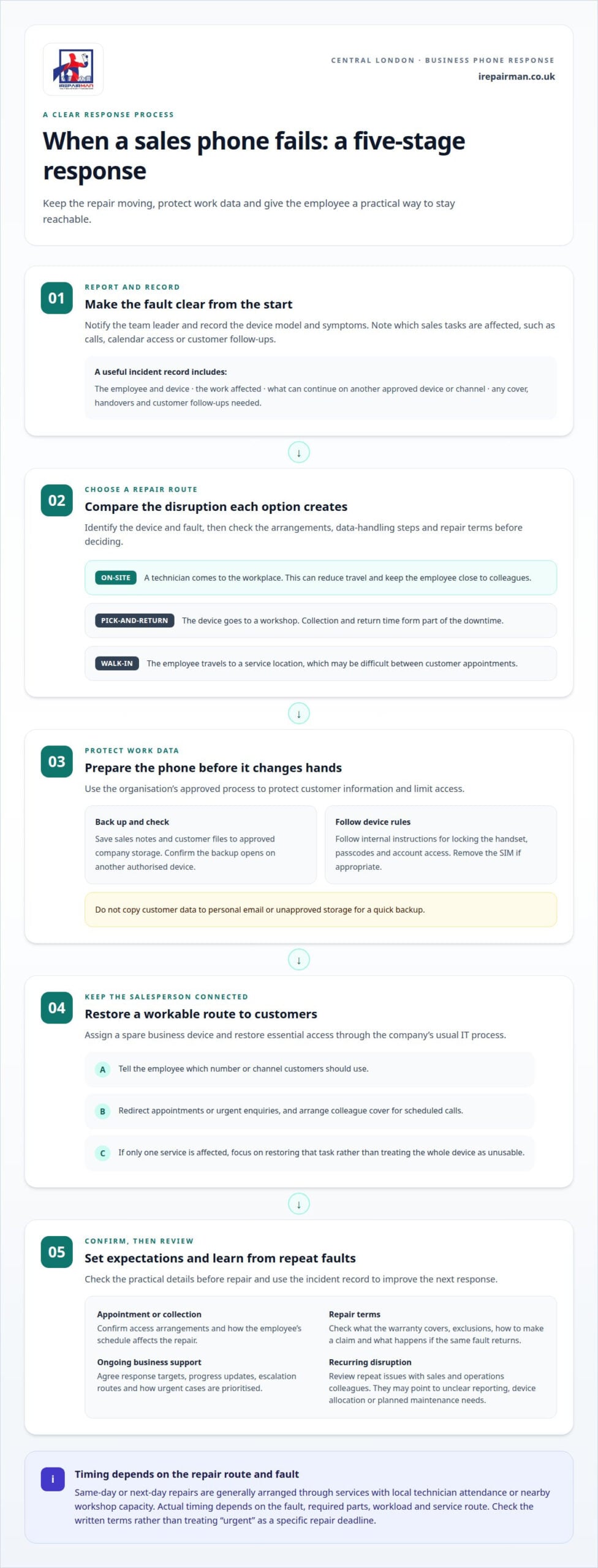
A failed sales phone can interrupt customer calls, calendar access and follow-ups. Start with a simple incident process: notify the team leader, record the device model and symptoms, then arrange repair through an established route. This keeps the response moving without leaving employees to improvise during a busy selling day.
With an on-site repair, a technician comes to the workplace, reducing travel and keeping the employee close to colleagues. Pick-and-return repair sends the device to a workshop, so collection and return time form part of the downtime. A walk-in repair requires travel to a service location, which may be difficult between customer appointments.
Before choosing a repair route, identify the device model and fault, then consider how the service handles business devices and booking. Confirm the attendance or collection arrangements, data-handling steps and repair terms. For a Central London team, office access and the employee’s schedule also affect how practical an appointment will be.
Read the warranty terms to understand what the repair covers, any exclusions, how to make a claim and what happens if the same fault returns. For a device sent in transit, review the delivery arrangements and applicable cover. For ongoing business support, agree response targets, progress updates, escalation routes and how urgent cases are prioritised.
A phone sent away for repair may contain sales contacts, email and customer records. Before dispatch, back up work data through the company’s approved system, remove the SIM if appropriate, and follow internal instructions for passcodes and account access. Before handing over a phone for repair, businesses can take sensible steps to protect personal data, limit access and keep track of the device.
In Central London, same-day or next-day repairs are generally arranged through services with local technician attendance or nearby workshop capacity. Actual timing depends on the fault, required parts, workload and the service route. A business should compare these factors in the written terms rather than treating “urgent” as a specific repair deadline.
To keep a salesperson working, assign a spare business device and restore essential access through the company’s usual IT process. Tell the employee which number or channel customers should use, and redirect appointments or urgent enquiries. A colleague can cover scheduled calls while the affected employee uses approved systems on the loan device.
Before repair, save sales notes and customer files to approved company storage, then confirm the backup opens on another authorised device. Follow the organisation’s process for locking the handset and managing work accounts. Don’t copy customer data to personal email or unapproved storage just to make a quick backup.
To reduce avoidable faults, schedule operating-system and app updates, inspect charging cables, and use a protective case and screen protector. Ask team members to report a cracked screen, unreliable charging or unusual battery drain early. Reviewing recurring faults can help sales leaders adjust device practices before more work is disrupted.
2. Productivity and operating costs
Keeping your sales team connected with fast repairs starts with identifying what work each device supports. A salesperson’s phone may provide access to calls, calendars, customer records and work apps. If one fault blocks several tasks, the disruption can spread to colleagues covering meetings or handling delayed enquiries.
Track the operational impact, not just the device fault. Record which customer actions were delayed, who provided cover and how much coordination the incident required. For example, if a representative cannot confirm a meeting or update a prospect after a call, note the handover and follow-up needed. These details show managers how repair arrangements affect the working day.
Consider the full impact of downtime when choosing a repair route. Collection involves arranging a handover and keeping the employee productive while the device is away. On-site repair can reduce travel for a Central London team, although the fault and repair requirements still shape the process. Compare the disruption each route creates, not just the repair itself.
Salespeople also rely on laptops and broadband to connect to company systems. A phone repair won’t resolve a broadband outage or a work-account problem. Identify whether the issue affects one device, one location or access to a particular service. This distinction helps direct the next step to the right support team.
Use a shared incident record to make each response easier to manage:
- Log the device, employee and sales tasks affected.
- Note what work can continue through another approved device or channel.
- Record the cover, handovers and customer follow-ups needed.
- Review repeat issues to spot problems with devices or processes.
Set repair priorities according to business needs. If a salesperson cannot make calls, restore an approved way to reach customers. If email works but a sales platform does not, focus on the interrupted task rather than treating the whole device as unusable. Clear priorities help employees act without waiting for a manager to direct every step.
Review recurring disruption with sales and operations colleagues. Repeated incidents may indicate unclear reporting, unsuitable device allocation or a need for planned maintenance. Agree who owns each action and how customer follow-ups are handed over. This protects productivity and gives managers a clearer basis for improving the repair process.
When businesses connect sales and service, they should set clear goals, such as improving customer satisfaction, increasing revenue or reducing operating costs. These aims help teams focus changes on the outcomes they want and assess whether their approach supports them. They also give sales and service colleagues a shared basis for deciding which problems need attention.
Reliable access to company systems is essential to keeping customer interactions uninterrupted. Salespeople need laptops and broadband that connect quickly and seamlessly to company systems so customer interactions are not disrupted. Teams should look for friction in both their own work and the customer experience, then fix anything that causes friction for the team or its customers. Reviewing these issues alongside operational goals can help keep improvements focused on the work customers and employees need to complete.
3. Replacement of worn, damaged or failed components
A phone may still switch on while a key component is failing. For a sales representative, a cracked screen that no longer responds properly can make calls, customer records and calendar updates difficult to manage. Replacing the damaged part can restore the function the employee needs, without assuming the whole device has failed.
Start by recording the fault and its effect. Note whether the screen has dead areas, the battery drains unusually quickly, or the phone charges only when the cable is held at an angle. These details help a technician distinguish a worn component from a software problem or loose connection.
Diagnosis matters because similar symptoms can have different causes. A phone that won’t charge may have a damaged charging port, faulty cable or battery issue. Ask for an assessment that identifies the suspected component and explains why replacement is recommended. Depending on the findings, the next step may be a part replacement or further testing.
Common examples to discuss with a technician include:
- A cracked or unresponsive screen affecting calls and customer-facing apps.
- A battery that struggles to last through scheduled meetings and travel.
- Charging port failures that prevent reliable charging between appointments.
- Damaged internal connectors causing intermittent faults after an impact.
Keep the employee’s tasks in view when prioritising repairs. A salesperson who can’t use a touchscreen may be unable to engage with prospects or update a customer platform. A phone with a failing battery may work at a desk but fail during a day of visits. Consider the impact on selling, follow-ups and revenue to decide which device needs attention first.
Consider software issues too. If an app crashes but calls, charging and screen controls work normally, updating or reinstalling the app may help. If the fault remains after software checks, a hardware assessment can establish whether a component needs repair or replacement.
After a replacement, test the functions related to the reported fault. For a screen, check touch response across its surface; for charging, confirm the connection is stable. Record the completed repair and any follow-up in the device log, giving the fleet manager a clearer view of recurring issues.
Repair is worth considering when a faulty component prevents useful work but the rest of the phone still suits the employee’s role. Compare this option with the disruption of ongoing faults, repeated troubleshooting and a device that no longer supports the team’s software. A clear diagnosis gives sales representatives and managers practical evidence for their decision.
4. What are the most common device and connectivity problems that disrupt UK sales teams?
A failed sales call may be caused by the handset, connection or an account setting. A cracked screen may prevent a representative from entering notes, while a weak signal can interrupt a call even when the phone works normally. Identify the source of the problem before arranging support, since each symptom points to a different next step.
Physical damage is easy to spot, but its effects vary. A dropped phone might have a shattered display, unresponsive touch controls or a loose charging port. A worn battery can run down during customer visits, leaving the employee unable to access contacts or confirm the next appointment. Record the specific symptom, not just “phone broken”.
Connectivity faults can look like device failures. Calls may drop in a basement meeting room, messages may remain unsent, or a sales platform may not load over mobile data. Check whether the same problem occurs on Wi-Fi and mobile data. If only one connection fails, report that detail to the person managing the network or device.
Software and account access can cause other interruptions. An app update may trigger a sign-in prompt, a forgotten password can block customer records, and full storage may prevent new files from saving. Note the app, error message and last action before the issue appeared. This helps distinguish an account or software problem from faulty hardware.
Common warning signs include:
- Calls that cut out, sound distorted or fail to connect.
- Emails or customer messages that stay queued instead of sending.
- A phone that charges intermittently or loses power during appointments.
- Touch controls that miss taps, making contact details hard to select.
- Work apps that repeatedly crash, freeze or request account access.
Use a short troubleshooting sequence before escalating. Check whether the phone has signal, then test a call and a work app. Restart the device if it is safe to do so, and see whether the fault returns. Don’t repeatedly reset the handset or remove business accounts without following the organisation’s IT process.
If several employees report the same connection problem in one office, record their location and the affected service. If one handset has a cracked screen or charging fault, record its model and symptoms separately. These details help route the issue to device support or network support instead of wasting time on the wrong fix.
A simple fault log can reveal recurring patterns. Record the device, symptom, location, affected task and action taken. Repeated charging problems across a team, for instance, may call for a review of cables and charging routines; recurring app access failures may need attention from the account administrator. Specific records make follow-up more useful.
5. How quickly should business-critical phones, laptops and tablets be repaired?
Keeping your sales team connected with fast repairs means setting urgency according to business impact. A device used for customer calls, identity checks and sales records has a different priority from one used occasionally. Set response priorities around the work disrupted, then review them if the fault or employee’s commitments change.
Start by identifying what the employee cannot do and which deadlines are affected. A phone failure before a scheduled client presentation may need more urgent attention than a fault affecting a non-essential function. Note upcoming calls, account deadlines and customer commitments so the team can rank incidents by impact rather than arrival order.
Use these criteria to assign priority:
- Critical customer work: the fault blocks a scheduled call, client meeting or time-sensitive sales action.
- Essential access: the employee cannot reach approved customer records or complete required account checks.
- Limited disruption: core work continues, but a fault slows specific tasks or creates repeated interruptions.
Separate the time needed to assess a fault from the work needed to complete a repair. A cracked screen may be straightforward to diagnose, while intermittent charging can require further checks. The device model, symptoms and parts needed all shape the repair. A useful response plan accounts for those factors rather than setting one timing for every fault.
Phones, laptops and tablets serve different roles. A phone may be essential for field calls and authentication, while a tablet may support product demonstrations. A laptop might hold a presentation or sales records. Set priorities according to the employee’s immediate tasks and available access to those systems, rather than treating every device alike.
Agree how the employee and manager will receive progress updates. For example, set a review point if the diagnosis changes or a deadline approaches. This keeps decisions tied to current business needs and helps managers adjust customer schedules with clear information.
After repair, define what “ready for work” means for the device. Test the functions the employee needs, such as opening approved sales software, accessing records or completing a presentation. Record the result and return the device to normal use once those role-specific checks are complete.
A clear priority policy makes keeping your sales team connected with fast repairs part of day-to-day operations, rather than an improvised response. For a damaged business phone or tablet, arrange a repair assessment and plan the next steps around the employee’s work.
Keep repair priorities aligned with company goals and expected sales revenue. Clarify who is responsible for each step and how any service issues will be addressed.
IRepairMan London: iPhone Screen Repair
iRepairMan London provides iPhone Screen Repair for sales employees whose damaged displays make calls, messages or work apps difficult to use. A screen assessment helps identify the damage and the repair needed, so the team can plan around the employee’s customer commitments. Each repair includes a 12-month warranty.
For a business, a cracked display can affect more than convenience: it may stop an employee reading customer details or updating a sales record. Arrange repair support when screen damage begins to interrupt everyday tasks. iRepairMan London also repairs iPhone back glass, iPads and Samsung phones.
To arrange an iPhone screen repair in Central London, contact iRepairMan London or book through irepairman.co.uk.
Make repair planning part of your sales strategy
Keeping your sales team connected with fast repairs means treating device readiness as part of sales operations. Choose someone to oversee repair decisions, agree how urgent cases are prioritised and review recurring issues during team planning. Regular reviews can help managers spot patterns and improve the process before the next busy period.
Give employees a clear way to report faults and record which customer work is affected. Use those reports to refine priorities, clarify responsibilities and assign owners to follow-up tasks. A consistent process helps your team respond calmly when a device issue interrupts the working day.
Put that process in place now, so employees know what to do when a problem arises. Contact iRepairMan London today to discuss repair support for your team. With a clear plan, your salespeople can stay focused on serving customers.
Frequently Asked Questions
Who and Where?
For phone and tablet repairs in Central London, iRepairMan provides on-site support, with UK-wide pick-and-return repairs for teams based elsewhere. A Central London employee with a damaged iPhone screen can arrange support without travelling to a repair shop. The service also covers iPhone back glass, iPad and Samsung phone repairs, helping businesses address common mobile-device faults.
Why is post-sale service important?
Post-sale service helps a business address customer problems after a purchase and maintain confidence in the relationship. If a customer reports an issue after receiving a product, a clear response process can help resolve it and show that their feedback matters. Sales teams can share recurring concerns, improve follow-up and clarify who owns customer support.