

You can replace an iPhone screen yourself, but the job requires suitable parts, tools and careful handling. If you’re considering an iPhone fix for a cracked screen, professional repair services in London are a popular option, especially if you prefer a quick turnaround. Standard manufacturer warranties typically cover manufacturing issues rather than accidental damage such as a dropped phone. Your choice also depends on the display’s condition and the support you want during the repair.
A damaged display can make everyday tasks frustrating, so it’s understandable to want a dependable solution. Whether you mainly use your phone for messages, navigation or work, a fault can disrupt your routine and leave you weighing your options. The repair process, available cover and level of support you prefer can all help shape your decision.
This guide explains what a DIY screen replacement involves, how professional services fit into your options, and what to consider when arranging an iPhone screen repair in Central London. It also compares the practical trade-offs, helping you choose the best route to get your phone working again with iRepairMan London.
Key Takeaways
- A DIY screen replacement is possible, but you’ll need the right parts, tools and repair skills to avoid further damage.
- Apple’s Limited Warranty covers manufacturing issues for one year from purchase, but not accidental damage such as a cracked screen.
- Apple Authorised Service Providers offer a professional repair route, and AppleCare service fees are the same at Apple and these providers.
- Repair options can depend on your iPhone model, the type of screen damage and parts availability.
- For a London repair option, iRepairMan London provides iPhone screen repair, so you can explore a professional alternative to doing the work yourself.
Can I replace my iPhone screen myself?
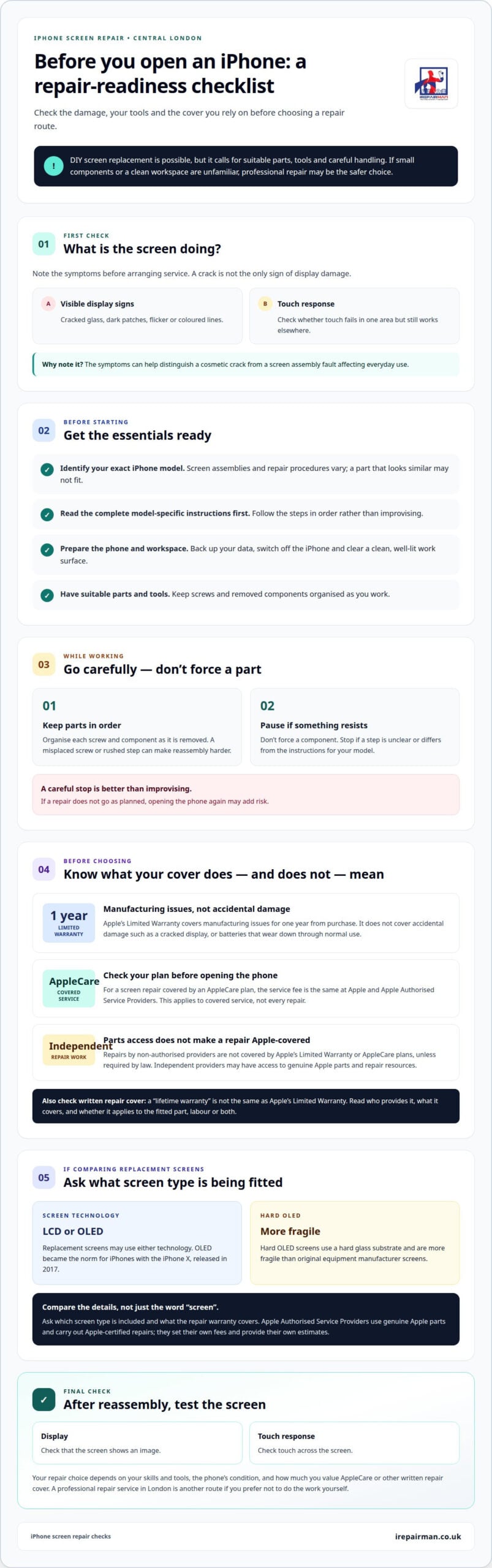
Yes, you can replace an iPhone screen yourself, but the job requires suitable parts, tools and careful handling. Before opening the phone, identify its exact model and read the model-specific repair instructions from start to finish. Screen assemblies and procedures vary, so a part that looks similar may not be suitable. If you’re unfamiliar with small components or don’t have a clean workspace, professional repair may be the safer choice.
Prepare before you begin. Back up your data, switch off the iPhone and clear a well-lit work surface. Keep screws and removed components organised as you work. A misplaced screw or rushed step can make reassembly harder. Follow the instructions in order, and don’t force a component that resists movement. The replacement is complete only after you’ve reassembled the phone and checked the display and touch response.
Apple’s Limited Warranty covers manufacturing issues for one year from the purchase date. It doesn’t cover accidental damage, such as a cracked display, or batteries that wear down through normal use. A screen broken in a fall is therefore different from a display fault caused by a manufacturing issue. The warranty period alone doesn’t make accidental damage eligible for cover.
AppleCare is separate from the Limited Warranty. When a screen repair is covered by an AppleCare plan, the service fee is the same at Apple and all Apple Authorised Service Providers. This applies to covered service, not every repair. Read your plan’s terms and consider whether the damage is covered before opening the phone yourself. DIY repair may not suit you if retaining AppleCare support matters.
Independent repair work has a different relationship with Apple cover. Repairs by non-authorised providers aren’t covered by Apple’s Limited Warranty or AppleCare plans, unless required by law. Independent providers may have access to genuine Apple parts and repair resources, but that doesn’t make the repair Apple-covered. Consider this distinction alongside your plan and confidence in carrying out the repair.
Use these checks before deciding:
- Match the screen to your exact iPhone model.
- Read the complete model-specific repair instructions first.
- Back up your data and switch off the phone.
- Set out a clean workspace and organise each removed part.
- Stop if a step is unclear or a component resists movement.
A “lifetime warranty” on a replacement screen isn’t the same as Apple’s Limited Warranty. The phrase alone doesn’t explain who provides the cover, what it applies to or how the provider defines a lifetime. Read the written terms for the screen and repair work. Check whether they cover a fault with the fitted part, labour or both, and whether accidental damage is excluded. Don’t assume this cover means Apple will pay for future damage.
If you choose DIY, follow the instructions for your specific model and don’t improvise if a step differs. After reassembly, check that the display shows an image and responds to touch across the screen. If the repair doesn’t go as planned, opening the phone again may add risk. Your decision depends on your skills and tools, the phone’s condition, and how much you value AppleCare or other written repair cover.
Your AppleCare decision may also involve protection beyond a damaged display. Depending on the plan, an iPhone may be eligible for replacement if it is lost or stolen. That is separate from deciding whether to handle a screen repair, and it doesn’t mean every plan provides this eligibility. Before opening the phone, review your plan’s terms and identify which situations they address. Keep lost-or-stolen protection separate from screen damage, and don’t assume that information about one type of cover answers the other. If the wording is unclear, clarify the relevant terms before you begin so you can make an informed repair decision.
For iPhone models with Ceramic Shield, AppleCare plan terms refer to the Ceramic Shield display as the screen and the Ceramic Shield back as back glass. These labels distinguish the two surfaces when you read the plan, but don’t establish that a particular repair or replacement is covered. Match the plan’s wording to the damaged part, then consider it alongside the model-specific repair guidance and your confidence with delicate work.
Screen repair
Start a screen repair decision by identifying what has failed. Cracked glass is visible, but a damaged display may also show dark patches, flicker or coloured lines. Touch response may fail in one area while working elsewhere. Note these symptoms before arranging service. They help distinguish a cosmetic crack from a screen assembly fault that affects everyday use.
Apple Authorised Service Providers carry out Apple-certified repairs using genuine Apple parts, and those repairs are guaranteed. They set their own iPhone repair fees and provide their own estimates. Options can vary by location and parts availability, so your model and the part required may affect the service offered. An authorised repair may suit you if you prefer Apple-certified work and genuine parts.
Screen technology is one factor in comparing replacement options. OLED became the norm for iPhones with the iPhone X, released in 2017. Other replacement screens may use LCD or OLED technology. The choice depends on the iPhone model and the screen being fitted. Ask what screen type is included in the proposed repair, rather than comparing offers by the word “screen” alone.
Hard OLED screens use a hard glass substrate and are more fragile than original equipment manufacturer screens. That difference may matter if you use your phone heavily or carry it without a case. A repair estimate should specify the screen type and what the repair warranty covers. The part’s technology and repair terms are useful comparison points, alongside how the work will be done.
When comparing repair options, consider the whole service, not just one headline detail. Check whether the provider is Apple Authorised, what type of part will be used and what warranty applies to the repair. Also check whether the repair is available for your model and where it can be completed. These practical details help you compare like with like.
- Damage: describe cracks, touch problems, lines or dark areas.
- Model: provide the exact iPhone model for an accurate assessment.
- Screen: ask whether the proposed part is LCD, OLED or genuine Apple.
- Repair terms: read what the provider’s repair warranty covers.
- Logistics: consider the location and parts availability for your repair.
For an estimate, share your model and describe the symptoms clearly. The price depends on the specific case and is provided after a quote request; the model, screen type, damage and repair route all affect it. A clear description helps explain whether the display itself is affected or whether the fault presents differently. Before agreeing to proceed, ask for the proposed work and terms in writing.
Apple-certified repair is not the only professional route. Independent repair providers may have access to genuine Apple parts and repair resources, but their repair work has different terms. Compare those terms with the part type and service you need. If you prefer a local option, a London screen repair service may help you consider repair without travelling across the city.
Once you have an estimate, check that it describes your iPhone model, the screen work and the repair terms. Clear explanations of the part and practical arrangements make it easier to decide. The right option is the one that suits your phone, priorities and expectations for support after repair.
Cost is another factor when comparing repair options. This is an average saving, not an amount guaranteed for an individual repair. Compare the estimate for your specific phone and ask what it includes before deciding. The screen type and repair terms should be clear so you can compare options on the same basis.
Ask whether that kit is being offered, confirm the proposed screen type and check what the repair warranty covers. A lower estimate is useful only when you understand which part and service it refers to. Keeping the model, symptoms and proposed screen type in view can make it easier to choose based on the repair route, part or overall cost.
IRepairMan London: iPhone Screen Repair
iRepairMan London provides iPhone screen repairs for people seeking a professional alternative to replacing the display themselves. In Central London, you can arrange an on-site repair at a suitable location, such as your home or workplace, to reduce disruption to your day.
Its encrypted, no-access data safety protocol is designed to protect your privacy during repair, and each repair includes a 12-month warranty. If the damage affects the back rather than the display, iPhone back glass repair is also available. Describe the damage and your iPhone model when arranging the repair, so the issue is clear from the outset.
For help with a cracked iPhone screen in Central London, contact iRepairMan London to discuss a repair.
Choose the repair route that fits your phone
A cracked display can make simple tasks harder, from reading messages to joining a work call. Choose a repair route that suits the damage and your confidence with delicate phone parts. If you’re considering an Apple fix for a cracked screen, weigh the repair process and warranty terms alongside the part itself.
For a professional option, iRepairMan London offers iPhone Screen Repair and iPhone Back Glass Repair. It also repairs iPads if another device needs attention. Sharing your model and describing the damage is a clear starting point for discussing the repair you need.
There’s no need to rush into opening your phone if you’re unsure about the steps. Choose the option that leaves you comfortable with both the work and its terms, then take the next step when you’re ready.
Contact iRepairMan London to discuss your repair. A clear plan can help you get back to using your device with confidence.
Frequently Asked Questions
How do I book an iPhone Repair?
Book through iRepairMan London’s online booking service, providing your iPhone model and a brief description of the damage. For example, say whether the glass is cracked, touch controls are unresponsive or the display has dark patches. Include your Central London location and preferred appointment details. Clear information helps describe the repair you need, whether it’s screen or back glass work.
How much will it cost?
The amount depends on the phone, the damage and the repair required. For a cracked iPhone display, the model and whether other parts are affected can influence the estimate. Include those details with your quote request so the repair can be assessed for your device. This avoids relying on a price that may apply to a different model or fault.
Where can I get service?
In Central London, you can arrange an on-site phone repair at a suitable location, such as your home or workplace. This can help if travelling with a damaged phone is difficult or disruptive. Share the address and describe the fault when booking. Throughout the Central London coverage area, iRepairMan London focuses on delivering convenient local solutions for your cracked screen.
What is the screen repair cost for each iPhone model in the UK?
There isn’t one screen-repair price that applies to every iPhone model. The model, screen type, extent of damage and repair route all affect the estimate. For a useful comparison, provide the exact model name and explain whether the display still works. A quote request can then address your phone rather than relying on figures for another model or repair type.
Is it cheaper to repair a cracked iPhone screen with a third-party repair shop?
It can be, but a lower quote doesn’t reveal the full value of the repair. Compare the part being fitted, the repair warranty and how the work relates to any AppleCare cover. Independent repair providers may have access to genuine Apple parts and repair resources, but their repairs aren’t covered by AppleCare plans unless required by law. Check the terms before deciding.
Will a cracked screen repair affect iPhone water resistance or warranty?
Don’t assume a repaired iPhone retains its original water resistance. Ask what sealing or post-repair checks are included, and follow the written repair warranty terms. Apple’s Limited Warranty excludes accidental damage, while AppleCare cover depends on the plan and service. Independent repairs aren’t covered by AppleCare unless required by law, so consider this distinction before authorising work.