

A cracked iPad screen doesn’t have one fixed repair cost. The quote depends on the model, the extent of the damage and whether the glass can be replaced separately from other screen components. For iPad glass replacement in Kensington, an assessment establishes what work is needed and what the quote covers. Standard manufacturer warranties typically cover factory defects for one year from purchase, which is entirely different from accidental damage.
A cracked screen can make an iPad difficult to use, even when the display still works. Before arranging a repair with iRepairMan London, it’s reasonable to want a clear answer about whether the damage is limited to the glass and whether your cover applies.
This article explains what affects a repair quote, how warranty coverage relates to accidental damage and what to expect from the repair process. You’ll also see how an assessment helps identify the right repair for your iPad.
Key Takeaways
- The iPad model and extent of the damage help determine whether the repair involves the glass alone or the full display.
- Apple’s Limited Warranty covers manufacturing issues for one year from purchase; accidental damage is a separate coverage question.
- Find out what to look for in a repair quote so you can understand which work it includes.
- Screen repairs in Kensington and Chelsea commonly take between 30 minutes and 1 hour, depending on the repair.
- Learn how iRepairMan London’s iPad Repairs can help, including options for schools and nurseries.
IPad cracked screen replacement
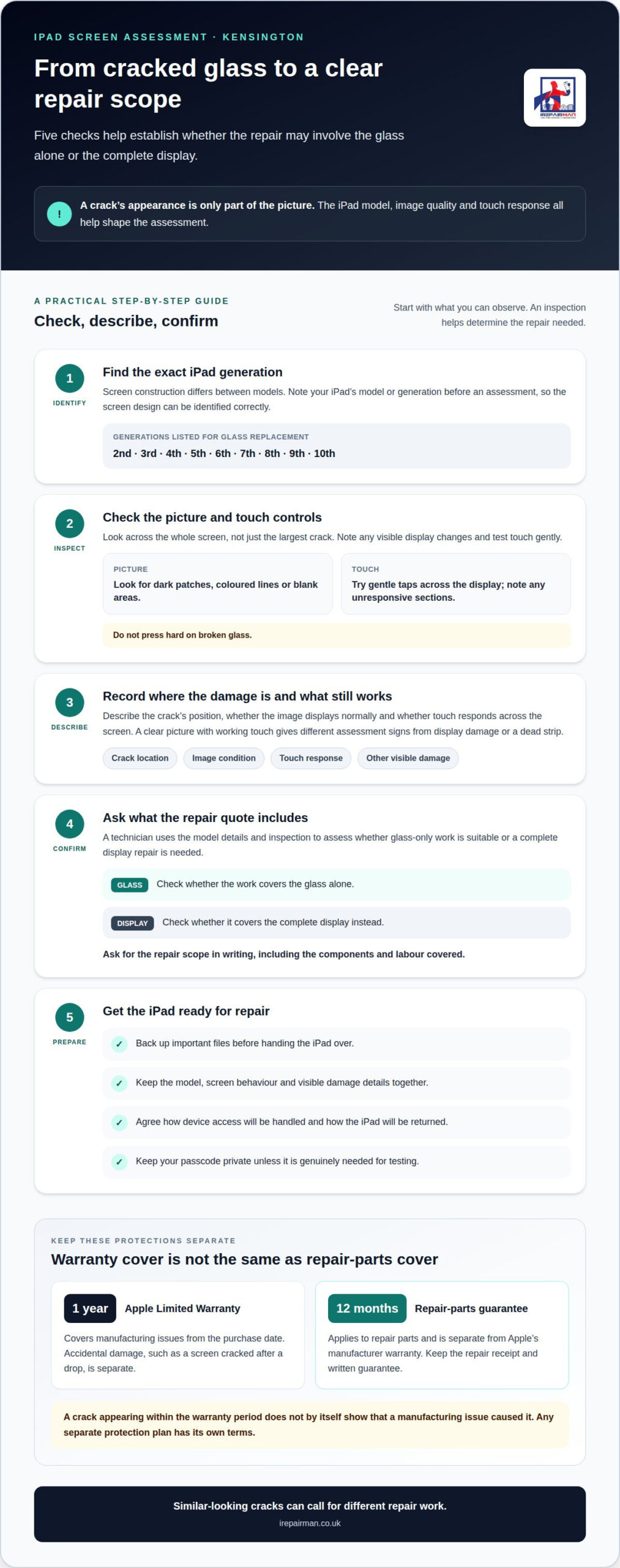
A crack can affect more than the visible glass. A small chip near the edge may leave the picture clear, while a larger break can make tapping or swiping difficult. First, identify the iPad model and assess whether the damage is limited to the front glass or also involves the display beneath it. That distinction shapes the repair method and what a quote includes.
Model matters because screen construction differs across iPads. Glass replacement services cover models from the 2nd through the 10th generation, including generations 2, 3, 4, 5, 6, 7, 8, 9 and 10. An older iPad and a newer-generation model may need different parts and repair steps. Identifying the exact generation helps avoid basing an assessment on the wrong screen design.
Check the whole screen, not just the largest crack. Look for dark patches, coloured lines or blank areas. Try gentle taps across the display and note any sections that don’t respond. A clear picture with working touch controls, for example, calls for a different assessment than a screen with a dead strip or visible display damage. Don’t press hard on broken glass.
Before arranging iPad glass replacement in Kensington, have the model details ready and describe what still works. A technician can use that information and an inspection to determine whether glass-only work is suitable or a complete display repair is needed. The crack’s position, touch response and any other visible damage help define the repair scope. Your quote should clarify which components and labour it covers.
Before handing your iPad over, back up important files and note the model, screen behaviour and visible damage. Agree how access will be handled, and keep your passcode private unless it’s genuinely needed for testing.
Some repair services serving Kensington accept iPads by post. Collection and local delivery are separate arrangements, so postal repair should not be mistaken for a collection service or a guaranteed return method.
- Record the iPad generation and describe where the glass is cracked.
- Note whether the image displays normally and touch controls respond across the screen.
- Ask for the repair scope in writing, including whether it covers glass alone or the complete display.
- Back up files before repair and agree how the device will be returned.
These checks give the repair assessment a clear starting point. They also help explain why two cracked iPads can need different work, even if the damage looks similar at first glance.
Warranty coverage and accidental damage
Apple’s Limited Warranty covers an iPad against manufacturing issues for one year from its purchase date. It is not the same as cover for accidental damage. A screen cracked after a drop has physical damage, rather than a manufacturing issue, so it falls outside the warranty’s stated manufacturing-issue cover. The cause matters: a screen that develops a fault without an accident raises a different warranty question from glass broken by an impact.
Before deciding what to do about a cracked screen, separate three things: the cause of the damage, the Apple warranty period and any separate cover for the device. A one-year warranty doesn’t automatically mean every repair is included during that period. Likewise, a crack that appears within that year doesn’t by itself show that a manufacturing issue caused it.
Start with the purchase date and any paperwork supplied with the iPad. Then describe what happened plainly, such as “the glass cracked after the iPad fell from a desk” or “the display developed a fault without an impact”. This helps distinguish accidental damage from a possible manufacturing fault. Keep warranty documents and repair records together, as they can clarify which terms apply and what work has already been done.
Accidental damage cover is separate from Apple’s Limited Warranty. The warranty’s stated scope is manufacturing issues, not damage from a drop, knock or pressure. Any separate protection plan has its own conditions, exclusions and repair process. Read its terms for the specific rules on screen damage, claims and charges, rather than assuming Apple’s one-year warranty includes accidental repairs.
Repair work can also carry its own parts guarantee. A 12-month guarantee applies to repair parts, separate from Apple’s one-year Limited Warranty for manufacturing issues. These protections cover different things: the manufacturer’s warranty concerns qualifying faults, while a repair-parts guarantee concerns the parts supplied for repair. Keep the repair receipt and written guarantee so the covered work and its start date are clear.
- Record the cause: note whether an impact occurred or the fault appeared without one.
- Establish the date: use the purchase record to understand the one-year warranty period.
- Read separate cover: look for accidental screen damage and the conditions attached to any protection plan.
- Keep repair paperwork: retain the receipt and parts guarantee alongside the iPad’s warranty details.
For example, a drop-cracked iPad within its first year is not automatically covered by Apple’s manufacturing warranty. A 12-month parts guarantee on a later repair is a separate protection, with its own scope. Keeping these distinctions clear helps you understand which cover relates to the cause of damage and which relates to replacement parts.
Do Kensington repair shops replace only the glass or the complete iPad display?
The repair may involve the outer glass alone or the complete display assembly. The right option depends on the iPad model and the condition of the picture and touch controls. A cracked surface with a clear image and responsive touch gives the technician different signs from a screen with lines, dark patches or unresponsive areas. The visible crack is only part of the assessment.
Glass-only work addresses the broken outer layer. It may be suitable when the display beneath it still shows an image and responds across its surface. A complete display replacement involves more than the cracked pane and may be needed if the picture or touch function is also damaged. The options aren’t interchangeable: the assessment should connect the observed fault to the proposed work.
Model identification matters because iPad screen construction varies between generations. The repairer needs the exact model, not just “an iPad”, to identify the screen design and assess the parts involved. An iPad with a sharp image but a cracked pane, for example, presents different symptoms from one with a black area and failed touch response. This distinction helps clarify whether glass-only work is suitable.
A useful assessment checks the screen in stages. The technician identifies the iPad model, inspects the glass and frame, then tests the image and touch response. Inspection can show whether impact damage extends beyond the surface. A flickering picture or a section that ignores taps, for instance, points to a display fault as well as broken glass. The repair recommendation should explain the findings plainly.
- Glass-only proposal: ask which checks show that the underlying display remains functional.
- Complete display proposal: ask which image or touch fault makes the wider replacement necessary.
- Either option: make sure the quote names the iPad model, parts and work included.
Before approving work, compare the written repair scope with the symptoms recorded during assessment. If the quote says “screen replacement”, ask whether that means the glass alone or the full display. Clear wording helps you understand what the repair addresses and what has been tested, rather than relying on a general label.
After repair, testing should cover both the picture and touch response. A technician can check that the image appears consistently and taps register across the usable screen. A drawing app makes missed touch areas easy to spot, while a plain screen can reveal lines or discolouration. These checks link the repair choice to the everyday tasks you need your iPad to handle.
For iPad glass replacement in Kensington, the key question is whether damage stops at the outer pane or affects display function. A model-specific inspection, clear diagnosis and itemised repair scope make the options easier to understand before work begins.
How long does iPad screen replacement take at Kensington repair shops?
In Kensington and Chelsea, iPad screen and battery replacements normally take between 30 minutes and 1 hour. A standard pane replacement usually takes 1-2 hours. These are different repair timings, not one fixed duration for every cracked iPad. The work required and the repair method affect how long the device is being handled.
A pane replacement focuses on the front glass, while a wider screen repair may involve other display parts. That distinction helps explain why estimates vary. A cracked pane with a working image and touch response, for example, presents a different repair task from a screen with blank areas or failed touch controls. The symptoms guide the assessment and repair plan.
Time spent on the repair is only part of the appointment. A technician needs to identify the iPad model, inspect the damage and confirm the repair scope before beginning. After fitting the replacement part, checks can confirm that the picture appears and touch responds. Each step matters: fitting time alone doesn’t show whether the device has been tested afterwards.
For a more useful estimate, describe the model and screen behaviour when arranging the repair. Mention any lines, dark patches or areas that don’t respond to taps. A clear description helps distinguish a glass-only job from a repair involving the display, and gives the repair service a practical starting point for discussing timing.
- Model: identify the iPad generation so the repair can be scoped accurately.
- Damage: describe whether the glass is cracked and whether the image remains clear.
- Touch: note any areas that don’t respond during normal use.
- Testing: allow time for checks after fitting, not just the replacement itself.
Plan your day around the stated repair window rather than assuming every visit will take the shorter estimate. A standard pane replacement is usually 1-2 hours, whilst screen and battery replacements in Kensington and Chelsea normally take between 30 minutes and 1 hour. These timeframes refer to the repair work, not necessarily travel, collection or waiting before work starts.
If you rely on your iPad for lessons, meetings or work, plan a period when you can be without it. A school can schedule the handover around a class change, for example, while someone working from home can set aside time between calls. Back up essential files and note important screen issues beforehand. This makes the handover clearer and helps keep the repair process focused.
The clearest timing discussion names the iPad model, describes the screen fault and confirms whether the estimate covers fitting and post-repair checks. In Kensington, use the 30-minute-to-1-hour and 1-2-hour ranges as separate guides for different repair categories, not as interchangeable promises.
Same-day or walk-in iPad glass replacement in Kensington?
Walk-in access and same-day completion are separate questions. In Kensington, a repair service does not require an appointment, so a booking may not be needed before attending. That does not mean every iPad can be repaired immediately or collected the same day. The repair still needs assessment, the correct parts and time for the work and checks.
For an on-site repair, the practical question is whether your particular job can be completed during the visit. An iPad with a cracked pane may need different work from one with display faults, and the model also affects the process. Share the model details and a clear description of the damage when arranging the visit, so the technician has useful information from the outset.
Before setting out, establish the drop-off process and what happens if the repair cannot be completed during your visit. Ask whether the device will be assessed first, how you will receive the repair decision, and what collection or return arrangements apply. These details help you plan around work, school or other commitments in Kensington without assuming that walk-in access means instant service.
- Describe the fault: explain whether the image and touch controls still work.
- Identify the iPad: provide its model details so the repair can be scoped correctly.
- Clarify the visit: establish whether the service accepts walk-ins and how handover works.
- Plan for collection: agree how you will be told the repair is ready and how the iPad returns to you.
A walk-in visit suits someone already near the repair location, but it may not suit a tightly scheduled day. For example, a parent between school pick-up and an appointment needs a clear handover plan, not just an open door. A scheduled visit can make the timing easier to manage, while walk-in access avoids arranging a slot in advance. Choose the approach that fits your day.
If you need the iPad back the same day, state that when arranging the repair and provide the model and fault details. The repair scope, inspection and practical arrangements determine the next steps. Back up essential files and bring accessories only if they relate to the reported fault.
For iPad glass replacement in Kensington, the useful distinction is clear: walk-in access means an appointment isn’t required, whilst same-day completion concerns when the repair is finished and returned. Confirm the handover and collection plan before travelling, especially if you need the iPad for a class, meeting or journey later that day.
IRepairMan London: iPhone Back Glass Repair
iRepairMan London provides iPad Repairs for people dealing with a cracked screen or another tablet fault. If your iPad needs attention after an assessment, this is the relevant service to discuss. Schools and nurseries can also arrange Schools & Nursery iPads screen repairs for their devices.
An assessment helps establish what work your iPad needs and clarifies the next step. Share the model and describe what’s happening, such as cracked glass, an unclear picture or touch controls that aren’t responding. That gives the team a useful starting point for discussing the repair, without assuming every screen needs the same treatment.
iRepairMan London also provides iPhone Back Glass Repair and iPhone Screen Repair. If you need help with an iPad, contact iRepairMan London to discuss its repair.
Choose your next repair step
A clear repair plan starts with your device’s symptoms and how you use it. For iPad glass replacement in Kensington, note whether you need the iPad at home, work or school, then choose the handover arrangement that fits your day.
iRepairMan London handles iPad Repairs, alongside iPhone Screen Repair and iPhone Back Glass Repair. The next step is to share the iPad model and describe the issue, so the repair discussion can focus on your device and circumstances.
If you’re ready to move forward, start arranging your iPad repair. A considered plan can make it easier to get the device back into your routine.
Frequently Asked Questions
How much will it cost?
The work required depends on your iPad model and the damage. Repairing only the outer glass involves a different scope from work that also requires display components. Share the model and describe what happened, including any changes to the picture or touch response. This helps identify the repair needed for your device, rather than assuming every cracked screen follows the same process.
Is there a service guarantee?
iRepairMan London provides a 12-month warranty on most repairs and replacement parts. If the same issue covered by the repair returns, the technician will fix it at no extra charge. The coverage relates to the original repair, rather than later accidental damage or an unrelated fault. Keep the repair record, which sets out the work completed and helps identify whether a returning problem relates to that repair.
Need a local repair?
iRepairMan serves Central London with mobile phone and tablet repairs. An on-site repair can be arranged at a practical address, such as your home, workplace or school. For example, a parent can arrange an iPad repair at home without making a separate trip to a repair counter. Include your location and the device issue when arranging the visit, so the service can fit your circumstances.
Where can I get a service?
In Central London, iRepairMan London offers on-site repair arrangements; elsewhere in the UK, its pick-and-return service is an option. The device is repaired in the London workshop and returned by tracked delivery, with a typical total turnaround of 2-3 working days. This can suit a school or remote office that cannot arrange a local visit. Choose the service route that fits your location and how you can hand over the iPad.
Where can I get an iPad screen or glass replaced in Kensington, London?
iRepairMan provides iPad repair support in Central London, including Kensington. Arrange for the repair to be handled at a suitable address rather than travelling to a shop. When booking, share the iPad model and describe the screen issue. If the device is used for school or work, mention any timing needs so the arrangements fit your routine.
Which Kensington repair shops replace iPad glass, and what are their addresses and opening hours?
iRepairMan offers on-site mobile repairs in Central London, so Kensington customers can arrange service at a suitable address instead of relying on a walk-in shop. Discuss a practical location, such as home or work, and arrange the handover. This can be useful if travelling with a damaged iPad is inconvenient or would disrupt your day.
How much does iPad glass replacement cost in Kensington by iPad model?
The repair scope depends on the iPad model. Its generation helps determine which screen parts and repair method apply, while the image and touch response also inform the assessment. A model with working touch and a clear picture, for example, presents different symptoms from one with a blank area. Provide the exact model details and describe the symptoms to help establish what work the device needs.
Do local iPad repair shops offer warranties or guarantees on replacement screens?
Coverage terms differ between repair services, so focus on the written terms for the replacement screen. Look for which part or repair work is covered, how long the cover lasts and what happens if the same fault returns. Distinguish a fault with the replacement from new damage after collection. Keep the repair paperwork as a clear record of the work and applicable terms.