

A discount is only useful if it covers the repair you need. A multi-device repair discount for business might apply to labour, replacement parts or both, but the offer terms and quote determine what is included. Don’t assume staff repairs qualify automatically.
Look beyond the headline reduction. The device model, fault, proposed work and required parts all affect the quote, while exclusions can limit which repairs or devices qualify.
This guide explains what a business repair discount may cover, what exclusions to look for and how eligibility can work. It also compares ways to organise repairs for several devices, including on-site support in Central London and UK-wide Pick & Return, to help you plan around staff needs.
Key Takeaways
- Find out whether a business discount covers labour, replacement parts or both, and which devices and account terms it applies to.
- Compare each device’s model, fault, proposed repair and parts when reviewing quotes, and understand how quote validity and payment terms affect planning.
- Learn how staff or employer eligibility may differ, including the role of insurance and any applicable removal terms.
- Choose a booking route that suits your team, with on-site repairs for workplace convenience or UK-wide pick-and-return for remote staff.
- See how the B2B Repair HUB can coordinate repair batches of 20 or more devices and which phone and tablet repairs it covers.
Discounted phone repairs for business staff: what does a good offer cover?
A clear offer identifies eligible devices, account requirements and covered work. It should also explain how invoices, approvals and warranty terms apply to a multi-device repair discount for business staff.
Eligible devices and business accounts
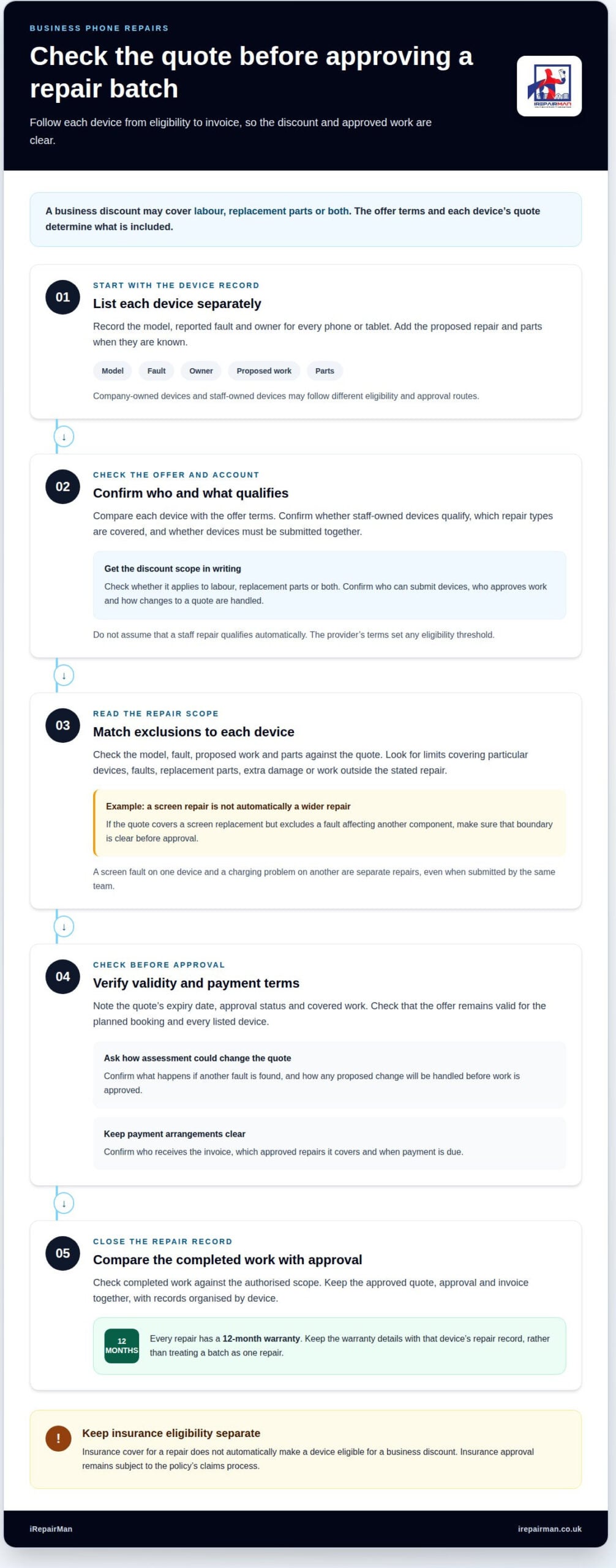
Eligibility can depend on device type, ownership and booking route. A company-owned smartphone booked through a business account may be treated differently from an employee’s personal tablet. Check whether the terms cover staff-owned devices and who can authorise repairs. Before arranging a batch, record each device’s model, fault and owner so every assessment is linked to the right handset.
Business discounts and volume pricing
Business accounts may use volume pricing or bespoke quotes, but a discount is not automatic. The terms for a multi-device repair discount for business should state whether it applies to labour, replacement parts or both. Request separate quote lines for each device and proposed repair, such as a smartphone screen repair and a battery replacement. Account terms should also explain invoicing and payment arrangements. A dedicated account contact can help coordinate billing and repair records.
Account approval and applicable terms
Account approval may require the organisation’s billing details and authorised contacts. Terms should say which employees can submit devices, who approves work and how changes to a quote are handled. Check whether the discount covers one or several repair types and whether devices must be submitted together. Keep the approved terms with the repair records so invoices can be matched to authorised work.
Warranty coverage and bulk repair risks
Every repair has a 12-month warranty. Keep warranty details with each device’s repair record, rather than treating a batch as one repair. Bulk servicing can also leave several employees without phones at once. Plan handovers around work needs, and understand the repairer’s data-handling process before sending devices, since access to business information and staff downtime can affect operations.
Before staff book, businesses should treat the discount as unconfirmed rather than assuming it covers repairs to employees’ phones. Check the specific offer terms and the quote for each repair, and confirm whether the proposed reduction applies to that work. If the quote does not show a reduction, ask the provider to clarify the offer before authorising the repair, then retain the agreed quote with the account records.
Checking exclusions and quote validity
Assess a multi-device repair discount against the work proposed, not just the headline offer. Each phone’s quote should link its model and reported fault to the proposed work and parts. A screen fault on one device and a charging problem on another are separate repairs, even if the same team submits both together.
Read exclusions alongside each repair description. Check for limits on device models, particular faults, replacement parts, extra damage found during assessment or work outside the stated repair. If a quote covers a screen replacement but excludes a fault affecting another component, that boundary should be clear before approval. This prevents a specific repair from being mistaken for a wider service.
Quote validity matters when approval, collection or sending devices takes time. Check the expiry date, the work covered and how the quote may change if assessment finds another fault. For a multi-device repair discount for business accounts, make sure the offer remains valid for the planned booking and every listed device. Keep the approved quote with the repair record for invoice checks.
- Match each line: pair the device model with its fault, proposed repair and parts.
- Read exclusions: identify components or work outside the quote.
- Note validity: record the expiry date and approval status.
- Compare outcomes: check completed work against the authorised scope.
For a larger fleet, request a bespoke quote with a separate entry for each model and fault. A grouped summary can show the overall scope, while itemised lines help a fleet manager compare devices. This is useful for a mixed batch of iPhones and Samsung phones, or tablets that need separate assessment. Grouping can simplify coordination, but should not obscure which repairs are included.
Payment terms should be set out in the written quote or account agreement. Confirm who receives the invoice, which approved repairs it covers and when payment is due. Keep the quote, approval and invoice together under one repair record. If the completed work differs from the approved scope, these records help identify the discrepancy before payment.
Eligibility for repairs involving multiple devices
Eligibility depends on the offer terms, account arrangements and ownership of each device. A company phone and an employee’s personal handset may follow different approval routes. Treat insurance eligibility separately from a repair discount: cover for a damaged screen does not automatically make a device eligible for discounted servicing.
There is no single minimum device count or repair spend for every offer. The provider’s terms set any threshold and may say whether devices must be submitted together. If your team has several phones, record each model, fault and owner, then compare those details with the eligibility criteria.
Insurance discounts follow the relevant policy or account terms, which may set rules for eligible devices, named users, approved faults and repair routes. For example, a screen repair may qualify under one policy while another fault does not. A technician can assess the device and proposed work, but insurance approval remains subject to the policy’s claims process.
Staff and employer discounts can differ. An employer may arrange repairs for company-owned phones through a business account, while staff-owned devices may need separate approval. Check who can authorise work, who receives the invoice and whether the offer covers both ownership types. Keep the approval with the repair record to show which terms applied.
Removing an eligible insurance product can affect cover for devices or users linked to it. The terms and conditions should explain how removal works, when it takes effect and whether other insured devices remain covered. Before removing a product, identify the phones attached to it and any open claims. Keep written confirmation with the account record to avoid confusion during a later repair.
- Match every device to its owner, fault and account route.
- Separate repair discounts from insurance benefits and claim approval.
- Record any minimum batch requirement stated in the offer terms.
- Check how removing cover affects linked devices and open claims.
When an employer arranges work for several staff phones, handle the assessment device by device rather than treating the group as a single repair. Assess each device’s model, fault, proposed work and parts separately. Keep those details together so the repair being considered for one phone is not confused with the work proposed for another. This approach keeps the assessment specific to each device and gives the employer a clear basis for checking the proposed repair against the applicable offer terms and quote. A shared arrangement for several phones does not remove the need to consider the details of each repair individually.
Businesses should not assume that phone repair discounts automatically apply to staff repairs. The specific offer terms and quote determine whether a reduction applies. Review the terms alongside the quote for the proposed work, and confirm whether the quoted repair includes a reduction before presenting it as discounted. Where the offer terms and quote do not show that a staff repair qualifies, do not treat a reduction as approved. Keep each device’s assessment with the relevant quote so that the model, fault, proposed work and parts can be considered alongside the terms that determine whether the reduction applies. This helps distinguish an assessed repair from a repair for which a discount has been confirmed.
Business device repair booking options
Choose a booking route based on staff locations, device faults and operational needs. A clear device list helps coordinate an on-site visit or collection.
Requesting a multi-device repair quote
Start with a list of each phone or tablet, its model, fault and preferred repair route. Include a business contact, workplace or collection address, and a suitable handover window. A Central London team, for example, can group office phones for an on-site appointment. These details help the repair team assess the batch and prepare a quote matched to each device.
When the quote arrives, match each repair to the correct employee and device. Confirm the approved work before repairs begin, then keep the booking reference with the business record. This helps avoid mix-ups when employees use similar phone models or report different faults. A named staff contact can coordinate handovers and update the team on which devices are being repaired.
Location and collection or delivery
Discount terms depend on the written offer, not on a single UK-wide postcode rule. Check for location conditions and whether collection or delivery is included. UK-wide Pick & Return can support remote employees and satellite offices, while on-site repairs in Central London can keep devices near the workplace. The route affects how staff hand over devices and plan for their temporary absence.
For workshop repairs, tracked delivery returns devices in around 2-3 working days. A fleet manager can arrange collection for a remote team, then use the device list to track which phones are being sent. Businesses should plan handovers so employees know when to pass over a device and how they will manage work during its repair. For an office visit, identify a suitable work area and a staff contact to coordinate access.
For a Central London office, an on-site visit can keep devices close to staff during the repair. Collection can be more practical when employees are spread across the UK. Record each device’s location, user and booking route to give the business one clear schedule for coordinating repairs across office and remote teams.
- Device model, fault and assigned employee.
- Preferred repair route and location.
- Approved quote and booking reference.
- Handover and return arrangements for each device.
UK firms offering multi-device repair discounts
UK repair firms set their own terms for business accounts and batch repairs. A discount is not automatic, and the written offer determines whether it applies to labour, replacement parts or both. Compare terms for the same device models and faults instead of relying on a headline discount.
For example, a Central London business might have three iPhones with damaged screens and a Samsung phone with a charging fault. Have each device assessed separately. A useful quote identifies the model, fault, proposed work and parts for every handset, and shows which repairs qualify for the stated business offer.
Compare the repair route as well as the quote. On-site repairs at a London office can suit a local team, while collection and delivery can support employees across the UK. These options affect handovers and staff downtime. Check whether the quoted terms include collection, return delivery or only the repair work, then compare like with like.
Warranty details also matter. Read the written terms to see what applies to parts and labour, which repair work is covered, and how a warranty claim is handled. A screen replacement and a battery repair may have different terms. Keep the warranty information with each device’s repair record, so the business can identify the work completed later.
Use this comparison list for each UK firm under consideration:
- Eligibility: identify covered phone models, faults and business account requirements.
- Discount scope: establish whether the offer applies to labour, parts or both.
- Quote detail: match each device to its proposed repair and parts.
- Logistics: compare workplace visits with collection and delivery arrangements.
- Warranty: record the coverage and claim terms for each repair type.
A bespoke quote can help when a fleet includes mixed models or different faults. Send a list showing each device and issue, then compare the repair lines returned. If a quote groups everything under one repair description, request itemised details before comparing it with quotes that separate each handset. Clear information helps the business understand what the offer covers and plan repairs around employees’ work.
IRepairMan London: Business • Corporate • B2B Phone Repair HUB
iRepairMan London’s Business • Corporate • B2B Phone Repair HUB gives organisations a route for coordinating repairs across staff devices. It suits businesses managing several phone or tablet faults, rather than arranging each repair as an unrelated booking.
The HUB can handle batches of 20 or more devices simultaneously. Each device’s fault and required work is recorded individually, helping teams coordinate a larger repair group. For example, a batch might include iPhones needing screen repairs alongside iPads requiring assessment.
Relevant repairs include iPhone screen repair, iPhone back glass repair and iPad repairs. Clear device details help the repair team assess the right work for each item. A list of models, fault descriptions and staff assignments gives the business a practical starting point for organising the handover.
- Record the device: note its model and the staff member responsible.
- Describe the fault: distinguish screen damage from back glass damage or another issue.
- Group the work: identify devices being submitted together for repair.
- Track the outcome: keep each repair record with its device and completed work.
For Central London teams, on-site phone and tablet repairs can simplify workplace handovers. Devices that need workshop handling are repaired at iRepairMan’s London workshop. Both routes give office and operations teams a practical way to coordinate repairs without requiring staff to travel to a repair shop.
Data handling matters in a business setting. The repair process uses an encrypted, no-access data safety protocol designed to prevent technicians from accessing device data. Post-repair safety testing checks devices before return. These measures are relevant when staff phones contain work communications or business information.
For a larger batch, prepare a device list with models, faults and staff assignments. This helps organise the repairs and maintain a clear record from handover through return. Each device is assessed separately, so the final scope reflects its actual fault rather than treating every phone as identical.
Contact iRepairMan London to discuss business phone and tablet repairs.
Frequently Asked Questions
How should employers compare phone repair quotes for staff?
Compare quotes using the same device list and repair scope, then consider more than the discount. For a Central London team, weigh handover arrangements, repair route and warranty terms alongside the proposed work. Check that a cracked screen and a charging fault are quoted as separate repairs. This gives employers a clearer view of service fit, staff disruption and what the warranty covers if an issue with the repair recurs.
What should a business include when requesting a repair quote?
Include each device’s make and model, reported fault, assigned employee and business location. Add a preferred route, such as an on-site visit in Central London or collection for a remote worker. Identify similar devices individually rather than describing them as one batch. Clear details help the repair team assess the request and provide an itemised response for the business to review.
What discount rates or price breaks are available for multi-device business repairs?
There is no stated percentage for a multi-device business discount, so don’t assume a batch automatically receives a set reduction. The published PD15 code gives 15% off labour for Pick & Drop repairs; it isn’t described as a multi-device business rate. Business terms and the quote establish what applies to a particular repair group. Keep any code or written offer with the booking record, and distinguish it from a fleet-specific arrangement.
Which devices and types of repairs qualify for business multi-device discounts?
Eligible devices and repairs depend on the offer terms and assessed faults. iRepairMan repairs iPhone screens and back glass, iPads and Samsung phones. If an office submits iPhones with screen damage and an iPad with a different fault, list each device separately. The repair team can assess the work for each one instead of assuming every model or fault qualifies for the same discount.
Are collection, delivery, diagnostics, or call-out fees included in business repair discounts?
The written offer and repair route determine what is included. An office visit in London and a UK-wide Pick & Return repair involve different arrangements, so read the quote for any collection, delivery, diagnostic or call-out items. Where applicable, ask for these to be shown separately from repair work. This clarifies the scope before approval and helps the accounts team match the completed repair to its booking record.