

Two essentials keep business continuity and mobile device repair on track: a risk assessment and a continuity and disaster recovery plan. Start by identifying critical phone and tablet-dependent activities and how disruption could affect them. The UK Government says disaster recovery planning identifies events that could interrupt a service, assesses their likelihood and impact, plans responses and tests recovery plans.
When staff rely on mobile devices to communicate, serve customers or access work systems, a repair disruption can quickly become an operational problem. Planning ahead helps you prioritise essential activities, keep teams connected and decide what to do if devices or repair arrangements are affected.
This article explains how risk assessment informs continuity planning, what to include in a practical response and how to keep phone and tablet repairs moving during disruption. You’ll learn how to set priorities, prepare communication and recovery steps, and arrange repair support that fits your organisation.
Key Takeaways
- Identify which phone- and tablet-dependent activities are critical, then assess how repair delays could affect staff and customers.
- Set realistic recovery priorities and plan actions for the first day or two of disruption and the following week.
- Compare in-house, manufacturer and third-party repair routes by considering capacity, logistics, device needs and the impact of downtime.
- Build clear data-protection steps into the repair process, including limiting access to information and managing devices securely.
- Understand how UK rules apply to business device repairs so your procedures account for responsibilities around safety, data and equipment.
2. Risk assessment
Start by listing the phone- and tablet-dependent activities your organisation needs to keep running. A Central London clinic, for example, may rely on devices for staff communications, appointment coordination and access to work systems. A retailer may need them for customer updates and internal coordination. These examples help identify which device failures could interrupt essential work.
Next, record events that could disrupt each activity. Consider a cracked screen, battery failure, charging port fault, lost device, repair delay or temporary loss of access to a work location. UK Government guidance on disaster recovery planning recommends identifying events that could make services unavailable, assessing their likelihood and impact, planning responses and testing recovery plans.
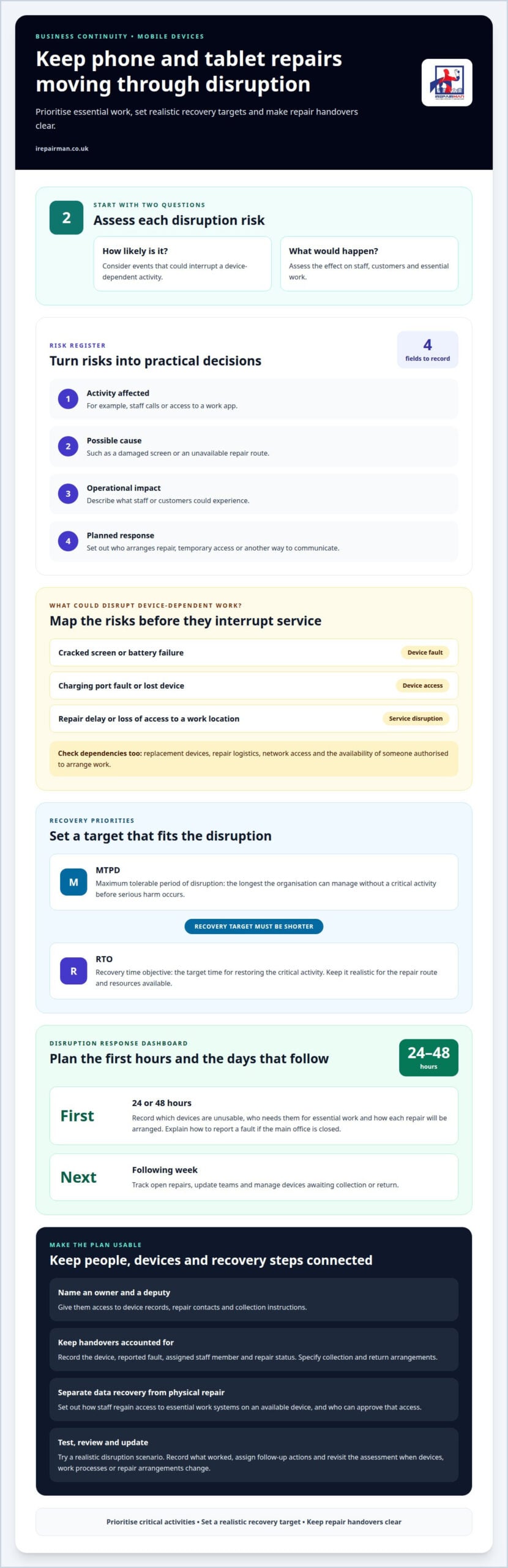
Assess each risk by asking two practical questions: how likely is it, and what would happen if it occurred? One damaged phone may slow an employee, while several unavailable devices could affect a whole team. Include dependencies such as replacement devices, repair logistics, network access and the availability of someone authorised to arrange work.
An unsuitable mobile device repair service can create risks such as poor-quality work, further damage or unclear accountability if a repair fails. The process may also expose business information if it gives someone unnecessary access to a device. Before adding a repair route to your continuity plan, assess how the provider handles devices, records repairs and takes responsibility for completed work.
Use a simple risk register to turn observations into decisions. For each scenario, record:
- Activity affected: such as staff calls or access to a work app.
- Possible cause: such as a damaged screen or unavailable repair route.
- Operational impact: what staff or customers could experience.
- Planned response: who arranges repair, temporary access or another communication method.
Then identify critical activities and set recovery priorities. Define the maximum tolerable period of disruption, or MTPD, as the longest time your organisation can manage without a critical activity before serious harm occurs. Set a recovery time objective, or RTO, as the target time for restoring it. Keep the RTO shorter than the MTPD, and make it realistic for the repair route and resources available.
Review the assessment whenever devices, work processes or repair arrangements change. A school introducing more iPads, for example, may need to reconsider which teams manage downtime and coordinate repairs. Test the response with a practical scenario, such as several staff phones becoming unusable during a busy workday. Record what worked, assign follow-up actions and update the risk register.
3. How can businesses keep mobile phone and tablet repairs running during disruption?
Keep the repair process usable when normal working arrangements are interrupted. Name someone who can report faults, authorise repairs and update affected teams. Give them access to device records, repair contacts and collection instructions. A named deputy can take over if the usual decision-maker is unavailable. For a Central London office, include practical instructions for staff working remotely or at another site.
Plan actions for the first 24 or 48 hours, then the following week. During the initial period, record which devices are unusable, who needs them for essential work and how each repair will be arranged. Set out how staff can report a fault if the main office is closed. For the next week, include how to track open repairs, update teams and manage devices awaiting collection or return.
Keep communication moving even if the office internet or phone system is unavailable. A 4G/5G backup can support data connectivity when the main connection is disrupted. Hosted phone systems and softphone clients can let staff work from another location with an internet connection. Cloud-based business numbers can redirect calls to mobiles or other devices, helping teams maintain customer contact.
Document the repair handover process so devices remain accounted for during disruption. Record the device, reported fault, assigned staff member and repair status. Specify where a device can be collected and how its return will be received. If a team relocates from its Central London office, for example, it needs an alternative handover point and a way to notify the repair coordinator.
Include data and system recovery steps alongside repair arrangements. Staff should know how to regain access to essential work systems on an available device and who can approve that access. Keep instructions for restoring work data separate from the physical repair process. A phone with a damaged screen may need repair while its user needs a temporary way to reach work contacts.
Test the plan with a realistic scenario, such as office access being interrupted while several phones need attention. Check whether the deputy can locate records, contact the repair route and share updates with staff. Record gaps, assign follow-up actions and review the plan when work locations or device processes change. For a repair route that fits your organisation’s needs, explore business phone and tablet repair support.
Make customer contact part of the disruption plan rather than leaving it to individual judgment. A business continuity plan can specify communication channels that help maintain customer service when a physical office is unavailable. Explain how staff should choose the appropriate channel and keep colleagues informed if they cannot use their usual workplace.
A business continuity plan can include backup communication channels, remote access protocols, data and system recovery steps, and testing and review cycles. Align these with repair handover arrangements so staff can continue essential work while a device is being repaired. After a test or disruption, check that the arrangements remain clear and usable, and update them when needed.
4. Repair turnaround: in-house, manufacturer & third-party
Repair time depends on the fault, parts, technician capacity and how the device reaches the repair team. A cracked screen may need a different process from a charging fault that requires diagnosis. Compare the full process, from reporting the damage to receiving a tested device, rather than focusing only on repair time at the bench.
In-house repair can reduce handovers if an organisation has trained technicians, suitable tools and the required parts. An office technician, for example, might assess a damaged screen and arrange a repair without sending the phone elsewhere. But internal workloads, staff absence or missing components can create a queue, and repairs may compete with other IT support tasks.
A manufacturer repair route may suit devices that need specialist assessment or manufacturer-led work. The total time can include booking, shipping or travel, inspection, parts supply and return delivery. A fleet manager should also consider how the manufacturer handles several devices needing attention at once, rather than assuming every repair follows the same schedule.
Third-party repair services vary in location and workflow. An on-site technician may assess eligible faults at a workplace, while a workshop route may involve collection and return. A London workshop-based service, for example, repairs devices and returns them by tracked delivery in around 2-3 working days. That figure describes one service’s repair and return process, not a general industry turnaround.
For a fair comparison, map the stages and dependencies for each route:
- Intake: how staff report the fault and provide device details.
- Assessment: whether diagnosis happens on-site or after delivery.
- Repair: whether technician capacity and parts affect scheduling.
- Return: how the device reaches the employee and is handed back.
- Testing: what checks take place before the device returns to service.
Compare each route with the activity’s recovery time objective. A phone used for customer calls may need faster attention than a spare device. At a school, a damaged iPad used for classroom work may take priority over an unused tablet. Set priorities according to operational impact, not repair route alone.
Track actual elapsed time at each stage, including authorisation, collection and delivery. The record can show whether delays stem from diagnosis, parts or logistics. Use the findings to choose which repair routes belong in continuity plans and what temporary arrangements staff need while devices are away. A realistic comparison gives teams a clearer basis for decisions during disruption.
5. What UK laws and regulations apply to repairing business mobile devices?
Business device repairs can involve data protection, workplace safety and decisions about equipment that cannot be repaired. The relevant considerations depend on the device, the fault and how your organisation arranges the work. Treat repair as part of established processes, with clear ownership of authorisation, handover and return. For a Central London business, include the steps staff should follow when devices move between an office and a repair location.
Data protection matters because a phone may hold work emails, customer details or access to business systems. Limit repair access to what the task requires. Before a device leaves the office, assign someone to prepare it, record its condition and manage the handover. Staff should not share account passwords casually and should follow the organisation’s procedures for backing up work information.
A cracked-screen phone, for example, may be repairable without opening business apps or messages. Your internal process can ask staff to use approved backup methods, sign out of sensitive applications where practical and tell the repair coordinator about restricted information. Record who handled the device and when. This creates a clear record of its movement without disclosing more than the repair requires.
Consider workplace safety when devices are collected, stored or handled on your premises. If a handset appears damaged, staff should stop using it and report the concern through the organisation’s fault process. Specify who receives the report and where the device should be kept pending assessment. A repair record can note visible damage, reported symptoms and any concern raised by the user.
If a phone or tablet cannot be repaired, keep that decision distinct from routine repair records. Mark it as awaiting a decision, under repair or removed from use, in line with your organisation’s process. A device awaiting assessment, for instance, should not be confused with one approved for disposal. Clear status records help colleagues understand what is happening without assuming the device’s condition.
Make repair procedures practical for staff and clear to anyone handling devices. Set out how work is authorised, how information is protected, who coordinates collection and return, and who records the device’s status. At a school, a named staff member might manage an iPad handover and record its return. In a Central London office, reception can direct outgoing phones to the designated repair coordinator.
Review the process whenever device use, work systems or repair arrangements change. Give staff a straightforward way to report faults and ensure the repair coordinator can access current instructions. Keep records consistent so each device’s status and handover are easy to follow. This connects data care, workplace procedures and repair planning without making assumptions about what a particular repair requires.
5. How should businesses protect data and maintain GDPR compliance during device repairs
Start with a clear rule: repair access should be limited to what the fault requires. A technician replacing a cracked screen usually needs to assess the display, not read emails or open customer records. Tell staff not to share account passwords casually, and assign a named person to coordinate device handovers.
Before sending a phone or tablet away, identify the information it holds and the work systems it can access. A finance team’s handset may contain email access, while a school iPad may hold pupil-related work data. Use organisation-approved backup and device-management processes where available. Keep business data in managed accounts rather than relying on personal copies.
Prepare a short repair record for each device. Include its asset identifier, reported fault, handover date, authorised repair scope and responsible person. Record visible condition and any known data concerns. These details help distinguish an authorised screen repair from an unexpected request to access business applications.
Agree practical safeguards with the repair provider before work begins. Clarify who may handle the device, how it will be stored, whether data access is needed and how it will be returned. A no-access protocol can separate the repair from the device’s contents. If access is genuinely necessary for diagnosis, define its purpose and limit it to that task.
During repair, keep the chain of custody clear. Log each transfer between your organisation, the courier and the repair team, then record receipt on return. A Central London office, for example, can have reception record an outgoing handset and the designated coordinator acknowledge its return. This makes unexplained gaps easier to identify and resolve.
After repair, the assigned staff member should confirm the device’s condition and check that approved work accounts function as expected. Review relevant access or device-management records if your organisation uses them. If a device is missing, unexpectedly accessed or returned with unfamiliar changes, escalate the concern through the established data-incident process.
GDPR compliance also depends on clear internal ownership. Assign responsibility for approving repairs, communicating safeguards and retaining records. Train staff to report faults without sending passwords or sensitive information in ordinary messages. Review the procedure when devices, work systems or repair arrangements change, so it continues to reflect how the organisation operates.
For a repair arranged with data handling in mind, arrange business device repair support around your organisation’s process.
For continuity planning, the template recommends maintaining at least two telephone lines at temporary accommodation. This provides an alternative to relying on a business device that is away for repair. Include the arrangement in communications planning so staff know how to stay in contact while the device is unavailable, without sharing passwords or giving a technician broader access to business data.
Cloud-based numbers can support call flows or auto attendants and announcements during a major incident. These options can help maintain communications when repair work coincides with disruption. Explain how staff should use available lines or call flows and include the guidance in continuity arrangements. These measures do not replace repair safeguards: limit access to authorised work, maintain a clear custody record and check the device on return.
IRepairMan London: Business • Corporate • B2B Phone Repair HUB
iRepairMan London’s Business • Corporate • B2B Phone Repair HUB supports organisations managing phone and tablet repairs. It can handle batches of 20 or more devices simultaneously, helping teams coordinate repair needs across a business. For individual device issues, its services include iPhone screen and back glass repairs, plus iPad repairs.
When repair planning needs a clear data-handling approach, iRepairMan uses an encrypted, no-access data safety protocol. Every repair also includes a 12-month warranty, giving organisations a defined period of support for repair work. These services can fit into business continuity arrangements when damaged devices need professional attention. Contact iRepairMan London to discuss your business repair requirements.
Make your repair plan part of everyday operations
A continuity plan works best when it is easy to use before pressure builds. Include repair coordination in routine operational reviews, alongside staff responsibilities and device records. When teams change roles, work from new locations or adopt different devices, update the repair process to keep it practical.
Business continuity and mobile device repair should work together in a clear, usable process: staff know how to report a fault, the right person can arrange a repair, and teams understand what happens while a device is unavailable. A short practice run can reveal unclear handovers or missing instructions while there is still time to improve them.
If you’re ready to put a repair process in place for your organisation, contact iRepairMan London to discuss your requirements. A considered plan can help your team respond with greater clarity and keep important work moving.
Frequently Asked Questions
What does business continuity mean for mobile device repair services?
A workable plan lets you coordinate repairs and keep essential teams informed when normal arrangements change. Business continuity and mobile device repair planning can include a backup contact for repair requests and a clear handover process. For a Central London firm temporarily moving to another workplace, it also means knowing where a device can be collected and who will track its return.