

Need a screen repair in Central London? iRepairMan London offers same-day, on-site phone repairs at your home, work, school or a café, so you can arrange help without travelling to a repair shop. Every repair has a 12-month warranty. Screen replacement warranty details matter because the cover relates to the repair, rather than automatically applying to every new impact or crack.
It’s understandable to want to know what happens if a replacement screen develops a problem, and whether accidental damage is treated differently. This guide explains what screen replacement warranty details to check, how to report a fault and which exclusions may apply. It also distinguishes repair cover from the phone manufacturer’s warranty, so you can see which terms relate to your situation. Contact iRepairMan London to arrange a same-day repair at a convenient Central London location.
Key Takeaways
- Find out how long repair cover lasts and how the warranty for a replacement screen differs from your phone’s manufacturer warranty.
- Learn what details and proof of purchase can help when you make a warranty claim.
- Understand why accidental damage may be treated differently from a fault with the repair.
- Spot common exclusions, including damage linked to misuse and changes to a phone’s original water resistance.
- See how iRepairMan London’s 12-month warranty applies to its repairs and which screen repair services may suit your device.
Manufacturer warranty and accidental screen damage
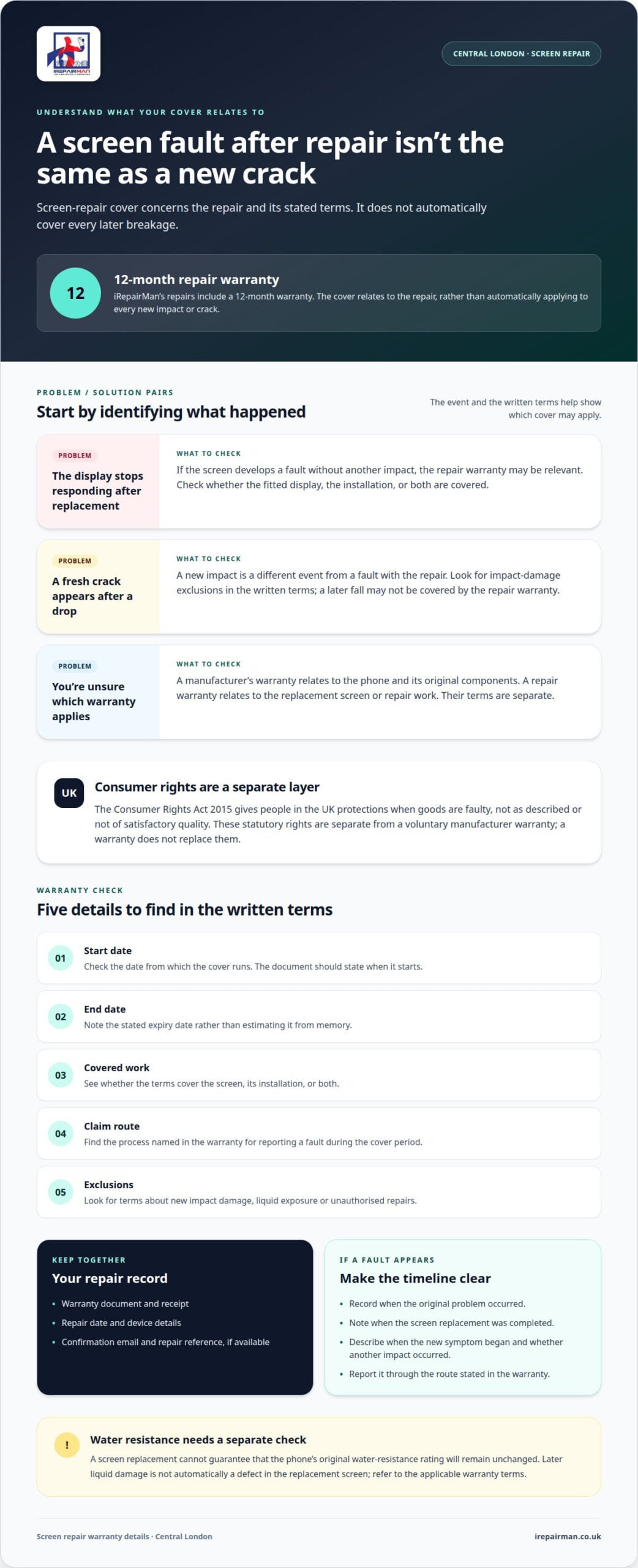
A manufacturer’s warranty and a screen-repair warranty are separate. The manufacturer’s terms apply to the phone and its original components; a repair warranty applies to the replacement screen or repair work. If an iPhone screen cracks after a drop, the two warranties may treat that damage differently.
In the UK, statutory consumer rights are separate from a voluntary manufacturer warranty. The Consumer Rights Act 2015 gives people in the UK protections when goods are faulty, not as described or not of satisfactory quality, according to UK Parliament. That legal protection is distinct from a manufacturer’s voluntary promise. A warranty does not replace statutory rights, and its terms cannot explain every possible rights issue.
Accidental damage usually means a sudden event, such as dropping a phone onto a hard floor or striking its screen against a table. An impact crack is different from a screen fault that appears without a new accident. For example, a replacement display that stops responding may need to be assessed as a repair issue, while a fresh impact mark points to new damage.
That distinction matters because repair cover generally concerns faults connected with the repair, not every later breakage. The written terms define the scope, including which parts or workmanship are covered, how long cover lasts and how a later accident is treated. A manufacturer’s voluntary warranty has separate terms and may treat accidental damage differently.
Before arranging a repair, note two timelines. Record when the original fault or damage occurred, then when the screen replacement was completed and any new problem began. If the display fails after repair without another impact, the repair warranty may be relevant. If the phone is dropped afterwards, the resulting damage may fall outside that cover.
Keep the phone’s warranty documents and the screen-repair terms together. Check which component is covered, the stated duration, any impact exclusions and how to report a fault. For instance, a warranty might cover a fault with the fitted display but exclude a new crack from a separate fall. The exact wording determines how each event is assessed.
A screen replacement can also affect expectations about water resistance. Replacing a display cannot guarantee that the phone’s original water-resistance rating will remain unchanged. If the phone later suffers liquid damage, that is not automatically a defect in the replacement screen. Consider each event separately and refer to the applicable warranty terms.
Screen-replacement warranty duration
Screen replacement warranty details should specify the repair’s cover period. Check the start date, end date and covered work carefully. Cover might begin on the repair completion date, but the document should state when it starts. If the receipt and warranty record show different dates, keep both for the claim.
Do not assume that every independent screen repair has the same warranty duration. The period depends on the terms issued for that repair, including which parts and workmanship are covered. For example, cover for a fitted display does not automatically extend to unrelated camera or charging-port faults. The wording explains how a later problem relates to the original repair.
Check the warranty for these details before relying on it:
- Start date: identify the repair date or other stated date from which cover runs.
- End date: note the stated expiry date, rather than estimating it from memory.
- Covered work: see whether the terms refer to the screen, installation, or both.
- Claim route: find the process for reporting a fault during the cover period.
- Exclusions: look for terms about new impact damage, liquid exposure or unauthorised repairs.
These points help distinguish a repair defect from a new incident. If touch response becomes unreliable soon after replacement, the date and symptoms can help explain the issue. A fresh crack after a fall is a different event. The warranty period alone does not determine whether either problem qualifies; the covered work and exclusions matter too.
Are screen replacement warranty rights different for phones bought or repaired online in the UK? Arranging a repair online does not, by itself, determine the screen-repair warranty duration. The written repair warranty states its period and terms, while UK statutory consumer rights remain separate.
For an online repair, save the confirmation email, receipt, warranty document and repair reference together. These records show which device was repaired and when cover began. If a display fault appears while the written warranty is active, the repair date and a clear description of the fault give the repairer a useful starting point for assessing the claim.
A phone’s charge level or everyday use does not extend its warranty. Continued operation does not restart the cover either. If the screen develops a problem near the stated expiry, report it promptly through the specified route and explain when the symptom first appeared. A clear timeline helps distinguish a developing fault from later damage.
Screen replacement warranty details also help keep your repair record useful over time. Save the terms somewhere easy to retrieve, such as the email account used for the booking. For a work phone shared between colleagues, record who noticed the problem and when. This can connect the symptoms with the device’s repair history.
Claim process and proof of purchase
Start with the screen-repair warranty document and receipt. Together, they identify the repair date, device and applicable terms. If the receipt is digital, save the original email as well as a readable copy. A bank statement can help trace a transaction, but may not describe the repair or warranty.
Use the claim route named in the warranty, such as the listed email address or claims form. Give the device model, repair date and a clear description of the fault. For example, say whether the display flickers, touch response fails or part of the screen stays dark. Include when the symptom began and whether the phone suffered a later impact.
Useful supporting records include:
- Proof of repair: a receipt, order confirmation or repair record showing the work completed.
- Warranty terms: the document identifying the cover period and the parts or work covered.
- Fault evidence: clear photographs or a short video showing the screen problem.
- Device details: the model and any repair reference shown on the paperwork.
- Timeline: the date you first noticed the fault and any relevant event, such as a drop.
Keep your report focused. If touch response fails during ordinary use, describe the steps that reproduce the problem. If the battery also drains unusually quickly, record that separately rather than presenting it as proof of a screen fault. Clear details help distinguish the display issue from other symptoms.
What remedies are available if a replacement screen fails during the warranty period? The terms determine the remedy for an accepted claim. They may provide for repair or replacement of the affected work, but the available option depends on the written cover.
After submitting a claim, keep the case reference and any replies. If the device is inspected, note the reported fault and assessment outcome. A repair record identifying the screen fault can clarify whether the issue concerns the replacement work or separate damage. Save messages, photographs and updated paperwork together.
Before handing over a phone, follow the stated instructions for preparing it and protecting personal information. Do not erase files unless the process requires it, and secure anything you need first. For a school or workplace device, include the responsible contact and asset reference so the correct phone can be matched to its repair record.
If a claim is declined, compare the reason with the warranty wording. For example, a decision based on impact damage should identify the evidence or term relied on. Reply with relevant records if the timeline or fault description was misunderstood. Keep the exchange factual and save the final decision with the original proof of purchase.
Exclusions and misuse
Exclusions describe circumstances in which warranty cover may not apply. Read the specific wording: a term might concern unauthorised alterations, mishandling or damage during another repair. Look beyond a heading such as “misuse” to the condition itself. For example, a restriction on unauthorised work concerns intervention on the device; it does not automatically explain every later fault.
Misuse is not always obvious from a damaged phone. A device may have been opened for a battery change, adjusted after a fault or modified with a part that affects the screen assembly. These details may matter if the warranty addresses third-party work. Keep service records showing what changed and when, especially if the phone has had more than one repair.
Will using a third-party repairer affect my manufacturer’s warranty? The third-party repair has its own terms, while the manufacturer’s warranty follows the manufacturer’s wording. Those terms determine how work by another repairer relates to a later manufacturer claim.
Before assuming an exclusion applies to the whole device, identify its scope. A clause may concern one component, a specific type of work or damage linked to an event. For instance, if an iPhone was opened to replace a charging port, record that separately from a later display concern. A clear record helps establish what happened without assuming the outcome.
Warranty wording may distinguish user-caused damage from a fault that appears during ordinary handling. Avoid drawing conclusions from appearance alone. A dent near a phone’s frame, for example, does not by itself establish why the display behaves unexpectedly. The terms and assessment should connect the reported issue to the relevant condition.
When reviewing exclusions, look for language about:
- Unauthorised alterations: changes made to the device or fitted components.
- Further repair work: work performed after the original screen replacement.
- Handling outside stated instructions: actions that the warranty terms identify as misuse.
- Separate faults: problems involving another component or an unrelated event.
If a term is unclear, focus on its exact wording and the event it describes. For example, consider a clause about alterations in light of the work actually performed, rather than assuming every repair has the same effect. Keep documents from each repair and a concise timeline of changes to the device.
For school or workplace phones, assign one person to record repairs and device changes. This avoids confusion when a shared iPhone passes between users. A clear history can show whether another intervention occurred and give the warranty assessment relevant context, without treating unrelated issues as one claim.
Does a screen replacement warranty cover accidental damage or only repair defects?
A screen-replacement warranty usually relates to the repair or fitted screen, not every accident that happens afterwards. A replacement screen may have cover for defects or other issues, but the written terms determine what qualifies. A touch-response fault, for example, differs from a fresh crack caused by dropping the phone.
Think of the warranty as cover tied to a particular repair, not general protection for the whole device. If a display develops a fault without a new impact, the repair terms may be relevant. If the phone is dropped and the glass breaks, that is accidental damage. The cause, timing and screen condition help distinguish the situations.
Examples can make the difference clearer:
- Possible repair issue: a section of the replacement screen stops responding during normal use.
- Accidental damage: the screen cracks after the phone falls onto a hard surface.
- Separate device fault: the camera stops working, although the replacement display remains intact.
- Mixed condition: a display fault appears alongside a new impact mark, requiring both issues to be assessed.
These examples do not determine a claim by themselves. The warranty document states which parts and work are covered, while an assessment considers the device’s condition and reported symptoms. A new crack does not explain every display fault, just as a screen fault does not prove accidental damage.
When reporting an issue, describe what changed and when. For example, say that touch response failed during ordinary use, then note whether the phone was dropped afterwards. Clear photographs of the screen and frame can show visible cracks or impact marks. A short video may help demonstrate an intermittent display problem that is difficult to capture in one image.
Check whether the written terms distinguish defects in the replacement part from installation problems. They may also explain how accidental damage is handled, if at all. Do not assume that cover for the screen extends to the phone’s battery, camera or other components. Each repair and fault must match the stated scope.
If the evidence points to accidental damage, the repair warranty may not cover the new break. If the screen appears to have failed without a later accident, report it through the stated claim process. Keep the repair record and describe the sequence of events accurately so the assessment can focus on the relevant fault.
For a damaged display in London, arrange an iPhone screen repair and keep the repair warranty terms with your device records.
IRepairMan London
iRepairMan London helps London phone owners understand repair cover alongside the screen repair they need. If a display develops a fault, clear repair records and warranty terms help distinguish a repair issue from new accidental damage.
Support is available for iPhone screen and back glass repairs, iPad repairs, and business device needs through the Business • Corporate • B2B Phone Repair HUB. This gives individuals, schools and workplace teams a practical route when a damaged screen is disrupting daily use. The relevant repair paperwork sets out the applicable cover and claim information.
If you need help with a device repair or its warranty details, contact iRepairMan London.
Choose your next repair with confidence
Use the warranty information to make your next repair decision with a clear record of the device, the work required and the terms provided. Clear screen replacement warranty details help explain how a repair relates to a later fault, without assuming every new issue has the same cause.
For a damaged phone or tablet, iRepairMan London offers iPhone screen repair, iPhone back glass repair and iPad repairs. The right service depends on the device and damage. Sharing those details is a practical first step towards arranging suitable support.
Contact iRepairMan London today to discuss your repair needs. A clear next step can make getting your device looked after feel more manageable.
Frequently Asked Questions
What’s covered under warranty?
A repair warranty covers the work or replacement part named in its terms, not every feature of the phone. If a display fault affects an otherwise working device, the screen-repair record helps identify the relevant cover. Keep it accessible so you can refer to the repair description if you need support.
Will my screen replacement come with a warranty?
Most iRepairMan repairs and replacement parts come with warranty cover, subject to the terms for the work completed. Keep the paperwork provided after the repair; it identifies the device and covered work. For a school or business phone, save the document with that device’s maintenance records.
Can I add the warranty to a device I already own?
A repair warranty is linked to the repair work, not simply to owning a device. If your phone needs attention, the applicable terms are those provided for the completed repair. For a device repaired elsewhere, refer to the warranty documents issued for that specific work when seeking support.
How many times can I make a claim?
The number of claims depends on the warranty terms and the issue reported. If the same repaired fault returns, explain that it has recurred and provide the original repair reference. A different problem, such as a camera fault after a screen repair, may be assessed separately because it concerns another component.
Is there a service guarantee?
iRepairMan provides warranty cover on most repairs and replacement parts, subject to the applicable terms. This cover relates to the specified repair; it does not promise that the whole device will remain fault-free. Keep the repair record so you can identify the covered work and distinguish it from a later issue affecting another part.
What damage is not covered?
Damage from a later accident, such as a new crack after a fall, differs from a fault with the completed repair. A separate issue, such as a damaged camera beside an intact replacement screen, should also be described independently. The written terms explain which events or types of damage fall outside the repair cover.
What does a screen replacement warranty cover in the UK?
It covers the screen-related repair or replacement part described in its terms. In the UK, the Consumer Rights Act 2015 gives people protections when goods are faulty, not as described or not of satisfactory quality, according to UK Parliament. Those statutory consumer rights are separate from a voluntary repair warranty, so keep relevant purchase and repair documents.
How long is the warranty on a screen replacement?
The applicable warranty period is stated in the documents for the repair. Check the record for its start and expiry dates rather than relying on memory or a verbal estimate. For a shared work or school device, keep a copy with its maintenance history so the responsible person can find the terms if a screen issue arises.