
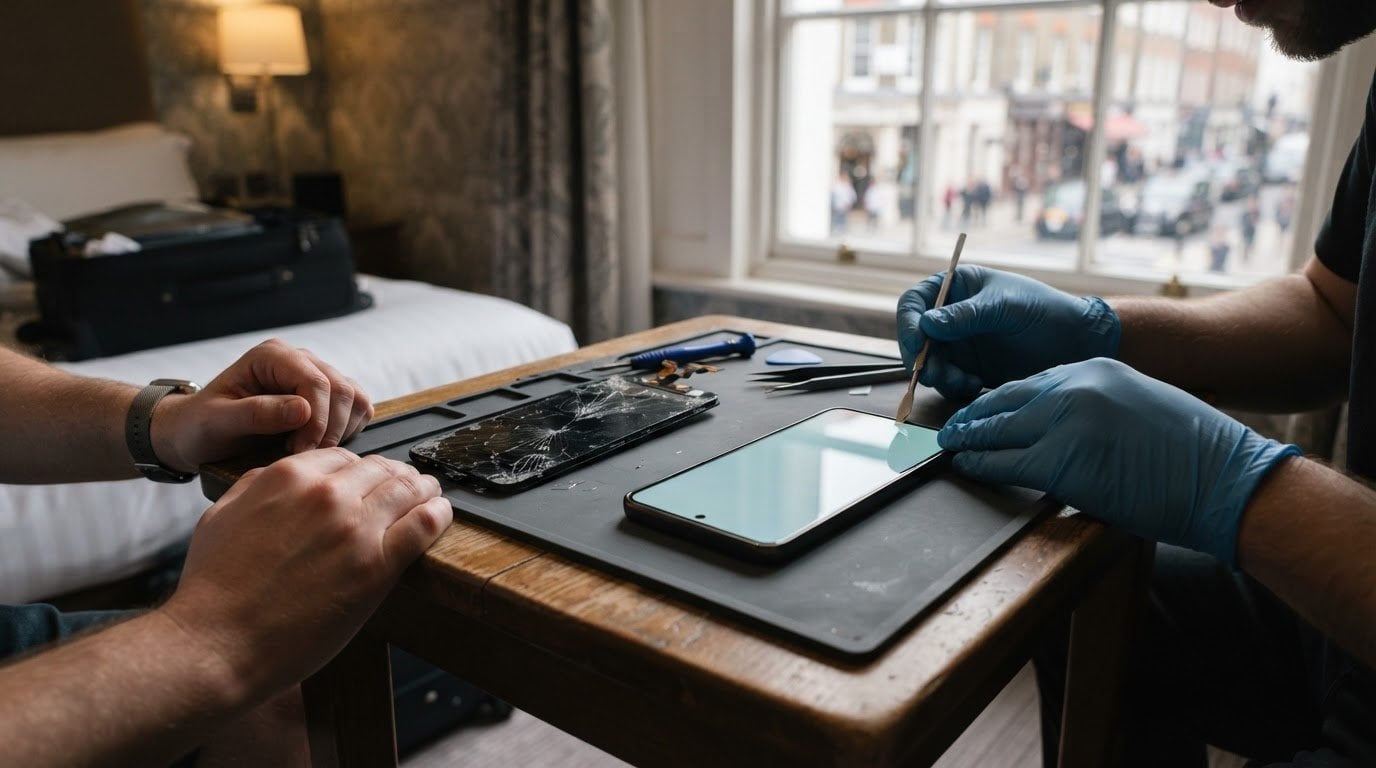
Could a Samsung repair fit into your day without a trip across London? If you’re looking for same-day Samsung repair in Central London, an appointment is the practical starting point: it helps plan around your handset, the fault and where you need help. A same-day repair isn’t a timing promise for every fault, as the work and required parts can affect how long it takes.
A broken screen or charging problem is disruptive, especially when you rely on your phone for work, travel or family plans. You’ll find out what to expect from booking, which details help plan a visit and what can affect repair time, so you can make a more informed decision before arranging your day.
On-site support is available across Central London, including the City, Mayfair and the West End, at a suitable home or workplace address. Whether your Samsung needs a screen assessment or another repair, sharing the model and fault details helps plan the appointment and avoid an unnecessary journey.
Key Takeaways
- Plan an appointment around your Samsung model, the fault and where you need the repair carried out.
- Repair time depends on the work required and whether the necessary parts are available.
- Find out how Central London service areas can affect the most practical place to arrange a repair.
- Share clear details about the fault when booking to help plan the appointment more effectively.
- Learn what to expect from Samsung phone repair when you need to reduce disruption to your day.
Same-day repair availability
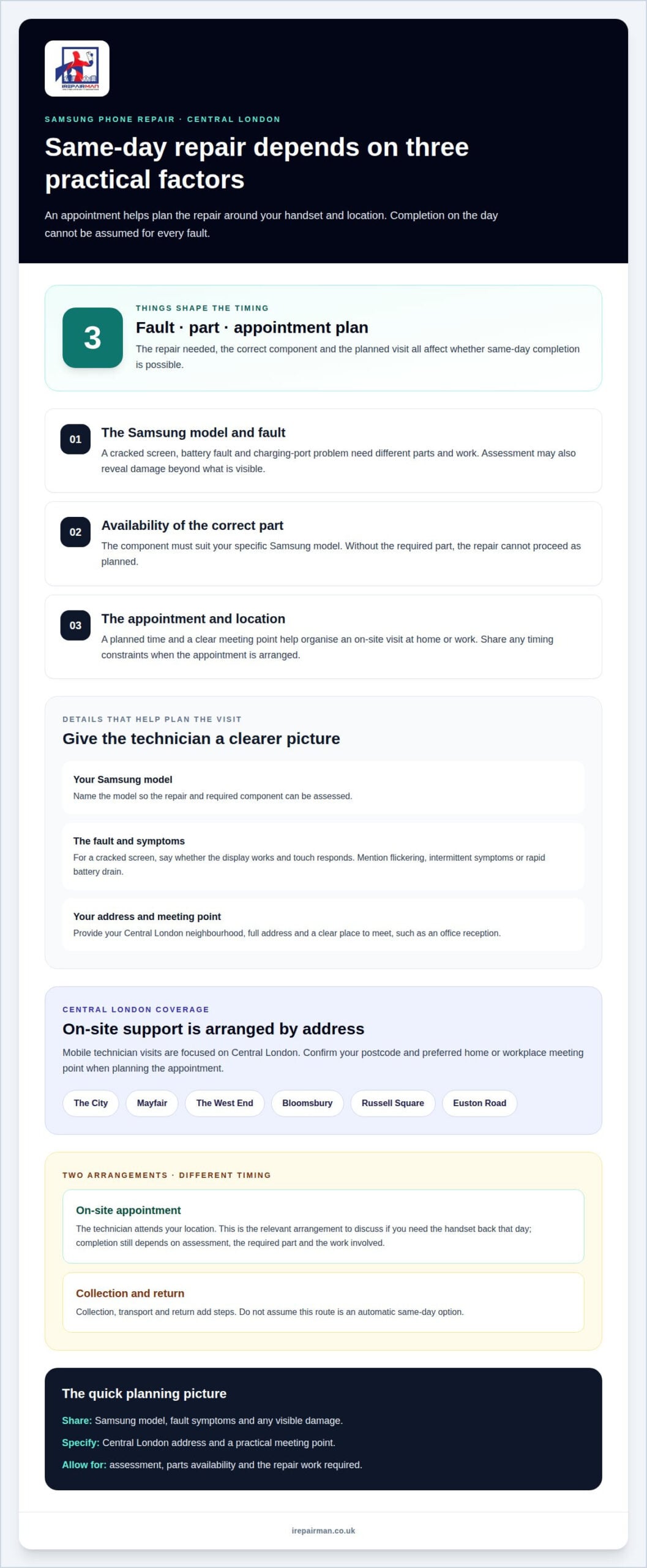
Book an appointment to give your Samsung repair a planned time and place. How long it takes depends on the fault and whether the required parts are available; same-day completion can’t be assumed for every device or repair.
Repair times and parts availability
A cracked screen may need replacing, while a battery or charging-port fault involves different parts and work. The repair time depends on the device model, the fault and the parts required. Sharing the model and describing the symptoms helps the technician assess the job and plan the visit.
Parts availability matters because a repair cannot proceed without the component suited to that Samsung model. A cracked screen, for example, may look straightforward, but the correct replacement part must be available. If the fault involves more than the visible damage, assessment can also reveal additional work. These are the main factors behind the time required, rather than a single duration that applies to every device.
Booking a repair appointment
Book an appointment rather than relying on an unplanned visit. Provide your Samsung model, a clear description of the fault and your preferred location, such as home or work. If the screen is cracked, say whether the display still works and if touch response is affected.
Booking also gives you a chance to explain any timing constraints before the appointment is arranged. If the device is needed for work or travel, say so when describing the fault. That context helps establish a practical appointment plan, though it doesn’t change the parts or repair work the device needs.
Same-day repair depends on more than the appointment slot: the fault needs to be assessed, the right part must be available and the repair must fit the time planned. A visible crack alone does not show the full condition of the display or handset. Share the details early so the appointment can be planned around the actual repair.
Pickup and delivery are different from an appointment carried out at your location. Collection, transport and return add steps, so they should not be treated as an automatic same-day option. If you need the device back that day, an on-site appointment is the relevant arrangement to discuss. For a workplace, home or café, a specific meeting point makes planning clearer and avoids unnecessary travel during your day.
Before the appointment, keep the phone accessible and note any symptoms that come and go. For example, mention a flickering screen, unresponsive touch controls or unusually rapid battery drain. Along with the model and visible damage, these details help the technician assess the fault and explain the repair needed.
Samsung repair service areas across London and nearby towns
Your address determines how to arrange your Samsung phone repair. iRepairMan London provides dedicated on-site support exclusively within Central London, ensuring rapid assistance for city-centre locations. Choose the arrangement that suits your Central London address and whether you require a visit to your workplace or home.
Central London locations include Mayfair, the West End, Bloomsbury, Russell Square and Euston Road. Provide your neighbourhood, full address and preferred meeting point, whether you are at home or work. At a busy office, for example, naming the reception or another clear location helps avoid confusion and unnecessary interruption.
For locations outside our core coverage, distinct service routes apply rather than standard on-site visits. While we focus our mobile technician visits on Central London, we can clarify the most suitable repair route based on your specific postcode within our operational parameters. The service route depends entirely on your exact address and whether an on-site appointment is feasible.
A Samsung-authorised service partner appointment is a separate consideration from where a repair takes place. Authorised describes a service relationship, not whether an appointment is available that day. If this status matters for your device or warranty, consider it separately from the repair location and how the handset will be handled.
Samsung phone repairs are different from Samsung TV repairs. A TV technician may be able to repair a television when the required spare parts are available. Same-day or next-day TV service depends on the relevant repair arrangements and parts, and shouldn’t be assumed from a phone repair appointment. A cracked smartphone screen, by contrast, needs a handset repair assessment.
If you are arranging a repair, provide your full Central London address and postcode so the correct service route can be arranged. Keep these practical distinctions in mind:
- Central London: Give the neighbourhood and a suitable home or workplace meeting point for on-site support.
- Core coverage: Confirm your specific Central London postcode for mobile technician availability.
- Service routes: Distinguish between city-centre visits and alternative arrangements for boundary locations.
- TV faults: Treat parts availability and technician arrangements separately from smartphone repairs.
These details help you plan around the device and location, rather than assuming one repair route fits every address. For a handset fault in Central London, explore the Samsung phone repair option that matches your location and repair need.
Appointment duration and booking
An appointment organises the repair around your Samsung model, fault and location. The time needed depends on the assessment, replacement part and work involved.
Online booking and walk-ins
Online booking lets you provide repair details before arranging an on-site visit. Include your Samsung model, symptoms and preferred location, such as your office or home. For example, say whether a cracked screen still responds to touch or charging stops intermittently.
A walk-in is different: it does not reserve a technician’s time or provide repair details in advance. Rather than building your day around an unplanned visit, book an appointment and share your location and repair needs, particularly if you rely on your phone for work or travel.
Online booking is most useful when you can describe the fault clearly. A photo can show visible screen damage, while a short note can explain symptoms that are not apparent in an image. Enter the exact model, since Samsung devices may require different replacement parts.
Repair appointment booking
For an on-site appointment, provide the model, a concise fault description and the address where the phone can be assessed. Add details such as whether the screen displays an image, touch controls respond or the battery charges. This gives the technician a clearer picture of the job before the visit.
State your preferred appointment time and any access instructions. A reception desk, school entrance and home address can each need different arrangements. If your schedule is tight, mention this when booking rather than assuming every repair takes the same amount of time.
The appointment duration follows the fault and the work required. A screen replacement and a charging fault involve different checks and parts. Assessment can also show whether visible damage is the only issue. That is why a single duration cannot accurately describe every Samsung repair.
Courier collection appointments suit a different situation from a technician visit at home or work. The UK-wide pick-and-return service provides a collection route for remote teams and satellite offices. For collection, the address, access arrangements and device details help coordinate handover; transport and return are separate steps, not an on-site repair appointment.
Before handing over the phone, note its model and symptoms. If the screen works intermittently, explain when it fails. If charging is unreliable, describe what happens when you connect the charger. Clear examples help identify the fault more precisely than a general request for a replacement.
Choose the repair arrangement around your day: book an on-site visit for an assessment at a suitable address, or use pick-and-return if courier handling suits your location. This makes the booking details useful from the outset and sets expectations around the repair required.
Central London locations including Mayfair, Belgravia, Soho and Marylebone
Mayfair, Belgravia, Soho and Marylebone are useful location details when arranging Samsung phone repair. Give your neighbourhood, full address and a practical meeting point, such as an office reception or home entrance. A precise location helps plan an on-site visit rather than a trip to a shop. The repair still depends on the phone fault and parts required.
Searching for a repair shop in Central London may show nearby premises, but proximity alone does not confirm that a shop repairs your Samsung model or offers a suitable appointment. Check whether a result describes a general store, a repair service or a device drop-off point. A cracked screen requires a different assessment from a software fault.
In Soho, a nearby shop may seem convenient during a lunch break, but a walk-in does not ensure a technician is ready to assess your phone. In Marylebone, an on-site workplace appointment can save you a journey with a damaged device. For bookings in Belgravia or Mayfair, provide a precise address, particularly if the building has multiple entrances.
EE Hub store locations are another kind of search result. A store address alone does not confirm that Samsung phone repairs or same-day screen replacements are available there. Distinguish between finding an EE Hub and arranging a repair appointment that suits your device, location and timing.
Use location information to plan the practical details, then match the repair arrangement to your day. Consider the following before booking:
- Address: Include the postcode and the entrance or reception point.
- Device: State the Samsung model and whether the issue affects the screen, charging or software.
- Repair route: Distinguish an in-store drop-off from an appointment at home or work.
- Timing: Avoid assuming a nearby store has an immediate repair slot.
These checks are useful near Mayfair, Belgravia, Soho and Marylebone, as well as across the wider West End, where shop addresses and repair services can appear together in search results. A listing can help with location planning, but the appointment must suit the device and repair required.
If travelling across Central London would disrupt work or plans, consider arranging a repair at a suitable address instead. For instance, a quiet office room may be easier than a busy café for discussing a phone fault. The right location is one where the device can be assessed without adding an unnecessary journey to your day.
Same-day Samsung repairs in Central London
For a Samsung phone in Central London, same-day repair planning starts with the fault, model and appointment address. A booking helps organise the visit; it doesn’t make every repair a same-day job. The key takeaway is to match the repair need to the available parts and work required, then plan your day around that specific arrangement.
The Samsung Galaxy model identifies the device, but the fault determines the repair. A cracked screen, battery issue and charging problem involve different parts and steps. Describe what the phone does, not just what looks damaged. For example, say whether the display shows an image and touch still works.
Parts availability is a practical factor in same-day completion. The replacement component must suit the exact model and fault. If an assessment identifies more than one problem, the repair scope can change. A booking that includes the correct model and clear symptoms gives the repair appointment useful detail from the outset.
Be clear about what needs fixing. A screen repair addresses display damage, while a battery replacement addresses a battery fault. A search result or one-off symptom cannot confirm that a repair is complete. The device needs to be assessed against the reported issue and the work carried out.
Before arranging a Central London appointment, send or provide these details:
- Samsung model: Include the model identifier or series shown in the device settings.
- Fault: Describe screen damage, battery behaviour, charging or other function issues.
- Location: Give the full address and a suitable meeting point, such as work or home.
- Timing: Share your preferred appointment window and any fixed commitments.
This information helps establish whether an on-site visit suits the repair. A screen that remains usable presents a different immediate problem from a phone that will not charge. The technician can assess the reported fault and the device’s condition before work begins.
Same-day completion is most practical when the booking, assessment and required part align. The repair type matters more than the phrase “same-day”: a straightforward screen issue and a fault requiring further diagnosis are not identical jobs. For a Central London phone owner, arrange Samsung phone repair with specific device information and allow the repair plan to follow the actual fault.
Keep essential plans flexible until the repair and timing are clear. If you rely on your Samsung for navigation, work or messages, plan a temporary way to manage those tasks during the appointment. This can help protect your schedule while the device is assessed and repaired.
IRepairMan London: Samsung Phone Repair
iRepairMan London provides Samsung Phone Repair for Central London device owners who need a clear repair plan. Share your Samsung model, fault and preferred address so the repair can be considered around your day. Same-day completion depends on the repair required and parts availability, so it isn’t promised for every device.
Most repairs and replacement parts include a 12-month warranty. The data safety protocol is encrypted and designed for no access to personal content. The service may also suit you if you need iPhone Screen Repair, iPhone Back Glass Repair or iPad Repairs.
Get your Samsung repair plan moving
Make your next step a clear repair request, not another trip across Central London. Include your Samsung model, the fault and the address that suits you. That gives the repair team useful context to discuss the next stage and how it fits around your day. For same-day Samsung repair in Central London, completion depends on the repair needed and parts availability, so keep your plans flexible until the repair arrangements are clear.
iRepairMan London also offers iPhone Screen Repair, iPhone Back Glass Repair and iPad Repairs. If another device in your household or workplace needs attention, you can raise that separately rather than combining it with the Samsung request.
Contact iRepairMan London to start your Samsung repair request and share the details that will help shape the next step. A clear request is a practical start, and support is within reach.
Frequently Asked Questions
Do I need an appointment?
Yes. Book an on-site Samsung repair and provide the model, fault and Central London address where you’d like the work carried out. If you’re at work, include access instructions, such as the building reception or a suitable meeting point. These details help plan the visit and avoid relying on an unarranged walk-in.
Do you use genuine parts?
Yes, you can choose genuine or high-quality parts for your Samsung repair. The suitable part depends on the handset model and fault. A screen replacement, for example, needs a component matched to the device. Share your preference when arranging the repair and confirm the selected part type before work begins.
Is my data safe during a repair?
You can describe visible damage, such as a cracked screen, without sharing your passcode. Explain what you’ve noticed, including whether the display works or touch response has stopped. Keep your accounts and passcodes private. If a diagnostic step appears to require access to the phone, ask what it involves before deciding how to proceed.
Will my repair affect my manufacturer warranty?
Your Samsung manufacturer warranty and the repairer’s warranty are separate matters. Whether a repair affects manufacturer coverage depends on your device’s terms and the work involved, so do not assume coverage remains unchanged or ends automatically. Keep your repair record and review the warranty information supplied with your Samsung device before deciding how to proceed.
Which Samsung repair shops in Central London offer same-day repairs?
iRepairMan London provides on-site Samsung phone repairs in Central London, so you can arrange a visit at a suitable address instead of travelling to a shop. Same-day appointments are available for on-site repairs. Tell the team whether you’re in Mayfair, Soho or another Central London area, and describe the fault so the visit can be planned around your location and device.
Which Samsung repairs are available same day, including screen, battery and charging-port repairs?
On-site repairs cover Samsung screen, battery and charging-port faults, as well as other common phone problems. The right repair depends on the device and assessment. For example, a phone that charges only at a certain angle may need different work from one with a cracked screen. Include the model and symptoms when booking.
What are the opening hours and locations of Samsung repair centres in Central London?
On-site appointments operate seven days a week, from 07:00 to 23:00 local time. Coverage includes Central London, with on-site service within 15-20 miles of Baker Street Underground Station. You can provide your home or workplace address when booking rather than planning a trip to a repair centre. Include the postcode and any access details to help organise the visit.
Do central London Samsung repair shops use genuine Samsung parts and provide a warranty?
For Samsung repairs, genuine or high-quality parts are available as a choice. A repair warranty applies to most repairs and replacement parts, subject to the work covered; it doesn’t extend to unrelated faults or damage. Before the repair begins, ask for the selected part type and the applicable warranty details to be recorded with the repair, so you know what the arrangement covers.