
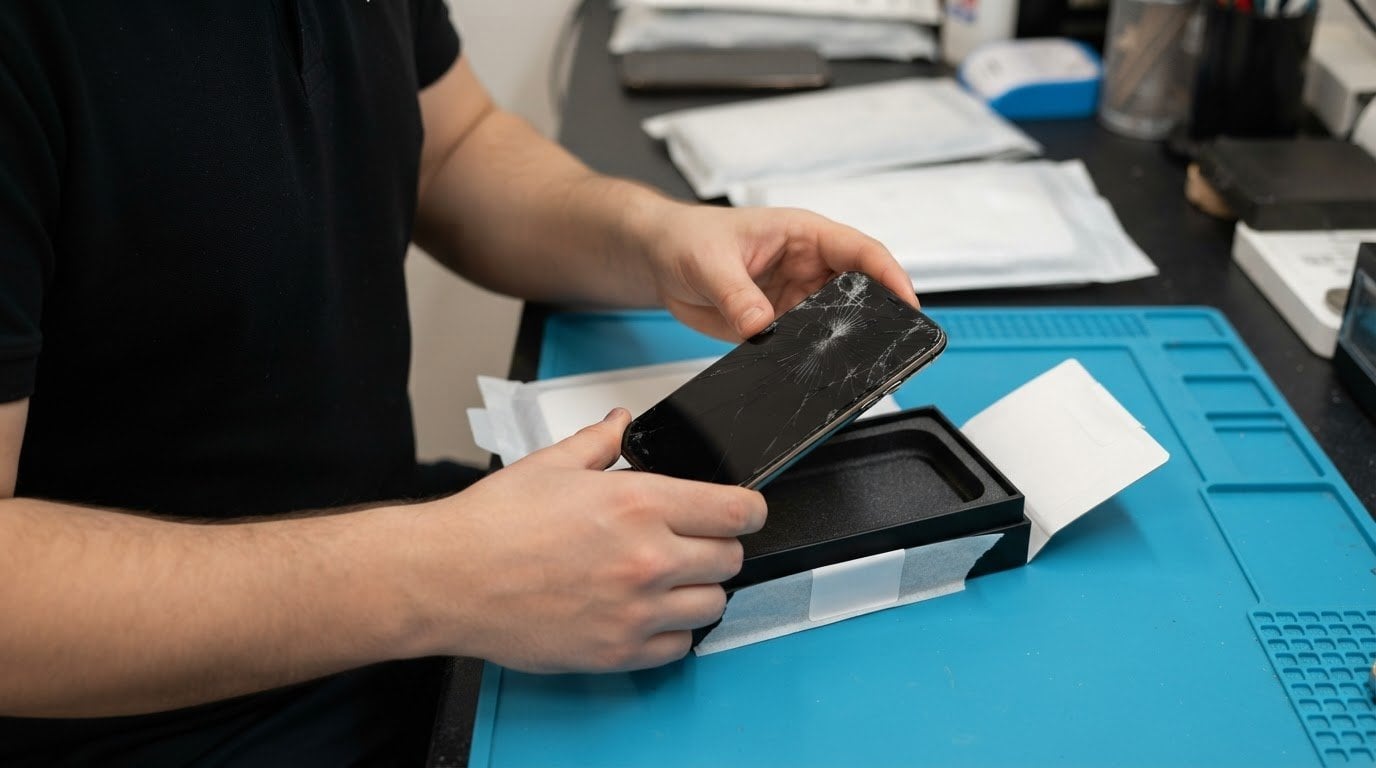
Do you get a shipping label, or do you need to arrange postage yourself? With a UK-wide secure postal repair service, a label may be provided as part of the arrangement, but it isn’t automatic; the booking details should explain how your parcel is sent. Don’t assume postage is prepaid.
Sending a phone or tablet away for repair can feel like one more complication when you need it back in use. Clear instructions make the process easier: you can see how to prepare the parcel, where to drop it off or how collection works, and how the return is tracked.
This guide explains how labels, parcel drop-off, collection and tracked returns fit together, and what to understand about postage compensation if a parcel is lost or damaged. You’ll also learn what information to look for before sending your device, so you can make a confident decision and know what happens at each stage.
Key Takeaways
- Find out what to clarify about the shipping label, parcel drop-off or collection, and how the repaired device will be returned.
- Choose tracked postage with parcel protection that suits your device, and understand what compensation may cover.
- Prepare the parcel securely and include clear repair details so the device can be identified and assessed.
- Keep your postage receipt and tracking reference to follow the parcel’s progress and retain proof of posting.
- See how iRepairMan London’s UK-Wide Pick & Return Repair Service can help with iPhone screen and back glass repairs and iPad repairs.
Parcel drop-off, collection and returns
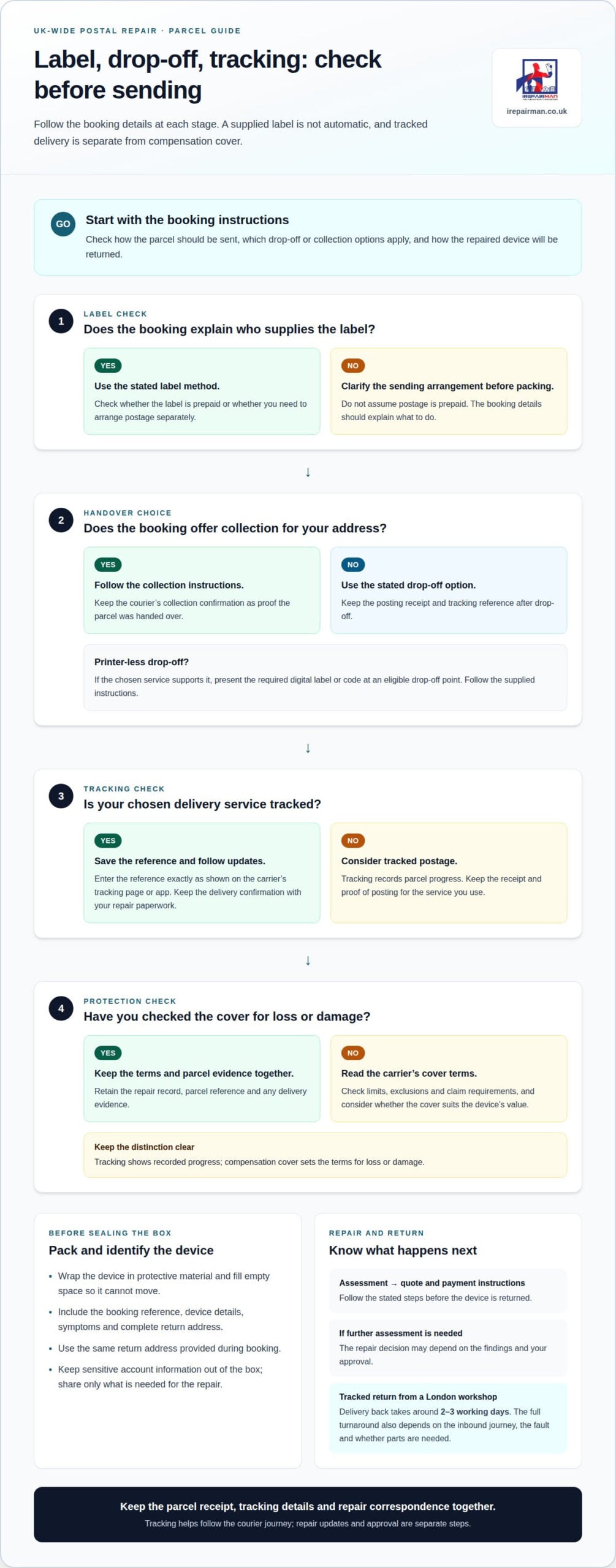
From booking to return, the process is: agree the repair, prepare and send the device, then follow its return tracking. The booking instructions should say whether you use a supplied label, arrange a collection or pay for postage separately.
Booking and parcel drop-off
At booking, provide the device model, fault and return address. Read the sending instructions for the label, parcel size and available drop-off or collection options. A label may be prepaid or require you to arrange postage; these are different arrangements, so establish which applies before packing.
Pack the device so it cannot move inside the box. For example, wrap a phone in protective material, then fill empty space around it. Keep the parcel’s tracking reference and proof of posting after drop-off. If a courier collects it, retain the collection confirmation instead.
A printer-less return can simplify drop-off when the chosen service supports it. Follow the supplied instructions and present the required digital label or code at an eligible drop-off point. The counter or parcel point can process the label where that option is available. Keep the receipt or confirmation, as it records that the parcel entered the delivery network.
Tracked return delivery
For the return journey, a tracking reference lets you follow parcel updates from dispatch towards delivery. Use the carrier’s tracking page or app, entering the reference exactly as shown in the dispatch notification. Save the delivery confirmation with your repair paperwork. Tracking shows recorded progress, but it is separate from compensation if a parcel is lost or damaged.
Before repair work proceeds, the service should explain how assessment, approval and payment fit together. Read the repair quote and payment instructions, then follow the stated steps before the device is returned. For example, if a fault needs further assessment, the repair decision may depend on the findings and your approval. Keep the quote and payment confirmation with the tracking details.
Return postage and insurance are also separate considerations. A tracked service records delivery updates; compensation cover sets the terms for loss or damage. Before dispatch, read the carrier’s cover limits, exclusions and claim requirements, and consider whether they suit the device’s value. For an insured return, retain the repair record, parcel reference and any delivery evidence together.
When a parcel is collected or dropped off, use the same return address provided during booking. A clear address and recipient details help prevent misdirection, while the tracking reference helps identify the parcel if delivery is delayed. Keep the box and packing materials until the device arrives and its condition has been checked.
Tracked postal and courier services for UK mail-in repairs
Tracked delivery records a parcel’s progress, while transit cover depends on the terms of the service. Keep the tracking details and delivery evidence, and understand the cover that applies if a parcel is lost or damaged.
To protect the device and personal data, pack it securely and share only information needed for the repair. A secure repair process should use controlled handling and prevent unauthorised access to device data.
Repair turnaround times
Turnaround includes the journey to the workshop, assessment, repair and return delivery. For a London workshop repair, tracked delivery back takes around 2-3 working days. The overall time also depends on the inbound journey, the fault and whether parts are needed. Check the stated timing to see whether it covers repair alone or the full postal journey.
Royal Mail and courier services offer different tracking and compensation terms. That figure is specific to a watch, so don’t assume it applies to a phone or console. Check the cover terms for the item you are sending and choose a service whose compensation conditions suit its value.
For a phone, compare the delivery options on practical details: tracking updates, proof of delivery, compensation limits and how a claim is made. A courier may be more appropriate for a higher-value console when its service offers suitable compensation or cover. Keep the receipt and tracking reference; they help identify the parcel if a delivery issue arises.
UK regional availability
A UK-wide postal service can serve customers beyond Central London, including Northern Ireland and remote areas. Collection and delivery options depend on the address and carrier route, so the booking instructions should set out how the parcel travels from that location. Allow for the full journey, not just workshop time.
Scam letters can exploit concerns about parcels or repairs. In the UK, premium-rate numbers mentioned in postal scam letters start with 09. Treat an unexpected request to call such a number cautiously, and don’t use contact details printed in a suspicious letter to resolve a parcel issue. Use the tracking reference and the contact route provided with your repair booking instead.
Before sending a device, check who supplies the label, whether collection is arranged, and which service handles the return. Keep the parcel receipt, tracking details and repair correspondence together. For a repair sent from outside London, clear tracking at both ends helps you follow the device without confusing workshop progress with its courier journey.
Information to include with a posted device
A clear repair note helps identify your device, understand the fault and return it correctly. Include the booking reference, device details, symptoms and a complete return address. A UK wide secure postal repair service can use these details to match the parcel with the repair request. Keep sensitive account information out of the box.
Identify the device and repair request
Write the manufacturer and model, such as an iPhone or iPad, plus the fault you’ve noticed. Describe what happens in practical terms: “screen stays black”, “glass is cracked” or “charging stops when the cable moves”. Mention when the issue began and whether it happens every time. These details help distinguish a fault from visible damage.
Add your booking reference to the note, not just your name. If you’re sending several devices, give each one a separate description and label. For example, “Device A, cracked screen” is clearer than “phone repair” when a parcel contains multiple items. A UK wide secure postal repair service benefits from a clear match between each device and its repair request.
Include contact and return details
Provide the name, telephone number and email address used for the booking. Include the full return address, with the postcode and any flat, floor or business name. A missing flat number or incorrect postcode can complicate delivery, even when the parcel has tracking.
- Booking reference, so the repair request can be matched to the parcel.
- Device make and model, to identify which item needs assessment.
- Fault description, including examples of when the problem occurs.
- Return address and contact details, written clearly and legibly.
- Repair approval preferences, if the booking process asks how to handle additional work.
Protect personal information
Don’t put passwords, payment card details or unrelated personal information in the box. A phone’s lock code gives access to private messages, photographs and accounts. Only provide access details if the repair instructions specifically require them, and use the secure method given for sharing them.
Before packing, save important files using your usual backup method, where the device still works. Remove the SIM card and any memory card unless the repair instructions say they’re needed. For a school or business device, follow your organisation’s data-handling process before dispatch.
Send only what the repair needs
Include accessories only when they help demonstrate the fault or the instructions request them. For example, a charging cable may help explain an intermittent charging issue, but a case or headphones may not be relevant. List each accessory in the note, so its purpose is clear.
Record existing damage, such as a dent beside a cracked screen, and keep a copy of your repair note. Place the note inside the parcel, separate from the outer label. A concise, accurate description helps the repair team assess the device without relying on a vague note such as “not working”.
Parcel tracking and proof of postage
Tracking and proof of postage serve different purposes. A tracking reference follows recorded parcel events, while a receipt shows when and where you handed it over. Keep both records. For example, a Royal Mail receipt and its tracking reference can help you distinguish a posting delay from a repair update.
After dispatch, enter the reference on the carrier’s tracking page. Match the parcel details, then note the latest event and date. A recorded acceptance scan indicates the carrier has received the parcel; later entries show its progress through the network. The tracking history can help you understand whether it is still travelling or has reached its destination.
Save the tracking reference as soon as it is issued. Keep the original receipt until the repair and return are complete. If you use a printer-less label, retain the counter receipt or digital confirmation instead. A screenshot of the tracking page can preserve an update, but it doesn’t replace the carrier’s own record.
Tracking may not update at every handover. If a parcel appears stationary, compare the latest scan date with your collection and dispatch details. Check that you entered every letter and number correctly. If the carrier records delivery but the repair team hasn’t acknowledged arrival, provide the tracking reference and delivery date.
Proof of posting is also useful if a parcel is lost or damaged. Keep the receipt, booking confirmation, device description and any photographs of the packed parcel together. For example, a clear image showing the phone secured inside its box can help document its condition before dispatch. Follow the carrier’s claims process and provide the records it requests.
For a business sending several devices, match each parcel reference to its device and repair request. A simple dispatch record can list the device model, booking reference, carrier reference and posting date. This makes it easier to identify which item has arrived if parcels travel separately. Avoid putting passwords or other private account details in that record.
When the repaired device is sent back, keep its return reference separate from the original collection details. Check the delivery event against the return address and recipient details. If a colleague receives a parcel at work, record who accepted it and when. These steps give you a clear record of both journeys without confusing delivery evidence with repair progress.
What devices and repair types do UK postal repair services cover?
Postal repair can suit devices small enough to package securely, especially smartphones and tablets. The device make, model and fault description help the repair team identify the work requested. An iPhone, Samsung phone and iPad are different device categories, so include the exact model where possible.
Screen damage is a common reason to send a phone for assessment. Describe whether the glass is cracked, the display is blank, or touch input fails. These symptoms can point to different issues, and a clear description helps distinguish visible damage from a display problem. Don’t assume that a cracked outer surface explains every fault.
Back glass damage is another distinct repair request. Note whether the rear panel is cracked, loose or visibly damaged, and mention any other symptoms. For example, a phone with damaged back glass may also have a separate screen fault. Listing both helps the technician assess the device as a whole rather than treating one visible mark as the only issue.
Tablet repairs cover a different form factor. An iPad has a larger screen than a phone, so describe the affected area and whether the device responds to touch. Include details such as a screen that remains dark or a crack across the display. For a school or business device, record its asset label separately from the device model.
Samsung phones also need an accurate model description. “Samsung phone” alone may not identify the device sufficiently; the model name or number narrows it down. Add a short fault example, such as a cracked screen or a device that won’t charge. A symptom is useful information, not a diagnosis, so avoid naming a component unless you know it.
Before packing, separate the main fault from secondary symptoms. A concise note might say: “iPad screen cracked; touch works on the left, but not across the right side.” That gives more useful detail than “tablet broken”. Include any recent change, such as the fault appearing after a drop, without assuming the cause.
- Smartphone: give the make, model and screen or back-glass symptoms.
- Tablet: identify the model and describe the affected screen area.
- Multiple faults: list each symptom separately, such as cracked glass and charging trouble.
- School or work device: note its asset label alongside the model details.
Keep the description factual. “Display flickers after the phone starts” is clearer than “screen needs replacing”, because the technician can assess the fault before deciding on the repair. Accurate details help match the device to the requested work and keep the repair record clear.
IRepairMan London: UK-Wide Pick & Return Repair Service
iRepairMan provides a UK-wide Pick & Return Repair Service for supported phones and tablets, so customers do not need to travel to a workshop. Devices are collected, repaired in the London workshop and returned by tracked delivery. This option suits individual owners, remote teams and satellite offices across the UK.
The service covers iPhone Screen Repair, iPhone Back Glass Repair and iPad Repairs. Devices are repaired in the London workshop and returned by tracked delivery in around 2-3 working days. Repairs include a 12-month warranty, and the encrypted, no-access data safety protocol is designed to protect personal information during handling.
If your iPhone or iPad needs attention, contact iRepairMan London to discuss the repair and arrange the next step.
Make your next repair step straightforward
If travelling to a workshop doesn’t suit your schedule, a UK-wide secure postal repair service can be a practical route to having your device assessed. Decide whether sending it away fits your needs, then contact iRepairMan London to discuss the repair and the next step.
A clear conversation can help you understand the process before committing. Contact iRepairMan London for repair help and talk through the issue affecting your device. You can take the next step with a clearer idea of what to expect.
Frequently Asked Questions
Do you provide a shipping label?
For iRepairMan London’s secure postal repair service, the device is collected rather than sent using an ordinary mail-in label. Keep the collection details with your booking reference, especially if the device is being sent from a workplace or school. This helps the person handing over the parcel identify the correct repair and provide the relevant information.
Do you send me a box to pack it in?
Pack the device in a suitable box you already have, rather than relying on the repair service to supply packaging. A retail phone box is designed for display and storage, not necessarily for a courier journey. Choose an outer carton that closes securely and has room for protective packing around the device, without leaving large empty spaces that let it shift.
How do I package my parcel?
Keep the device and any approved accessories from pressing against each other. If you are sending more than one item, use separate protective wrapping inside the outer carton. Remove loose objects such as keys or adapters that could scratch a screen during transit. Close the box firmly, then avoid adding unrelated paperwork containing personal details or account information.
How do I pay for the repair?
Use the payment instructions provided for the repair you have booked, and keep the payment record with your booking correspondence. Before paying, make sure the repair description refers to the correct device and requested work. If an organisation is paying on your behalf, agree internally who approves the repair and retains the receipt, so the payment can be matched to its device record.
Which repair services offer secure postal repairs?
iRepairMan London offers a secure postal repair service for supported mobile phones and tablets. Our collection and delivery service is available when visiting our Central London workshop in person is not practical, providing a reliable alternative for local clients and clients further afield.
Are postal repair services insured for loss or damage in transit?
Transit cover is subject to the applicable terms. Before sending a device, check what protection applies to your shipment and whether any additional cover is available. If a business is sending a group of valuable devices, keep an itemised device record and the relevant shipment paperwork together. This helps identify the devices involved if a transit claim needs to be considered.
How can customers check a postal repair service is reputable and secure?
Look for a written repair record that identifies the device and the requested work, plus a clear explanation of data handling. iRepairMan London uses an encrypted, no-access data safety protocol and controlled workshop handling. For a business device, record who authorised dispatch and who receives it back. That creates an accountable handover without placing passwords in the parcel.
What should customers do to back up and securely prepare a device before posting it for repair?
Back up important files before dispatch, then check the backup date and confirm that key contacts or documents are present. Make sure you can access the account used for the backup from another device, without putting its password in the parcel. For a work or school device, follow the organisation’s rules for stored information and keep recovery details separate from the shipment.