
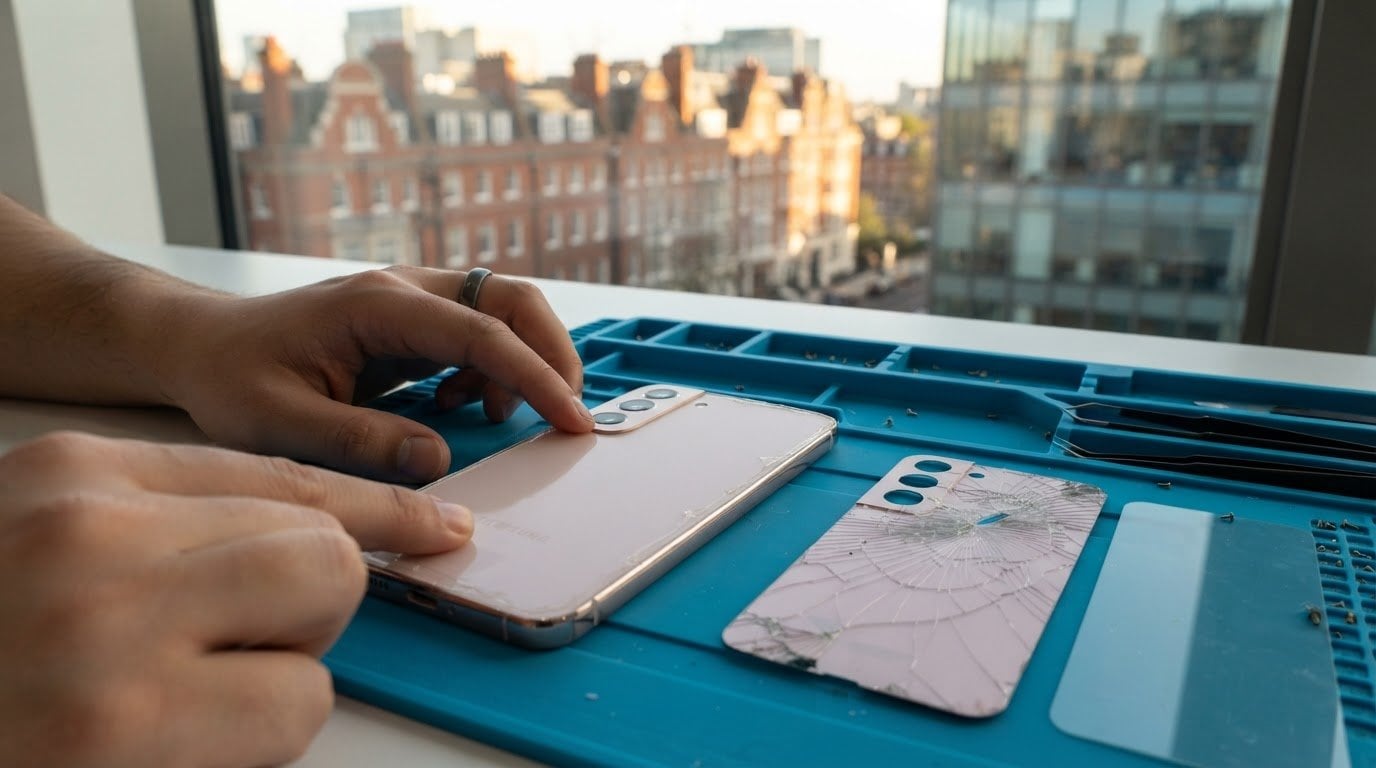
A cracked Samsung S22 back doesn’t always mean the phone needs replacing. Samsung S22 back glass repair in London can be a sensible option when broken glass affects handling, whilst a small cosmetic mark may not disrupt everyday use. The right decision depends on the damage and how you use your phone.
It’s understandable to want a clear picture before arranging a repair, especially if you rely on your S22 for work, travel or keeping in touch. The repair method and the condition of the handset both matter.
This guide explains what to expect from replacement parts, testing and repair warranties. It also covers water resistance after the repair and how a mobile appointment can fit around your day in Central London, whether you’re at home, work, school or a café.
Key Takeaways
- Weigh the extent of the crack and the phone’s condition when deciding whether back glass repair makes sense.
- See how the replacement part and the work required affect your quote, which is provided after a quote request.
- Learn what to look for in repair testing and what the 12-month warranty on every repair means for ongoing support.
- Understand why replacing the back glass breaks the original water-resistant seal and how to treat your phone afterwards.
- Compare repair options in London by considering the service offered, parts, testing and convenience of the repair location.
Repair warranty
Samsung Care+ or phone insurance may cover back-glass damage if the policy includes accidental-damage cover and its terms allow the claim. Exclusions and any excess affect whether making a claim is worthwhile.
A repair warranty has a different purpose: it relates to the repair work, rather than insuring the phone against every accident. For example, it may cover a fault linked to the repair, while damage from a later impact is a separate event. Read the written terms to see what is covered and how to raise a claim.
For this repair service, every repair comes with a 12-month warranty. Keep the warranty details and repair record together. They help identify the work completed, the date and the route for support if an issue arises during the cover period.
Check that the paperwork identifies the Samsung Galaxy S22 and the back-glass work. A clear record reduces confusion if the phone later shows a problem. It should also explain what the warranty covers, any exclusions, and how to report a concern. Those details matter more than a broad promise of “peace of mind”.
Separate three possible situations before making a claim:
- A repair-related fault: describe what changed after the repair and when it began.
- New physical damage: explain whether another impact occurred after the replacement.
- An insurance claim: check the policy’s accidental-damage wording, exclusions and excess.
These distinctions help you identify the right cover. A repair warranty and an insurance policy are not interchangeable. Insurance may have an excess or claim conditions, while a repair warranty relates to the work described in its terms. Keep the repair record and relevant policy details together.
Before authorising work, ask for the warranty period and scope in writing. Find out how a repair-related concern is assessed, what evidence is useful and how support is arranged. These are practical terms to clarify, not assumptions about every warranty. A written answer gives you a clear reference later.
After collection, review the repair record and warranty information while the details are fresh. Store them safely with your Samsung S22 documents. If you use insurance, keep its claim instructions separate. This makes it easier to distinguish a workmanship concern from accidental damage and follow the correct process without mixing the two.
For a cracked rear panel, warranty clarity is part of choosing a repair, alongside the repair itself. A defined 12-month period gives you a clear timeframe for the repair warranty. The written terms explain its actual scope, while Samsung Care+ or another insurer’s policy sets separate conditions for accidental-damage claims.
Replacement parts and testing
Samsung offers official Galaxy S22 repairs in the UK, though the repair route determines the work offered. A cracked rear panel can be repaired without replacing the whole phone, but the damaged glass still needs a suitable repair.
Full back glass replacement
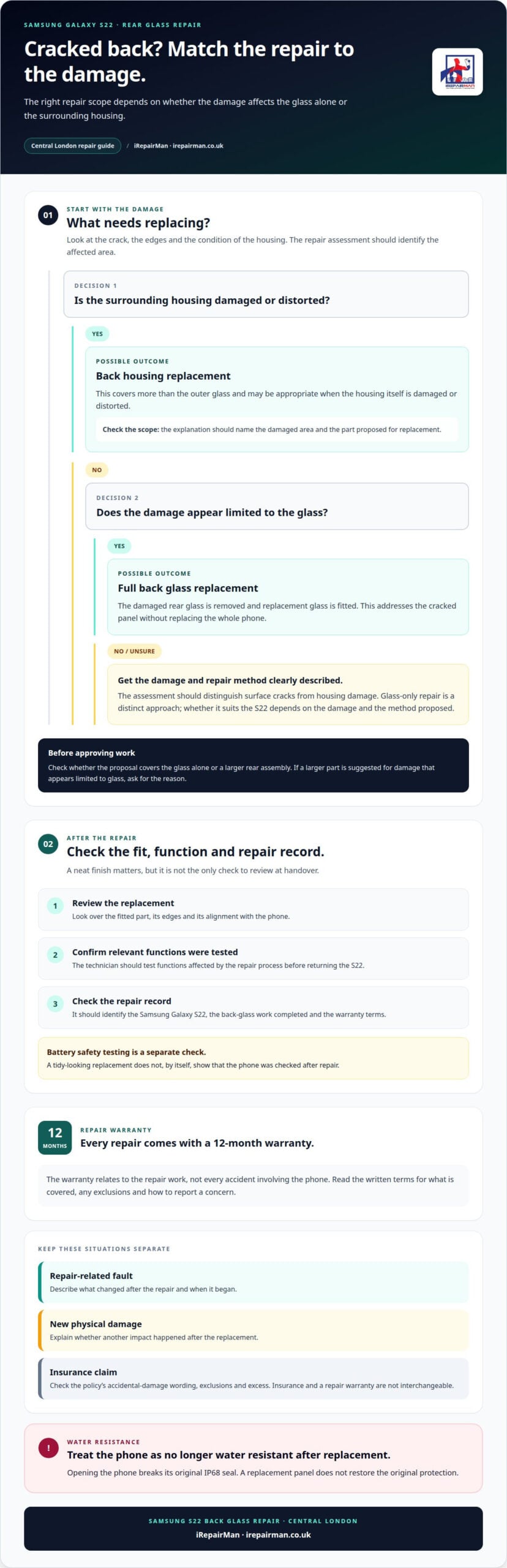
A back-glass replacement removes the damaged rear glass and fits replacement glass. It addresses the cracked panel without replacing the entire phone. The repair assessment should consider where the crack is, how much glass is damaged and whether the surrounding housing is affected. For example, an edge crack may need closer assessment than a small mark in the centre.
Ask what the proposed part covers. “Back glass” and “back housing” describe different repair scopes. The written quote should identify the replacement, so you can see whether it covers the glass alone or a larger assembly. This helps you avoid approving work beyond the damage you want addressed.
Back housing replacement
Back housing replacement covers more than the outer glass. It refers to replacing the rear housing assembly, which may be appropriate when the housing itself is damaged or distorted. The repair scope should reflect the condition of the S22, rather than treating every cracked back as the same job.
Compare the proposed part with the visible damage. If the frame or housing is affected, glass-only work may not address the full problem. If damage appears limited to the glass, ask why a larger assembly is recommended. A clear explanation should identify the damaged area and the part to be replaced.
Repairing cracked glass without a full panel replacement
A cracked Galaxy S22 back can be repaired without replacing the whole phone. However, “without replacing the whole panel” is different from replacing only the outer glass. Glass-only repair is a distinct approach, and the damage and repair method determine whether it suits the device.
Look for a precise description of the work, not just “glass repair”. The assessment should distinguish surface cracks from damage to the housing. That gives you a practical basis for understanding why the repair involves glass alone or a larger rear assembly.
Testing matters after replacement. A careful handover should include a visual review of the fitted part, its edges and its alignment with the phone. The technician should also test the functions affected by the repair process. This helps identify fit or function concerns before the S22 is returned.
Post-repair safety checks add another step beyond assessing the phone’s appearance. Battery safety testing is also part of the repair quality process. These checks are separate from confirming that the replacement glass sits correctly. A neat finish alone does not show whether the device was checked after the repair.
Before approving a repair, make sure the proposed part and work are clearly described. Afterward, review the S22’s finish and the repair record. Clear details about glass replacement, housing work and testing help you understand exactly what was done.
Water resistance and sealing
After Samsung S22 back glass replacement, treat the phone as no longer water resistant. Opening the phone breaks its original IP68 seal, so a replacement panel does not restore the original protection. Keep this limitation in mind around rain, spills and damp surfaces.
The new glass must be fitted and sealed as part of the repair. That does not mean the phone can safely be exposed to water afterwards. A clean-looking join around the panel cannot prove that the original seal remains intact. For everyday use, keep the S22 away from water after repair.
Before taking your Samsung Galaxy S22 for repair, back up important files and describe any recent liquid contact. Remove the phone case, note visible cracks and tell the technician if the handset has behaved differently since getting wet.
A few practical steps can make the handover clearer:
- Back up files: save important photos and documents before the appointment.
- Remove the case: this makes the rear panel and its damage easier to see.
- Describe water exposure: share when it happened and which area became wet.
- List changes: mention any new display, charging or camera issues.
If water has reached the phone, don’t expose it to more moisture to demonstrate the problem. Explain what happened instead. This gives the technician useful context without adding another risk to the damaged device.
Water-damage advice matters even if you’re only requesting cracked-glass repair. For example, a phone dropped into a sink may have both rear-panel damage and liquid exposure. Describe both, as they are separate issues. A back-glass replacement alone is not a water-damage repair and does not confirm that internal effects have been addressed.
After collection, keep the S22 dry and avoid testing its resistance with a tap, bowl or wet cloth. The original IP68 seal was broken during opening, and water exposure can’t be ruled safe based on appearance alone. Use a case for handling protection, but don’t treat it as restoring water resistance.
Ask for a repair record describing the work performed and any sealing completed, and keep it with your warranty details. If the phone later comes into contact with water, explain that the back glass has been replaced and describe the exposure clearly. Accurate information helps distinguish a new liquid incident from the original glass damage.
Repair quotes and pricing
For Samsung S22 back glass repair in London, start by describing the damage clearly. Note whether the glass is chipped, cracked across the panel or damaged near an edge. Also explain whether the phone has suffered another impact. These observations help the repair assessment focus on the condition of your handset, rather than assuming every cracked back needs the same work.
Identify the exact model before discussing the repair. The Galaxy S22, S22 Plus and S22 Ultra are separate devices, and the repair details need to match yours. If you’re unsure which model you have, check the device information in your phone’s settings. Sharing the model name helps avoid confusion about which parts and repair process apply.
Describe any changes in how the phone works. For example, mention if the camera image has changed, a button feels different or the phone has trouble charging. These symptoms may be unrelated to the visible back-glass damage, but they give the technician a fuller picture. Be specific: say what happens and when you first noticed it.
Useful details to share include:
- Model: Galaxy S22, S22 Plus or S22 Ultra.
- Damage location: the camera area, an edge or the centre of the back.
- Impact history: whether the phone has been dropped or knocked.
- Other symptoms: changes to charging, buttons or camera use.
Samsung S22 back glass repair in London can involve different work depending on what the assessment finds. Damage limited to the glass differs from damage affecting the surrounding housing. Ask for the proposed repair to be explained in plain language, including which part is involved and what the repair covers. This helps you understand the plan before the work begins.
Think about how you use the phone, too. Someone who relies on the S22 for calls throughout a working day may need to plan around handing it over. A person who uses it mainly at home may have different practical priorities. Describe any access or timing needs when arranging the repair, so the process can be considered around your routine.
Keep the repair record with your device information. A written note of the model, reported symptoms and work completed gives you a useful reference if you need support later. Clear details from the outset make the repair discussion more focused and help ensure the proposed work reflects the phone’s condition.
Which London repair shops replace Samsung S22 back glass?
In Central London, look for a repair service that explicitly handles Samsung Galaxy S22 back glass. The repair description should distinguish glass replacement from back housing replacement. Those terms describe different work. A clear explanation helps you understand what the repair covers before you approve it.
Start with the exact model name. A Galaxy S22, S22 Plus and S22 Ultra are separate models, so the quote and replacement part should match your handset. Describe whether the crack affects the camera area, reaches an edge, or extends across the panel. These details help explain the assessment and proposed work.
Look for a clear repair process. The service description should explain how the damaged glass is assessed, what part is fitted and what testing follows. If the frame is also damaged, for example, ask how that affects the proposed repair. The scope should reflect the phone’s condition, not rely on a generic “Samsung repair” label.
Use these points to compare the service information:
- Model accuracy: the repair covers your specific Galaxy S22 model.
- Part description: the quote identifies glass or housing replacement.
- Testing: the process explains what is checked after fitting.
- Warranty: written terms describe the repair cover and support route.
- Water resistance: the service explains that opening the phone breaks its original seal.
Location also affects convenience in London. An on-site repair can save you a trip to a shop, while a workshop repair means handing over the phone. Consider which arrangement fits your day, whether you’re at home, work, school or a café. Understand the repair method and appointment arrangements before you commit.
Data handling deserves attention too. Before handing over a Galaxy S22, ask how the repair is carried out and whether access to personal data is needed. A documented no-access protocol helps protect privacy during repair. Keep your repair record so the work, part and warranty details remain easy to find.
For a Central London repair, look for clear answers rather than broad claims. You should understand which part will be fitted, the repair scope, the post-repair checks and any limits on water resistance. If the proposed work changes after assessment, the reason should be explained before you approve it. This makes it easier to judge whether the repair suits the damage and your needs.
For help with your Galaxy S22 repair, arrange a repair enquiry and describe the model and visible damage.
IRepairMan London: iPhone Screen Repair
iRepairMan London provides Samsung Phone Repair for people dealing with a cracked Galaxy S22 back. The repair details covered above can help you understand the work, sealing limits and quote factors before deciding what to do.
For Central London customers, iRepairMan offers on-site repairs at home, work, school or a café. If you have an iPhone instead, iPhone Screen Repair and iPhone Back Glass Repair are also available. The right repair depends on the phone and the damage, so share the model and affected area when arranging an appointment.
Contact iRepairMan London to discuss your Samsung S22 repair.
Choose your next repair step
Make your next decision with the condition of your Galaxy S22 in mind. A clear description of the damage helps frame the repair conversation: note whether the crack reaches the camera, edges or surrounding housing, and explain any other faults you’ve noticed. For Samsung S22 back glass repair in London, this gives you a practical starting point for discussing the right repair scope.
iRepairMan also offers iPhone Screen Repair, iPhone Back Glass Repair and iPad Repairs. If you’re arranging repairs for several devices, describe each model and issue so the request is clear from the outset.
Take the next step when you’re ready. Contact iRepairMan London to discuss your repair and share the details that will help explain what your phone needs. A straightforward conversation can help you move forward with greater clarity and confidence.
Frequently Asked Questions
Should I repair cracked Samsung back glass?
Repair is worth considering if the crack catches on your hand, spreads towards the camera, or makes the phone uncomfortable to hold. For example, loose glass around an edge can make everyday handling awkward. If the damage is only a small mark, think about whether it affects how you use the handset. The choice should reflect the damage and your plans for continuing to use the S22.
What should I provide when arranging S22 back glass repair in London?
Give the exact Galaxy S22 model, describe the damaged area and explain any other problems you’ve noticed. A clear photograph can help show the crack’s position, especially if it reaches the camera surround or an edge. Include a convenient location and time for the appointment. These details give the repair team a useful starting point and reduce avoidable back-and-forth about your handset.
How long does Galaxy S22 back glass repair take in London?
On-site phone repairs are usually completed in 20-30 minutes, although the time for your S22 depends on the work involved. Damage affecting the rear housing may require a different repair process from a crack limited to the glass. If you have a fixed meeting or travel commitment, mention it when arranging the appointment. That helps you plan your day around handing over the phone.
What warranty do London phone repair shops provide for S22 back glass replacement?
Warranty terms vary, so read the written document for the repair you’re booking. Check how to report a concern, which records to provide and whether the cover relates to the fitted part or the repair work. Keep your paperwork somewhere accessible. If an issue arises, note when it began and what you observed, rather than guessing at the cause.
Is the Galaxy S22 waterproof after back glass repair?
No. Don’t rely on a repaired Galaxy S22 for swimming, showering or other deliberate water exposure. A handset that appears to work normally is not proof that it can safely withstand water. Treat water resistance as unavailable in daily use, including during wet-weather activities. If you’re planning an outing where the phone may get wet, keep it protected from exposure rather than testing it.
What should I tell a technician about S22 back-glass damage?
Describe when you first noticed the damage and whether the phone had been dropped or hit beforehand. Mention any changes to photographs, sound or charging, even if you’re unsure they relate to the back glass. For example, explain whether a camera problem started before or after an impact. Specific observations help distinguish the original fault from symptoms that appeared later.
How can I check whether an S22 repair shop uses genuine Samsung parts?
Ask for the replacement part to be identified in writing. iRepairMan offers a choice of genuine or high-quality parts, so the repair record should state which option was selected. Keep that document with your phone records. If you need support later, it gives you a clear reference to the part fitted instead of relying on memory or a general repair description.