

A home visit works best when the repair, appointment time and travel area are clear from the outset. A qualified mobile phone technician London can carry out on-site repairs across Central London. Your location and the work needed help shape the appointment.
A phone problem can disrupt work, study and everyday plans. It’s reasonable to expect clear communication, a suitable appointment and an explanation of what will happen, without an unnecessary trip to a repair shop.
This guide explains how to arrange a phone repair, what details to provide when booking and how the location affects the appointment. You’ll also learn what to expect at home, work or another practical setting, so you can plan with less disruption.
Key Takeaways
- Share your location, device model and fault when arranging a visit so the appointment can be planned around the repair and travel requirements.
- Learn which qualifications and accreditations can help you assess a technician’s training and repair experience.
- Find out what can affect same-day and on-site appointments, and how to prepare a suitable place for the repair.
- Before handing over your phone, protect your information and agree how the device and repair will be handled.
- Understand why a repair may affect warranty terms or water resistance, and what to clarify about the work afterwards.
Customer service and scheduling
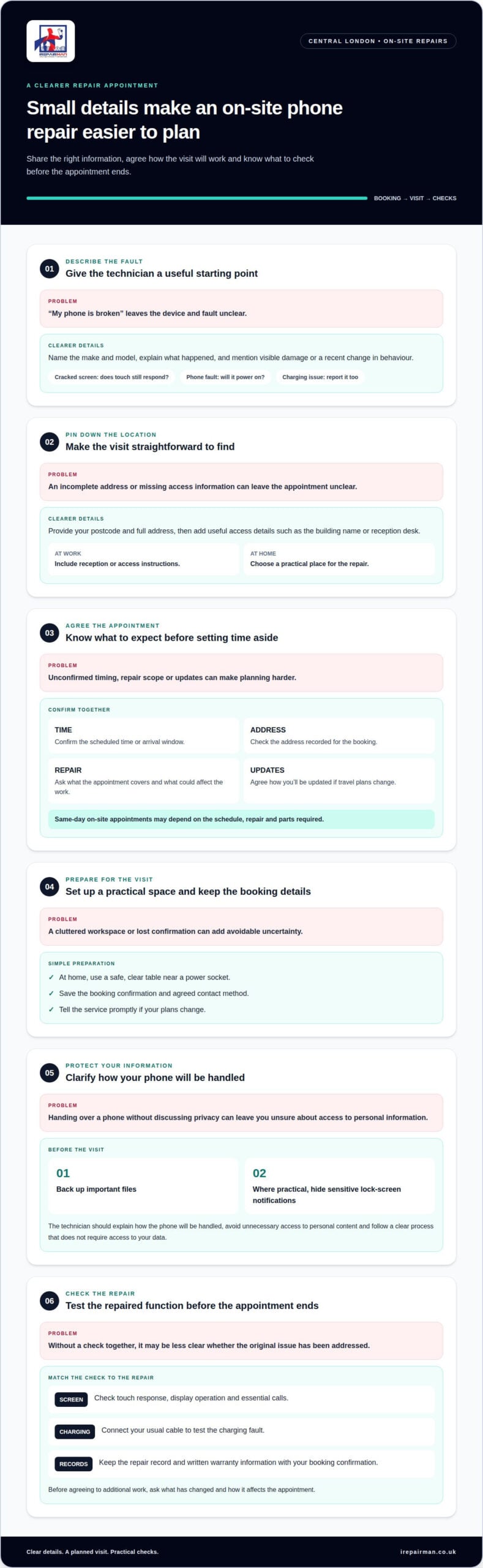
A well-organised booking starts with specific details, not a vague description such as “my phone is broken”. Share the make and model, describe the fault, and provide your postcode and preferred repair location. For example, say whether a cracked screen still responds to touch or the phone will not power on. This helps the technician understand the issue and prepare for the visit.
Agree the appointment arrangements before setting aside time. Confirm the scheduled time or arrival window, the address on the booking and how you’ll receive updates if travel plans change. For a workplace repair, include reception or access instructions. At home, choose a safe, practical workspace, such as a clear table near a power socket.
- Describe the fault. Name the device and explain what happened, including any visible damage or recent change in behaviour.
- Give the location. Provide the full address and useful access details, such as a building name or reception desk.
- Set expectations. Ask what the appointment covers, what could affect the repair, and how updates will be provided.
- Keep the booking details. Save the confirmation and the agreed contact method, then tell the service promptly if your plans change.
Clear communication is especially important if the initial assessment changes the repair plan. A fault may involve more than visible screen damage. Before agreeing to additional work, ask what has changed and how it affects the appointment. For example, if the phone also fails to charge, report that symptom when booking rather than requesting only a screen repair.
What data privacy and security precautions should a phone technician follow? The technician should explain how they’ll handle your phone, avoid unnecessary access to personal content and follow a clear process that does not require access to your data. Before the visit, back up important files and, where practical, hide sensitive notifications on the lock screen.
How do London phone repair shops handle parts quality and repair guarantees? Ask which replacement part will be fitted, whether its condition or source is explained, and what testing follows the repair. Get the warranty terms in writing, including its duration, coverage and how to report a fault with the repair.
Before the appointment ends, test the repaired function with the technician. After a screen replacement, check touch response, the display and essential calls. For a charging fault, connect your usual cable. Keep the repair record and warranty information with your booking confirmation, so you have a clear reference if you need support.
What UK certifications or accreditations are relevant to phone repair technicians?
There isn’t one certificate that proves every phone-repair skill. Look for training and experience relevant to the device and fault. An iPhone screen repair, for example, calls for experience with screen replacement, careful reassembly and post-repair testing. A certificate is most useful when you know what it covers and how it relates to the repair.
Ask about relevant vocational training in electronics or mobile-device repair. A course certificate can show structured learning, but it doesn’t prove hands-on ability by itself. Find out whether the training included practical work, such as diagnosing a charging fault or replacing a screen, and how the technician checks the repair afterwards.
Manufacturer training or authorisation may also be relevant, as it can indicate familiarity with particular devices, repair methods or parts. Ask which brands and repair types it covers. Experience with one phone model doesn’t necessarily show expertise across every manufacturer’s devices. A useful answer connects the technician’s training to your phone and its fault.
- Vocational learning: Ask whether training covered electronics, mobile repair or both.
- Practical assessment: Find out whether the technician completed hands-on repairs, not only classroom study.
- Manufacturer training: Ask which brands, models and repair tasks the training relates to.
- Recent repair experience: Request a relevant example, such as diagnosing a screen fault or replacing a battery.
Accreditation can refer to a course provider, a training programme or a technician’s professional standing. These terms don’t all mean the same thing. Ask who issued the certificate, what assessment it involved and whether it applies to the work you need. For example, a general electronics certificate may not cover a specific phone-repair procedure.
Practical questions can reveal how the repair will be handled. Ask how the technician diagnoses the fault, what checks follow the repair and how the work is recorded. After a screen repair, for example, touch response and display operation should be checked. For a charging problem, ask how they distinguish a port fault from a cable or battery issue.
Use qualifications as one part of your decision, alongside clear explanations, relevant repair experience and written warranty terms. If you’re arranging a repair, reviewing the provider’s phone repair service information can help you understand the work involved and prepare focused questions about technician training.
Do London mobile phone repair technicians offer same-day or on-site repairs?
Mobile technicians can repair phones at your location. On-site appointments in Central London may be available the same day, depending on the schedule, repair and parts required. On-site describes where the work happens; same-day describes when. A visit to your home in Bloomsbury could be on-site without being available that day.
Travel arrangements affect what appointments are practical. A London technician role may cover on-site repairs within a 5-mile radius of the technician’s residence in London and Greater London. This is a role-specific coverage area, not a city-wide rule for every technician. Your postcode and the technician’s working route help determine whether a home or workplace visit fits.
Same-day timing depends on more than distance. The schedule must allow time to reach your address, assess the fault and complete the repair. The necessary part must also suit your phone model. A cracked screen on a common model may need different preparation from a charging fault that requires further diagnosis.
When booking, provide the phone model, symptoms and full location. Mention anything that could affect access, such as a controlled office entrance or school reception. These details help plan the visit and equipment. A café may suit a straightforward appointment, but careful device handling calls for a quiet spot with a stable work surface.
- For a home visit: Provide the full address and a practical place to work.
- For an office: Give reception instructions and the contact name for access.
- For an urgent fault: Describe the symptoms clearly and state when you need the phone.
- For a repair requiring parts: Share the make and model so the correct component can be identified.
Before confirming a same-day appointment, make sure the agreed arrival time or window and address are recorded. Ask how you’ll receive updates if London traffic affects the journey. Keep your phone accessible, or provide another contact method if the damaged device cannot receive calls.
On-site repairs suit jobs that can be completed safely with the technician’s mobile equipment and available parts. A fault requiring workshop tools, further diagnosis or a component that isn’t on hand may need a different arrangement. A phone that won’t power on, for example, may need assessment before the repair method is clear. Share all known symptoms when booking, then plan around the confirmed appointment.
What should I check before handing my phone to a repair technician?
Before the repair begins, record the phone’s condition. Photograph the front, back and edges, including existing scratches or dents. Describe the fault plainly, for example, “the screen flickers after unlocking” or “the charging cable feels loose”. This makes it easier to distinguish pre-existing damage from anything noticed afterwards.
Protect your information before handing over the phone. Back up photos, contacts and documents somewhere you control, then check that the backup is complete. Remove the SIM card if the repair doesn’t require it. If your phone uses an eSIM, ask how calls and messages will work during the repair.
- Secure your accounts: Don’t give anyone your email, banking or cloud-account password.
- Check access requirements: Ask whether testing needs the screen unlocked, and agree a privacy-conscious method.
- Review notifications: Hide sensitive previews on the lock screen before the appointment.
- List accessories: Record whether you’re handing over a case, charger or stylus.
Before approving the repair, ask for the proposed work to be recorded in writing. It should identify the phone model, reported fault, repair task and replacement-part type. “Screen replacement” is clearer than “phone repair”. Ask whether you’ll need to approve any additional work first, especially if diagnosis reveals a separate fault.
Clarify the warranty terms before work starts. Keep the repair record and note what the warranty covers, its duration and how to report a problem. Ask whether the repair affects any manufacturer warranty terms. A written record gives you a useful reference after the appointment.
At handover, agree who will keep the phone and how you’ll receive it. At an on-site appointment at home or work, stay available to answer questions about the fault. If the device must leave your address, record its visible condition and confirm collection or return arrangements. Don’t hand over unrelated personal items with it.
When the phone is returned, test the function that prompted the repair. For a screen issue, check touch response, brightness and display. For a charging fault, connect your usual cable. Inspect the casing for new marks and compare it with your earlier photographs. Keep the receipt or job record with your warranty details, and report any immediate concern through the agreed support process.
Before the technician leaves, ask who is responsible for the repair and whom to contact if the agreed work does not resolve the fault. If the proposed job changes, pause and request the revised task in writing before agreeing. Keep the discussion focused on the issue and don’t share account credentials. If access is needed, stay present and enter your details yourself only if you’re comfortable.
You may also ask about the technician’s experience, but do not treat a job title alone as proof of skill. iRepairMan states that applicants for its mobile phone technician role do not need prior phone-repair experience. That does not establish anything about the person handling your phone, so ask directly about their experience with the repair you need and whether the work will be checked before it is returned.
Can phone repairs affect the manufacturer warranty or water-resistance rating
A repair can affect how a manufacturer handles later claims, depending on the phone, fault and repair terms. Check the warranty information for your model before work starts. A cracked screen and a later battery fault, for example, are separate issues. Keep the repair record and ask how the original coverage applies to each.
Don’t assume every repair cancels every part of a manufacturer warranty, or that coverage remains unchanged. The manufacturer’s written terms and the type of repair matter. Before approving the work, ask for a description of the repair and parts, and have any known effect on existing cover recorded.
Water resistance needs particular care. Opening a phone can disturb its seals, so don’t assume its original resistance is unchanged after repair. A new adhesive seal or visual inspection alone doesn’t show that the device has the same protection as before. Avoid exposing a repaired phone to water unless its protection has been properly assessed.
Before booking, use this short checklist:
- Check the manufacturer’s terms: Find the warranty conditions for your specific model and note any repair-related wording.
- Describe the phone’s history: Mention earlier repairs, cracks or casing damage that could affect the work.
- Ask about the repair record: Request written details of the fault, work completed and replacement parts.
- Clarify water-resistance checks: Ask what testing is carried out and what the result means for everyday use.
- Keep the paperwork: Save the repair receipt, warranty terms and any test results with your device records.
Describe how you use the phone. A device carried outdoors in wet London weather faces different exposure from one used mainly at a desk, but neither situation makes water resistance safe to assume. Tell the technician about a cracked back or bent frame before the phone is opened, as existing damage can affect how the casing closes afterwards.
After the repair, inspect the casing and test the phone’s everyday functions. Keep it away from water if its resistance is uncertain. If a fault appears later, note when it began and whether it relates to the repaired area. The repair record helps distinguish the original fault from a new issue and provides useful details for the repairer or manufacturer.
For a screen fault, arrange an iPhone screen repair and keep the repair details with your warranty documents.
IRepairMan London: iPhone Screen Repair
iRepairMan London provides iPhone screen repairs for cracked or faulty displays that make your phone difficult to use. Share your iPhone model and describe the problem, such as unresponsive touch or visible damage, to help clarify the repair.
For related device faults, iRepairMan London also carries out iPhone Back Glass Repair, iPad Repairs and Samsung Phone Repair. Most repairs and replacement parts include a 12-month warranty.
If your iPhone screen needs attention, contact iRepairMan London to discuss the repair.
Make your next repair decision with confidence
Choose a repair based on the device you rely on and the fault affecting it. If your phone is essential for work, travel or staying in touch, plan how you’ll manage during the appointment. A practical plan can reduce disruption and help you focus on getting the repair done.
A qualified mobile phone technician in London can assess your phone’s fault and explain a suitable repair. iRepairMan London repairs iPhone screens and back glass, as well as iPads, helping you address common problems with the devices you rely on.
When you’re ready to take the next step, contact iRepairMan London to arrange a visit. Share the device and issue so the conversation can start with what you need. A clear repair plan is a straightforward way to get your device back into your routine.
Frequently Asked Questions
What qualifications should a mobile phone technician in the UK have?
Look for practical training and experience relevant to your phone and its fault. A certificate can show study, but it doesn’t prove skill with your specific model. Ask how the technician would distinguish a damaged display from a fault affecting internal components. The explanation should make the proposed work clear and show how they’ll check whether it has addressed the problem.
How can I find a qualified mobile phone technician in London?
For Central London repairs, consider an on-site mobile service. iRepairMan London repairs phones and tablets, including iPhone screens and back glass. When arranging a visit to your home or workplace, describe the device and visible damage so the repair can be discussed in context. A qualified mobile phone technician in London should explain the work clearly.



