

Is a cracked iPad screen safe for a child to use? Cracked iPad screen child safety starts with limiting contact, not judging the damage by how small the crack looks. Apple warns that a cracked screen can cause injury, so keep the iPad out of children’s hands while you assess it.
It’s understandable to wonder whether a small crack needs immediate attention or whether simple precautions will do. Sharp or loose glass can pose a risk, and everyday handling may make damage worse. Don’t assume a case or screen protector makes a damaged iPad safe for a child to use.
This checklist explains how to look for visible changes without touching the damaged area, reduce your child’s contact with the screen and decide what to do next. If repair is needed, iRepairMan London provides iPad repairs. On-site support is available across Central London, subject to confirmation for the specific repair, and a UK-wide pick-and-return service is also available.
Key Takeaways
- Cracked iPad screen child safety calls for a measured decision: a photo or brief description can’t confirm whether a damaged screen is safe.
- Use an adult-led visual check to spot changes to the display, touch response or casing, without running fingers over the glass or pressing the screen.
- Know what temporary precautions can and can’t do, and which signs make professional assessment a sensible next step.
- Follow separate steps for a family iPad and a school or nursery device, including who to notify and how to arrange an assessment.
- When enquiring about iRepairMan iPad repairs, share the model, symptoms, location and preferred service arrangement.
Is a cracked iPad screen safe for a child to use?
Safety depends on the damage and how the iPad is handled. A small-looking crack isn’t proof that the screen is safe, and a photograph or brief description can’t show whether an edge is sharp or any glass is loose. Apple advises against using an iPad with a cracked screen because it may cause injury. Until the device has been checked, don’t leave a child to handle a visibly damaged screen unsupervised.
That doesn’t mean every crack will cause harm. It does mean you shouldn’t rely on appearance alone. If you’re concerned about contact with the damaged area, stop your child using the iPad and arrange an in-person assessment.
What can make a cracked iPad screen a concern?
Look for cracks, chips or material that appears loose, but treat these as signs to assess, not proof of a particular injury risk. Sharpness and loose fragments need to be checked in person. Don’t run your fingers over the glass to test it. Screen materials vary by device; chemically strengthened glass, for example, is designed to resist damage, but that doesn’t establish whether a cracked screen is safe.
Also note symptoms beyond the visible damage. Without pressing on the screen, check whether:
- The display looks distorted, has unusual marks or is difficult to read.
- Touch response seems unreliable during ordinary adult use.
- The casing appears bent, separated or otherwise affected.
These observations don’t diagnose the fault, but they help you describe the problem when seeking advice.
Can a child keep using an iPad with a small crack?
Crack size alone can’t establish safety or predict whether the damage will spread. A fine line may seem harmless, but the condition of its edges and the device’s response matter too. Until the iPad is assessed, keep it with an adult, prevent direct contact with the damaged area and stop use if the screen changes or handling raises concern.
Pause a child’s use if the damage may be unsafe, and seek professional advice rather than relying on the crack’s size.
How to assess a cracked iPad screen before a child uses it
Keep the iPad out of children’s reach while an adult checks it. Choose a well-lit place, handle the device as little as possible and don’t run fingers over the damaged glass or press on it. This check can help you describe what you see, but it can’t confirm that the screen is safe to use.
Which signs should prompt you to stop use?
Stop your child using the iPad and arrange an assessment if you notice loose-looking material, cracks that appear to be worsening or edges that look sharp. Also take changes in the display, unexpected touch behaviour or unusual heat seriously. None of these observations proves a particular fault, but each is a reason to avoid guessing and seek advice.
If the device seems unusually hot, stop handling it and keep it away from your child. Don’t test the screen by pressing hard or repeatedly tapping a damaged area. If you’re unsure whether what you see is concerning, keep the iPad out of use until it can be assessed.
What should parents and carers check without touching the damage?
Observe the screen in good light without touching it. Note where cracks appear, whether there are chips or loose-looking areas, and whether the display shows marks, flickering or other changes. You can photograph the damage to document its appearance, but a picture can’t establish whether the glass is safe or reveal every device issue.
- Look at the display without pressing on it.
- If you need to check touch response, have an adult operate the iPad gently and stop if the screen behaves unexpectedly.
- Look over the casing for visible changes, without trying to bend or prise anything.
- Record the iPad model and symptoms you’ve noticed for a repair enquiry.
Keep children’s names, school details and other personal information out of photos or notes shared for an enquiry. Include only what’s needed to identify the device and explain the problem.
Don’t assume a cracked screen creates a particular chemical exposure. A University of Saskatchewan study examined chemicals from LCD screens in household dust, but it doesn’t establish that a cracked iPad exposes a child to those chemicals. Read about the study’s findings on potential chemical exposure from screens in its stated context.
For Cracked iPad screen child safety, a visual check is a useful first step, not a safety clearance. If you remain concerned, iRepairMan offers iPad repairs, with Central London on-site support subject to confirmation for the specific repair. Ask about an iPad assessment and share the model and symptoms you recorded.
Cracked iPad screen: temporary precautions versus professional assessment
Temporary precautions can reduce handling while you decide what to do, but they can’t confirm that a damaged screen is safe. For Cracked iPad screen child safety, separate the immediate step, keeping the device away from children, from the longer-term decision about assessment and repair.
| Option | What it can do | What it can’t tell you |
|---|---|---|
| Immediate precautions | Keep the iPad out of children’s reach if the glass looks sharp, loose or is deteriorating. Store it securely and avoid pressure on the screen. | These steps don’t establish whether the glass or device is safe to handle. |
| Case or screen protector | May cover the device during ordinary storage or use, depending on its condition. | It can’t confirm that damaged glass is safe, hold every fragment securely or assess the iPad’s function. |
| Professional assessment | A technician can inspect the device and advise on suitable next steps. | The repair outcome can’t be promised before the iPad’s condition and parts availability are assessed. |
Glass damage deserves care, but evidence should be applied accurately. The US Consumer Product Safety Commission described a laceration and injury hazard in a recall involving glass tables. That notice concerns a different product; it doesn’t assess iPad screens or determine the risk from a particular crack.
What can families do while arranging an assessment?
If the screen appears sharp, loose or worse than before, keep the iPad away from children. Put it somewhere secure where it won’t be knocked, pressed or picked up by mistake. Don’t try a home repair or apply tape or adhesive unless you have verified guidance for that specific iPad. If another device is available, it may be used instead, but there’s no need to arrange one solely for this purpose.
When is professional iPad screen repair the sensible next step?
Arrange an assessment if the damage affects handling, the display or touch response, or if you’re not confident the device can be used safely. A technician needs to inspect the iPad before advising whether repair is suitable; the device’s condition and parts availability affect the options. A case or protector doesn’t replace that assessment.
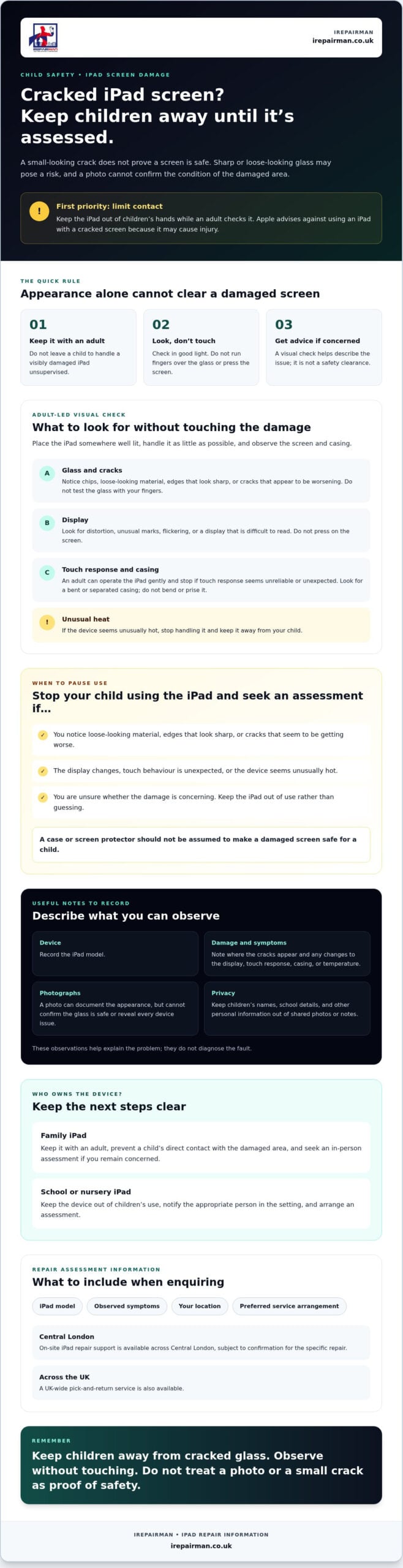
A parent and school checklist for cracked iPad screen safety
A clear sequence helps adults take control without guessing what the damage means. Keep the iPad away from children or pupils while you record what you’ve noticed and decide who should arrange an assessment.
For a family-owned iPad
- 1. Pause your child’s use if the screen looks sharp, loose or otherwise concerning. Keep the device with an adult.
- 2. Store it securely on a stable surface where it won’t be knocked, handled or pressed.
- 3. Record what you can see without touching the damaged area. Note where the cracks appear and when you first noticed them.
- 4. Write down the iPad model and any symptoms, such as display changes or unexpected touch behaviour. Keep notes focused on the device, not your child’s personal details.
- 5. Arrange an assessment if the damage raises concern or affects handling or function. When enquiring, describe the symptoms clearly and ask about suitable service arrangements.
This record gives a repair professional useful context, but it isn’t a substitute for examining the device. Cracked iPad screen child safety depends on the condition of the screen and how the iPad is handled, so don’t treat a checklist as a safety clearance.
For a school or nursery iPad
- 1. Remove the device from pupil access and place it with a responsible staff member.
- 2. Follow your organisation’s reporting process. Notify the appropriate staff member and use the established procedure for damaged equipment.
- 3. Record the device and damage as your organisation requires, including the model, visible screen condition, when it was noticed and any functional symptoms.
- 4. Wait for the responsible person to decide next steps before returning the iPad to use or arranging repair.
School-managed devices may have specific reporting and handling procedures, so staff should follow those rather than treating the iPad as a family-owned device. For wider planning, consult the iPad repair for schools UK guide.
Once you’ve recorded the details, iRepairMan can advise on iPad repairs. Central London on-site support is subject to confirmation for the specific repair; a UK-wide pick-and-return service is also available. Enquire about an iPad repair assessment and include the model, location and symptoms.
How to arrange a cracked iPad screen assessment with iRepairMan
Once you’ve kept the iPad away from children and noted what you can see, ask about an assessment. iRepairMan provides iPad repairs, with on-site support across Central London subject to confirmation for the specific repair. A UK-wide pick-and-return service is also available. Share your preferred arrangement and ask which option is available for your iPad.
What information should you have ready when booking?
A few practical details help explain the problem and establish what options may suit. You don’t need to handle the damaged glass or test it by pressing on the screen. Have the following ready if you can:
- iPad model: Include the model name or number if known. If you’re unsure, say so rather than searching the device while it appears unsafe to handle.
- Screen symptoms: Describe where the cracks are and whether the display looks different or touch response seems affected. Mention any other function that appears unusual.
- Location: Give your Central London location or, if you’re elsewhere in the UK, ask about the pick-and-return option.
- Preferred arrangement: Explain whether you’d like to ask about on-site support or pick and return, then confirm which arrangements are available for that iPad.
Keep the description factual. For example, “crack across the lower corner, display visible, touch response seems inconsistent” is more useful than guessing what has failed. Cracked iPad screen child safety is a reason to seek a careful assessment, not to diagnose the device at home.
What happens after an iPad repair?
The repair options depend on the iPad’s condition and parts availability, so an outcome can’t be confirmed before assessment. Ask what the inspection finds, which repair option is suitable and what service arrangement can be confirmed. You can discuss these points before deciding how to proceed.
Before agreeing to a repair, ask what the proposed work covers and what checks will be carried out afterwards. The assessment helps establish what can be done for your particular iPad.
To take the next step, contact iRepairMan with the model, screen symptoms, your location and preferred service arrangement. Ask about Central London on-site support or UK-wide pick-and-return. The available arrangements and repair options need to be confirmed for the device.
Make a calm, informed decision
Cracked iPad screen child safety starts with limiting a child’s contact with damaged glass and making a measured decision, rather than judging risk by the crack’s size. Keep the iPad away from children if damage looks sharp, loose or worsening, and don’t touch or press the affected area to test it. A visual check can help you note display or touch symptoms, but it can’t confirm the screen is safe.
Record the iPad model, visible damage and any changes in how it works. For a family device, arrange an assessment if you’re concerned. If it belongs to a school or nursery, follow the organisation’s reporting process and keep it out of pupil access until next steps are agreed.
Cracked iPad screen child safety: deciding what to do
If the glass looks sharp or loose, the display has changed, or touch response is unexpected, stop your child using the iPad and keep it with an adult. If none of these signs is obvious but you’re still unsure, don’t treat that as proof the device is safe. Record what you can see and arrange an assessment before deciding whether the iPad should return to use.
iRepairMan provides iPad repairs, with on-site support across Central London subject to confirmation for the specific repair and a UK-wide pick-and-return service also available. Ask iRepairMan about an iPad screen assessment and share the model, symptoms, location and preferred arrangement.
Frequently Asked Questions
Is a cracked iPad screen dangerous for a child?
A cracked iPad screen needs careful assessment before you decide it’s suitable for a child. Cracked iPad screen child safety depends on the damage and how the device is handled; a small-looking crack or photograph can’t confirm that the glass is safe. Keep the iPad away from children if the screen looks loose, sharp or is changing, and avoid touching or pressing the damaged area. An in-person check can help establish what needs attention.
Can my child use an iPad with a small crack?
A small crack doesn’t, by itself, show whether an iPad is safe to use. The condition of the damaged area and how the device behaves also matter, and a photograph can’t confirm either. If you’re concerned, pause your child’s use and keep the iPad with an adult until you can arrange advice. If you allow brief use while deciding, supervise closely and prevent direct contact with the damaged area.
What should I do first when my child’s iPad screen cracks?
First, keep the iPad out of your child’s reach, particularly if the damage looks sharp, loose or concerning. Don’t run your fingers over the screen or press on the crack. In good light, note where the damage is and whether the display or touch response seems different, then record when you noticed it. Arrange an assessment if you’re unsure about safe use or see changes in how the device works.
Can a screen protector make a cracked iPad safe?
No. A screen protector can’t confirm that the damaged glass is safe, show whether the iPad has other faults or replace an assessment. A case also doesn’t establish that a cracked screen is suitable for a child to handle. Avoid applying tape, adhesive or attempting a repair unless you have verified guidance for that specific iPad. If you’re concerned, keep the device away from children and ask a repair professional to assess it.
When should I stop letting a child use a cracked iPad?
Pause use if you notice loose-looking material, cracks that seem to be worsening, sharp-looking edges, display changes or unexpected touch behaviour. These signs don’t prove a particular fault, but they’re good reasons to keep the iPad with an adult and seek an assessment. Also stop if you’re not confident the child can avoid the damaged area. Don’t press or handle the crack to test it.
Can iRepairMan repair a cracked iPad screen at my home or school in London?
iRepairMan provides on-site support across Central London, but confirm availability for the specific iPad repair and ask about appointment options. Share the iPad model, screen symptoms and preferred location, such as home or school, when enquiring. A UK-wide pick-and-return service is another option; ask whether it suits your device. Repair options depend on assessment and parts availability, so outcomes can’t be promised in advance.



