

A device failure doesn’t have to take a working day with it. For Central London teams, minimising business disruption with on-site repair means arranging professional support around quieter periods and the way your business operates.
It’s understandable to worry that a repair will interrupt staff, customer service or essential tasks. On-site support brings phone and tablet repairs to a convenient location, such as your workplace, so devices don’t need to be taken away for assessment. The repair and timing depend on the fault, device and parts required.
This guide explains how to plan repairs around business activity, what to expect when device problems affect your work, and how professional support can help limit disruption. It also shows how a dedicated business repair service can support teams managing multiple devices.
Key Takeaways
- Plan device repairs around quieter periods and essential business activities to help keep teams operational.
- The Office for National Statistics reported that 327,000 UK businesses failed in 2021, underlining the importance of planning for disruption.
- Clear recovery procedures and recent backups can help staff respond when hardware or software failures interrupt work.
- On-site phone and tablet repairs can reduce the need to take devices away from the workplace, with the repair approach shaped by the fault and parts required.
- For teams managing multiple devices, a business repair service can help coordinate maintenance and support continuity.
Scheduling repairs around business operations
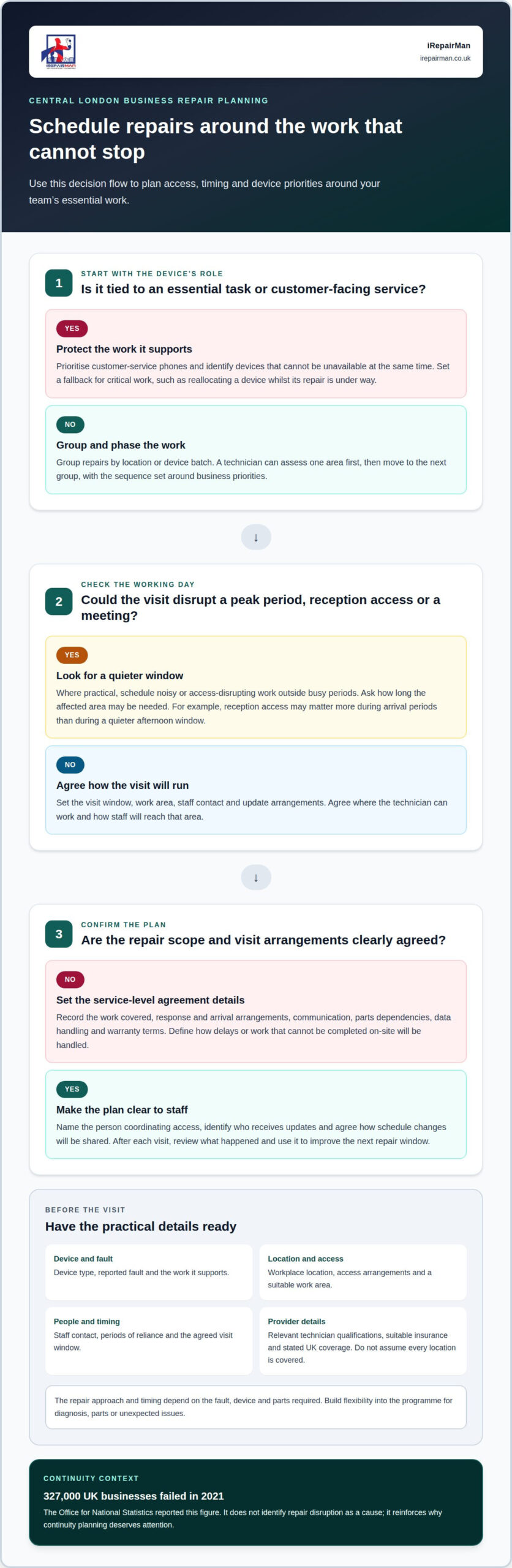
Set repair times around essential work, busy periods and access needs. A clear schedule helps staff plan while keeping affected devices and work areas available where possible.
-
Arrange an on-site repair and prepare the workplace with the provider
Share the device type, fault, location, access arrangements and the periods when staff rely on it. For example, identify a reception phone that must stay available during opening hours. Agree the visit window, work area, staff contact and updates with the provider. The service-level agreement should set out the work covered, response and arrival arrangements, communication, parts dependencies, data handling and warranty terms.
Before the visit, agree where the technician can work and how staff will reach that area. Look for relevant technician qualifications, suitable insurance for the work and premises, and stated coverage across the UK; avoid assuming a provider covers every location.
-
How a repair provider schedules disruptive work outside peak hours
Identify peak periods, customer-facing tasks and meetings before agreeing a visit. Ask the provider to schedule noisy or access-disrupting external works outside those periods where practical, and to explain how long the affected area may be needed. For a Central London office, for instance, reception access may matter more during arrival periods than during a quieter afternoon window.
Agree who will receive updates and how schedule changes will be shared. This helps staff direct visitors and protect productivity without assuming every repair can happen outside normal hours.
- Group repair work by location or device batch, then phase it around business priorities. A technician can assess devices in one area first while other teams continue working, then move to the next group. For example, prioritise customer-service phones before devices used for less time-sensitive internal tasks. Agree the sequence, access arrangements and a point of contact before work starts.
Build flexibility into the programme for diagnosis, parts or unexpected issues. The Office for National Statistics reported that 327,000 UK businesses failed in 2021. That figure does not identify repair disruption as a cause, but it reinforces why continuity planning deserves attention. Set a fallback for critical work, such as reallocating a device while its repair is underway.
- Define the service-level agreement before booking, rather than relying on a general promise of fast support. Record the agreed service scope, response process, appointment window, progress updates and how the provider handles parts delays or work that cannot be completed on-site. These terms help managers judge the likely operational impact and tell employees what to expect.
Keep the plan practical: name the person who coordinates access, identify devices that cannot be unavailable together, and schedule each phase around those dependencies. A supplier should communicate changes promptly, so teams can adjust tasks and maintain service. Review the schedule after each visit and use what happened to improve the next repair window.
Hardware and software failures
- Record the symptoms and the business task each affected device supports. A cracked screen may prevent staff from reading customer records, while a charging fault can leave a field worker without an active phone. Note when the problem began, whether it recurs and any visible damage. This gives the technician a useful starting point and helps prioritise devices tied to urgent responsibilities.
Describe what still works, too. A phone might switch on but fail to connect to a business app, for example. Separate the device fault from the work interruption: staff may need a temporary way to handle calls or access essential information during diagnosis.
- Arrange a professional assessment to distinguish hardware faults from software problems. Hardware issues can involve a screen, battery or charging port; software symptoms may include an app failing to open or the device repeatedly restarting. Similar symptoms can have different causes, so a technician should assess the device before recommending repairs.
Share the device model, operating system if known, error messages and recent changes. Mention whether the fault affects one device or several. If the same app stops working across a team, the issue may involve the software or service rather than one handset. This distinction helps identify the next step and avoid unnecessary device handling.
- Set out a recovery plan before a failure happens. Keep recent backups of business data and document how staff can restore access to essential files. Store recovery procedures in an approved location that employees can reach if their usual device stops working. Assign responsibilities for reporting faults, contacting support and communicating changes to affected teams.
If a sales phone fails before a client appointment, for example, the team should know which colleague handles the call and where authorised records are stored. Test recovery processes so staff understand the steps. A written plan can reduce confusion during an emergency and help preserve productivity while a technician diagnoses the fault.
- Protect information and define what happens during repair. Tell the technician which business functions depend on the device and whether it contains sensitive work data. Agree how the device will be handled, what access is needed for diagnosis and how updates will reach the named contact. Clear responsibilities help staff avoid sharing access details through informal channels.
After repair, ask the technician to explain the checks completed and any remaining limitations. Confirm that essential functions work, such as calls, charging or the relevant business app. Record recurring faults by device and symptom. Those records help managers spot patterns, plan maintenance and decide whether a repeat issue needs further assessment.
On-site support and repair relevance
On-site repair can help when a device fault interrupts business and taking the device away adds handovers. Key risks include unauthorised access to information, accidental damage and hazards from tools or a cluttered work area. Agreed data handling, controlled access and a suitable repair space help manage these risks.
- Match the repair location to the work affected. Identify the device and function that have stopped, such as a reception phone that cannot take calls or a tablet used to check visitors in. Minimising business disruption with on-site repair starts with having the technician assess the device near the people who understand its role. This can avoid delays caused by transport or unclear fault descriptions.
Consider the setting, too. A quiet office room can give a technician space to assess a phone, while a busy reception desk may need to stay clear for visitors. Agree on a location that preserves staff access and keeps the device close to its usual users.
- Share the symptoms and business impact before the visit. Explain what the device can still do, when the fault began and which tasks depend on it. A phone that charges intermittently creates a different operational problem from one with a damaged screen, for example. These details give the technician a useful starting point and focus the assessment on the function your team needs.
Keep the description factual. Note any error message, repeated restart or visible damage, then say whether one device or several are affected. If multiple staff report the same app failure, include that pattern so the issue can be assessed beyond a single handset.
- Agree access, data handling and workplace safety. Name a staff contact who can admit the technician, explain site arrangements and keep others clear of the work area. Before repair begins, agree what device access is needed and how business information will be protected. Avoid sharing passwords through informal messages; use your organisation’s approved method for any required access.
Keep the work surface clear and separate repairs from customer or staff traffic. For example, move the assessment away from a public counter if tools or small components could obstruct service. Clear arrangements help reduce unnecessary handling of devices and information.
- Confirm the repair outcome against the affected function. Once work is complete, ask for the relevant operation to be tested, such as making a call, charging the phone or opening the business app. This checks the original problem directly, rather than relying only on the device powering on.
Record the reported fault, work completed and any follow-up needed. A clear incident record helps managers review repeat problems and understand whether the original business function has been restored. Minimising business disruption with on-site repair also means leaving staff with a clear record of the device’s status and next steps.
Reducing downtime with on-site repairs
On-site repair can reduce downtime by bringing assessment and repair to the workplace, avoiding device collection and staff travel. For example, a technician can assess a work phone at the office while the team follows its continuity plan.
- Prioritise repairs by business impact. List affected devices and the tasks they support, then address those blocking essential work first. A customer-facing phone that cannot take calls may need attention before a spare tablet used occasionally. This helps direct repair activity where restoring function matters most.
Group devices with similar faults for assessment. If several team phones have damaged screens, for example, a planned repair session can reduce repeated interruptions and help staff coordinate temporary cover.
- Address small faults before they interrupt work. Routine maintenance can identify issues before they become major problems, while emergency breakdown repairs can cause greater disruption. Record recurring symptoms, such as intermittent charging or a screen that stops responding, and arrange an assessment before the device becomes unusable.
Keep a simple device log with the fault, date reported and work completed. A fleet manager can use these records to spot repeat problems and plan maintenance around normal operations, rather than reacting only after a team loses access.
- Choose on-site support when moving devices adds delay. Repair at the workplace avoids the transport and handover steps involved in off-site repair. Staff can explain the fault directly, and the technician can assess the device where it is used. This can reduce the time a team spends without its usual equipment.
On-site work still depends on the fault and parts needed. If a repair requires further workshop work, the provider should explain the next step so the business can arrange cover instead of waiting without a plan.
- Track the repair outcome and prevent repeat disruption. Ask for the affected function to be tested after work, such as calls, charging or access to a business app. Record whether the original fault has cleared and note any follow-up. This gives the team a useful record if similar symptoms happen again.
Review the log during routine device planning. If one model or team has repeated faults, managers can adjust maintenance priorities and keep suitable spare devices available. This supports productivity without treating every incident as an isolated emergency.
For phone and tablet fleets, preventative maintenance means recording recurring faults and arranging assessment before devices stop working. This can help managers plan around normal operations rather than responding only after disruption begins.
Use device records to plan routine phone and tablet repairs. For example, recurring screen or charging problems can be assessed before they interrupt essential tasks. Avoid delaying action until several devices are out of use at once.
What types of on-site repair services are available to UK businesses?
- Match the repair to the device and fault. Business phone support can cover faults such as a damaged screen, back glass or charging port. A team member with a cracked iPhone screen may need the display assessed, while a Samsung handset that will not charge needs a different diagnosis. A technician identifies the problem before recommending the appropriate repair.
Tablet support can also suit workplaces where staff use iPads for visitor sign-in, teaching or stock records. Group affected devices by make, model and symptom before arranging a visit. This helps the technician understand the repair requirements and the business functions affected.
- Arrange repair at the location where the device is used. On-site phone and tablet repairs can be organised at an office, school or other suitable business address. This avoids asking staff to travel with a faulty device and lets them explain how the fault affects their work. A quiet desk or meeting room can provide a practical space for assessment.
For a school, a tablet fault might interrupt classroom activities; for a reception team, a damaged phone could affect incoming calls. Describe the work setting and access arrangements when booking support. The location, device condition and parts needed can affect what work is practical during the visit.
- Use collection and return when an on-site repair is not suitable. Some faults need workshop equipment or additional work away from the business address. iRepairMan’s UK-wide Pick & Return service can support remote teams and satellite offices. Agree which devices are being collected, how they will be identified and how staff will manage without them.
For example, a business with teams in several locations could coordinate phone repairs through a central contact. Keeping a clear device record helps match each handset to its user and fault. The return process should fit the organisation’s workflow, particularly when staff rely on the devices for customer communication.
- Choose a service arrangement that suits the number and urgency of repairs. A single damaged phone may need an individual appointment, while several affected devices call for coordinated business support. Schools and nurseries may need iPad screen repairs arranged around lessons or care routines. Airport teams can use emergency repair support when a phone fault affects time-sensitive work.
Set out the device types, fault symptoms, work locations and operational priorities in the booking request. That information helps the repair team plan the right service route and communicate the next steps. To discuss a suitable on-site phone repair, arrange support for the devices affecting your business.
IRepairMan London: Business • Corporate • B2B Phone Repair HUB
iRepairMan London’s Business • Corporate • B2B Phone Repair HUB supports organisations coordinating phone repairs for their teams. Same-day on-site appointments can help limit disruption, although the repair timing depends on the fault, device and parts required.
The HUB can handle batches of 20 or more devices simultaneously. For individual business users, iPhone Screen Repair and iPhone Back Glass Repair address damage that can affect daily phone use. iPad Repairs can support organisations relying on tablets for work or learning.
Share which devices are affected, their locations and the work they support when arranging service. This helps iRepairMan understand your operational priorities and discuss a suitable repair approach.
Contact iRepairMan London to discuss support for your business devices.
Make device support part of your continuity plan
Give device repairs a defined place in your business continuity planning. A named contact, clear fault-reporting route and agreed priorities help your team respond calmly when an essential phone or tablet fails. Minimising business disruption with on-site repair is an operational decision, not just a reaction to a broken device.
For your next repair, note which work is affected, where the device is used and what staff need to keep functioning. iRepairMan provides iPhone screen and back glass repairs, as well as iPad repairs, for businesses managing these faults. The appropriate work depends on the device and assessment, so sharing the symptoms and operational impact gives the technician a useful starting point.
Build a support relationship before a device failure becomes urgent, and your team can approach the next incident with a clearer plan. Contact iRepairMan London today to discuss repair support for your business devices.
Frequently Asked Questions
How can I arrange an on-site business repair in the UK?
Provide the device model and a clear description of the problem, then arrange a convenient time and location for the repair. A technician can assess whether the work is suitable for an on-site visit or needs workshop handling, and explain what parts may be required.
How can an on-site repair provider assess whether a device or fault is suitable for repair?
A technician considers the device’s condition, the fault and the work needed to restore its function. A phone with a damaged screen, for example, is assessed differently from one that will not power on. The technician can explain whether the work is suitable for an on-site visit or needs workshop handling, and what parts may be required.
How can an on-site repair provider minimise disruption while technicians carry out repairs?
Agree on a repair location that keeps the technician clear of customer-facing activity, then coordinate access through one staff contact. For a busy Central London office, this might mean using a meeting room rather than a shared reception desk. Tell affected staff when the device will be unavailable and arrange temporary cover for calls or tasks that cannot pause.