

What if a corporate phone repair request, device update and invoice could all be managed in one place? A B2B repair portal for corporate accounts gives business teams a secure online space to submit repair requests and access relevant account information, rather than relying on separate email threads and records.
That convenience matters when several people coordinate devices across an office, school or wider team. A portal can bring repair status, invoices, order history and product lists together, with access tailored to each user’s role. CRM integration can also keep customer contacts and account details aligned, depending on how the systems connect.
This guide explains what a B2B self-service portal does, which features support day-to-day device management and how payments and invoicing can fit into the process. It also looks at the practical considerations for corporate repair accounts, including how a dedicated repair hub and UK-wide pick-and-return service can support teams in Central London and beyond.
Key Takeaways
- A business portal can connect CRM records with account-specific contacts, terms and product lists, helping keep customer information aligned.
- Linking invoicing and accounting tools can bring invoices, payment tracking and reconciliation into a clearer workflow.
- Role-based access and a shared account view help teams manage service information without relying on scattered emails and records.
- Saved product lists and order histories can make repeat requests easier to manage and help teams see what has already been ordered.
- A repair-focused portal can bring repair requests, device status and service records together for corporate account management.
Can a B2B customer portal integrate with an existing CRM?
Yes. A B2B portal can connect with a company’s existing CRM, giving customers a clearer view of account details. For example, when a sales team updates a business contact or contract term in its CRM, that information can appear in the customer’s portal. The portal then supports purchasing without requiring staff to repeat updates across separate records.
A portal can also show products and terms relevant to each customer’s account and agreement. Buyers see information that applies to their business, rather than a generic catalogue.
Product catalogues can be tailored in the same way. A portal can limit each customer’s view to products and stock-keeping units relevant to its agreement. For example, a company buying approved device models can browse the products available to its account instead of searching an unrelated catalogue. This makes product discovery more relevant and can reduce questions about which items a buyer can order.
CRM integration can link customer records with order and account activity. When connected to stock systems, a portal can use shared customer, order and stock data. A buyer might check an existing order or view available stock before purchasing. How current the information is depends on how connected systems exchange updates and how often they synchronise.
For effective account management, the connection should support clear, consistent records across these areas:
- Contacts: account contacts and sales-team changes held in the CRM.
- Products: catalogues limited to items relevant to the customer’s agreement.
- Orders: order information connected with the account and purchasing history.
These connections can reduce duplicate administration. If a contract contact changes, staff can update the CRM record instead of editing separate customer files. If a buyer needs an invoice or order update, a portal that shares account and transaction information makes it easier to find. Customer service teams can then focus on requests that need personal attention.
Integration depends on systems sharing compatible information and having agreed rules for which record takes priority. A business should define how account contacts, product access and order updates move between its CRM, portal and stock systems. Clear ownership prevents conflicting edits, such as outdated information remaining visible after a sales-team change.
For corporate buyers, the practical benefit is one account view connecting purchasing details with customer records. A fleet manager, for instance, can find the relevant catalogue and review account-linked orders in the portal. CRM integration does not replace customer service; it gives buyers and staff a more consistent starting point.
Payments, invoicing and financial reporting
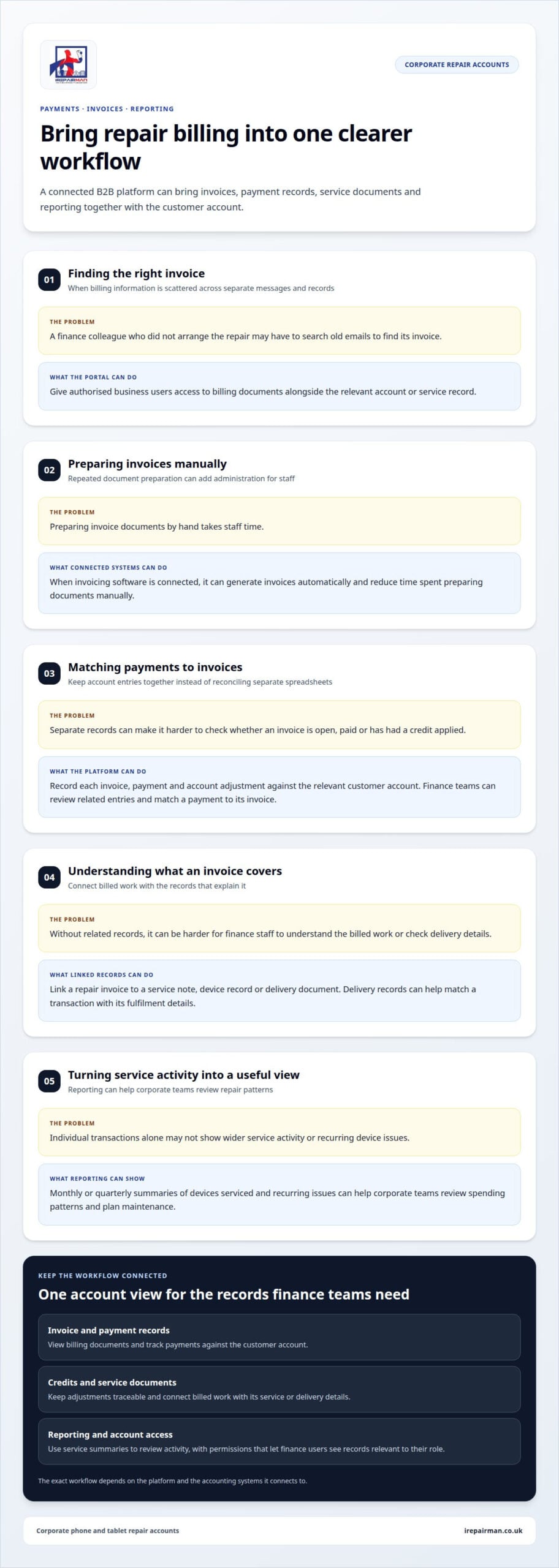
A B2B platform can connect invoice and accounting software with customer accounts. This brings payment records, service documents and reporting into a clearer workflow.
Invoice access and online payments
Invoice access lets authorised business users retrieve billing documents through their account, while online payment tools provide a digital way to settle them. This is useful when a finance colleague needs an invoice but did not arrange the original repair. Instead of searching old emails, they can find the document alongside its account or service record.
When connected accounting and invoicing software generates invoices automatically, staff spend less time preparing documents manually. Payment tools can sit alongside invoice access, giving authorised users a practical place to view amounts due and record payments. The exact workflow depends on the platform and the accounting systems it connects to.
Invoice, payment and credit tracking
Invoice, payment and credit tracking means recording each billing document, payment and account adjustment against the relevant customer account. This gives finance teams a clearer view of whether an invoice is open, paid or has had a credit applied. For example, a finance colleague can match a payment to its invoice instead of reconciling separate spreadsheets.
Connecting the platform to accounting software can support payment tracking and financial reconciliation. Clear records also help resolve questions about a credit or an invoice that appears unpaid, because staff can review related account entries together. Agreed access permissions ensure finance users can see the records relevant to their role.
Invoice management should link billed work to the documents that explain it. A repair invoice may be linked to a service note, device record or delivery document, helping finance staff understand the charge. If goods or repaired devices are delivered separately, delivery records can help match the transaction with its fulfilment details.
Credit management needs the same traceable approach. A credit should appear against the relevant account and invoice so the balance reflects the adjustment. Clear references help finance staff explain a revised balance to purchasing or customer service colleagues. They also reduce confusion when several people handle the same business account.
Financial reporting can turn individual transactions into a useful view of service activity. Monthly or quarterly summaries of devices serviced and recurring issues can help corporate teams review spending patterns and plan maintenance. For example, a fleet manager may use a report to identify repeat repairs and consider whether the maintenance schedule needs attention.
For a team coordinating repairs across locations, a UK-wide pick-and-return service can connect device logistics with account administration. An organised platform can help staff match service records, invoices and delivery information without treating each document as an isolated transaction.
What is a B2B self-service portal?
A B2B self-service portal is a secure, password-protected platform for business customers to access information, documents and services. In the UK, GDPR is a compliance requirement when portals handle personal data; ISO 27001 is a relevant information-security standard for business-critical information.
Corporate client needs and service expectations
Corporate clients need a shared place to coordinate orders, service records and account activity. A customer portal gives a fleet manager and finance colleague different ways to access information linked to the same business account. One may submit a repair request, while another reviews an invoice or service note.
A B2B portal differs from an online shop. An online shop mainly supports browsing and buying products, whilst a self-service portal can also manage service requests, documents and ongoing account interactions. Some portals combine both functions, connecting purchasing with after-sales support. That distinction matters when a business needs more than a route to place orders.
Service-level agreements and response times
A service-level agreement, or SLA, sets out how a provider handles service and communication. For a repair account, it can record response-time and turnaround expectations, escalation routes and reporting frequency. Keeping these terms alongside account records gives the business and service team a shared reference point.
For example, an operations contact can follow the agreed escalation path when a device issue affects the team’s work. A portal can show request progress and service notes, while the SLA explains the expected process. Clear terms help customers understand what happens after submission, rather than treating each repair request as a separate transaction.
Repair requests and after-sales services
A repair portal lets business users submit a request and follow the related device record. A useful submission captures the device, reported fault, business contact and collection or service details. The repair team can use this information to assess the request and keep its history attached to the account.
After-sales support may include status updates, repair records, invoices and service notes. Keeping these together helps a customer service colleague answer follow-up questions without searching multiple email threads. For a distributed business, authorised contacts can view the same request history, even when they coordinate devices or locations separately.
Portal features, risks and limitations
Business customers need account-level access, role-based permissions, repair submissions, status tracking and document history. These features help staff manage routine tasks independently. However, a portal cannot replace human support when a fault needs assessment, a repair needs explanation or an urgent issue requires escalation.
Risks include outdated information, unclear permissions and account data being visible to the wrong users. A business should define who can view or update each record and align portal access with its account processes. Map the repair journey first, connect relevant customer and service records, then test request, notification and escalation workflows with representative users. This helps identify gaps before the portal becomes a routine channel.
Product lists, favourites and order history
Product lists and order history help business buyers repeat routine purchases with fewer manual searches. A facilities team, for example, can save frequently ordered items to a shared list and return to it when stock needs replenishing. Favourites provide a personal shortcut, while account-level lists can keep purchasing consistent across colleagues.
For a business buying several products, a portal may accept a large order list uploaded as a CSV file. This can save staff from entering every line manually. Before submitting, buyers can review product descriptions, quantities and account-specific options. Clear item details and a review step help catch mistakes before they become orders.
Saved lists are most useful when they reflect the buyer’s actual agreement. A portal can limit the catalogue to products and stock-keeping units relevant to that customer. For example, a team can select from its approved device range instead of browsing unrelated products. Product lists need maintenance: changes to an agreement or catalogue should flow through the portal integration so outdated items do not appear as current choices.
Order processing can connect with business management, inventory or fulfilment systems. Once an order is submitted, shared records can help staff handle it across systems without re-entering the same details. Automation may reduce repetitive data entry, but it relies on accurate product data and a clear process for exceptions, such as a discontinued item or incomplete order.
Order history gives buyers a record of previous transactions, including what was ordered and when. A purchasing colleague can compare a repeat request with an earlier order, then build a new basket from relevant products. This is especially useful when responsibility changes hands, because the next person can see the account’s previous purchasing activity.
After dispatch, shipping information can add delivery status and an expected delivery date to the order record. Buyers can use updates to coordinate with the receiving office, school or other delivery location. Tracking is useful only when order and fulfilment records stay connected: a status change in the delivery system should also appear in the customer-facing view.
Order tools need sensible controls as well as speed. Buyers should be able to review quantities and delivery details before submitting, while account permissions can distinguish people who prepare orders from those who approve them. Testing a CSV upload, repeat purchase and status update during portal development can reveal where manual work or confusing steps remain.
Corporate repair client portals
A B2B repair portal for corporate accounts is a secure account area for submitting device repairs and managing related service information. It connects a business contact with repair requests, device status and service records through one customer-facing interface.
This differs from a standard commerce portal. A product catalogue helps buyers select and purchase goods; a repair portal focuses on service after a device develops a fault. For example, an operations contact can submit a damaged phone for assessment, then return to the same record for progress updates and repair notes.
A corporate account may involve several people, not just one buyer. An office manager might raise a repair, a fleet manager oversee affected devices, and finance staff retrieve related documents. Linking authorised contacts to one company account keeps requests connected instead of splitting service history across separate email threads.
Notifications can make the process easier to follow. When a device status changes, an update can alert the relevant contact, such as when a repair request moves into assessment or is ready for return. Clear status descriptions matter: “awaiting assessment” means something different from “repair completed”. Each update should relate to the correct device and request.
Repair history is valuable beyond a single transaction. If the same phone returns with a fault, previous service notes can give the repair team useful context. A business can also review device records to spot recurring issues, prepare internal reports or plan maintenance. That history supports a more informed relationship between corporate clients and their repair partner.
Where a business has a service agreement, attaching its terms to the account keeps them close to device and repair records. Staff can refer to the applicable coverage and service schedule when raising a request. Keeping contract documents in the same account is more practical than relying on a separate folder that only one colleague can find.
A portal can make common service tasks easier, but it should not reduce every interaction to a form. A damaged phone may need assessment, and an urgent business interruption may need direct discussion. The portal works best for routine submissions and record access, while clear escalation routes help customers reach a person when needed.
For corporate buyers, the key measure is a more joined-up customer experience: one company account, relevant contacts and a traceable service record. If your organisation needs coordinated phone or tablet repairs, arrange corporate repair support through the available service channel.
IRepairMan London: Business • Corporate • B2B Phone Repair HUB
iRepairMan London’s Business • Corporate • B2B Phone Repair HUB supports organisations coordinating phone and tablet repairs. Its team can handle batches of 20 or more devices simultaneously, helping businesses manage larger repair needs through one dedicated service.
Turn to the HUB when workplace devices need repair, or when a school or organisation needs iPad support. Available services include iPhone Screen Repair, iPhone Back Glass Repair and iPad Repairs. For a corporate team, keeping device repair needs coordinated can help reduce disruption to staff who rely on those devices at work.
For a repair involving sensitive business devices, iRepairMan London uses an encrypted, no-access data safety protocol. Each repair also comes with a 12-month warranty, giving organisations a clear point of reference after the work is complete.
Contact iRepairMan London to discuss your organisation’s phone or tablet repair needs.
Put your corporate repair process into action
As your organisation plans its next device refresh, decide how repair records will inform future decisions. Assigning an internal owner to review recurring device issues can help your team make better-informed maintenance and replacement plans.
A B2B repair portal for corporate accounts can support that planning when its records fit your team’s working practices. Identify who will review repair activity and how those findings feed into your organisation’s device planning.
For help with your organisation’s phone or tablet repairs, contact iRepairMan London. A clear next step can help your team move forward with its repair needs.
Frequently Asked Questions
What is the difference between a B2B customer portal and a B2C storefront?
For a business buyer, the difference often comes down to internal purchasing controls. A company may need to record a purchase order reference, identify the responsible department and retain documents for its approval process. Consumer checkout is usually centred on an individual purchase. For example, a Central London office may need its accounts team to reconcile a repair transaction with the correct internal budget code.
Can the portal display account-specific service information?
A portal can apply the correct account rules when configured to do so. A useful setup should also make service changes traceable, so staff can identify which arrangements applied when a request was placed. For example, a buyer reviewing an older order should be able to distinguish the original agreed arrangements from a later account update. This supports clearer discussions when a service record needs review.
What Are B2B Repair Contracts, and Why Do They Matter?
A B2B repair contract records the working arrangement between a business and its repair provider. Beyond describing service coverage, it can help teams plan for organisational changes, such as adding a satellite office or transferring devices between departments. Keeping a record of approved changes helps staff apply the current arrangement consistently, rather than relying on informal messages or an outdated copy held by one colleague.
What account management features should a B2B portal have?
Look for tools that make account records easy to maintain and review, such as searchable device references, exportable service records and clear contact details for each site. For example, a business with several offices could filter records by site when reviewing repair activity. These practical details help staff find information quickly and maintain an audit trail for internal planning.
How do corporate customers register and manage users on a repair portal?
Businesses usually appoint an account administrator to coordinate registration and user changes. A simple internal process helps: record the employee’s work contact, identify their business role, then remove access when they leave or change responsibilities. For example, a Central London office can nominate a replacement contact during a staff handover, reducing the risk of repair updates going to an inactive account.
How does a B2B repair portal handle repair requests, quotes and approvals?
A well-planned request captures enough detail for the repair team to understand the issue and identify the device. Include its make and model, an internal asset reference if used, the reported fault and a useful contact. If approval is required before work begins, record who authorised it and when. This helps operations and finance teams follow the decision later.
Which UK repair providers offer portals for corporate accounts?
iRepairMan London serves corporate and institutional customers through its Business • Corporate • B2B Phone Repair HUB. This is a dedicated repair service, not a claim that customers use a self-service software portal. For Central London organisations, it is relevant when phone or tablet repairs need business-focused coordination. Remote teams and satellite offices can also use its UK-wide pick-and-return repair service.
How do B2B repair portals connect with business, customer and purchasing systems?
Planning starts by deciding which system holds each business record and how updates should be handled. For example, a purchasing system may issue an internal requisition reference that needs to stay attached to the repair transaction. Teams can test a typical request, a changed contact and a rejected approval before launch, then review how exceptions appear across connected systems.