
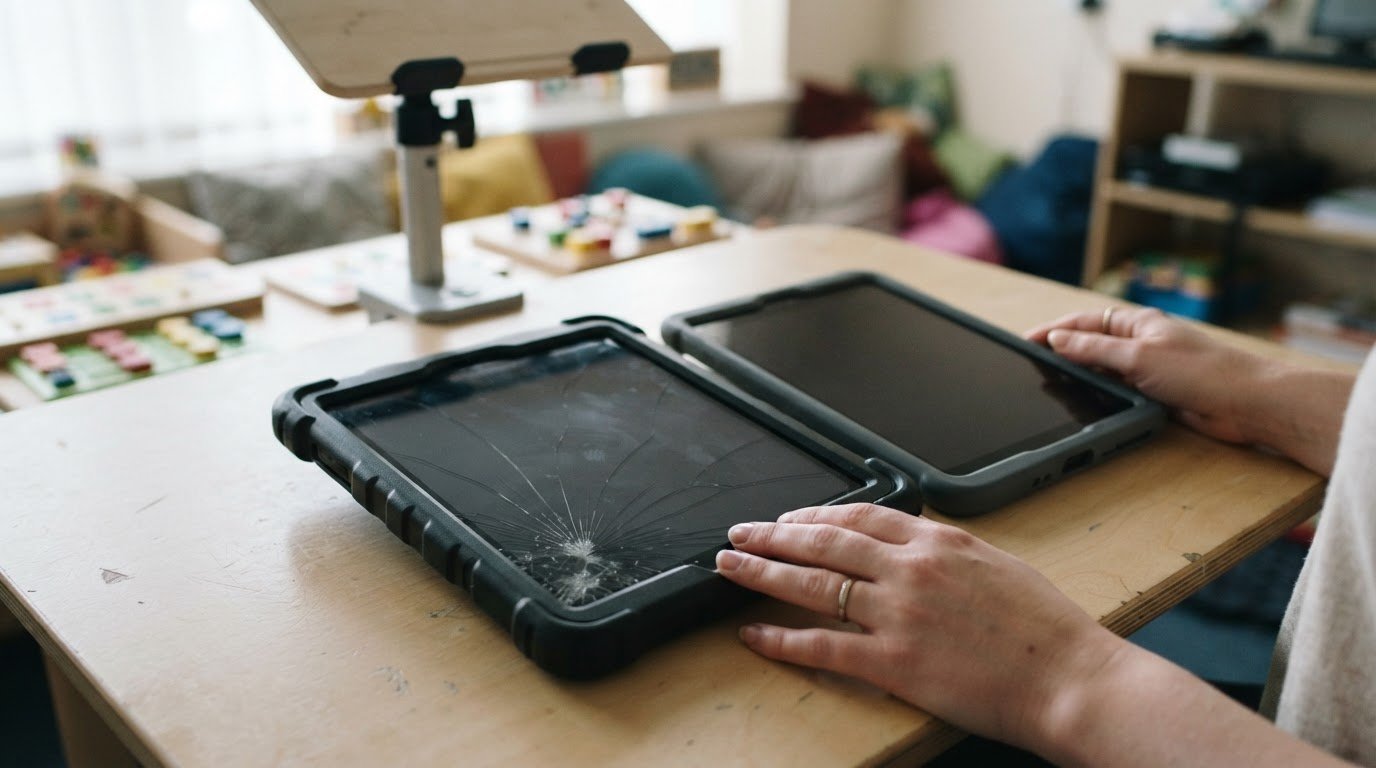
Arrange an on-site tablet repair for your special needs school in London by sharing the device model and fault when you book. Same-day appointments may be available, and a technician can come to your school to help reduce disruption to staff and pupils.
Choosing a repair means considering the fault, the device and the school’s practical needs. A cracked screen calls for a different assessment from a tablet that will not charge or respond properly. A clear diagnosis helps staff understand the recommended work before it begins.
This guide covers common tablet faults, screen and display repairs, booking options and what to expect before work begins. It also explains how technician experience, careful handling and data privacy matter in a school setting, and how mobile repairs can fit around the school day. You’ll find out what information helps describe the problem and how a professional repair service can support school and nursery iPads, including when several devices need attention.
Key Takeaways
- Learn how the type and extent of a fault help determine the right repair approach for a school tablet.
- Find out what a screen assessment can reveal about damage to the display and whether the tablet remains practical to use.
- See what details help organise an on-site repair around the school’s location and timetable.
- Understand how technician expertise, careful handling and data privacy support repair decisions in an education setting.
- Discover how iPad screen repairs can help schools and nurseries return devices to learning use.
Repair parts and technician expertise
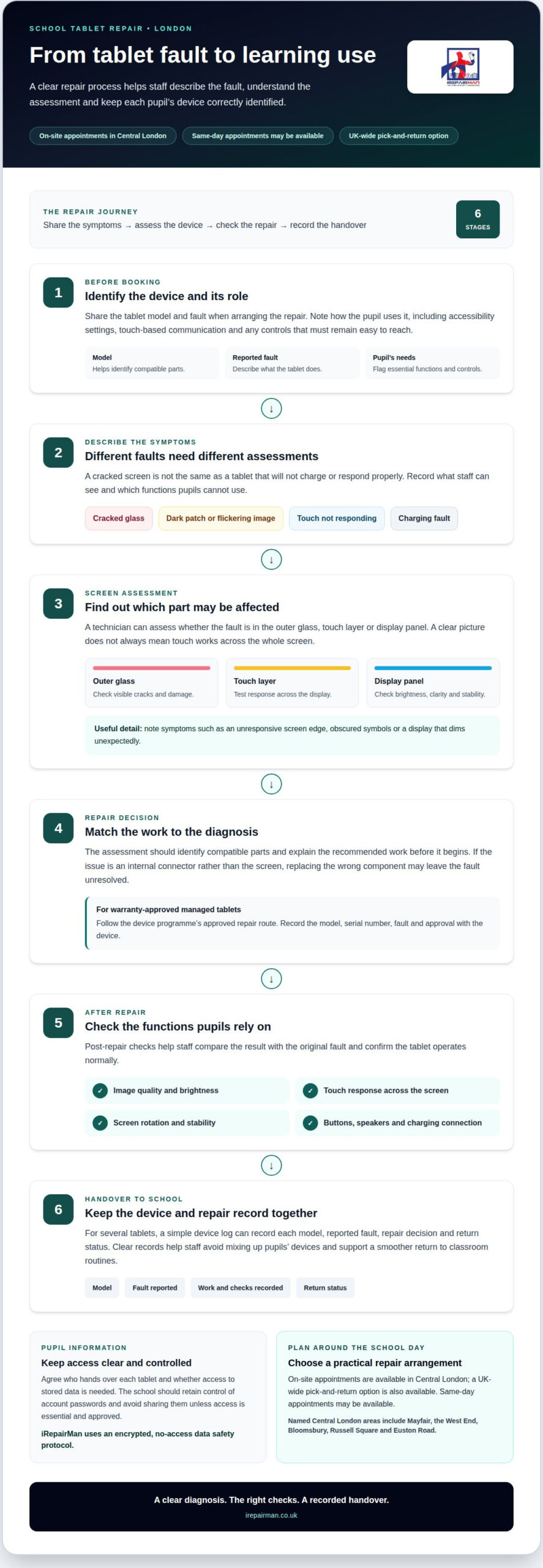
For a special needs school, a tablet must support each pupil’s communication and learning routines. Consider accessibility settings, screen size and controls in light of how the pupil uses the device. For example, a pupil who relies on touch-based communication needs a responsive screen and a protective case that does not block buttons. A repair assessment should identify compatible parts and explain how the work may affect everyday functions.
Parts quality affects more than appearance. A replacement screen needs to display clearly and respond accurately to touch; a poor fit can make gestures or on-screen communication harder. The technician should identify the tablet model before selecting parts, then test the display, buttons, speakers and charging connection after repair. If the fault is an internal connector rather than the screen, replacing the wrong component may leave the problem unresolved.
Choose a repair provider whose technicians explain the diagnosis in plain English and handle school devices consistently. Ask what part is being replaced, which checks will be carried out and what warranty applies. For a batch, a simple device log can record each tablet’s model, reported fault, repair decision and return status. This helps staff track equipment and avoid mixing up pupils’ devices.
Connectivity also matters when schools use tablets for online learning or communication. The Department for Education said its fibre upgrade programme was set to complete upgrades to 833 schools. The Department for Education also reported that its digital infrastructure programme had provided connectivity to 3,700 schools. These figures describe school connectivity programmes, not individual tablet repair performance; a technician still needs to test the repaired device’s own connection and functions.
For safeguarding and data protection, choose a repair process that limits access to pupil information and makes device handling clear. Agree who hands over each tablet, whether access to stored data is needed and who can authorise a device wipe. The school should retain control of account passwords and avoid sharing them unless access is essential and approved. iRepairMan uses an encrypted, no-access data safety protocol to keep repair work separate from stored information.
Which London repair companies handle school tablets? Options include mobile repair services and providers focused on education devices. Compare their experience with school equipment, parts process, data safeguards, post-repair checks and warranty terms. iRepairMan provides school and nursery iPad screen repairs, with on-site appointments in Central London and a UK-wide pick-and-return option.
Before arranging repairs, group devices by model and fault, then prioritise tablets pupils depend on for communication. A cracked screen, unreliable charging and failed touch response each need a different assessment. Clear records and model-specific parts help technicians make informed decisions, while a final function check helps staff return each device to its intended use.
Lending libraries were planned for up to 32 local authorities.
Tablet screen and display repairs
Display damage can affect more than what pupils see. A hairline crack may spread, while a dark patch or flickering image can obscure symbols, text and visual prompts. For a pupil using an iPad communication programme, familiar choices may become harder to recognise. An assessment should establish whether the fault is in the outer glass, touch layer or display panel, as each affects use differently.
Useful checks cover the whole screen, not just the visible crack. A technician can test touch response across the display, brightness, image clarity and whether the screen remains stable when the tablet moves. For example, the picture may look clear while taps along one edge go unregistered. Recording the exact symptoms helps distinguish screen damage from a software or connection fault before parts are selected.
For warranty-approved repairs on managed tablets, follow the device programme’s approved repair route and record the model, serial number and fault. The route may require an authorised repair service. Keep the approval and repair record with the device to track management requirements and support future maintenance.
Area coverage varies by service. For London schools, the relevant local focus here is Central London, including Mayfair, the West End, Bloomsbury, Russell Square and Euston Road. These are named areas rather than a borough-by-borough list; schools can use their location and access arrangements to plan a repair visit.
After screen work, a useful handover includes checks of the functions pupils rely on. The technician should test image quality, touch response, rotation and brightness, then confirm that the tablet starts and operates normally. Staff can compare the results with the reported fault, such as an unresponsive corner or a display that dims unexpectedly. A protective case may help reduce knocks, but it should not press against the repaired screen or obstruct controls.
Screen damage across a school programme calls for sensible prioritisation. A tablet used for daily communication may need attention before a spare device with a small crack and fully responsive touch. Grouping faults by model can help organise assessments, while condition records make handovers clearer. Repair decisions should account for screen function, the pupil’s way of using the tablet and the device’s role in class.
For a managed device, repair documentation matters as much as the physical result. The school should receive a record of the screen work and checks completed, so staff know which tablet has been returned and what was tested. This makes it easier to put the device back into its classroom routine without confusing it with another pupil’s equipment.
An independent boarding school had Surface screen repairs completed over seven weeks, showing how display work may extend across a programme. When planning assessment and handover, staff can keep the device’s function and the pupil’s needs in view.
Booking on-site tablet repairs
An on-site appointment lets a technician assess tablets at school, so staff do not need to travel to a repair shop. To book tablet repair for a special needs school in London, choose a suitable visit window and share the school’s access arrangements. Include reception check-in procedures, visitor requirements and any restrictions on moving equipment around the building. This helps the visit fit the school’s routines.
Plan where the repair work will take place. A quiet room near reception can make it easier to discuss faults without interrupting lessons or exposing pupil information. Tell the technician where they can set up and whether a staff member needs to accompany them between rooms. Clear arrangements make the appointment easier to coordinate.
Useful booking details include the school’s main contact, preferred appointment window and visitor safeguarding arrangements. If the timetable is busy, suggest a period between lessons or outside a planned communication session. iRepairMan can plan an on-site tablet repair visit around the school’s practical needs.
A simple booking sequence helps staff prepare:
- Choose an appointment window that avoids lessons and pupil transitions.
- Share visitor check-in and access instructions with the repair team.
- Set aside a suitable room and identify a staff contact for the appointment.
- Explain any school-specific safeguarding or privacy arrangements.
Repair time depends on the device, fault and parts required. The technician assesses the work before estimating the time needed for repair and functional checks. A screen fault with no other symptoms, for example, needs a different assessment from a tablet that also shuts down unexpectedly. Allow time for that assessment when planning the appointment.
Do London repair services provide loan tablets? A loan device is a separate arrangement, so schools should not assume one is included with a repair booking. If a pupil depends on a particular tablet, staff can plan how to maintain the communication routine while it is away, using an appropriate school device if available.
Schools outside Central London can use iRepairMan’s UK-wide pick-and-return service, so staff do not need to take tablets to a shop. Agree a suitable collection point and prepare devices for an authorised handover. This offers teams across the UK an alternative when an on-site appointment does not suit their location or timetable.
Before the visit, share the appointment details with the named school contact and explain where the technician should report on arrival. That contact can coordinate entry, answer practical questions and help the technician follow school procedures. Clear arrangements make tablet repair for special needs schools in London easier to fit around the school day.
Common tablet faults
A tablet can fail in several ways, and similar symptoms may have different causes. A screen that ignores taps might have display damage, a loose connection or a software fault. A device that restarts during a lesson may have a battery or system problem. Tablet repair for special needs schools in London should begin by identifying the cause, rather than treating every fault as a screen issue.
Charging problems can interrupt classroom routines. If an iPad charges only when its cable is held at an angle, the port may be damaged or obstructed. A technician checks the port, cable connection and power response to find where charging stops. Replacing the battery without diagnosing the port may leave the original problem unresolved.
Battery faults can cause rapid power loss, unexpected shutdowns or a tablet that will not start. These symptoms can disrupt a pupil’s communication routine, particularly when the device is used throughout the school day. An assessment considers whether the battery is responsible, whether charging works correctly and whether another fault affects power delivery. This helps ensure the repair plan addresses the underlying issue.
- Screen: Cracks, dark areas, flickering or missed touches can affect reading and communication.
- Charging: A loose cable fit or inconsistent charging can point to a port or connection fault.
- Battery: Sudden shutdowns or fast power loss can interrupt a planned classroom activity.
- Buttons and sound: A stuck button or failed speaker can make familiar controls harder to use.
Sound and button faults matter too. A speaker that cuts out can affect audio prompts, while a stuck power button may make daily access difficult. A technician tests each reported function, including volume controls and buttons, to distinguish a failed part from a problem elsewhere in the device. For pupils who rely on audio cues, describe when the sound fails.
Connectivity problems may show up as a tablet that repeatedly drops its school network connection. The cause could involve the device, its settings or the local network, so assessment establishes whether other functions work normally. Recording when the fault occurs, such as during a particular classroom activity, can help narrow down the cause. It also clarifies whether one device or several are affected.
Make fault reports more useful by recording the device model, symptoms and when they occur. “iPad won’t charge after lunch” gives a technician more context than “tablet broken”. Note whether the screen, sound, buttons and charging work, and whether the device supports a pupil’s communication. These details help prioritise assessment and avoid treating a symptom as the underlying fault during tablet repair for special needs schools in London.
When several tablets show similar problems, group them by symptom and model. Cracked screens need a different assessment from charging port failures. A clear record helps staff track which devices have been assessed, repaired or returned to classroom use, and makes handover more orderly.
IRepairMan London: School and nursery iPad screen repairs
iRepairMan London provides school and nursery iPad screen repairs for education teams managing cracked, unresponsive or damaged displays. When a tablet supports a pupil’s communication or classroom routine, a faulty screen can make familiar activities harder. Schools can arrange an on-site repair in Central London or use the UK-wide pick-and-return service when collection is more suitable.
For a school visit, provide the device model, describe the screen fault and explain where the iPad is used. This helps the technician prepare for the assessment and consider how the display needs to work after repair. Cracked outer glass, missed touch responses and a dark display are different symptoms, so the screen is assessed before the repair approach is decided.
The mobile workstation carries professional repair tools, including a microscope for close inspection. That supports careful work on small components around the display. After screen repair, post-repair testing checks the functions that affect daily use, including touch response and screen operation. The repair also comes with a 12-month warranty, giving school teams a clear record of cover for the repair work.
For schools handling several iPads, the Business, Corporate and B2B Repair HUB can manage batches of 20 or more devices simultaneously. Grouping devices by model and fault can make the handover more organised. Staff can identify each iPad and note its classroom role, helping keep communication devices distinct from general classroom tablets during repair handling.
Data privacy matters when school devices contain pupil information. iRepairMan uses an encrypted, no-access data safety protocol, so repairs are carried out without accessing stored data. Staff retain control of account credentials and can share school-specific handling instructions at handover. The repair process stays focused on the device fault, not its contents.
Schools can choose the arrangement that best fits their location and timetable:
- On-site: Arrange assessment at the school in Central London, reducing the need to transport devices.
- Pick and return: Use the UK-wide service when a school needs collection and return logistics.
- Batch handling: Group iPads by model and reported screen fault for coordinated maintenance.
These options suit different school routines. An on-site appointment keeps the handover at school, while pick-and-return provides an alternative for teams outside the local service area. The repair route depends on the school’s location, device details and preferred handling arrangements. The technician assesses the display and completes relevant checks before the iPad returns to its intended use.
To arrange school or nursery iPad screen repairs, contact iRepairMan London with the device details and a description of the fault.
Frequently Asked Questions
Do London tablet repair services offer on-site school visits or collection?
Yes. Schools can arrange an on-site visit in Central London or use iRepairMan’s UK-wide pick-and-return service. Nominate a staff member to hand over the devices and receive them afterwards. If a tablet is needed for a planned communication session, tell the repair team when booking so the school can plan for its temporary absence.
How can I arrange an assessment for an iPad or Android tablet repair in London?
Share the device model and a clear description of the symptoms when booking. An iPad screen fault and an Android tablet charging fault, for example, need different assessments. The repair team can assess the job and help arrange an on-site visit or collection.