

When tablets fail, keeping lessons moving depends on more than getting devices repaired quickly. Damaged tablets can interrupt classroom activities and staff workflows, while arranging each repair separately adds administration. Bulk tablet repair for London schools gives your team a practical way to organise a batch and plan around the devices pupils and staff need.
For schools in Central London, iRepairMan London’s B2B Repair HUB can handle batches of 20 or more devices simultaneously. Choose between on-site support and secure pick-and-return logistics, then plan the handover, repair workflow and return around your school timetable. Workshop repairs are carried out in London and returned by tracked delivery in around 2-3 working days. An encrypted, no-access data safety protocol, post-repair safety testing and a 12-month warranty on every repair add reassurance. This guide covers how to coordinate a batch, protect school data and reduce classroom disruption.
Key Takeaways
- Bulk tablet repair for London schools is easier to coordinate when devices are grouped by fault and classroom priority.
- Identify which classes and staff need working tablets first, then plan repairs around school routines.
- Choose between on-site support and pick-and-return logistics based on access, handover arrangements and how long devices can be away.
- Include data privacy, post-repair checks and warranty terms in your repair plan.
- Use a shared fault record to track each tablet from handover through to its return to classroom use.
Why bulk tablet repair matters for London schools
A cracked screen, a tablet that will not charge or another fault can take a device out of use just when a lesson needs it. That can interrupt access to learning materials, leave staff searching for alternatives and add repair administration to a busy school day. In Central London schools, where iPads may be shared across classes, knowing which devices are unavailable and what they affect helps staff make a workable plan.
Bulk tablet repair is the coordinated assessment and repair of multiple school devices through one organised process. Instead of submitting separate requests and tracking each device in isolation, staff can record faults together, set priorities and coordinate the batch. A shared overview makes it easier to see what is being repaired and what still needs attention.
Repair is also part of the wider conversation about keeping devices in use. The Right to Repair movement advocates for people’s ability to repair electronic devices. For schools, choosing a repair route can support responsible device management alongside decisions about lesson needs and equipment allocation.
Which school devices should be prioritised first?
Start with the timetable, not simply the order in which faults were reported. A tablet needed for an upcoming lesson or staff task may take priority over a spare that can remain out of circulation for a while. Group devices by their role, then consider which classes or activities would be affected if each one stayed unavailable.
- Classroom-critical: tablets needed for scheduled lessons or access to essential learning materials.
- Staff-use: devices required for teaching or school administration.
- Spare or lower-priority: devices that can wait while working alternatives remain available.
For each device, record a school identifier, the reported fault and the activity affected. Avoid adding pupil names or other personal information that is not needed to organise the repair. This gives the team useful context without turning a repair list into an unnecessary record about individual pupils.
When does a batch repair approach make sense?
A batch is useful when several devices need attention and separate requests would mean repeating updates, handover details and follow-up. A shared record helps staff track which devices are being repaired, what faults have been reported and which tablets should return to service first. iRepairMan London’s B2B Repair HUB handles batches of 20 or more devices simultaneously.
For ongoing planning, consider how repairs fit alongside routine device care and allocation. The iPad repair for schools guide covers wider school fleet maintenance. This section focuses on how grouping faults and setting classroom priorities can make a repair batch easier to coordinate.
What to assess before choosing bulk tablet repair for a school
A repair arrangement needs to fit the school day as well as address the faults. Before booking, decide which devices staff can release, how the batch will be handed over and returned, what information is needed to identify each tablet, and what checks and warranty apply after repair. For Bulk tablet repair for London schools, clear arrangements help your team plan device access and keep repair records organised.
Use this framework to plan the practical details:
- Device access: Decide when tablets can leave classrooms or staff teams, and whether working alternatives are available.
- Logistics: Choose on-site support or workshop repair with pick-and-return based on your premises and timetable.
- Data handling: Understand how the repair process protects information stored on devices and what details staff need to provide.
- Testing and warranty: Include post-repair safety testing and warranty cover for repair work in your planning.
How should schools assess data privacy and device handling?
iRepairMan London uses an encrypted, no-access data safety protocol. The repair process is designed to protect information through encryption and prevent technicians from accessing the tablet’s contents. GDPR-compliant technicians are another safeguard. These measures offer practical reassurance, alongside the school’s own decisions about device access and handling.
Prepare a handover record with each tablet’s identifier and reported fault so devices can be matched to the right repair information. Do not include account passwords in the repair notes or share them as a routine part of handover. If a particular fault needs information from school staff, keep that communication separate from the batch list and share only what is needed to describe the issue.
Which quality checks help restore confidence in repaired tablets?
Include a clear check before devices return to school use. Post-repair safety testing is part of iRepairMan London’s service. The repair and outcome depend on the fault, so do not assume every device needs the same work or will have the same result.
Every repair includes a 12-month warranty. Post-repair safety testing and a 12-month warranty give school teams clear checks and reassurance after a repair. Keep the repair record with the device identifier and relevant warranty information, so staff can follow up if an issue arises.
For a school arranging repairs in Central London, these checks help turn a batch handover into a process the team can track. Explore iRepairMan London’s school tablet repair service as you plan your next repair batch.
On-site or pick-and-return: which tablet repair route suits your school?
Choose a repair route around your school’s access needs. On-site support can reduce the need to move devices away from the premises. Workshop repair with pick-and-return lets staff organise a batch for assessment and repair in one place. For Bulk tablet repair for London schools, consider how many tablets need attention, whether staff can release them together and how their absence will affect lessons.
| Route | What it involves | May suit your school when |
|---|---|---|
| On-site support | Support is arranged at the school location. | You want to limit staff travel and device handovers, or need help with devices kept on site. |
| Workshop repair with pick-and-return | Devices go to the London workshop and are returned by tracked delivery. | You’re coordinating several tablets and can plan around them being away for repair. |
When can on-site repair reduce disruption?
On-site mobile phone repairs take place at the customer’s location. For a school, on-site support means arranging help at the premises in Central London. This is convenient when staff have limited time to travel or coordinating the handover of several school devices would be difficult. The school can plan support around access to its site. Repair time and outcomes depend on the fault, so on-site support does not mean every device or batch will be completed on the same day.
When is workshop repair with tracked return a practical choice?
A workshop route suits a school that has recorded its tablet faults and can release a group of devices for repair. iRepairMan London carries out repairs in its London workshop and returns them by tracked delivery in around 2-3 working days. Tracking lets the school follow the return, and the stated timeframe helps staff plan device access. It is not a promise that every fault will have the same repair outcome.
iRepairMan London’s secure pick-and-return logistics are available UK-wide, supporting remote teams and satellite offices as well as London organisations. For a school, consider whether devices can be away together or whether classroom needs make keeping them on site a better fit. You can also split a batch by priority and arrange repairs in stages so essential tablets are not all unavailable at once.
Match the handover route to the school timetable, available alternatives and the number of devices staff can release. A simple return plan helps: list the tablets included, note their priority and name the person who will receive and review them. Schools comparing batch arrangements for other teams may also find relevant context in this corporate phone repair guide.
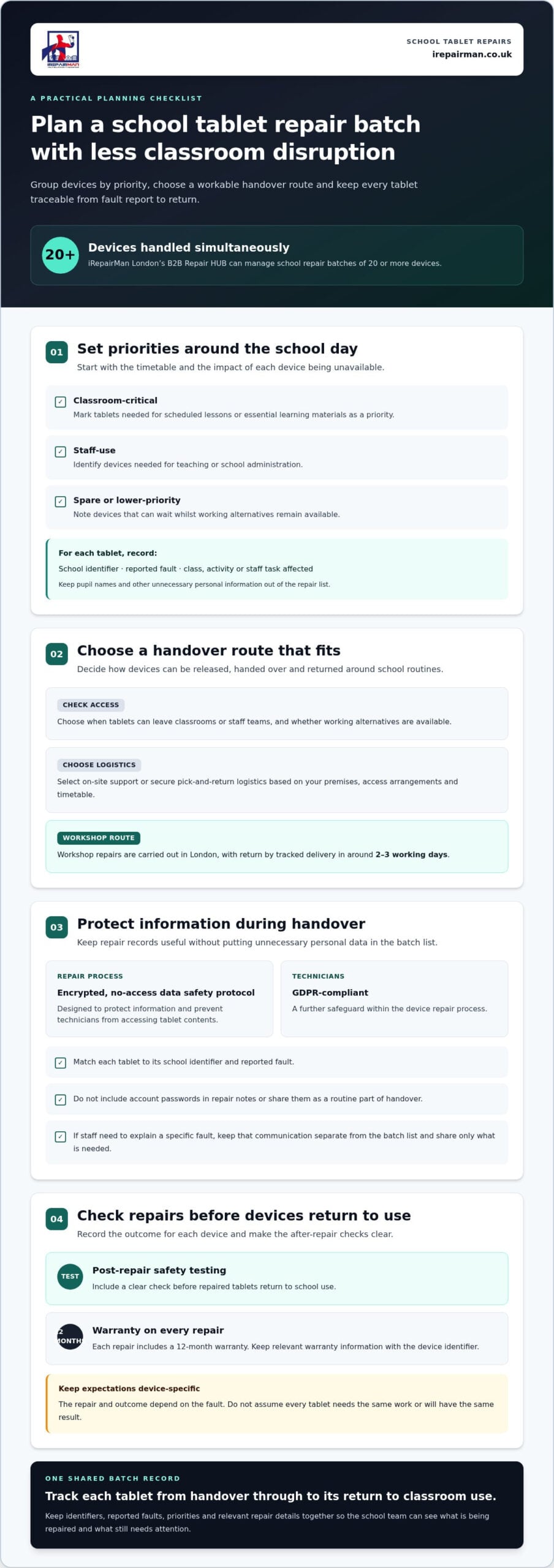
How London school teams can prepare a tablet repair batch
A clear batch record makes it easier to arrange repairs, track devices and plan for their return. Before booking, bring fault details, classroom priorities and your preferred repair route together in one place. This gives the school contact a useful overview without creating separate paperwork for every tablet.
What information should the school organise before booking?
Start with a simple list. Use a school device identifier rather than a pupil’s name, and keep passwords and unnecessary personal information out of notes and handover documents. Record only what helps identify the device and describe the fault.
- 1. Record each device: Add its school identifier and a brief description of the reported fault.
- 2. Group by fault: Sort similar issues together, such as screen damage or a tablet that will not charge. This helps staff see the types of faults in the batch.
- 3. Mark classroom priority: Note which tablets support scheduled teaching activities and which can wait because alternatives are available.
- 4. Add timetable constraints: Flag dates or school activities that affect when devices can be handed over or need to return to use.
- 5. Follow school data procedures: Prepare devices for handover in line with the school’s own data-handling practices. Do not include account passwords in the repair list.
This preparation helps the team distinguish urgent classroom needs from general repair administration. For example, two tablets may have the same fault, but one may be needed for a scheduled activity while the other is a spare. Recording both the fault and the school priority gives the batch coordinator useful context without adding personal details.
How can staff manage handover and return?
Nominate one school contact to coordinate the batch, keep the device list up to date and receive repair updates. A single point of contact makes it clear where staff should direct questions and who will receive devices when they return.
- 6. Choose the repair route: Decide whether on-site support or tracked pick-and-return better fits the school’s timetable, access arrangements and device needs.
- 7. Confirm the handover list: Match each tablet against its identifier and recorded fault as it is prepared for repair.
- 8. Review devices on return: Check returned tablets against the list and use post-repair safety testing as a checkpoint before putting them back into classroom use.
For Bulk tablet repair for London schools, these steps turn separate faults into a manageable workflow. Once the device list and preferred route are ready, arrange your school tablet repair batch with iRepairMan London.
Arrange bulk tablet repair for your London school with iRepairMan London
Bring your school’s tablet repairs into one organised plan. iRepairMan London provides school and nursery iPad repairs, with on-site support and UK-wide secure pick-and-return logistics. Its B2B Repair HUB can handle batches of 20 or more devices simultaneously, helping school teams coordinate a group of repairs instead of managing each device as a separate request.
For Bulk tablet repair for London schools, choose the arrangement that fits your team: support at the school or a planned handover to the London workshop. Prepare the device list, reported faults and classroom priorities so the batch has a clear starting point.
What schools can expect from the repair service
Workshop repairs are carried out in iRepairMan London’s London workshop and returned by tracked delivery in around 2-3 working days. Tracking helps the school follow the return, while the stated timeframe helps staff plan around devices being away. The timeframe is not a promise that every fault will have the same repair outcome or schedule.
For schools that need devices to stay on their premises, on-site support offers another practical route. iRepairMan London operates Monday to Sunday, giving school teams a clear service schedule to consider when planning. The service includes an encrypted, no-access data safety protocol and post-repair safety testing. Every repair includes a 12-month warranty, adding reassurance after the device returns to school.
These details help teams plan the handover and return while keeping classroom needs in view. A school contact can keep the batch list together, track which devices are being repaired and review returned tablets before they go back into use. If the batch includes devices with different faults or priorities, retain those notes in the school’s repair record.
How to take the next step
Before arranging repairs, prepare a device list with each tablet’s identifier, reported fault and priority. Note any timetable requirements that affect when devices can be handed over or when your team needs them back. Keep passwords and unnecessary personal information out of the list, and follow the school’s own data-handling procedures when preparing devices.
Then choose whether on-site support or secure pick-and-return best fits your school’s access and scheduling needs. A clear list and preferred route give the repair plan a practical starting point, helping staff coordinate the batch with less disruption to lessons and school workflows.
Arrange bulk tablet repairs with iRepairMan London and put a clear repair plan in place for your school’s devices.
Make your school’s next repair batch easier to manage
A tablet repair plan is most useful when it fits around the school day. Choose a handover route, keep the device list and priority faults together, and decide who will coordinate the batch. That gives your team a practical starting point and helps staff plan for devices returning to classroom use.
For Bulk tablet repair for London schools, iRepairMan London can help you arrange repairs around your school’s device needs. Share the list of tablets and their faults when booking, so the batch can be organised with classroom priorities in view.
Arrange bulk tablet repairs with iRepairMan London and take the next step towards getting your school’s tablets back into use with less disruption.
Frequently Asked Questions
Is bulk tablet repair suitable for a school with fewer than 20 devices?
Yes. A school does not need to wait until it has 20 damaged tablets to arrange repairs. The B2B Repair HUB is set up to handle batches of 20 or more devices simultaneously, and schools with smaller groups can still use the school repair service. Prepare a short list of affected tablets and their faults, then arrange a repair plan that fits your timetable and the devices available for use.
Can a school send several tablets for repair at the same time?
Yes. Bulk tablet repair for London schools brings several devices into one organised repair process. The B2B Repair HUB can handle batches of 20 or more devices simultaneously. Before arranging the batch, note each tablet’s identifier, fault and classroom priority. Devices in one batch may have different faults, so do not assume they will have identical repair outcomes or completion times.
How long does tablet repair take for a London school?
Repairs are carried out in iRepairMan’s London workshop, with devices returned by tracked delivery in around 2-3 working days. This is the stated return timeframe, not a guarantee that every repair will be completed within that period. Plan device access around your timetable, and use tracking to follow the delivery so staff can prepare for the tablets’ return.
Is school data accessed during tablet repairs?
iRepairMan uses an encrypted, no-access data safety protocol, and its technicians are GDPR-compliant. Schools should still follow their own data-handling procedures when preparing devices for repair. Include the device identifier and fault details needed to manage the job, but do not put account passwords in repair notes or handover documents. These steps support careful handling without guaranteeing that data can never be affected.
Are repaired school tablets tested before they are returned?
Yes. iRepairMan carries out post-repair safety testing as part of its service. When tablets return, staff can match each device to the original fault record and check whether the reported issue remains. If something needs follow-up, record it through the service process. Testing provides a useful checkpoint, but it does not establish that every tablet will suit every classroom task or have the same repair outcome.
Does iRepairMan support schools outside Central London?
Yes. iRepairMan provides secure pick-and-return logistics across the UK, so schools outside Central London can arrange repairs without travelling to a repair shop. Devices go to the London workshop and return by tracked delivery. On-site support is available across London, including Central London, while UK-wide pick-and-return serves schools elsewhere. This distinction helps staff choose an arrangement that fits their location.



