

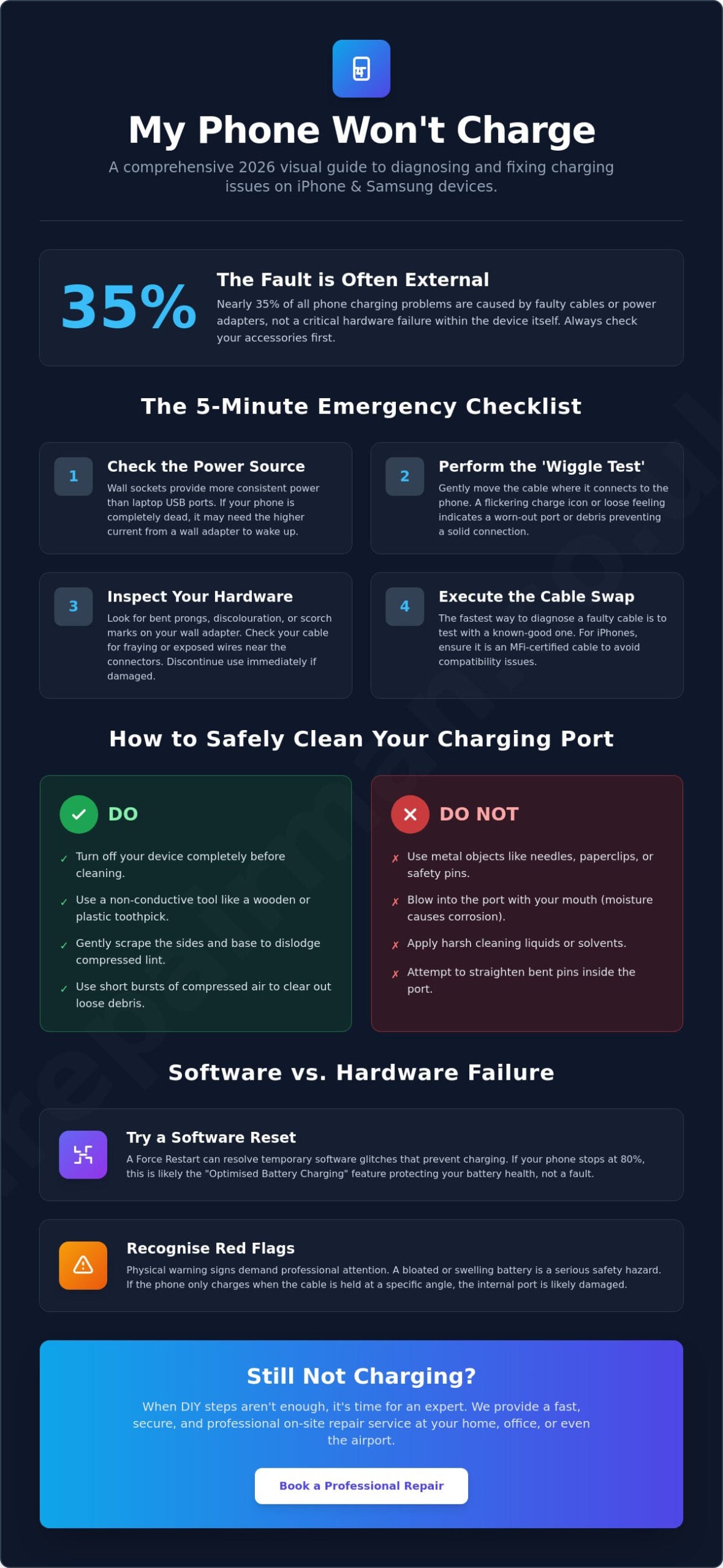
The silence of a dead handset is deafening when you’re halfway through a business trip or navigating a busy city. You plug it in; nothing happens. When you realise my phone won’t charge, the anxiety of losing data or being disconnected whilst travelling is immediate and overwhelming. It’s a high-stakes situation that demands a calm, professional solution. You might fear the worst, but research indicates that nearly 35% of charging issues are actually caused by damaged cables or adapters rather than a total hardware failure.
We’re here to help you regain control. This comprehensive 2026 checklist is designed to help you diagnose and fix iPhone and Samsung devices before you commit to an expensive repair. We’ll cut through the technical jargon to provide clear, actionable steps for the latest software, including iOS 26.5.1 and Android 17. Whether it’s a simple port cleaning or a software reset, this guide ensures you understand the fault. You’ll gain the peace of mind that comes with a working phone or the clarity needed for a fast, secure professional service if DIY steps aren’t enough.
Key Takeaways
- Perform immediate logistical checks on power sources and cables to eliminate external failures before assuming a hardware fault.
- Master safe cleaning techniques to remove pocket lint and debris that often prevent secure connections in iPhone and Samsung ports.
- Resolve persistent software glitches by using force restarts and understanding why my phone won’t charge past 80% due to optimised settings.
- Recognise the physical warning signs of internal component failure, such as battery bloating, that require urgent professional intervention.
- Learn when to transition from DIY troubleshooting to a secure, on-site repair service that meets you at your home, office, or airport.
My Phone Won’t Charge: The 5-Minute Emergency Checklist
Panic is the natural response to a black screen, but effective troubleshooting begins with a calm, methodical assessment. When you realise my phone won’t charge, the fault is often found in the accessories rather than the device itself. Before you assume the worst, perform a physical inspection of your charging hardware. Start by examining your wall adapter for any signs of discolouration, scorch marks, or bent prongs. These are clear indicators of a failed transformer that can no longer regulate power safely. Next, perform the ‘Wiggle Test’ by gently moving the cable whilst it is plugged into your phone. If the connection feels loose or the charging icon flickers on and off, you have likely identified a physical obstruction or a worn-out port.
Testing Your Power Source and Sockets
The source of your power is just as critical as the device receiving it. Wall sockets are significantly more reliable than laptop USB ports, which often provide a lower current that is insufficient for lithium-ion batteries in a state of deep discharge. If your handset has been dead for several hours, a low-powered USB port might not have the strength to ‘wake’ the battery. Always test with a different ‘brick’ or wall adapter to rule out a localized transformer failure. Keep in mind that a completely depleted phone may require up to 30 minutes of continuous charging before the battery icon even appears on the screen, so patience is essential during this initial phase.
The Cable Swap Protocol
- Rule of thumb: If a different cable and a different wall socket don’t solve it, the issue is likely internal.
- Safety first: Never attempt to ‘straighten’ bent pins inside a charging port yourself.
- Data check: If your phone charges via a computer but not a wall socket, your wall adapter has failed.
Cables, Ports, and Debris: Identifying Common Hardware Hurdles
Most users carry their devices in pockets or handbags where tiny fibres and lint naturally accumulate. Over months of use, every time you plug in your cable, you inadvertently compress this debris into a dense layer at the base of the port. Eventually, this layer becomes thick enough to prevent the charging pins from making physical contact. This hidden obstruction is a primary reason why my phone won’t charge, even when the cable appears to be fully inserted. Beyond simple lint, you should also inspect the port for “green” or “black” residue. This discolouration suggests oxidation or corrosion, often caused by exposure to moisture or humidity, which requires a more technical resolution than simple cleaning.
How to Safely Clean Your Charging Port
Safety is paramount when handling delicate internal components. Many online forums suggest using a metal needle or safety pin to scrape out debris. This is dangerous advice that can lead to a total device failure. Metal is conductive; inserting it into a live port can short-circuit the pins and cause permanent motherboard damage. Instead, follow professional troubleshooting charging issues protocols by using a non-conductive tool, such as a wooden toothpick or a specialised plastic cleaning pick. Use a high-intensity torch to inspect the port first. Gently sweep the base to dislodge the “packed” lint, then use short, controlled bursts of compressed air to clear the remaining particles. Avoid blowing into the port with your mouth, as the moisture in your breath can accelerate corrosion.
Recognising Physical Port Wear and Tear
Sometimes the hurdle isn’t debris but structural degradation. If your phone only charges when the cable is held at a specific angle, the internal solder joints or the port housing have likely loosened. This physical wear is common in devices that are frequently used whilst plugged in. There is a distinct difference between a dirty port and a structurally failed one. A dirty port feels “spongy” when you insert the cable, whereas a failed port often feels “wobbly” or lacks a tactile click. Experienced iPhone screen repair London technicians often discover these port issues during routine screen replacements, as the two components are closely linked in the device’s architecture. If cleaning doesn’t restore a firm connection, the port likely needs a professional component swap. In such instances, arranging an on-site Samsung or iPhone repair is the most efficient way to resolve the fault without losing access to your device for days.
- Visual Check: Use a magnifying glass to check for bent pins inside the port.
- Tactile Feedback: A healthy port should provide a distinct “click” when the cable is fully seated.
- Corrosion Alert: Any signs of blue or green mould-like residue indicate liquid damage.
Software Glitches vs. Hardware Failure: Advanced Troubleshooting
Charging is not merely a physical connection; it is a complex digital “handshake” between your device’s operating system and the power source. Even if your hardware is pristine, you might find that my phone won’t charge because the software has proactively blocked the power flow to protect the internal circuitry. This often happens when the firmware becomes unresponsive or “freezes” whilst managing the power intake. Professional troubleshooting phone charging issues often reveals that a simple software reset can resolve what looks like a terminal hardware failure.
One common source of confusion is the “Optimised Battery Charging” feature found in modern iOS and Android versions. This intelligent system learns your daily routine and may intentionally pause charging at 80% to reduce battery wear. If your device stops at this specific percentage, it isn’t broken; it is simply waiting for the right moment to finish the cycle. Similarly, if your phone detects moisture in the port, it will disable charging entirely. This is a safety mechanism designed to prevent short circuits, but it can sometimes be triggered by high humidity or a damp connector cable.
Force Restarting Your Device (iPhone & Samsung)
A force restart is the “universal fix” because it cuts the power to the logic board and reboots the charging controller. For iPhone 8 and all later models, including the latest iPhone 17 series, quickly press and release the Volume Up button, then the Volume Down button, and finally hold the Side button until the Apple logo appears. For Samsung Galaxy users, press and hold the Volume Down and Power buttons simultaneously for about 10 seconds whilst the device is plugged in. This procedure forces the software to re-evaluate the power source and often clears any glitches preventing the charge.
Dealing with Moisture and Liquid Alerts
Modern handsets are incredibly sensitive to liquid. If you see a moisture detection alert, do not ignore it. Whilst many phones offer an “emergency override” option, using it is a significant risk that can lead to permanent motherboard damage. Avoid the “rice myth” at all costs; rice particles can enter the port and cause more harm. Instead, follow these steps:
- Natural Airflow: Stand the phone upright in a well-ventilated area.
- Wait Time: Allow at least five hours for the port to dry completely before plugging in a cable.
- Wireless Alternative: If your phone supports Qi or Qi2 wireless charging, you can often use this to power the device whilst the physical port dries out.
If these software-level interventions fail to restore power, the issue likely resides in the deeper hardware components. When my phone won’t charge after a full software reset and a thorough drying period, it is time to assess the physical health of the battery itself.
Assessing Battery Health and Internal Component Failure
If you’ve reached this stage and my phone won’t charge, we must look beyond the surface. Internal components have finite lifespans. A chemically aged battery may still show a charging icon but fail to actually store energy. Alternatively, the issue might lie within the motherboard. For iPhone users, a failure in the U2 IC chip often results in a device that drains battery rapidly or refuses to recognise power altogether. Samsung devices face similar hurdles with dedicated charging ICs that can fail due to power surges or poor-quality adapters. These faults require a professional eye to diagnose correctly; similarly, those seeking specialist automotive restoration can explore Unfallinstandsetzung at Mad Auto Design to ensure their vehicle’s structural integrity is expertly maintained.
This need for professional diagnosis applies to all high-end technology; for instance, those seeking appliance repair orange county for their home systems understand that complex internal faults require specialist attention to avoid further damage.
This standard of professional care is consistent across all technical fields; for example, those in Germany often seek out Reparatur24 Berlin for specialised appliance repairs, reflecting the global need for trusted experts when managing essential hardware.
This commitment to technical excellence is also found at appliancerepair-homefix.com, where specialists provide precision diagnostics for major household systems, ensuring that critical hardware is maintained to the highest standards.
Thermal throttling is a protective behaviour of modern smartphones that disables charging to prevent internal hardware from melting or catching fire. If your device is hot to the touch, it won’t accept a charge until the temperature drops to a safe operating range. This is often triggered by using intensive apps whilst the phone is plugged in or leaving the handset in direct sunlight. If your device feels unusually warm, unplug it immediately and allow it to cool in a shaded area; just as you would rely on air conditioner installation Orlando to manage extreme ambient heat, your phone requires a controlled environment to function safely.
Is it the Battery or the Charging Port?
Distinguishing between these two requires careful observation. If your phone shows no reaction at all when plugged into various power sources, the port or the IC chip is the likely culprit. If you see the charging lightning bolt but the percentage never increases, the battery is likely “flat-lined” and unable to hold a charge. Professionals often use a USB power meter to see if the device is actually “drawing” current. A reading of 0.00A whilst plugged in confirms a total break in the circuit, usually at the port or the charging chip. In contrast, a low but steady draw often points towards a failing battery cell.
The Dangers of Battery Swelling
A bloated battery is a serious safety hazard that demands immediate attention. You can spot this by looking for a subtle “curve” or lift in the screen or back glass. If the display seems to be separating from the frame, or if there are white spots appearing on the LCD, stop charging immediately. Continuing to pump electricity into a swollen cell is dangerous. This risk is particularly vital for business fleets where devices are in constant use. Reliable corporate phone repair London services ensure that staff devices are monitored for these risks, preventing workplace accidents and ensuring data security.
- Visual Inspection: Look for any “bulging” on the back of the phone.
- Heat Check: If the phone gets hot whilst charging, the internal resistance of the battery is too high.
- Drain Rate: A battery that drops from 20% to 0% in seconds is chemically exhausted.
When my phone won’t charge due to internal failure, DIY efforts reach their limit. Attempting to pry open a modern, adhesive-sealed device without specialised tools often leads to further damage. For a secure and guaranteed resolution, book a professional iPhone or Samsung battery replacement to have an expert technician visit you at your location today.
Professional Repair Solutions for London and UK Travellers
Recognising when to stop is a sign of technical maturity. If your device remains unresponsive after testing multiple certified cables and performing a force restart, the fault likely sits within the physical charging assembly or the power management IC. For a busy professional, the frustration of realising my phone won’t charge is amplified by the prospect of losing access to travel documents or corporate communications. At this stage, the safest and most efficient path is to engage a specialist who brings the repair centre to your location. Our on site phone repair London service eliminates the need to hand over your device to a stranger or spend your lunch break queueing in a high street shop, ensuring your data stays in your sight throughout the entire process. Attempting to pry open a modern handset yourself can lead to irreversible damage to the logic board or the display.
This transition from DIY troubleshooting to professional oversight is a standard practice for protecting any significant investment; for example, when purchasing a new-build house or apartment in Ireland, Snag My Home provides expert snagging lists to ensure the build quality meets all professional standards.
Just as you would trust a specialist at atozwatchrepair.co.uk for the intricate repair of a fine watch or piece of jewellery, complex electronic devices require the same standard of professional care.
This high standard of technical expertise is available globally; for instance, if you are based in or visiting Australia, you can learn more about SIMSIM Repairs to see how they provide specialised support for mobile and computer hardware.
Emergency Airport and On-Site Repairs
Travel schedules wait for no one. If you are at Heathrow, Stansted, or Luton and your battery is failing, our Airport Emergency Repairs provide a critical lifeline for passengers. Our mobile technicians are trained to perform rapid diagnostics and repairs directly at the terminal or your nearby hotel. We provide a ‘Flight-Ready’ guarantee, focusing on getting your device operational and safely charged before your boarding gate opens. This is particularly important for travellers who discover their phone won’t charge at the worst possible moment; if you are departing from Essex, our dedicated emergency phone repair Stansted Airport service ensures a mobile technician can meet you before your flight departs. For fans attending major events, you can also find out more about travel packages for London-based football matches. For our B2B and corporate clients, on-site repair is the gold standard for security. By having the repair performed in your office or home, you maintain physical custody of your device. This ensures that sensitive data never leaves your sight whilst the hardware is restored to peak condition.
Our mobile service covers the following logistical needs:
- On-Site Repairs: Direct service at your home or London office.
- Airport Emergency Support: Rapid fixes at Heathrow, Stansted, and Luton.
- UK-Wide Pick & Return: Secure logistics for clients nationwide.
Booking Your Professional Repair
Choosing a specialist over a generic high-street shop ensures that your device receives components that meet strict quality standards. A professional port replacement or battery swap involves precision work, often including the restoration of water-resistance seals that cheaper, rushed repairs might overlook. When you book a service, you are securing a logistical partnership rather than a one-off transaction. For those outside Central London, our UK-Wide Pick & Return Repair Service provides a secure, tracked method to have your device serviced and returned without you ever needing to leave your desk. Our process is designed for speed, transparency, and personal accountability. Book your on-site charging repair with iRepairMan London today and experience a seamless transition from technical failure to lasting peace of mind. If you find that my phone won’t charge, we meet you exactly where you are to provide a decisive resolution.
Restoring Your Connection with Expert Precision
Technical failures are often simpler than they first appear. By systematically verifying your power sources, clearing port debris, and performing a force restart, you can resolve the majority of charging hurdles without ever leaving your desk. When the realization hits that my phone won’t charge, remember that most obstacles are logistical rather than terminal. However, if your hardware has reached its limit through battery swelling or port wear, your focus must shift from DIY efforts to a secure, professional resolution.
Our expert technicians have been serving London since 2015, providing a discreet and reliable ally for those who cannot afford downtime. Whether you require emergency airport repairs at Heathrow, Stansted, and Luton, or prefer our secure UK-wide pick and return service, we bring the repair centre directly to you. Don’t let a dead battery disrupt your schedule or compromise your data. Get your phone charging again; Book a professional on-site repair now. We are ready to meet you exactly where you are and restore your peace of mind with a fast, guaranteed fix.
Frequently Asked Questions
Why does my phone say ‘Accessory Not Supported’ even with an original cable?
Authentication failure is usually the culprit behind this alert. Even an original Apple or Samsung cable can suffer from internal pin degradation or a hairline fracture in the wiring that prevents the ‘handshake’ with your device’s software. If the security chip inside the connector cannot be verified, the phone will block the power intake to protect the logic board from potential voltage irregularities.
Can a completely dead battery be revived if it hasn’t been charged for months?
Reviving a deeply discharged battery is possible but requires a high-amperage power source. When a battery remains at 0% for months, its voltage drops below a critical threshold that standard USB ports cannot overcome. You should use a high-wattage wall adapter and allow the device to sit undisturbed for at least an hour to see if the charging circuit can jump-start the chemical process.
Is it safe to leave my phone charging overnight if the port is loose?
Charging a device with a compromised port overnight is a significant safety risk. A loose connection can lead to electrical arcing, which generates localised heat that can melt internal plastic components or damage the charging flex. If your cable requires a specific angle to stay connected, the port is structurally failing and should be replaced immediately to prevent a fire hazard.
What should I do if my phone won’t charge after getting wet?
Immediate action is required to prevent a short circuit. Power the handset off and avoid the urge to plug it in, as electricity will accelerate any existing corrosion. If you find that my phone won’t charge after a spill, let it air-dry for at least five hours in a well-ventilated area. Avoid using rice, which can introduce dust into the port, and instead seek a professional ultrasonic cleaning if the device remains unresponsive.
How much does it cost to fix a charging port on an iPhone in London?
Based on 2026 market rates in the UK, a professional charging port replacement typically costs between £60 and £150. The price varies depending on whether your model requires a simple flex cable swap or more complex soldering on the motherboard. Opting for a mobile service allows you to avoid the downtime associated with traditional repair shops whilst receiving a guaranteed component replacement.
Does iRepairMan London offer emergency repairs at Heathrow Airport?
Yes, iRepairMan London provides specialised emergency support for travellers at Heathrow, Stansted, and Luton airports. We recognise the urgency of being disconnected whilst travelling, so our technicians meet you at your terminal or airport hotel to perform rapid on-site repairs. This service ensures you have a working device and access to your travel documents before your flight departs. Travellers departing from Essex can also read our dedicated guide to phone repair Stansted airport for full details on how our mobile technicians operate around the terminal.
Will I lose my data if the charging port needs to be replaced?
Hardware repairs to the charging assembly are modular and do not affect the encrypted data stored on your device’s logic board. Your photos, messages, and corporate files remain secure and intact throughout the process. When my phone won’t charge, a hardware swap is actually the safest way to restore access to your information without the need for a risky software restore.
How can I tell if my charging cable is actually broken?
The most reliable test is the ‘substitution method’ using a different, high-quality power source and cable. Visually inspect the connector tips for any blackening or ‘pitting’ on the gold pins, which indicates a short circuit. If the cable feels unusually warm to the touch during use or shows signs of fraying at the stress points, it has failed internally and should be discarded immediately.