
Arrange an iPhone screen repair in Central London without travelling to a shop. iRepairMan provides on-site repairs, with same-day appointments available, so a technician can meet you at home, work or a café. The screen fitted can affect how your iPhone looks and feels to use. OEM quality screens are intended to match the original display’s performance, while aftermarket screens vary in brightness, black levels, viewing angles and colour. The gap depends on the replacement’s quality, so “aftermarket” doesn’t automatically mean poor quality.
This guide explains what OEM means, how genuine, refurbished and aftermarket screens differ, and which display qualities matter most. You’ll have a clearer basis for choosing a replacement that suits your priorities, whether you want a viewing experience close to the original or are considering another screen option.
Key Takeaways
- Aftermarket screens vary in quality, so the label alone won’t tell you how the display will look or respond.
- Compare brightness, colour, black levels and viewing angles to decide which qualities matter most for everyday use.
- A refurbished screen may be a remanufactured Apple display or one removed from another iPhone; the part’s origin matters.
- “OEM” describes a relationship to the original device or its specifications, but the term alone doesn’t prove a screen is an original Apple part.
- Understanding the screen options can help you make a more informed choice when arranging an iPhone screen repair.
Visual quality of non-genuine displays
A replacement display affects both the image you see and how the screen responds to touch. Its type and condition help explain why two iPhones can look or feel different after repair.
Genuine OEM replacement displays
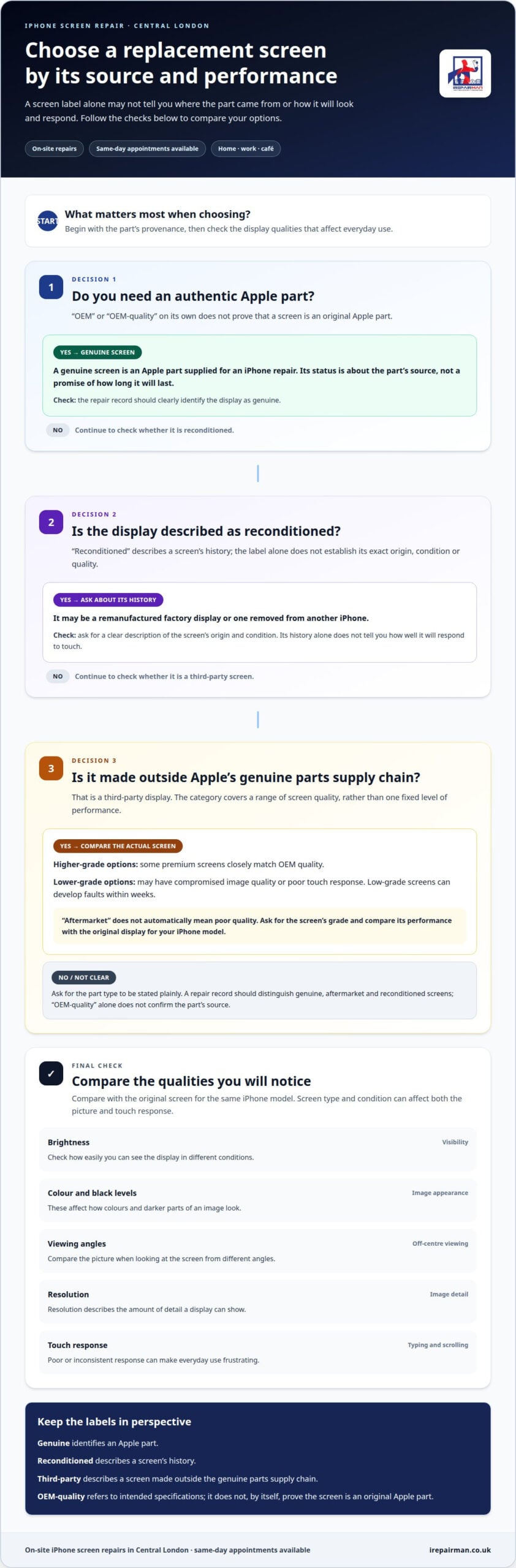
A genuine OEM replacement display is an authentic manufacturer part, not a third-party screen described as similar to the original. Its identity depends on its source, not simply on how it looks when the iPhone is switched on. For a clear comparison, the repair record should distinguish a genuine part from an aftermarket or refurbished display. That tells you what was fitted.
Third-party replacement displays
Third-party displays are made outside the official genuine parts supply chain. Their visual quality varies: some premium screens closely match OEM quality, while lower-grade options may have compromised image quality or poor touch response. Inconsistent touch response can make typing and scrolling frustrating. Low-grade screens can develop faults within weeks, so the part’s grade matters in everyday use.
A reconditioned display describes its history, rather than simply its quality. It may be a remanufactured factory display or one removed from a parted-out iPhone. The word “reconditioned” alone doesn’t establish its exact origin or condition. A clear description identifies it as reconditioned instead of relying on a broad quality label.
| Display option | What identifies it | Visual quality | Touch response |
|---|---|---|---|
| Genuine OEM replacement | Its source as an authentic manufacturer part | Identified by provenance, not appearance alone | Part type is recorded separately from performance |
| Third-party replacement | Made outside the official genuine parts supply chain | Ranges from close to OEM quality to compromised | Lower-grade screens may respond poorly |
| Reconditioned display | Its previous use or reconditioning | May be remanufactured or removed from another iPhone | History alone doesn’t establish response |
Choose based on your iPhone model, the screen’s stated origin and the display performance you want.
Can replacing a screen with an OEM-quality part affect a phone warranty or insurance in the UK? The “OEM-quality” label alone doesn’t determine how a warranty or insurance policy applies. The relevant policy terms govern how a screen repair is treated.
How can you identify a genuine OEM-quality replacement screen? “OEM” alone doesn’t prove a screen is an authentic manufacturer part. The repair record should state whether the display is genuine, aftermarket or reconditioned.
What are the risks of using a low-quality replacement screen? Lower-grade screens may have compromised visual quality or poor touch response, and can develop faults within weeks.
How should you choose a UK repair shop for an OEM-quality screen replacement? Look for a clear record of the display type and repair terms. When choosing a specialist such as iRepairMan London, the description should distinguish genuine, aftermarket and reconditioned screens, rather than using “OEM” as proof of origin.
Genuine and aftermarket screen brightness
Brightness, colour, resolution and durability all affect how an iPhone feels to use. OEM quality describes a relationship to the original screen’s specifications, not one universal brightness level.
OEM quality screens
An OEM-quality screen is made by the original device manufacturer or to the same specifications as the factory-fitted display. Those specifications provide a reference for brightness, colour and resolution on the relevant model. The term alone doesn’t establish the screen’s source or prove its performance. Treat it as a description of intended standards, not a guarantee of an identical viewing experience.
For durability, OEM quality describes a relationship to specifications, not a lifespan. A screen’s long-term performance also depends on the component’s quality and condition.
Genuine screens
A genuine screen is an Apple part supplied for an iPhone repair. Apple doesn’t manufacture iPhone displays itself; several companies supply its display assemblies. A genuine replacement is intended to follow the original screen specification for that model, including brightness, colour and resolution. It differs from a third-party part described as OEM quality because its status as an Apple part is the key distinction.
That distinction doesn’t specify a lifespan. Genuine status identifies the part’s relationship to Apple, rather than promising how long it will last.
Cheaper aftermarket screens
Aftermarket screens are made outside Apple’s genuine parts supply chain. Their performance varies: some premium options closely match OEM quality, while lower-grade screens may have compromised visual quality. A lower price doesn’t tell you the panel’s resolution or colour accuracy, so don’t assume all aftermarket replacements perform alike.
Durability varies by component, too. The aftermarket label doesn’t specify how long a screen will last, and a low-grade part can develop faults quickly. Ask for a clear description of the replacement type rather than relying on a broad grade label.
In practical terms, OEM specifications provide a reference for the original model’s image, while genuine status identifies an Apple part. Aftermarket describes a wider range, not one fixed level of brightness, colour or resolution. No category name alone establishes a screen’s durability.
Resolution describes the amount of detail a display can show; brightness affects visibility, while colour shapes how images look. Compare a replacement with the original screen for the same iPhone model, rather than assuming specifications from another device apply. This matters because a screen can appear bright yet reproduce colours differently.
Samsung figures illustrate why comparisons must stay model-specific: Samsung flagship screens can reach 1750 nits, while aftermarket Samsung screens discussed in market comparisons reach 500-700 nits. These are Samsung figures, not iPhone measurements, so they should not be used to judge an iPhone replacement.
Start by prioritising the original model’s display specifications, then distinguish genuine parts from OEM-quality descriptions and aftermarket grades. To assess durability, focus on the identified part and its repair terms, not the label alone.
Black levels and viewing angles
Black levels shape how dark scenes look, while viewing angles affect the image when you tilt your phone. These qualities depend on the display technology and replacement panel, so an OEM description alone doesn’t tell you what you’ll see.
Samsung AMOLED screens use pixels that produce their own light. A pixel showing black can switch off, creating deep blacks and high contrast. In a night-time film scene, this helps dark areas look black rather than grey. The effect comes from how AMOLED works, not simply from a screen being described as genuine or OEM quality.
Viewing angle is a different test. Look at the screen straight on, then tilt it gently to either side. Notice whether dark areas stay dark and colours remain consistent. This gives you a practical way to compare off-axis viewing, such as when sharing a photo with someone beside you. It doesn’t replace a model-specific assessment, but it helps show why the panel matters.
Panel type sets useful expectations, but it doesn’t tell the whole story. An aftermarket display can vary in construction and visual performance, while OEM quality refers to the original device’s specifications. For an iPhone repair, the original model’s display technology is the relevant reference. A Samsung AMOLED example explains how self-lit pixels create black levels; it shouldn’t be treated as a specification for every iPhone.
Contrast connects these two qualities. When a display shows deep blacks beside bright details, the difference between dark and light areas is more pronounced. In a dark photograph, this can make shadows and highlights easier to distinguish. Viewing angle affects whether that contrast remains clear when the phone isn’t directly in front of you.
To assess a replacement, compare the same image on the original display and fitted panel under the same lighting. Use a dark image with bright details, then view it straight on and from the side. Check for grey-looking blacks, colour changes or an uneven appearance. These observations help you describe the result, but they don’t establish the part’s origin or guarantee how every image will look.
For a fair comparison, keep the iPhone’s brightness setting consistent and use the same image on both screens. Changing brightness between tests can make one panel appear to have deeper blacks or stronger contrast. Compare at a normal viewing distance, too; holding the phone unusually close can distract from differences you’d notice in everyday use.
Black levels and viewing angles relate to panel design, not just the label on the part. Samsung AMOLED illustrates how self-lit pixels benefit dark scenes, while the exact viewing experience depends on the display fitted to the particular phone. When deciding on a repair, prioritise a clear description of the replacement type and compare screens under consistent conditions.
Meaning of OEM screens
OEM means original equipment manufacturer. In screen descriptions, “OEM quality” refers to a replacement intended to meet the factory-fitted display’s specifications. It describes a claimed standard, not a complete account of the part or repair. To understand why OEM quality screens are better, look beyond the label to what the repair record says about the screen fitted to your device.
A useful description makes clear what “OEM quality” means in context. It should identify the screen option and explain whether the term refers to its intended specifications. That helps you understand the claim instead of assuming it covers every aspect of the display or repair.
Keep the screen description with your repair paperwork. If you later see a notification in Settings or need support, the repair record gives you a specific part description to refer to. It also means you don’t have to rely on your memory of a brief conversation or a broad label in a listing.
For a practical record, note these details:
- Device: the iPhone model that received the replacement.
- Part description: the exact wording used for the screen.
- Repair record: any notes about the display and work completed.
- Settings message: the wording of any screen-related notification that appears afterwards.
On iPhone 12 onwards, a non-OEM screen may cause True Tone and display health notifications to appear in Settings if its serial number doesn’t match Apple’s records. This gives you a concrete point to discuss alongside the repair paperwork. The notification concerns the screen’s identification in Apple’s records; it doesn’t, by itself, describe every aspect of the display’s performance.
Treat a message as one piece of information, not a complete assessment of the screen. A True Tone or display health notification can be one clue to discuss when assessing a replacement screen. It doesn’t explain how the screen looks in daily use or what other checks were carried out during the repair.
The practical value of an OEM description is clarity. Ask what the wording means for the specific replacement and keep the answer with the repair details. Why OEM quality screens are better depends on the expectations behind that specification, so a precise description is more useful than a label without context.
If a Settings notification appears after a screen repair, note its wording and refer to the repair paperwork. This gives you a clear starting point for discussing the replacement and its identification, without treating one message as a complete verdict on the display.
What is the difference between OEM quality, aftermarket and refurbished screens?
These labels describe different things: a screen’s intended specifications, its source or its history. Separating those meanings helps you understand what an iPhone replacement description actually tells you.
OEM quality refers to a display made by the original device manufacturer or to the factory-fitted screen’s specifications. It describes a relationship to the original device, not necessarily the part’s manufacturer or supply chain. A screen labelled “OEM” isn’t automatically an original Apple part. The exact wording matters: “OEM quality” and “genuine Apple” don’t mean the same thing.
Aftermarket describes a screen made outside Apple’s genuine parts supply chain. It’s a broad category, not a fixed quality grade. Aftermarket displays range from premium components that closely match OEM quality to lower-grade parts with compromised visual performance or poor touch response. The label alone doesn’t tell you which level applies to a particular replacement.
Refurbished describes a screen’s history or reconditioning. It may be a remanufactured Apple display or a display removed from a parted-out iPhone. The term alone doesn’t explain whether the screen is genuine, how it was restored or how it performs. A refurbished display and an aftermarket display aren’t interchangeable terms: one refers to history, the other to supply chain.
Use the labels as separate clues when comparing options:
- Specification: Does “OEM quality” mean made to the factory-fitted screen’s specifications?
- Origin: Is the display identified as a genuine Apple part or an aftermarket screen?
- History: Is it new, refurbished, remanufactured or removed from another iPhone?
- Performance: Does the description explain expected visual quality and touch behaviour?
On iPhone 12 onwards, a non-OEM screen may cause True Tone and display health notifications in Settings if its serial number doesn’t match Apple’s records. Those messages relate to the screen’s identification. They don’t, on their own, establish whether it is refurbished or describe its viewing quality.
For a practical decision, first decide whether genuine Apple origin or specifications close to the original matter most. Then distinguish that preference from the screen’s history and grade. If you want performance as close to the original as possible, an OEM-refurbished screen is one option; its source and condition still matter. Clear part descriptions make it easier to compare what each label actually means.
IRepairMan London
iRepairMan provides same-day, on-site iPhone screen repairs in Central London, subject to technician and parts availability. A technician can meet you at home, work, school or a café, so you don’t need to travel to a repair shop. The team also repairs iPhone back glass and iPads. To arrange an appointment, contact iRepairMan London and discuss a suitable time and location.
Choose the screen experience that suits you
Your next step is to decide what matters most in daily use: a display designed to match the original, a genuine Apple part or another replacement option. Understanding why OEM-quality screens are better starts with separating the screen’s claimed specifications from its source and history. That distinction gives you a clearer basis for discussing a repair without treating every “OEM” label as proof of an original part.
If your iPhone screen is damaged, iRepairMan London provides iPhone screen repair at your home or workplace in Central London, with same-day on-site service where available. The team also repairs iPhone back glass and iPads, so you can discuss the right repair for your device in one place. A clear description of the screen option helps you make an informed choice before proceeding.
Contact iRepairMan London to describe your device and arrange a repair at a time and place that suits you. With the options clearly understood, you can choose the next step with confidence.
Frequently Asked Questions
Does it matter for iPhones?
Yes. A replacement screen affects how an iPhone looks and responds to touch, and some features depend on correct screen pairing. For example, from iPhone 12 onwards, a non-OEM screen may trigger True Tone or display health notifications in Settings if its serial number doesn’t match Apple’s records. On iPhone 13 and newer models, Face ID can stop working if the replacement screen isn’t properly paired.
Is the OEM screen kit any different from the original screen?
“OEM screen kit” doesn’t, by itself, mean the screen is identical to the factory-fitted part. OEM may describe a replacement made to the original device’s specifications, while “genuine Apple” identifies a part’s origin. If a repair description uses “kit”, focus on the exact screen type and what the term says about the display, rather than assuming it guarantees original Apple parts.
What are third-party (aftermarket) screens?
Third-party, or aftermarket, screens are made outside Apple’s genuine parts supply chain. The term covers different quality levels, not one consistent specification. A premium aftermarket display may closely match OEM quality, while a lower-grade part may have poor touch response or develop faults quickly. For example, typing can feel less responsive if the screen doesn’t reliably register touches.
What does “OEM” actually mean?
OEM stands for “original equipment manufacturer”. For a replacement display, it generally describes a part made by the original device manufacturer or to the factory-fitted screen’s specifications. Apple doesn’t make iPhone screens itself; several companies supply its display assemblies. So an “OEM” label alone doesn’t prove a screen is an original Apple part. The part’s source and the wording used to describe it matter.
What does OEM quality mean for replacement screens?
OEM quality means a replacement is described as matching the original device’s specifications; it doesn’t automatically identify who made it. When comparing repair descriptions, separate the claimed specification from the screen’s origin and history. For instance, “OEM quality” doesn’t tell you whether an iPhone display is genuine Apple, refurbished or aftermarket. That distinction helps you understand what the description does and doesn’t establish.
How do OEM quality screens compare with genuine manufacturer screens?
A genuine manufacturer screen is identified by its origin; OEM quality refers to a claimed relationship with the original device’s specifications. For an iPhone, the terms aren’t interchangeable. A screen described as OEM quality may be intended to match factory specifications without being a genuine Apple part. If original Apple provenance is your priority, the term “OEM” alone isn’t enough to establish it.
Do OEM quality screens support touch sensitivity and features such as True Tone or fingerprint sensors?
They may, but the “OEM quality” label alone doesn’t establish feature compatibility. Lower-grade replacement screens can have poor touch response. On iPhone 12 onwards, a non-OEM screen may prompt True Tone or display health notifications if its serial number doesn’t match Apple’s records. On iPhone 13 and newer models, Face ID can stop working if the replacement screen isn’t properly paired. Check the specific feature and model in question.