

A cracked iPad doesn’t have to mean a trip across London or a day without your device. With an iPad screen fix Southwark customers can arrange on-site, a technician can come to your home, workplace, school or a café, helping you keep your routine on track. Same-day appointments may be possible, depending on appointment timing and the repair assessment.
It can be hard to tell whether damage is limited to the outer glass or has affected the display or touch response. The right repair depends on an assessment of your iPad. This guide explains how to describe the problem, what happens during an on-site repair and how the device is checked afterwards. iRepairMan London uses an encrypted, no-access data safety protocol, and every repair comes with a 12-month warranty. If workshop handling is more suitable, tracked return delivery is another option, so you can arrange a repair without travelling to a repair shop.
Key Takeaways
- Cracks, unclear visuals and touch problems can each affect iPad use. Describe what you’re experiencing so the damage can be assessed.
- An iPad screen fix Southwark starts with identifying your iPad and its symptoms, then agreeing a repair approach based on the assessment.
- On-site repair can fit around your day at home, work, school or a café. Workshop handling is another option when appropriate.
- Before the appointment, have your iPad model and any access details ready, and note when the screen behaves unexpectedly.
- To arrange a repair, share your iPad model, screen symptoms, Southwark location and preferred appointment details.
IPad screen fix in Southwark: what damage needs attention?
A cracked iPad screen can make reading, studying, working or video calls uncomfortable. Damage might look like a fine line across the glass, a dark or discoloured patch, or touch controls that respond unreliably. Even if the iPad still switches on, these symptoms can make everyday tasks harder and less comfortable.
An iPad screen fix is guided by an assessment of the device. The visible glass is only part of the picture: display problems or touch faults can point to different repair needs. The iPad’s model also matters, so sharing it helps the technician identify the device before discussing a suitable repair plan. For general background on iPad models and their components, Wikipedia provides an overview.
How to recognise iPad screen damage
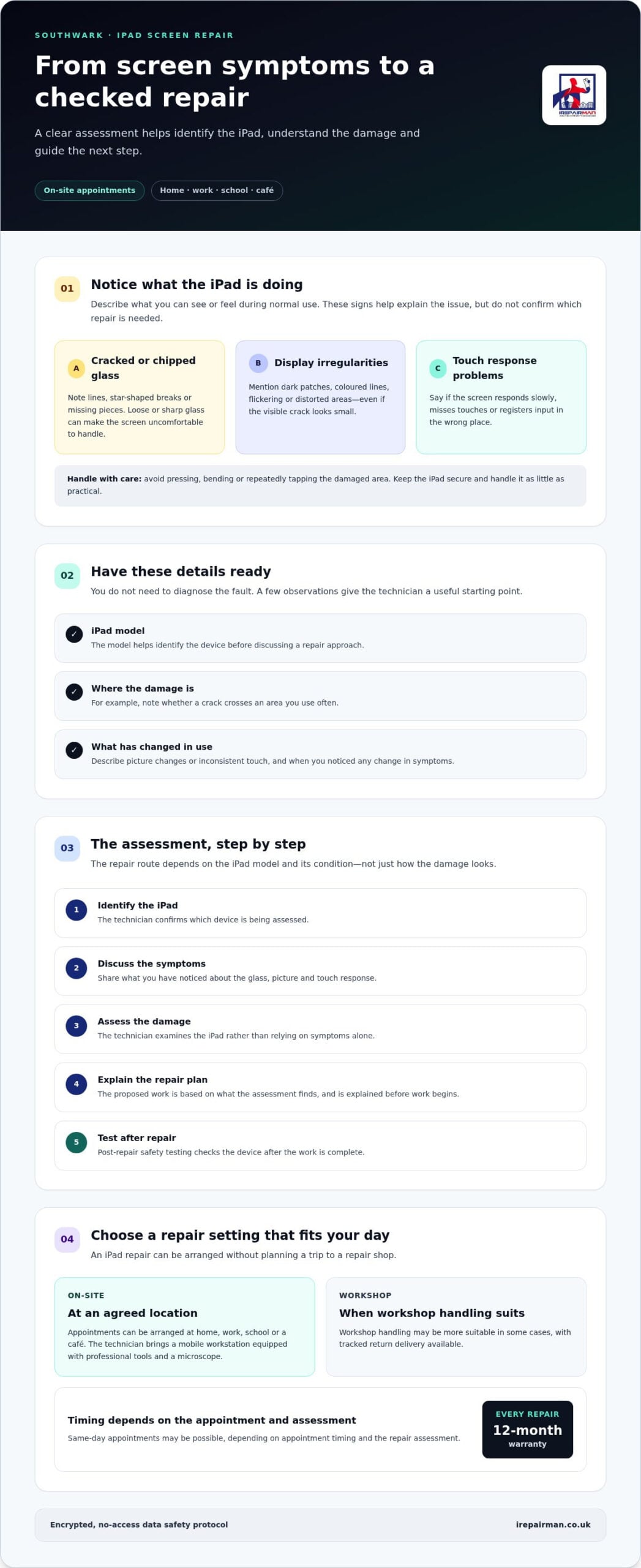
Look at what you can already see and notice how the iPad behaves during normal use. There’s no need to run tests or press damaged areas. Useful signs to describe include:
- Cracked or chipped glass: A line, star-shaped break or missing piece may catch a finger or make the screen uncomfortable to use.
- Display irregularities: Dark patches, coloured lines, flickering or distorted areas can affect what you see, even if the glass damage seems small.
- Touch response problems: The screen may respond slowly, miss touches or register input in the wrong place, making typing and selecting items difficult.
These details help explain the issue, but they don’t confirm which repair is needed. A small crack can occur alongside a display or touch fault, and visible damage alone can’t show what is happening beneath the surface.
When should you arrange an iPad screen assessment?
Arrange an assessment if a crack affects comfortable use, loose or sharp glass makes handling unpleasant, or the display or touch response interferes with everyday tasks. If symptoms change, such as a clear display developing dark areas or touch becoming less reliable, describe when you noticed the difference. Avoid pressing, bending or repeatedly tapping the damaged area. Keep the iPad somewhere secure and handle it as little as practical.
For an iPad screen fix Southwark appointment, share the model, what you can see and any display or touch symptoms. iRepairMan provides on-site phone and tablet repairs across London, including Central London, so you can arrange a convenient location rather than plan a journey to a repair shop. The assessment establishes the appropriate next step. Repair needs and outcomes depend on the damage found, but a clear description gives the technician a useful starting point.
How an iPad screen repair assessment guides the fix
A clear assessment helps you understand the repair process. The technician identifies the iPad, examines the damage and explains a suitable repair plan before work begins. A cracked screen doesn’t automatically mean every iPad needs the same fix. The model and the device’s condition both matter.
The assessment guides the appropriate repair route, and post-repair testing checks the device after the work is complete.
The process follows a practical sequence:
- Identify the iPad. The model helps the technician understand which device they’re assessing.
- Discuss the symptoms. Describe what you’ve noticed, such as cracks, changes to the picture or touch response.
- Assess the damage. The technician examines the iPad rather than relying on symptoms alone.
- Explain the repair plan. You’ll be told what the assessment indicates and what repair work is proposed.
- Test after repair. Post-repair safety testing is part of the service.
What information helps identify the right iPad repair?
If you can, have your iPad model details ready. Also describe where the damage is and what has changed during ordinary use. For example, say whether a crack crosses the area you use most, whether the picture looks different, or whether touch input feels inconsistent. You don’t need to diagnose the fault yourself. These details give the technician a useful starting point, while the hands-on assessment guides the repair choice.
Each model can have a different design, which is one reason the technician identifies the device before settling on a repair approach. For general repair background, iFixit provides iPad repair manuals and safety guidance. A guide can explain repair considerations, but it can’t assess the condition of your individual iPad.
What happens during repair and post-repair testing?
For an on-site appointment, the technician brings a mobile workstation equipped with professional tools and a microscope. It provides a dedicated setup for inspection and repair at the agreed location, whether that’s your home, workplace or school. The technician uses the assessment to guide the work, rather than treating every crack as the same repair.
Once the repair is complete, post-repair safety testing is carried out as part of the service. The technician checks the device after the work, rather than simply returning it without a final review. The proposed work reflects the iPad’s condition as found during the assessment.
Every repair comes with a 12-month warranty. If you’re arranging an iPad screen fix Southwark, sharing your model and symptoms helps start a focused conversation about the assessment and next steps. You can arrange an iPad repair at a convenient location.
On-site or workshop iPad screen repair in Southwark?
You can arrange an iPad screen repair without adding a trip to a repair shop to your day. iRepairMan provides on-site phone and tablet repairs across London, including appointments in Southwark and Central London. A technician can attend your home, workplace or school, subject to appointment timing and the repair assessment. Same-day appointments may be available, but they aren’t guaranteed.
Workshop handling is another option when a repair is better completed at the London workshop than at your chosen location. The assessment and repair plan help determine which route suits the device. Neither option requires you to travel to a repair shop: on-site service brings the technician to you, while workshop repairs are returned by tracked delivery.
When is an on-site iPad repair convenient?
An on-site appointment can reduce disruption if you’re working from home, have a busy day at the office, or need to keep a school or nursery routine moving. You can arrange for the technician to meet you at a suitable location, such as your home, workplace, school or a café in Southwark. That means less time organising travel and more flexibility around your day.
It can be useful if you’d rather stay nearby while the iPad is assessed and repaired. Appointment timing and the assessment affect what can be arranged, so same-day service isn’t a fixed promise. For an iPad screen fix Southwark, share your location and preferred appointment details when arranging the service.
When might workshop handling be the better route?
If the repair is better suited to workshop handling, your iPad can be repaired at the London workshop instead of during an on-site visit. This is an alternative, not a requirement for every screen repair. The assessment and repair plan help establish whether workshop handling suits your device and circumstances.
After workshop repair, the iPad is returned by tracked delivery in around 2 to 3 working days. This lets you have the work handled without arranging a journey to collect it. Consider what fits your routine: a technician at your location may be simpler, while workshop handling is another route when the repair calls for it.
To make arrangements straightforward, think about where you can comfortably meet a technician and whether an on-site visit or workshop handling better fits your day. Share your iPad model, symptoms and Southwark location when discussing the appointment. The repair route is guided by the assessment, taking both convenience and the device’s needs into account.
Prepare your iPad for a screen fix: data, access and safety
A few simple steps can help an iPad repair appointment run smoothly. You don’t need to prepare the device in a particular technical way. If it’s working, back up important information if you’re able to. If it isn’t, explain what you can and can’t access. You can also share practical details that help the technician understand how you use the iPad.
What should you do before the technician arrives?
Focus on the details that help with the appointment, and avoid trying to test or handle damaged areas.
- Back up important information if the iPad is usable and you’re able to do so.
- Keep passcodes private. Don’t include them in booking messages. Discuss device access directly with the technician if it becomes relevant.
- Have the iPad available at the agreed location, along with its model details if you can find them.
- Note other changes you’ve observed during normal use, such as intermittent touch response or display issues.
You don’t need to recreate a fault or press on cracked glass. A short, accurate description of what you’ve noticed is enough to explain the situation.
How are privacy and repair safety addressed?
iRepairMan uses an encrypted, no-access data safety protocol designed to protect personal information and avoid accessing its contents during repair. This safeguard is not a reason to share account details or passcodes unnecessarily. Technicians are vetted and GDPR-compliant, supporting careful handling of your iPad and data.
If you’re concerned about information stored on the device, mention that when arranging the appointment. You can also say whether the iPad contains work or school material you need to access soon, so the repair arrangements can take your routine into account. Avoid sending sensitive content in messages about the repair.
For an iPad screen fix Southwark, share your iPad model, screen symptoms and preferred appointment details. Arrange your iPad screen repair and mention any access or privacy concerns you’d like the technician to know about.
Arrange an iPad screen fix with iRepairMan in Southwark
To get an appointment moving, have four details ready: your iPad model, what has changed on the screen, your Southwark location and a preferred time. iRepairMan arranges on-site phone and tablet repairs around your needs, so you can request a visit at home, work, school or a café instead of planning a trip to a shop.
How to arrange a Southwark iPad repair
A clear description is a helpful starting point, even if you’re unsure what the damage means. Share the information you have, then let the assessment guide the repair plan.
- Identify the iPad. Include its model if you can find it.
- Describe the issue. Mention cracks, display changes or touch problems.
- Give your location. Say where in Southwark you’d like the appointment.
- Request a suitable time. Provide your preference so the arrangements can fit your schedule.
iRepairMan operates seven days a week, Monday to Sunday, but a particular appointment slot isn’t guaranteed. Same-day visits may be possible depending on timing and the repair assessment.
What reassurance comes with the service?
The assessment gives you a chance to understand the proposed work before deciding how to proceed. If the iPad is used by a school or nursery, the iPad Repair for Schools UK guide may help education teams consider their repair arrangements. If you’re weighing up collection and return for another device, the iPhone Repair Pick and Return UK guide explains that option.
To arrange an iPad screen fix Southwark, share your model, symptoms, location and preferred appointment details. Arrange your iPad screen repair at a time and place that work for you.
Take the next step towards a usable iPad
A damaged screen can make ordinary tasks frustrating, but you don’t need to work out the exact fault before arranging help. Start with what you know: your iPad model, the symptoms you’ve noticed and where in Southwark you’d like the appointment. That gives the repair team a practical starting point, while the assessment guides the appropriate next step.
Choosing an iPad screen fix Southwark service that comes to you can make it easier to fit a repair around your day. Share your preferred appointment details and arrange an appropriate service plan. You don’t need to wait until the screen becomes harder to use before asking for an assessment.
Arrange an iPad screen repair with iRepairMan and take the first step towards getting your device assessed. You can move forward with a clear plan and support tailored to your situation.
Frequently Asked Questions
Can you fix an iPad screen if the touch function has stopped working?
An iPad with touch that has stopped working can be assessed for repair. When arranging an iPad screen fix Southwark, explain whether touch stopped completely or only in one area, and whether the issue began after a drop. Don’t keep tapping or pressing the screen to test it. Those details help describe the fault, but the technician needs to assess the iPad before identifying the repair required.
How can I find my iPad model before arranging a screen repair?
If the iPad is usable, open Settings, tap General, then About to view its model details. Note the model name or take a screenshot to refer to when arranging the repair. If you can’t navigate the menus, don’t force the screen to respond. Share what you know, such as the device’s size or appearance, and the technician can identify it during the assessment.
Will an iPad screen repair delete my photos and files?
A screen repair is intended to address the screen, not erase photos and files, but no repair can guarantee that all data will remain accessible in every situation. If possible, keep a separate record of important information you may need during the appointment, such as contact details or schoolwork deadlines. You don’t need to send personal files or photographs to describe a screen fault.
Can I use a tempered glass protector on an iPad after a screen repair?
Usually, a tempered glass protector can be fitted once the replacement screen is ready for normal use. Choose one made for the exact iPad model, as screen dimensions and camera or button positions can differ. Follow the protector’s fitting instructions, and don’t apply it over cracked glass in place of repair. If you already own a protector, have its packaging or model details available when discussing the repair.
Does a cracked iPad screen affect the device’s other functions?
A crack doesn’t automatically mean every other iPad function is affected. Some devices may still play sound, connect to accessories or use their buttons, while others may show additional problems after an impact. Don’t assume the iPad is undamaged simply because one feature works. Tell the technician about changes you’ve noticed during ordinary use, including problems with sound, buttons or accessories.
Is it worth repairing an older iPad with a damaged screen?
That depends on whether the iPad still suits your needs and whether it has other faults. Think about the tasks you rely on, such as accessing school resources, reading or video calls, and whether the battery or buttons have also become troublesome. An assessment can clarify the screen issue. You can then weigh the proposed repair against how useful the device remains in your daily routine.
Can a repaired iPad screen look different from the original?
It can be difficult to predict the finished appearance before the iPad and damage have been assessed. The model, the screen’s condition and the repair required all matter. If matching the existing appearance is a priority, raise that before agreeing to the repair plan. You can also mention any visible marks or colour differences you’re concerned about, so expectations can be discussed in relation to your device.
What should I do if the iPad screen becomes unresponsive after a drop?
Stop trying to use the touchscreen and keep the iPad somewhere secure, especially if the glass is cracked. Don’t press hard on the display or bend the device. Note when the drop happened and whether the screen went blank, froze or still shows an image. Share those details when arranging an assessment in Southwark. They help explain what happened without risking further damage through repeated testing.



