

What if the repair itself isn’t the only thing you need to check? What to ask before getting your phone repaired includes questions about your personal data, the repair method, testing and what happens if an issue returns. It’s sensible to want clear answers before your phone leaves your hands, especially when you rely on it for work, travel or everyday plans.
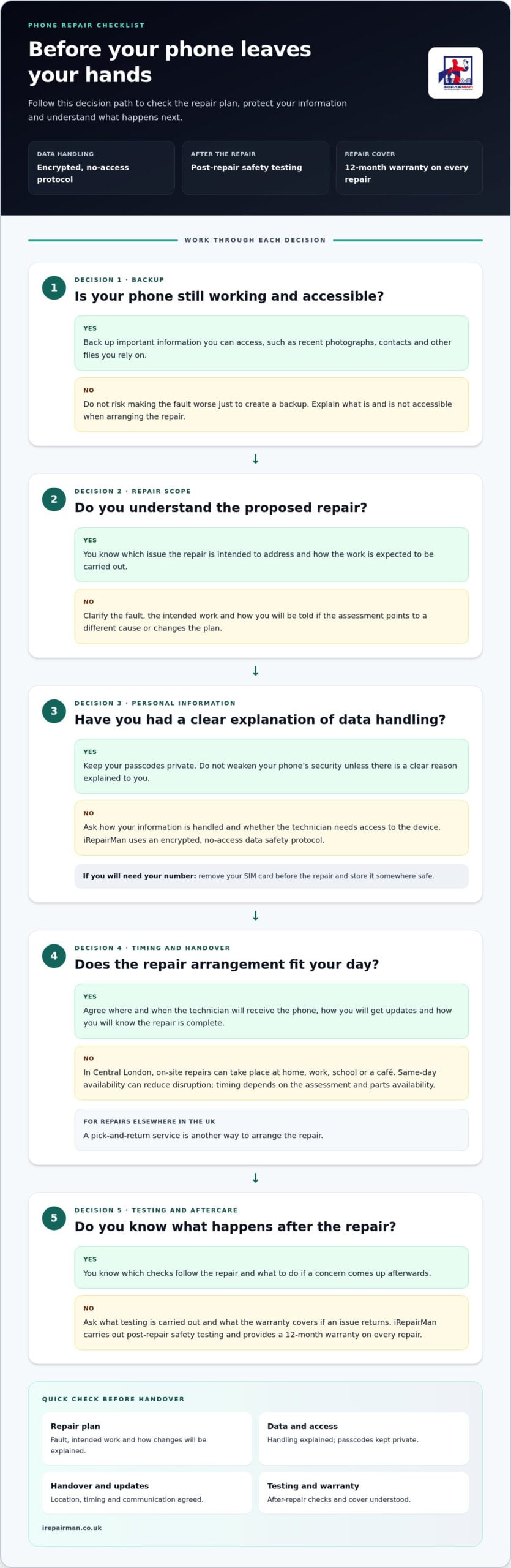
This checklist covers the repair process before booking, from data protection to post-repair checks and warranty terms. iRepairMan London uses an encrypted, no-access data safety protocol, carries out post-repair safety testing and provides a 12-month warranty on every repair.
You’ll also find out how to clarify timing and aftercare, and choose an arrangement that suits your day. In Central London, on-site repairs can take place at home, work, school or a café, helping you avoid an unnecessary trip to a repair shop. Same-day on-site availability helps reduce disruption, with timing depending on the repair assessment and parts availability. For customers elsewhere in the UK, a pick-and-return service offers another way to arrange a repair.
Key Takeaways
- Use What to ask before getting your phone repaired as a checklist for the repair method, data privacy, technician expertise, timing and aftercare.
- Clarify what work is planned and how any changes will be explained after the phone is assessed.
- Understand which checks follow the repair and what the warranty covers if an issue returns.
- Agree the appointment location and handover plan in advance to reduce disruption to work, travel or daily routines.
- Choose between an on-site appointment in Central London and pick-and-return arrangements for repairs elsewhere in the UK.
What should you ask before getting your phone repaired?
A damaged phone can disrupt a workday, complicate travel and interrupt everyday routines. Before arranging a repair, get clear answers about five areas: the repair method, data privacy, technician expertise, timing and aftercare. These details help you understand what will happen, who is responsible for each step and what to expect afterwards.
What to ask before getting your phone repaired depends on the fault and the device, but the aim is straightforward: understand the proposed work and how the repair will be managed. Focus on questions that clarify the repair scope, the handover and what happens if the assessment changes the plan.
Which repair questions matter most?
Start with the fault and proposed solution. Ask which issue the repair is intended to address, how the work will be carried out and whether the technician will explain any changes if the assessment points to a different cause. That establishes the scope before you arrange a handover.
Then separate practical arrangements from technical quality. Logistics questions cover where the repair takes place, how you’ll hand over the device and how you’ll receive updates. Quality questions cover technician experience, relevant checks and aftercare. The Right to Repair movement centres on access to repair options and information, making a clear explanation of the work a useful starting point.
The same checklist can guide iPhone, Samsung and tablet owners, but the repair process depends on the model and fault. A cracked screen, for example, raises different practical questions from a charging problem. Ask for an explanation that relates to your device and the issue you’ve reported.
How can you compare repair arrangements fairly?
Compare the whole process, not just the repair description. Check the location, how the device changes hands and how you’ll be kept informed if the assessment affects the plan. In Central London, on-site mobile phone repairs can take place at home, work, school or a café, so you can avoid building a journey to a repair shop into your day. Same-day on-site availability can help limit disruption, with timing dependent on the assessment and parts availability.
- Location: Can the repair take place somewhere that fits your day?
- Handover: Where and when will the technician receive the phone?
- Updates: How will you hear about the assessment or any change to the plan?
- Return: How will you know the repair is complete, and what should you do if a concern comes up?
For a screen fault, the iPhone screen repair guide explains the on-site repair process in more detail. Use the questions above to match the arrangement to your device, location and schedule, then consider the safeguards for your data and the completed repair.
What should you ask about phone repair data privacy?
Your phone may hold personal photographs, private messages and apps that open directly into your accounts. Data handling is a practical repair question, not an afterthought. Before arranging a repair, find out how your information is handled, whether the technician needs access to the device and what you can do to safeguard information that matters to you.
Ask for a clear explanation of what happens to your information during the repair and whether any step requires your involvement. Protecting data and backing it up are different: privacy measures help safeguard information during repair, while a backup gives you another copy if information on the phone is lost or the device stops working.
What does no-access data handling mean?
No-access handling is intended to protect your personal information without routine access to its contents. iRepairMan uses an encrypted, no-access data safety protocol. You shouldn’t need to share your account passwords or weaken the phone’s security without a clear reason. Keep passcodes private, and ask for an explanation before taking any step that changes your security settings.
Photos, messages and signed-in accounts can feel especially personal, so it’s reasonable to understand how they’re protected before handing over a device. A direct explanation helps you know what happens to your information and decide what you’re comfortable with.
What should you do if the phone still works?
If the phone is operational, back up important information before the repair where you can. Check that recent photographs, contacts and other files you rely on are included, rather than assuming an older backup has everything. If the device is too damaged to use, don’t risk making the fault worse just to create a backup. Explain what is and isn’t accessible when arranging the repair.
Consider the practical details, too:
- Keep a copy: Back up important information while the phone is working and accessible.
- Keep your number available: Remove your SIM card if you’ll need it during the repair period, and store it somewhere safe.
- Protect account access: Don’t volunteer passwords or turn off security features without a clear reason explained to you.
For an organisation arranging repairs across several devices, consistent handling and clear processes matter as much as individual preparation. iRepairMan’s corporate device management service supports business teams coordinating phone repairs.
For a personal device in Central London, you can arrange on-site phone repair at a convenient location. Before the appointment, decide which information you need backed up and whether you’ll need your SIM, so you can focus on the repair rather than avoidable access concerns.
What should you ask about repair quality, testing and warranty?
Repair quality is easier to assess when you understand who will do the work, what checks are planned and what support applies afterwards. Ask for clear explanations rather than a technical description alone. You should understand what the repair is intended to address and what to expect from the process.
iRepairMan uses vetted, certified technicians and professional tools, including a mobile workstation equipped with a microscope. The table below sets out useful questions and what they help clarify about your repair.
| Question | Why it matters | What to clarify with iRepairMan |
|---|---|---|
| Who will work on my device? | Knowing the technician’s experience helps you understand who is responsible for the work. | iRepairMan uses vetted, certified technicians and professional tools. |
| What checks are relevant to this repair? | Checks should relate to the work performed and the device’s condition. | Ask which checks apply to your repair and what they assess. |
| What does the warranty cover? | The terms help you understand what support applies if you have a concern later. | Read the warranty terms in relation to the specific repair performed. |
| How will you explain any findings? | Clear updates help you understand whether the repair plan needs to change. | Ask for findings and next steps to be explained in plain language. |
How can you understand the repair checks?
Find out what will be checked after the work and how the results relate to the fault you reported. For example, if the repair involves a battery, ask whether battery safety standards testing is relevant to that job. A useful check helps you understand the device’s condition after the repair, rather than relying on a vague assurance that it has been tested. iRepairMan carries out post-repair safety testing, and the team can explain which checks relate to your repair in everyday terms.
What should you know about repair warranty?
Read the warranty terms alongside the repair details. Check which work the terms relate to, how to raise a concern and what information you should keep. iRepairMan provides a 12-month warranty on every repair. Keep the repair record and warranty information together, and refer to the specific work carried out rather than assuming the terms cover every fault on the device.
For an iPhone screen fault, the professional iPhone screen repair guide provides screen-specific context. More broadly, use these questions to understand the technician’s approach, relevant checks and support for your repair. A clear explanation helps you make an informed decision for an iPhone, Samsung phone or tablet.
What should you ask about repair timing and logistics in London?
A repair plan should fit around your day, without leaving you guessing where your phone will be or how the handover works. For an on-site repair in Central London, explain the fault and device model when arranging the appointment. The time needed depends on the assessment and parts availability, so find out how these may affect your repair plan. Same-day on-site availability can help you get the repair arranged with less disruption.
Use this simple sequence to organise the practical details:
- Describe the fault: Explain what has happened and what the phone is doing now.
- Give the model: Share the make and model, such as an iPhone or Samsung phone, so the repair can be planned around the device.
- Choose a location: Say whether home, your workplace, a reception, coworking space, school or café suits you.
- Agree the handover: Clarify where to meet the technician and how you’ll receive updates about the repair.
Which repair location fits your day?
On-site repairs bring the service to a practical Central London location, including your home, workplace, school or a café. This can help if you need to stay nearby or carry on with your day. Workshop repairs follow a different route: devices are repaired at the London workshop and returned by tracked delivery in around 2-3 working days. You don’t need to travel to the workshop.
Think about what matters most for this repair. For an on-site appointment, choose a location where you can meet the technician and hand over the device. For a workshop repair, note how the return delivery will be tracked and make arrangements to receive the phone.
What should you clarify before arranging the repair?
Give a clear description of the fault, the exact device model and your preferred repair location. Find out how the assessment may affect the repair plan and whether parts availability could change the expected timing. This sets a realistic expectation without assuming every fault follows the same process. If your schedule is tight, explain any constraints when arranging the appointment so the practical details can be discussed upfront.
If you’re arranging a repair for a remote team or live outside London, UK-wide pick-and-return logistics provide an alternative to an on-site appointment. The UK-wide pick-and-return repair guide explains this option for customers organising a repair beyond Central London.
Before arranging your repair, make sure you understand the location, handover and update process as well as the work itself. For a Central London repair, arrange an on-site phone repair at a location that works for your day.
How does iRepairMan answer the questions before your phone repair?
A clear repair arrangement should tell you where the work can happen, how your information is handled, what checks follow the repair and what support comes afterwards. iRepairMan provides on-site phone and tablet repairs across Central London, as well as UK-wide pick-and-return service for customers elsewhere. These options can reduce the need to travel or disrupt a working day.
iRepairMan has served London customers since 2015. Before arranging your repair, note the device model, the fault, your preferred location and any timing needs. This gives the repair team useful context and helps make the next steps clear.
What can customers expect from iRepairMan?
On-site repairs can be arranged at a convenient Central London location, such as home, work, school or a café. For customers elsewhere in the UK, pick-and-return logistics provide another way to arrange a repair without travelling to London. The repair plan and timing depend on the device assessment and parts availability, so share the fault details when setting things up.
Repairs are carried out by vetted, certified technicians using professional tools, including a mobile workstation and microscope. iRepairMan carries out post-repair safety testing and provides a 12-month warranty on every repair. An encrypted, no-access data safety protocol is used to protect personal information during the repair process.
Each of these details answers a different concern. The repair location helps you plan your day; the data protocol addresses privacy; technician expertise and post-repair checks explain how the work is handled; and the warranty sets out the support attached to the repair. Keep the repair details and warranty information together for reference after the appointment.
How can you take the next step?
When arranging a repair, provide the device make and model, describe the fault as clearly as you can, and choose a location that suits your routine. If the device belongs to a school or workplace, include any handover arrangements so the visit can fit around the people who use it. For a UK-wide pick-and-return repair, outline where the device is based and who will coordinate the handover.
What to ask before getting your phone repaired comes down to getting a clear picture of the process before you commit: where the repair will happen, how your data is protected, what checks are carried out and what warranty applies. iRepairMan offers on-site repairs in Central London and UK-wide pick-and-return service, so you can choose an arrangement that suits your location and day. Arrange your phone or tablet repair with iRepairMan.
Take the next step with a clear plan
Before booking, note the fault, when it began and how it affects your day. Decide where a repair would fit most easily, and consider any arrangements you’ll need if your phone is unavailable for a time. This gives you a practical starting point for discussing the repair and keeps the process focused on what matters to you.
Use What to ask before getting your phone repaired as a prompt to raise anything that still feels unclear. You don’t need to know the technical details. Describe what you’ve noticed, explain what you need from the device and ask for the next steps in plain language. A repair plan should leave you informed, not rushed.
When you’re ready, arrange an on-site repair in Central London or use the UK-wide pick-and-return service. Arrange a phone repair with iRepairMan.
Frequently Asked Questions
Can I get my phone repaired at work in Central London?
Yes, you can arrange an on-site repair at your Central London workplace. When booking, give the building address, a suitable meeting point such as reception, and the phone model and fault. If access is managed by reception or a facilities team, let them know a technician is expected and agree how you’ll meet. This can fit the repair around your working day without an extra journey.
How long does a phone repair take?
There isn’t one set duration for every repair. Timing depends on the fault, the device and parts availability, so a screen issue and a less obvious fault may follow different paths. Share the phone model and symptoms when arranging the repair, then use the assessment to understand the expected process. Workshop repairs are returned by tracked delivery in around 2-3 working days; individual repair timing can vary.
Do I need to back up my phone before repair?
If your phone works well enough, back up important information before the appointment, especially recent photos, contacts and files you need for work or study. Check that the backup has completed rather than relying on an old copy. If the phone is unstable or badly damaged, don’t keep using it just to make a backup. Tell the technician what you can access and keep your SIM if you’ll need it.
Can a business arrange repairs for several phones at once?
Yes. iRepairMan’s B2B Repair HUB can handle batches of 20 or more devices simultaneously. For a team, prepare a simple device list with each phone’s model, reported fault and user or department. A fleet manager can coordinate handovers and let colleagues know when their device is needed. For remote teams and satellite offices, UK-wide pick-and-return logistics offer another way to organise repairs.
Can I use my phone whilst it is being repaired?
Plan as though the phone will be unavailable while the technician is working on it. For an on-site appointment, confirm the expected handover and work period for your device. Beforehand, make sure you can access essential messages or work details elsewhere, and tell colleagues or family how to reach you if needed.
What happens if the technician finds another fault during the repair?
A separate fault may affect the repair plan, so ask for the issue and its likely effect to be explained before agreeing to any additional work. An important part of what to ask before getting your phone repaired is whether the newly found fault is linked to the original problem or needs separate attention. This helps you understand what the proposed work covers and decide how you’d like to proceed.
Does every iRepairMan repair come with a warranty?
Yes, every iRepairMan repair comes with a 12-month warranty. Read the terms in relation to the specific repair carried out, so you know what the warranty applies to. Keep the repair record and warranty details somewhere easy to find. If you later notice a concern with the repaired area, those details will help you explain which work was completed and when.



