

Your child comes home with a cracked screen, an iPad that won’t turn on or a device that suddenly won’t charge. If your first thought is “My child’s school iPad is broken”, pause before trying a fix. The safest next step depends on whether there’s physical damage or a possible software fault.
It’s natural to worry about lost schoolwork, pupil data and missed lessons. Tell the school what has happened before arranging work on a school-issued device. The school can guide you on access to learning materials and manage the repair process.
This guide explains what to check safely, what information to share and how to choose a repair route that limits disruption. You’ll also learn when on-site iPad repair can help keep devices at school, how UK-wide pick-and-return supports schools elsewhere, and what to consider if several pupil iPads need attention.
For schools in Central London, iRepairMan London provides on-site phone and tablet repairs, with vetted technicians, an encrypted, no-access data safety protocol and a 12-month warranty on every repair. The aim is to protect the pupil’s work first, then help restore access to a working device with less disruption to learning.
Key Takeaways
- If My child’s school iPad is broken, note any visible damage and tell the school before attempting a repair.
- Check the charging connection and restart the iPad only if it’s safe to handle. Simple checks can’t diagnose every fault.
- Compare on-site school repairs with UK-wide pick-and-return to find the route that best fits the device’s location and learning needs.
- Record the iPad model and fault symptoms for the repair arrangement, but don’t share sensitive pupil information.
- For multiple devices, a school can arrange batch repairs through iRepairMan’s B2B Repair HUB, which can handle 20 or more devices simultaneously.
My child’s school iPad is broken: what should I do first?
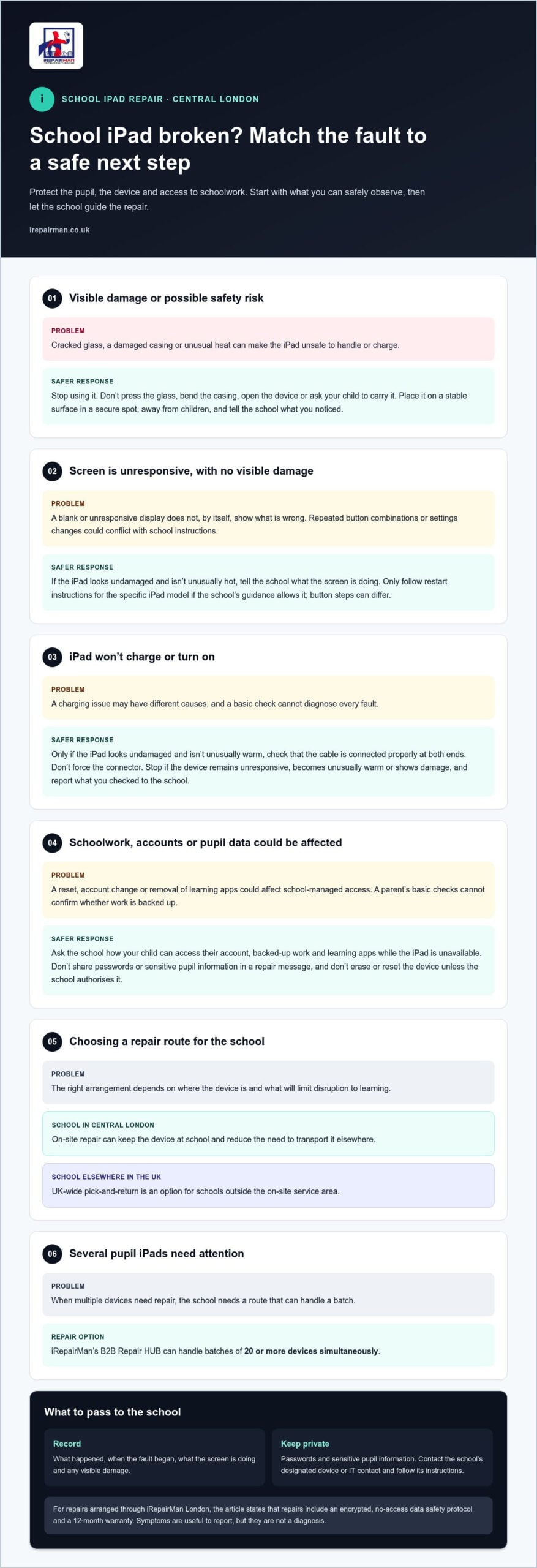
First, check whether it’s safe to handle. If there’s sharp glass, unusual heat or a damaged casing, don’t ask your child to keep using it or try to charge it. Keep the iPad somewhere secure, away from your child, and contact the school. A cracked screen, blank display or charging problem can have different causes, so symptoms alone can’t confirm what’s wrong.
If your message to the school is “My child’s school iPad is broken”, use this simple first-response sequence:
- Visible damage: Don’t press on cracked glass, bend the casing or try to open the device. Keep it still and report the damage to the school.
- Unresponsive screen: If the iPad looks physically undamaged and isn’t unusually hot, tell the school what the screen is doing. Avoid repeated button combinations or settings changes if you’re unsure of the school’s device instructions.
- Charging problem: If there’s no visible damage or unusual heat, check that the cable is connected properly. Don’t force a connector into the port or keep charging a device that appears damaged.
- Record and report: Note what happened, when the fault began and any visible damage. Contact the school’s designated device or IT contact promptly, then follow their instructions.
These are cautious first steps, not a diagnosis. Don’t press broken glass, open the casing or attempt a repair yourself. This could cause further damage and complicate the school’s repair arrangements. If the device is physically damaged, it needs an appropriate assessment before anyone decides what to do next.
Is the broken school iPad safe to use?
Stop using it if you notice sharp glass, unusual heat or a casing that’s cracked, bent or coming apart. Don’t let your child carry it in a school bag or handle a damaged screen. Place it on a stable surface in a secure spot, away from children, and tell the school what you’ve observed. A symptom doesn’t reveal the full fault, so leave the assessment to the repair process.
Who should a parent tell about a school-owned iPad?
Tell the school before arranging work on a school-owned iPad. The school may have its own process for reporting damage and managing devices, so contact the designated teacher, office contact or IT team if you know who handles device issues. Share the symptoms, when they started and any visible damage. Keep your message factual, and don’t include passwords or sensitive pupil information.
School iPads support classroom learning as part of educational technology. For schools in Central London, iRepairMan London provides on-site phone and tablet repairs. A technician can assess the device at the school, reducing the need to transport it elsewhere.
Check the iPad fault without risking schoolwork or device settings
If you’re thinking, “My child’s school iPad is broken,” keep checks simple and avoid changes that could affect school access. A school-managed iPad is controlled under the school’s arrangements, which may include settings and learning apps. A parent can note symptoms, but basic checks can’t confirm every fault or show whether work is safely backed up.
Look for the difference between a possible connection or software issue and visible physical damage. A blank screen without visible damage may allow a cautious restart. Cracked glass, a damaged casing or unusual heat are reasons to stop rather than experiment. Don’t erase the iPad, reset it, remove learning apps or change school-managed settings unless the school authorises it.
What can I check if the iPad will not turn on or charge?
Only try these checks if the device looks undamaged and isn’t unusually warm:
- Check that the charging cable is firmly connected at both ends, without forcing it into the port.
- If possible, check that the power source appears to work by using it with a suitable device or checking its usual indicator.
- If the iPad remains unresponsive, follow Apple’s current restart instructions for that specific iPad model. Button steps can differ, so don’t guess or keep trying combinations.
Stop if it still won’t respond, becomes unusually warm or shows damage. Tell the school what you checked and what happened. These observations can help describe the fault, but they aren’t a diagnosis.
How can I protect a child’s schoolwork and data?
Ask the school’s designated contact how your child should access their account, backed-up work and managed learning apps while the iPad is unavailable. Don’t ask your child to share account passwords, and don’t send passwords in a repair message. Avoid signing out, changing account details or attempting a reset. The school should guide any changes that could affect access.
For repairs, iRepairMan London uses an encrypted, no-access data safety protocol. This is designed to protect privacy during the repair process. The school remains the right contact for questions about its accounts, backups and learning systems. If the school arranges an assessment, share the symptoms and checks already tried so the repair team has a clear starting point.
Once the school has authorised the next step, iPad repair for schools can be arranged through iRepairMan London’s school and nursery repair service, keeping device handling straightforward.
Compare school iPad repair routes: on-site or pick-and-return
If your message to the school is “My child’s school iPad is broken”, the next decision is how to arrange an assessment and repair with as little disruption as possible. The right route depends on the fault, where the school is based and how it manages pupil devices. The iPad needs to be assessed before anyone can confirm the repair outcome.
| Consideration | On-site school repair | UK-wide pick-and-return |
|---|---|---|
| Location | A technician attends the school to assess the device. | The device is collected from and returned to an agreed school location. |
| Coordination | School staff arrange access for the technician and the device. | Staff coordinate collection and return around school operations. |
| Device access | The iPad is with the technician during the appointment. The assessment determines what can be done on-site. | The iPad is away from the school during collection, handling and return, so staff may need to plan for a period without it. |
When can on-site iPad repair suit a school?
An on-site appointment suits a school that wants repair support at its own premises and fewer hand-offs for the device. Staff can agree a suitable place and time for the technician to assess it. Whether the repair can be completed on-site depends on the fault and assessment, so don’t assume a particular outcome in advance. iRepairMan provides on-site phone and tablet repairs for schools and nurseries in Central London.
When can pick-and-return repair suit a school?
UK-wide pick-and-return is a practical option for schools outside Central London, including remote schools and satellite locations. The school coordinates collection and return at an agreed location, fitting those steps around its operating needs. As the iPad will be away during handling, consider how the pupil will access learning in the meantime. The repair process and timing depend on the assessment and any parts required.
For schools managing several devices, it can also help to consider how one repair route fits a wider maintenance plan. Read the iPad repair guide for schools for more on school fleet planning and coordinating device repairs.
Prepare a school iPad for repair and reduce classroom disruption
A clear handover helps the school arrange an assessment and plan for the pupil’s learning while the iPad is unavailable. If “My child’s school iPad is broken”, the parent and school contact can share practical details without sending passwords or other sensitive information.
What information should the school prepare?
Use the school’s own asset process to identify the device. Before arranging collection or an appointment, the parent or school contact can note:
- Device identity: Record the model and the asset details the school uses to track its iPads.
- Fault symptoms: Describe what happens, such as a blank screen, a charging issue or visible screen damage.
- Timing: Note when the problem first appeared and whether anything changed before it began.
- Checks attempted: Record any safe checks already tried and what happened. Don’t include passwords, pupil records or private account details.
- Point of contact: Agree who will coordinate the appointment and keep the family informed about next steps.
Before handover, the school should manage accounts, passcodes and access arrangements according to its own process. Parents shouldn’t remove school accounts or change managed settings unless authorised. This keeps the school in control of access and helps avoid preventable delays during handover.
How can schools plan around a device being unavailable?
Ask the school to agree a temporary, school-approved learning arrangement while the iPad is assessed. This could mean planning how the pupil will access the affected classroom task without that device. The school can advise on the learning apps and accounts involved.
If several pupil iPads need attention, coordinating their details together can help staff organise repair work and communication. iRepairMan’s B2B Repair HUB can handle batches of 20 or more devices simultaneously. For schools coordinating a wider group of devices, the corporate phone repair hub provides further fleet context.
Once the school has recorded the fault and agreed its access arrangements, arrange school iPad repair with iRepairMan. Clear device details and an agreed school contact help keep the next step organised.
Arrange professional school iPad repair with iRepairMan
Once the school has recorded the symptoms and agreed how the device will be handed over, share the fault and location to arrange an appropriate repair appointment. If “My child’s school iPad is broken”, a clear description, such as a cracked screen, a device that won’t start or a charging fault, helps the repair team understand what needs assessing. The school should coordinate the appointment for a school-owned iPad.
iRepairMan London provides on-site phone and tablet repairs for schools and nurseries, as well as UK-wide pick-and-return logistics. On-site repair can reduce handling and transport for a school in Central London. Pick-and-return gives schools elsewhere in the UK a way to arrange collection and return without taking the iPad to a repair location themselves.
What should schools expect from a professional repair?
A technician assesses the device before recommending repair. The appropriate work and likely outcome depend on the fault and assessment, so a symptom alone isn’t a promise of a particular fix. iRepairMan London uses an encrypted, no-access data safety protocol during repairs. This supports privacy, but it doesn’t guarantee that files can be recovered. The school should manage accounts and learning access separately.
After a repair is completed, the device receives post-repair safety testing, and every repair includes a 12-month warranty. These steps provide reassurance about the repair work and checks, while keeping the school informed about the device’s status.
How do you arrange school iPad repair?
The parent or school contact can share the fault description, any visible damage and the school location, then choose the route that suits the device and the school’s arrangements. For an on-site appointment, the school coordinates access for the technician. For a school elsewhere in the UK, pick-and-return can organise collection and return. Assessment and parts needs may affect the repair process, so don’t assume a particular turnaround or outcome in advance.
Give the school contact and device details when arranging the next step. Arrange a school iPad repair with iRepairMan London and choose a practical repair route for your school.
Get the school iPad back on track
If My child’s school iPad is broken, put safety first, avoid resets or DIY repairs, and tell the school what happened. A simple charging check or restart may help when the device is undamaged, but symptoms alone can’t confirm the fault. The school can protect account access, plan temporary learning arrangements and choose between an on-site appointment or UK-wide pick-and-return.
iRepairMan provides phone and tablet repairs for schools and nurseries. Every repair includes a 12-month warranty, and an encrypted, no-access data safety protocol helps protect privacy during the repair process. If several pupil devices need attention, the B2B Repair HUB can handle batches of 20 or more devices simultaneously.
Share the fault and school location to arrange a suitable repair route. Arrange a school iPad repair with iRepairMan and take the next step towards restoring access to learning. With a clear plan and the right support, disruption can feel more manageable.
Frequently Asked Questions
What should I do first if my child’s school iPad is broken?
First, check whether the iPad is safe to handle. If you’re thinking, “My child’s school iPad is broken”, stop using it if the glass is sharp, the casing is damaged or it feels unusually hot. Keep it somewhere secure, away from your child, and tell the school’s designated contact what happened. Describe the symptoms, but don’t open or reset a school-owned device without the school’s permission.
Can I arrange a repair for my child’s school iPad?
Tell the school before arranging work on its iPad. The school can coordinate authorisation, account access and any arrangements needed for the device. Once the repair route is agreed, an on-site appointment suits a school in Central London, while UK-wide pick-and-return supports schools elsewhere. Share the fault and location with the school contact so the next step follows the school’s process.
How can I tell whether a school iPad needs professional repair?
Visible cracks, a damaged casing, persistent charging problems or a device that remains unresponsive after safe basic checks may need professional assessment. These symptoms don’t identify the exact fault, so avoid guessing which part has failed or trying to fix it yourself. Stop using the iPad if it has sharp glass or feels unusually hot. Note what you’ve noticed and tell the school’s designated contact.
Is it safe to use an iPad with a cracked screen at school?
Don’t let your child handle an iPad if the screen is cracked or the glass is loose, as it may have sharp edges. Keep the device in a secure place and notify the school. Avoid pressing the damaged area or trying to remove the glass yourself. A technician can assess the damage and advise on the repair route. Until then, follow the school’s instructions for handling the iPad.
Will my child lose schoolwork if the iPad is repaired?
Whether work remains accessible depends on the device, school account arrangements and how learning apps are managed. Ask the school for guidance on backups and account access before repair, and don’t erase or reset the iPad without its approval. iRepairMan uses an encrypted, no-access data safety protocol during repairs. This supports privacy, but it doesn’t guarantee that data can be recovered.
Can a school arrange repairs for several broken iPads at once?
Yes. A school can coordinate details and appointments for multiple devices together, helping staff organise the repair process around its needs. iRepairMan’s B2B Repair HUB can handle batches of 20 or more devices simultaneously. The school should record each iPad’s fault and agree the repair route, so collection or on-site arrangements fit its operations and staff can plan for devices being unavailable.
Does iRepairMan repair school iPads at the school?
Yes. iRepairMan provides on-site phone and tablet repairs for schools and nurseries, including at customer locations in Central London. UK-wide pick-and-return is another practical route for schools elsewhere. The appropriate option depends on the device, fault and school arrangements, and an assessment establishes the repair. Share the symptoms and preferred location to arrange the next step without assuming every fault can be resolved on-site.



