

Could one failed phone disrupt a whole team, or leave business data exposed during repair? A Corporate mobile device repair plan should do more than arrange a fix. It should make downtime easier to manage and set clear expectations for every device.
That matters for teams working across offices, remote sites and busy Central London locations. The right arrangement depends on the devices you manage, how quickly staff need them back and whether repairs are best handled on-site or through collection and return. Check whether same-day availability is included rather than assuming it is.
This guide explains how to compare repair coverage, turnaround, data handling, warranty and repair quality. You’ll also see how on-site support differs from UK-wide pick-and-return, and when batch repairs may suit a larger fleet. For example, iRepairMan London’s B2B Repair HUB can handle batches of 20 or more devices simultaneously. Every repair includes a 12-month warranty, and the repair process uses an encrypted, no-access data safety protocol.
Key Takeaways
- Build a Corporate mobile device repair plan around the faults, device numbers and working patterns your team actually has.
- Compare on-site, workshop and pick-and-return options by checking supported devices, locations, logistics and confirmed repair times.
- Ask how the repair provider handles data, what its security protocol covers and what steps your team should take before a device is repaired.
- Keep a simple repair record with each device’s type, fault, location and operational priority to help coordinate requests.
- Check whether the provider can support your needs across locations. iRepairMan’s B2B Repair HUB can handle batches of 20 or more devices simultaneously.
What should a corporate mobile device repair plan solve?
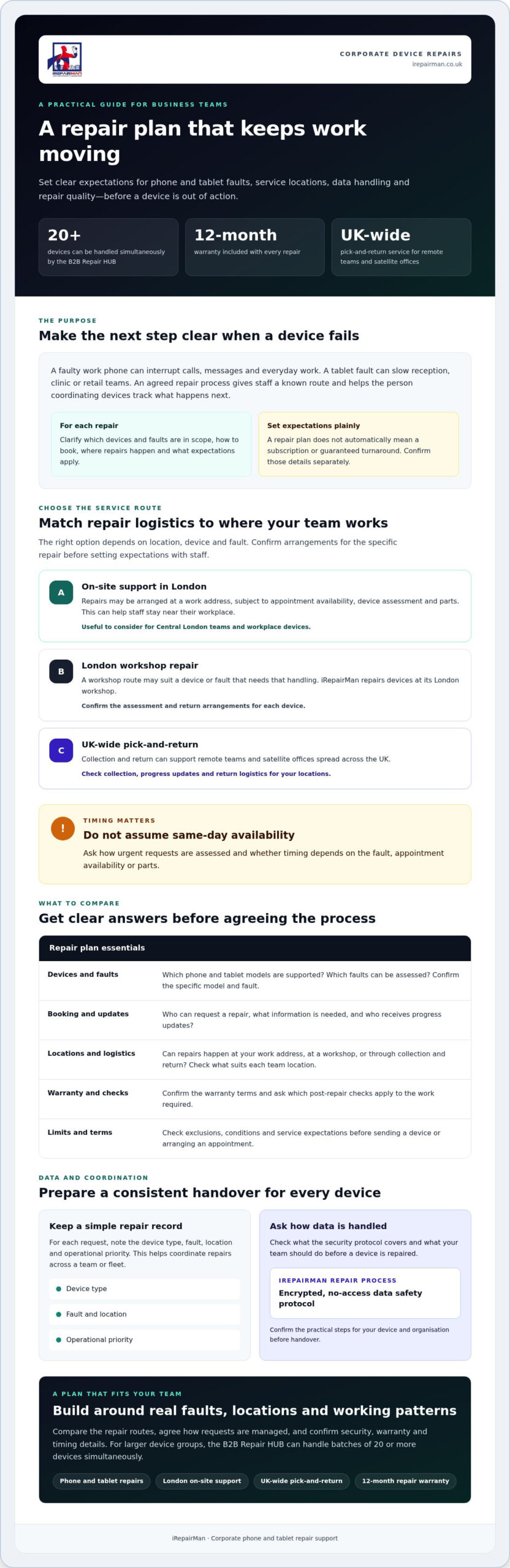
A failed work phone can interrupt calls, messages, bookings and access to everyday work tools. A faulty tablet may slow down a reception desk, clinic team or retail shift. A clear repair arrangement gives staff a known next step and gives the person coordinating devices a consistent way to assess faults, arrange repairs and track progress.
A corporate mobile device repair plan is an agreed approach to handling phone and tablet faults. It sets out which repairs are in scope, how devices are booked in, where repairs take place and what service expectations apply. It doesn’t automatically mean a monthly subscription or guaranteed turnaround. Agree and confirm those details separately.
Repair sits alongside, rather than replacing, day-to-day device administration. For context, Mobile Device Management describes how organisations manage devices and their settings. A repair process can complement that work by clarifying what happens when a device needs attention. It doesn’t mean the repair provider manages your devices or systems.
Which devices and teams need repair support?
Start with the phones and tablets staff rely on, such as devices used to contact customers, manage appointments, record work or support front-of-house duties. A single damaged phone may need an individual repair. Repeated faults across a group of devices suggest a fleet requirement, where consistent booking and logistics become more important.
Consider how repair needs vary across your organisation. An office in Central London may be able to arrange an appointment at the workplace, while a team spread across the UK may need collection and return. Retailers, clinics, hotels and other professional teams should also consider who depends on each device during a shift and what temporary workarounds are available while it is out of use.
What does a useful repair arrangement clarify?
Before agreeing a process, check the practical details in writing. Clear answers help staff route each fault correctly and set realistic expectations.
- Eligible devices and repairs: Confirm whether the arrangement covers your phone and tablet models, and which faults can be assessed.
- Booking route: Establish who can request a repair, what information they must provide and who will receive updates.
- Service locations: Check whether on-site support, workshop repair or UK-wide pick-and-return suits each team location.
- Urgent requests: Ask how urgency is assessed, how appointments or collections are scheduled, and whether timing depends on the fault or parts availability.
- Limits and terms: Confirm any exclusions, warranty details and conditions before sending a device or arranging an appointment.
Use these answers to choose an arrangement that fits actual working patterns, rather than relying on an assumed service level.
How to compare corporate mobile device repair services
Compare the service model with your team’s locations, device mix and likely repair volume, not just the headline turnaround. A Central London office may value an on-site option that keeps staff near their workplace; a team spread across the UK may need collection and return. Use the table to identify what to confirm with each provider before agreeing terms.
| What to compare | Questions to ask | iRepairMan information |
|---|---|---|
| Service location | Can repairs be carried out at your work address, or does the device need workshop assessment? | On-site support in London and repairs at its London workshop. |
| Supported devices | Which phone and tablet models, faults and repair types are eligible? | Phone and tablet repairs; confirm the specific model and fault before arranging service. |
| Logistics | How are collection, progress updates and return arranged for each location? | UK-wide pick-and-return supports remote teams and satellite offices. Confirm the arrangements for your devices. |
| Warranty and checks | What warranty applies to the repair, and what checks are completed afterwards? | A 12-month warranty applies to every repair. Ask which post-repair checks apply to the work required. |
On-site, workshop or collection and return?
For Central London teams, an on-site repair may reduce the need for staff to leave the workplace, subject to appointment availability, device assessment and parts. Workshop repair is another route when the device or fault needs that handling. iRepairMan repairs devices in its London workshop and returns them by tracked delivery in around 2-3 working days. UK-wide pick-and-return may suit remote staff or satellite offices. Before booking, confirm collection, tracking and return details for your location.
Match repair capacity to actual demand. If several devices need attention at once, ask whether the provider can process a batch and how that affects scheduling. iRepairMan’s B2B Repair HUB can handle batches of 20 or more devices simultaneously. This is a stated capacity, not a promise that every repair type or service arrangement will suit every batch.
Which service standards should buyers check?
Agree how you’ll receive updates, who to contact if plans change and how completion and return will be confirmed. Ask about post-repair checks and get warranty coverage in writing. Confirm whether dedicated account management is available instead of assuming it is included. Security updates are a separate part of device upkeep; the FTC guidance on mobile security updates offers background on why timely updates matter.
Confirm contract terms, service limits, cancellation terms and arrangements for repeat repairs directly with the provider. As a starting point, review iRepairMan’s business phone repair options and check which service routes could fit your team.
Can a repair plan protect data and reduce device downtime?
Sending a work phone or tablet away can raise reasonable questions: who may access it, how will it be handled, and what happens to staff who rely on it? A clear repair process helps your team consider these issues before booking. It can also help limit disruption by matching the repair route to the device, fault and work location.
A stated data protocol is useful information, but it isn’t a promise of zero risk. Treat it as one part of supplier assessment and ask what it means in practice. Your organisation should also follow its own device procedures, particularly when phones contain work information or are used for both personal and business activity.
What data safeguards should a business ask about?
Ask how technicians handle device access and customer information, and what staff should do before handing over a device. Check whether your internal process requires steps such as backing up information, removing access or contacting your IT team. Don’t assume the repair provider will make those decisions for you. IBM’s secure device management solution offers an example of device management and policy controls; those controls are separate from a repair provider’s data protocol.
iRepairMan uses an encrypted, no-access data safety protocol, and a 12-month warranty applies to every repair. This describes the provider’s protocol and repair warranty, not a guarantee that every possible data risk is eliminated. Ask for any further details your organisation needs to assess the arrangement.
How can repair logistics limit disruption?
For a Central London team, an on-site appointment at a workplace, reception or nearby business address may avoid sending a staff member elsewhere with a faulty device. On-site availability and suitability depend on the location, fault and appointment arrangements, so confirm these when booking.
For remote staff and satellite offices, UK-wide pick-and-return offers another route. Before sending a device, establish how collection, progress updates and return will be coordinated, and whether the process fits your team’s working pattern. Either route can make the next steps clearer, but neither can remove every period of downtime.
Repair timing depends on assessment and parts availability. Ask when the provider can assess the fault, how it will update your contact and what happens if the repair needs a different approach. This gives staff a more realistic basis for planning cover while a device is being checked.
How to prepare your organisation to use a repair plan
Some preparation makes repair requests easier to assess and route. Before introducing a Corporate mobile device repair plan, give staff one clear reporting process and make sure the person coordinating repairs has the information needed to act.
What information should the fleet manager gather?
Start with a practical inventory. It needn’t be complicated, but it should show which devices are in use, where they are and how essential they are to daily work.
- List devices and locations: Record phone and tablet models, approximate quantities and the offices or sites they serve.
- Note faults and dependencies: Track recurring problems and the roles that rely on each device, such as a receptionist handling calls or a clinician using a tablet for work.
- Set an operational priority: Note whether a fault affects one person or interrupts a team’s work. This helps the coordinator explain the impact without assuming a guaranteed repair priority.
- Name the contacts: Identify who can approve a repair, arrange access at a workplace, coordinate collection and receive service updates.
How should teams handle a repair request?
Use a short, consistent sequence so staff know where to report a fault and what happens next. For example:
- 1. Report: Staff contact the agreed internal booking person and provide the device type, fault, location and operational priority.
- 2. Review: The coordinator checks approval and follows the organisation’s device and data procedures before arranging a repair.
- 3. Arrange: The booking contact confirms the appropriate service route with the provider, including appointment or collection details.
- 4. Track: Record the repair status and keep the affected team informed. Mark the device as available again only after it has been returned and checked according to your internal process.
Before a rollout, ask the provider to confirm which devices and repair types are eligible, how booking works, and how collection and return are arranged for each location. If your organisation needs repeat collections, check whether a schedule can be agreed. Confirm service limits and terms in advance. Timing may depend on fault assessment and parts availability, so avoid promising staff a fixed return date unless it has been confirmed.
For a practical next step, discuss your organisation’s phone repair requirements with iRepairMan and confirm which service arrangements may fit your team.
How iRepairMan can support a corporate mobile device repair plan
A Corporate mobile device repair plan should fit how your team works, rather than sending every fault through the same route. iRepairMan offers on-site phone and tablet repairs in London, repairs through its London workshop, and UK-wide pick-and-return for remote teams and satellite offices. The suitable option depends on the device, its condition, the fault and the service assessment.
For eligible Central London workplace needs, on-site support may help staff avoid leaving the workplace to arrange a repair. Where workshop handling is more suitable, the device can be repaired at iRepairMan’s London workshop. Teams outside London can ask about UK-wide pick-and-return and confirm collection, tracking and return arrangements for their location.
Which iRepairMan service model might suit your team?
- Central London workplace: Ask whether an on-site appointment is suitable for your location, device and fault.
- Remote team or satellite office: Check whether UK-wide pick-and-return is available for the devices and repairs you need, and confirm the logistics before arranging collection.
- Multiple devices: The B2B Repair HUB can handle batches of 20 or more devices simultaneously. Confirm which devices and repair types can be included, and how the batch would be scheduled.
These are service options, not a fixed subscription or a promise that every repair can follow the same process. The fault may need to be assessed first, and parts availability can affect what happens next. iRepairMan operates seven days a week, Monday-Sunday. A 12-month warranty applies to every repair; ask how the warranty applies to the specific work proposed.
What to confirm before making an enquiry
Have a short summary ready so the team can understand your requirements. Include device types and approximate quantities, where devices are used, common faults and whether on-site or pick-and-return support seems more practical. Note your preferred repair route, but be prepared for the assessment to determine the suitable option.
Before booking, ask which devices and repairs can be supported in your circumstances, whether on-site appointments are available for your Central London address, and how collection and return would work for other locations. Confirm the expected next steps and any relevant service terms rather than assuming a particular turnaround or service level.
Share your device types, locations and repair needs via Discuss your business device repair needs to explore which arrangement may suit your team.
Put a clear repair process in place
A Corporate mobile device repair plan works best when it reflects your device mix, locations and working patterns. Decide which faults need support, how staff should report them and who can approve a repair. Then compare on-site appointments, workshop repairs and UK-wide pick-and-return by the disruption each option may involve.
Before choosing a provider, confirm eligible devices and repair types, booking and collection arrangements, service terms and data handling. iRepairMan’s B2B Repair HUB can handle batches of 20 or more devices simultaneously. Every repair includes a 12-month warranty, and the repair process uses an encrypted, no-access data safety protocol.
Ready to discuss the devices, locations and repair routes your team needs? Discuss your corporate device repair needs with iRepairMan. A clear conversation can help you plan a practical next step and give staff a straightforward route when a device needs attention.
Frequently Asked Questions
What should a corporate mobile device repair plan include?
A Corporate mobile device repair plan should set out the service scope your organisation has agreed with its provider. Confirm supported phones and tablets, eligible repairs, booking steps, service locations, collection or return arrangements, data handling and warranty terms. Providers may define their arrangements differently, so ask for the details in writing. Don’t assume the plan includes a subscription, fixed response time or guaranteed service level. Start with your fleet and working practices.
Can a repair provider handle multiple business devices at once?
Batch capacity varies by provider, so confirm what can be handled before scheduling repairs. iRepairMan’s B2B Repair HUB can handle batches of 20 or more devices simultaneously. When enquiring, share device types, quantities, locations and fault details. The fleet manager can then ask which repair route suits the batch and confirm availability, rather than assuming every device can be processed in the same way or at the same time.
How can businesses arrange secure phone repairs?
Ask how the provider handles device access, customer information and repair handovers, then follow your organisation’s own device procedures. iRepairMan uses an encrypted, no-access data safety protocol. This describes the stated protocol, not a promise that every possible risk disappears. Before an on-site appointment or collection, check whether staff should prepare the device in a particular way under your internal policies, and agree who will hand it over.
Can corporate mobile repairs be carried out at our London office?
Yes, iRepairMan provides on-site support in Central London, including at business addresses. Whether a repair can be completed at your workplace depends on the location, device fault, technician schedule and parts availability. Share the device model and issue when you enquire, and ask the team to confirm whether an on-site appointment is suitable. Workshop handling or another service route may be more appropriate after the repair needs have been assessed.
Is collection and return available for remote business teams?
Yes, iRepairMan provides a UK-wide pick-and-return service for remote teams and satellite offices. Confirm the arrangements for each location before booking. Ask where devices can be collected, how staff should hand them over, how progress will be communicated and how repaired devices will be returned. Sharing device details and fault information in advance can help the provider advise whether this route suits your team’s repair needs.
What warranty does iRepairMan provide on corporate device repairs?
iRepairMan provides a 12-month warranty on every repair. Before arranging work, ask which repair the warranty applies to and how to request support if an issue arises. The warranty relates to the repair carried out; don’t assume it covers unrelated faults, future damage or a particular repair outcome. Giving the person coordinating your devices access to the terms helps staff know what to do if they need follow-up support.
How quickly can a business phone be repaired?
Repair timing depends on the fault, assessment, parts availability, service location and appointment schedule, so ask for realistic timing for the specific device. iRepairMan operates seven days a week, Monday-Sunday, and offers on-site options in Central London. Operating days don’t guarantee same-day completion. When you enquire, provide the device model and fault, then confirm the assessment and expected next steps before planning cover for the affected staff member.



