

What if your phone hasn’t switched off, but its display has stopped showing anything? If my phone screen is black but still on, sounds, vibrations or incoming calls may suggest it’s still running. However, they can’t confirm whether the cause is a temporary freeze or a screen fault. It’s unsettling when you can’t use your phone normally, especially if you’re worried about losing data or making the problem worse.
Start with safe checks, not a risky fix. This guide explains how to check for signs of power, charge the phone and try a force restart that matches your model. Android users will also find out when Safe Mode may help identify an app-related issue. You’ll learn which clues may point to display damage and when it’s sensible to stop troubleshooting.
If the screen stays black, a professional assessment can help establish what’s wrong. In Central London, iRepairMan London can discuss an on-site repair at home, work or another suitable location. UK-wide pick-and-return is another option. Any repair depends on assessment and parts availability, so first work out what your phone is doing using safe checks.
Key Takeaways
- Sounds, vibration or incoming calls can suggest your phone is active, but they can’t confirm the display is working.
- If my phone screen is black but still on, begin with simple checks, such as removing anything covering the screen and checking the charge.
- Use restart steps that match your phone model, and stop if it becomes hot or shows signs of damage.
- Note the phone model, what you’ve noticed and any recent impact before seeking help. Avoid opening the device or trying unverified fixes.
- If the screen remains black or is visibly damaged, ask about a professional assessment, including an on-site repair in Central London or UK-wide pick-and-return.
My phone screen is black but still on: what the symptoms can tell you
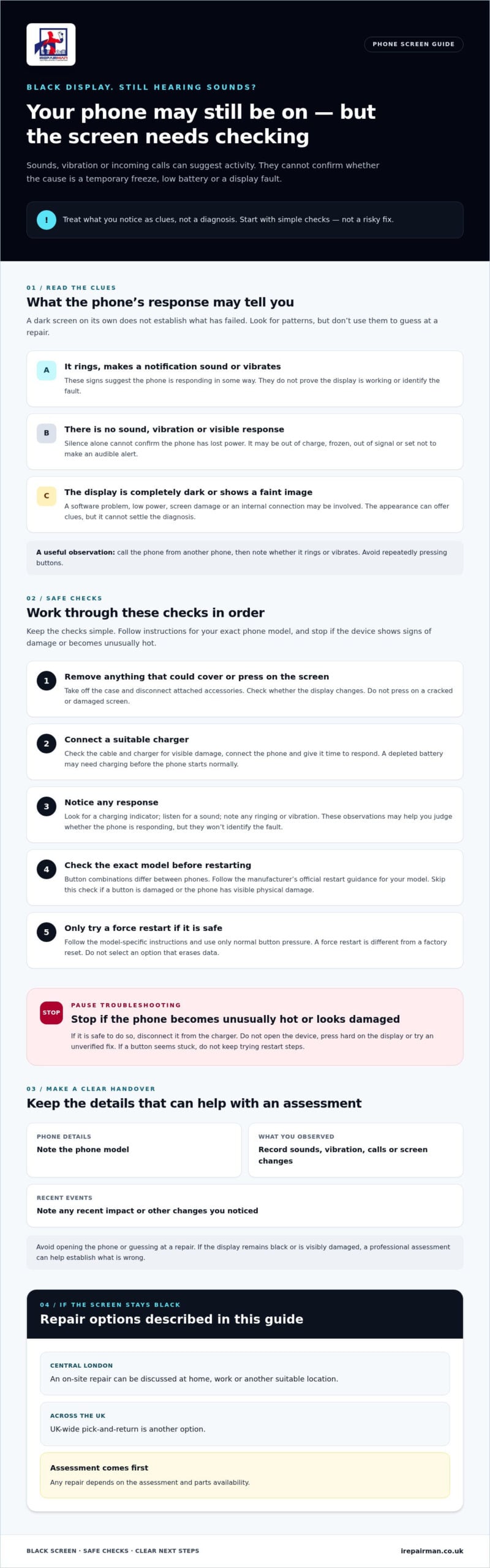
A black display doesn’t, by itself, mean your phone has stopped working. If your phone screen is black but still on, it may receive calls, play notification sounds or vibrate, even though you can’t see or use the screen. These signs suggest some activity, but they don’t identify the cause. A software freeze, low battery or display fault can produce overlapping symptoms.
This differs from a phone that gives no visible, audible or tactile response. Even then, silence alone can’t confirm that the device has lost power. It may be out of charge, frozen, or unable to signal through sound and vibration settings. Treat what you notice as clues, not a diagnosis.
How can you tell whether the phone is still active?
Try calling it from another phone, then listen for ringing or feel for vibration. You can also wait for a familiar notification sound or a brief buzz. Avoid repeatedly pressing buttons to provoke a response. Simply note what happens. If you hear a ring or feel vibration, the phone is likely responding in some way, but that doesn’t prove its display can be repaired or reveal what has failed.
If the call goes straight to voicemail or there’s no sound, don’t assume the phone is switched off. Its battery may be depleted, it may have lost signal, or its settings may prevent an audible alert. Record what you observe before trying further checks.
What does a black display not tell you?
A dark screen alone can’t confirm that the display is broken. A software problem may stop an image appearing. Low power can leave the phone unresponsive, while damage to the screen or an internal connection may prevent it from displaying anything. A phone making sounds can still have a faulty display. Further checks or a technician’s assessment may help establish the cause.
Not every display issue looks completely black, either. For example, screen burn-in is associated with persistent ghost images, rather than necessarily a blank screen. The appearance of the display can offer clues, but it can’t settle the diagnosis.
Keep track of whether calls connect, sounds play, the phone vibrates or the screen shows even a faint image. These details help distinguish a device that appears entirely unresponsive from one that may still be running with a display problem. Neither pattern identifies the fault with certainty, so use the clues to guide your next safe checks. Don’t attempt to open the phone or guess at a repair.
How to troubleshoot a black phone screen safely, step by step
Work through these checks in order, and stop if the phone becomes unusually hot, looks damaged or has a button that seems stuck. Don’t press hard on the display, open the casing or try to replace the screen yourself. If you’re unsure at any point, leave the device alone and seek advice.
- Check for anything covering the screen. Remove the case and any accessory that could be pressing a button or blocking the display. Disconnect attached accessories, then check whether the screen changes. Don’t push on a cracked or damaged display.
- Connect a suitable charger. Check that the cable and charger aren’t visibly damaged, then connect the phone and give it time to respond. A depleted battery may need charging before the phone can start normally. If it heats up unusually, disconnect it if safe to do so and stop.
- Look and listen for a response. Notice whether the phone shows a charging indicator, rings, vibrates or plays a notification. Avoid repeatedly pressing buttons. These checks can help you judge whether it’s responding, but they won’t identify the fault.
- Check the exact model before restarting. Button combinations differ between phones, so don’t rely on a generic sequence. Find the manufacturer’s official restart guidance for your specific model and follow it carefully. If a button is damaged or the phone has visible physical damage, skip this step.
- Try a force restart only if it’s safe. Follow the manufacturer’s instructions, applying only the normal pressure needed to operate the buttons. A force restart is different from a factory reset, but follow the guidance closely and don’t select an option that erases data. For additional general advice, PCMag explains how to troubleshoot a black screen.
What simple checks are safe to try first?
Keep it simple: remove a potentially obstructive case or accessory, connect a suitable charger, then give the phone time to respond. If your phone screen is black but still on, sounds or vibration may continue, but don’t repeatedly press buttons to test it. Stop if you notice heat, a damaged casing or other signs that further attempts could be unsafe.
How should you approach a force restart?
Use only instructions from your phone’s manufacturer that match its make and model. If the display stays black after safe checks, don’t keep repeating the restart or move on to opening the device. iPhone owners considering professional help can ask about iPhone screen repair. The cause and suitable next step depend on assessment.
Is it a software freeze, battery problem or damaged display?
The clues can help you decide what to check next, but they can’t confirm the cause. The phrase “my phone screen is black but still on” may describe a phone that responds to calls or sounds while showing no image. That activity doesn’t mean the display is working. A phone can keep running even if its screen has failed.
| Possible cause | Clues you might notice | What those clues can’t prove |
|---|---|---|
| Temporary software freeze | The phone seems active, but the screen and controls don’t respond as expected. | That a restart will restore the display or that software is definitely the cause. |
| Power-related issue | The phone has been uncharged, shows no clear response or behaves differently after being connected to a suitable charger. | That the battery is faulty. A black screen alone can’t distinguish low power from another problem. |
| Display fault | The phone rings or vibrates, but no image appears. A recent drop or visible screen damage adds useful context. | Which part is damaged, or whether the screen itself needs repair. |
Which signs may point to a temporary software freeze?
A frozen phone may appear to stay on, with notifications or calls still coming through, while the interface doesn’t respond. If there’s no obvious physical damage, a force restart using the instructions for your exact model may be a reasonable check. If the screen comes back, that doesn’t prove software was the only issue. If it stays black, the restart hasn’t ruled out other causes.
Could it be a battery or power problem?
A depleted battery may leave the phone without enough power to start or respond normally. Connecting a suitable charger and allowing time for a response can help check this possibility. However, a lack of response doesn’t prove the battery is at fault, and sounds or vibration don’t rule out a power-related issue. The clues overlap, so avoid drawing a firm conclusion from one test.
When might the display need professional assessment?
If the phone rings or vibrates but never shows an image, a display-related fault is one possibility. Tell a technician if it was recently dropped or has visible cracks, as this context can help guide an assessment. However, sound with a black screen doesn’t identify which component has failed, and even an unmarked screen can have an underlying issue. Symptoms alone can’t confirm what, if anything, needs repair. An assessment is needed to establish the cause and discuss next steps.
What to do next without risking your phone or personal data
If your phone screen is black but still on, avoid rushing into a repair or reset. A dark display may prevent you from checking whether your data is backed up, so don’t assume your photos, messages or files are safe or recoverable. Make a note of what’s happening first. That information can help a technician assess the device without relying on guesswork.
What information should you have ready?
- Device: Note the make and exact model, if you know it.
- Timing: Record when the screen went black and whether it happened suddenly or after a particular event.
- Responses: Note whether the phone rings, vibrates, makes notification sounds or responds when connected to a charger.
- Condition: Mention any recent drop or visible damage, and describe what you noticed without trying to diagnose the cause.
Keep account details and passcodes private. You don’t need to share a passcode unnecessarily when asking for advice or arranging an assessment. If an iPhone is affected, the iPhone screen repair guide explains the repair option. For a Galaxy device, see the Samsung phone repair guide.
When should you stop troubleshooting?
Stop if the phone becomes unusually hot, has visible physical damage or starts behaving unpredictably. Don’t press hard on the screen, repeatedly force buttons, open the casing or follow an unverified repair video. These actions may cause further damage and won’t reliably identify the fault. If safe basic checks haven’t restored the display, seek professional advice instead.
A black screen can also make it difficult to check or create a backup. Don’t assume a repair will restore access to data, and avoid attempting a factory reset if you can’t see the prompts clearly. Explain that data access matters when discussing next steps, so the technician can take your concern into account. iRepairMan uses an encrypted, no-access data safety protocol for repairs, but the device still needs assessment and outcomes depend on the fault.
In Central London, you can ask about an on-site phone repair at home, work or another suitable location. If an on-site appointment doesn’t suit, UK-wide pick-and-return is another option. Confirm availability for your device and location when enquiring.
When to arrange professional phone screen repair in Central London
If safe checks haven’t brought the display back, the screen stays black, or you can see damage, professional assessment is a sensible next step. Don’t keep repeating restarts or try to open the phone. A technician can assess what may be causing the fault and explain suitable options without guessing from symptoms alone.
What can customers expect from a repair assessment?
The technician assesses the device before confirming what repair, if any, is appropriate. iRepairMan provides on-site mobile phone repairs in Central London, so you can ask about an appointment at home, work or another suitable location. Technicians use a mobile workstation with professional tools and a microscope to examine devices. The assessment helps guide the next step, but the repair outcome depends on what’s found and parts availability.
If your phone is an iPhone and an on-site option doesn’t suit, you can ask about the UK-wide iPhone pick-and-return service. This is an alternative to arranging an appointment at your location. Confirm the available option for your device before making plans.
How can you arrange help with minimal disruption?
When you enquire, share the phone’s make and model, what the screen is doing, whether it still responds, and any recent drop or visible damage. This gives the team useful context before discussing an appointment. Ask whether a suitable time and location are available for your device. Availability can vary, so confirm these details before booking.
Every repair includes a 12-month warranty. iRepairMan also uses an encrypted, no-access data safety protocol. Keep your passcode private unless there’s a clear need to discuss access, and ask how your data will be handled if you have concerns. Repair options and outcomes still depend on assessment and parts availability.
If the display remains black after safe checks, you don’t need to travel to a repair shop to ask about help. Arrange an on-site phone repair enquiry and confirm appointment availability for your Central London location and device.
Take the next step with confidence
If your phone screen is black but still on, sounds or vibration can suggest it’s responding, but they can’t tell you whether the cause is a freeze, a power issue or a display fault. Try the safe checks first, note what happens and stop if the device is hot or damaged. If the display stays black, a professional assessment can help establish what to do next.
In Central London, iRepairMan provides on-site mobile phone repairs, so you can ask about an appointment at home, work or another suitable location. Every repair includes a 12-month warranty, and an encrypted, no-access data safety protocol helps protect your privacy. The right repair depends on assessment and parts availability.
Arrange a phone repair assessment and confirm availability for your device and location. You can take the next step without trying risky fixes or travelling to a repair shop.
Frequently Asked Questions
Why is my phone screen black but still making sounds?
Your phone can make sounds or vibrate even when its display isn’t showing an image. That suggests the device is active, but doesn’t identify the fault. A software freeze, power-related issue or display problem may cause similar signs. Try only safe checks, such as connecting a suitable charger if the phone appears undamaged and isn’t unusually hot. If the screen stays black, arrange an assessment rather than assuming the phone is working normally.
Can I fix a black phone screen with a force restart?
A force restart may help if your phone has temporarily stopped responding, but it won’t fix every cause of a black screen. Button combinations vary by device, so check the manufacturer’s instructions for your exact model before trying one. Don’t force the buttons or open the phone. If the display remains black after a suitable restart, stop troubleshooting and seek professional advice about the next step.
Is my phone screen broken if the phone still rings?
Not necessarily. Ringing suggests your phone is active, but it doesn’t confirm whether the issue is software-related or caused by the display or another component. Note whether the phone was recently dropped or has visible damage, then try safe checks. If the image doesn’t return, a technician can assess the device and explain suitable options. Sounds alone can’t establish whether the screen needs repair.
What should I do if my phone screen is black after dropping it?
Don’t press hard on the screen or try to open the phone. Check for visible damage and note whether calls, sounds or vibration still work. Tell a technician about the drop, as it’s useful context, but it doesn’t confirm what has failed. If the display stays black, arrange a professional assessment to identify the cause and discuss suitable repair options. Avoid repeated restart attempts if the phone appears damaged.
Can I access my data when my phone screen is black?
It depends on the device, its settings and whether it remains responsive. A black display may stop you unlocking the phone or using it normally, so don’t assume your data is backed up or accessible. Avoid sharing your passcode unnecessarily. Before arranging a repair, ask the provider how its data safety process works. For example, iRepairMan uses an encrypted, no-access data safety protocol, but data access or recovery shouldn’t be assumed.
Should I keep charging a phone with a black screen?
If the phone appears undamaged and isn’t unusually hot, you can connect a suitable charger and allow time for a response. Stop if it becomes hot, behaves unpredictably or shows physical damage. Charging may help you check whether depleted power is involved, but it can’t confirm the cause of a black display. If the screen remains black, seek professional advice instead of repeatedly charging or pressing buttons.
Can iRepairMan repair a phone with a black screen in Central London?
iRepairMan provides on-site mobile phone repairs in Central London, so you can ask about an appointment at home or work rather than travelling to a repair shop. A technician needs to assess the device before confirming the cause and suitable repair. Outcomes depend on assessment and parts availability. Ask about appointment options for your phone model and location, and confirm whether same-day availability is possible before arranging help.



