

A single damaged iPad can slow a team; several unreliable devices can disrupt everyday work. With bulk iPad repair London, the challenge is not only fixing each device. It is coordinating repairs, choosing a practical collection or on-site arrangement, and keeping work moving while devices are out of use.
If you manage a company fleet, you need a clear process that saves time without putting business data at risk. iRepairMan London’s B2B Repair HUB can handle batches of 20 or more devices, with on-site support across London and secure pick-and-return options for teams in different locations. Same-day availability and which faults can be repaired on-site depend on the devices, assessment, appointment availability and parts, so check these details when arranging a service.
This guide explains how to organise a batch, choose between on-site, collection and workshop repairs, and prepare devices before handover. It also covers questions to ask about data handling and post-repair checks. Repairs include a 12-month warranty, and the stated data-safety protocol is encrypted, with technicians having no access to customer data.
Key Takeaways
- Find out when coordinating several iPads through bulk iPad repair London may be more practical than arranging separate repairs.
- Make a device list with each iPad’s model, fault, location and assigned user to simplify batch coordination.
- Compare on-site, London workshop and pick-and-return options against your team’s locations and repair needs.
- Before handover, identify each device, record its fault and nominate an authorised contact for your organisation.
- When choosing a repair partner, ask about batch capacity, data handling and post-repair checks.
When bulk iPad repair in London makes sense for a company fleet
A cracked screen can make an iPad difficult to use. Charging port failures, weak battery performance, unreliable buttons or a device that will not power on can interrupt work for the person relying on it. If several faults arise across your London team, coordinating repairs through one request may be simpler than asking each employee to arrange a separate repair and tracking each case individually.
Bulk iPad repair London gives a company fleet one organised process for assessing a group of devices, while keeping each iPad’s fault and business impact visible. It is repair coordination, not device purchasing or mobile device management (MDM) software. MDM helps an organisation manage device settings and access; a repair service assesses and handles faults. They support different parts of fleet management, but one does not replace the other. As part of your preparation, consider the data security principles relevant to protecting information from unauthorised access.
Which company iPad faults should be grouped together?
Group devices by reported fault to make the initial assessment clearer, but do not assume similar symptoms will have the same repair outcome. Record each iPad’s model, reported fault, assigned user and business impact. For example, note whether it has a cracked screen, a charging issue or an intermittent fault, and whether it supports a time-sensitive task.
Prioritise devices that have stopped working or are interrupting essential tasks. Cosmetic damage that does not prevent normal use may be suitable for planned repair. A technician can confirm what is repairable after assessing each device.
When does a batch repair approach help?
A coordinated request can reduce the back-and-forth involved in booking and tracking separate cases. It can be especially useful when devices are spread across offices, receptions, coworking spaces and other business addresses in Central London. A fleet manager can gather the device details and discuss which arrangement fits each location and fault.
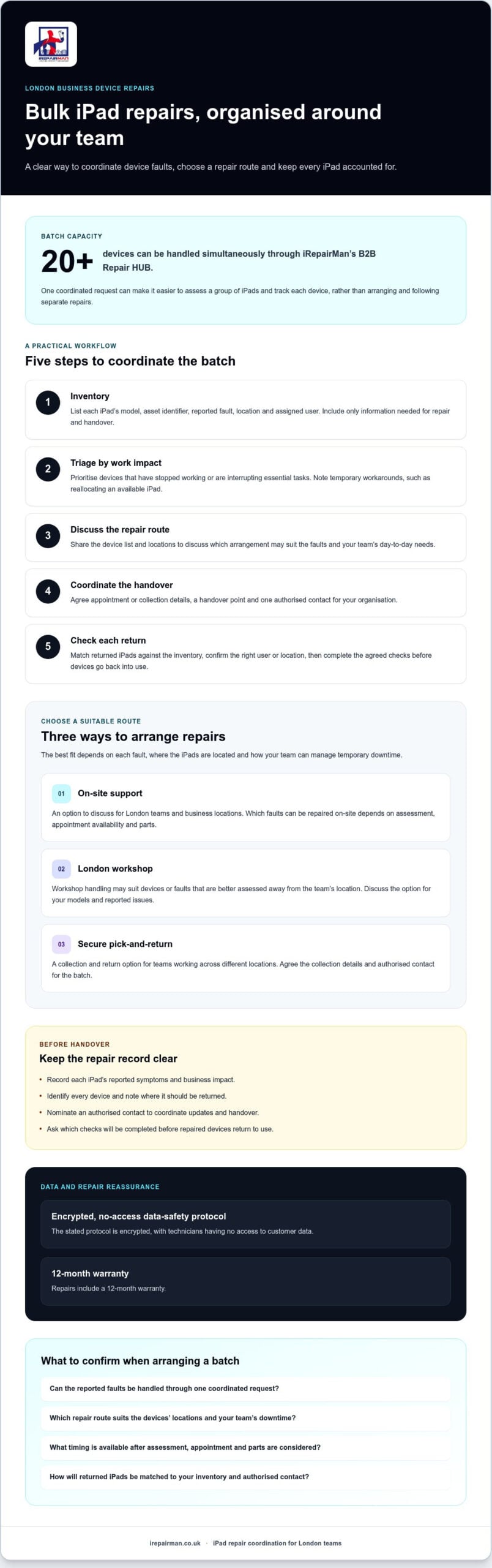
iRepairMan’s B2B Repair HUB can handle batches of 20 or more devices simultaneously. The right route still depends on the fault, where each iPad is located and how the team can manage temporary downtime. On-site support may suit some London teams, while workshop handling or pick-and-return logistics may be more practical for others. Confirm the options for your models and faults before arranging the batch.
Schools and education teams may have different scheduling and device-use needs. For those fleet considerations, see the iPad repair guide for schools in the UK.
How to organise bulk iPad repairs across a London team
A clear process helps you track each iPad, set priorities and agree a repair route before devices leave their users. For bulk iPad repair London, prepare one shared record and nominate a fleet manager or authorised contact to coordinate updates and returns.
Build a useful iPad repair inventory
Record each device’s model, asset identifier, reported symptoms, location and assigned user. Keep the list focused on repair and handover details, and leave out personal information that is not needed. Flag charging port failures and damage that affects everyday use, then confirm who owns each device and who should receive it back.
Use this five-step workflow to organise the batch:
- Inventory: List every iPad and note its model, asset identifier, fault, location and assigned user.
- Triage: Rank faults by their effect on work. Identify devices needed for essential duties and any temporary workarounds, such as reallocating another available iPad.
- Discuss the service route: Share the device list and locations to discuss whether London on-site support, workshop handling or pick-and-return logistics may suit the faults and team arrangements.
- Coordinate the batch: Agree appointment or collection details, a handover point and the authorised contact. iRepairMan’s B2B Repair HUB can handle batches of 20 or more devices simultaneously.
- Check returns: Match each returned iPad against the inventory, confirm it has reached the right user or location, and complete the agreed checks before putting it back into use.
Agree priorities and repair coordination
Set priorities according to business impact, not simply the number of devices with similar faults. An iPad used for an essential daily task may need attention before one with cosmetic damage. Share your priorities with the repair provider, then confirm timing based on assessment, appointment and parts availability. If your team manages iPads through Apple School Manager, review the relevant government guidance on device returns as part of your handover planning.
Once you have gathered the models, fault notes, locations and preferred arrangements, you can discuss a batch repair plan with iRepairMan. A prepared inventory makes it easier to talk through practical next steps for your team.
Compare London on-site, workshop and pick-and-return iPad repairs
For bulk iPad repair London, the best route depends on the reported fault, where devices are based and how your team can manage downtime. On-site support may be worth discussing for a London workplace, but not every fault is suitable for repair at the location. Use this comparison to prepare questions before arranging a batch.
| Repair route | Where it happens | May suit | Planning considerations |
|---|---|---|---|
| On-site support | At an agreed London business location | Teams with devices together at an office, reception or coworking space | Confirm the iPad models, reported faults, address and appointment options. Suitability depends on assessment. |
| London workshop | In iRepairMan’s London workshop | Devices that need workshop handling following assessment | Repairs are returned by tracked delivery in around 2 to 3 working days. This is the stated return timeframe, not a promise that every repair takes that long. |
| UK-wide pick-and-return | Devices are collected and returned through the pick-and-return service | Remote teams and satellite offices outside the main London workplace | Discuss how devices will be grouped, handed over and returned, and confirm arrangements for your locations. |
When might on-site repair suit a London workplace?
If several iPads are at the same office, reception or coworking space, an agreed appointment could reduce staff travel and make handover easier to coordinate. Keep the devices in one accessible place and have the inventory ready. Before booking, confirm the fault and exact location with the provider. An on-site visit is not automatically suitable for every repair.
When should a business consider workshop or collection logistics?
Workshop handling may be appropriate after a fault has been assessed, particularly if the device needs work that cannot be confirmed as suitable on-site. iRepairMan carries out repairs in its London workshop and returns devices by tracked delivery in around 2 to 3 working days. This is an approximate workshop return timeframe. The repair itself may take a different period depending on assessment and parts availability.
For teams spread across the UK, pick-and-return logistics can help coordinate devices from remote staff or satellite offices without asking everyone to arrange a separate repair. Agree collection and return details in advance. For wider business service context, see corporate phone repair in London.
Whichever route you consider, plan how company information will be protected during handover. The NCSC guidance on securing devices offers advice on managing device security for work use.
Prepare company iPads and protect data before repair
A tidy handover makes bulk iPad repair London easier to coordinate and helps your team track devices from collection or appointment through to return. Before arranging repairs, follow your organisation’s data and device-handling procedures, and check with the repair provider what preparation is needed for each assessed fault.
What should a team check before handing over iPads?
Use your approved inventory process to identify each iPad and record its reported fault. Keep the details practical and leave out personal information that is not needed. Before devices leave their usual locations, confirm who can authorise the repairs and who will receive them back.
- Identify each device: Record its model and asset identifier, following your organisation’s usual process.
- Describe the fault: Note the symptoms and any effect on everyday work, such as charging difficulties or a damaged screen.
- Confirm responsibility: Name the authorised repair contact and the person or location for each return.
- Ask about preparation: Check what the provider needs for the specific model and fault before handover.
Do not assume every repair needs the same preparation. Confirm instructions before changing device settings or removing information, so your team can follow its own procedures and avoid disrupting access unnecessarily.
How should a business assess data privacy assurances?
Ask how technicians handle access to information stored on the iPads and what safeguards apply during repair. iRepairMan’s stated data-safety protocol is encrypted and gives technicians no access to customer data. This is a defined protocol, not a claim that every possible data risk can be eliminated, so consider it alongside your organisation’s own handling procedures.
After repair, iRepairMan carries out post-repair safety testing, and each repair includes a 12-month warranty. Ask which checks are relevant to the fault and how the warranty applies to the repair work. These details help the authorised contact understand what to expect when devices are returned.
For wider business repair context, see the corporate device repair service in London. When you enquire, share the device models, reported faults, locations and preferred handover arrangements so the team can discuss suitable next steps.
Ready to discuss a coordinated handover? Discuss your company iPad repair needs with iRepairMan.
Choose a bulk iPad repair partner in London and arrange next steps
The right repair partner should make a batch easier to coordinate, rather than leave your team chasing separate updates. For bulk iPad repair London, check that the provider can handle your device numbers, explain the available routes and set out what happens at handover and return. iRepairMan offers on-site support across London, UK-wide pick-and-return logistics and its B2B Repair HUB, which can handle batches of 20 or more devices simultaneously.
Questions to ask before arranging a device batch
Share a list of the reported faults and ask whether they can be assessed through your preferred route. On-site support may suit a London workplace, while workshop handling or pick-and-return may fit other faults or team locations. Confirm the suitable option after assessment rather than assuming every device in a batch can follow the same route.
- How will handover work? Confirm whether devices will be brought to an agreed appointment or collected, who will coordinate the process and how returns will be handed to your authorised contact.
- What checks are carried out? Ask what post-repair safety testing applies to the work.
- What warranty applies? Confirm the terms for the repair. iRepairMan states that repairs include a 12-month warranty; check how it applies to the specific work being discussed.
- How is device data handled? Ask the provider to explain its data-handling arrangements and compare them with your organisation’s procedures.
What to include in a repair enquiry
A focused enquiry helps the provider understand the batch and discuss practical next steps. You do not need a perfect fault diagnosis. Clear reported symptoms and operational priorities are a useful starting point.
- Approximate number of iPads. Include whether the batch is 20 or more, the volume the B2B Repair HUB can handle simultaneously.
- Device models and each reported fault, such as a cracked screen or charging issue.
- Where the devices are based, including relevant London office or business locations.
- Which devices are most important to daily operations and any preferred appointment or collection arrangements.
Ask the provider to confirm availability for your models, faults and locations, and recommend a suitable arrangement. Assessment, appointment timing and parts availability can affect what can be arranged. With those details ready, you can have a specific conversation about the batch rather than starting with scattered repair requests.
Arrange a conversation about your iPad repair batch with iRepairMan.
Put your company iPad repair plan into action
Managing several faulty devices does not have to mean coordinating a separate repair for every employee. A clear inventory, agreed priorities and a service route matched to each device’s fault and location can make bulk iPad repair London easier to organise and help your team plan around downtime.
Before arranging the batch, gather the iPad models, reported faults, locations and an authorised contact. iRepairMan’s B2B Repair HUB can handle batches of 20 or more devices simultaneously. Its stated data-safety protocol is encrypted and gives technicians no access to customer data; repairs also include post-repair safety testing and a 12-month warranty. Confirm the suitable repair route, availability and warranty details for your devices before handover.
Ready to discuss your team’s requirements? Discuss your company iPad repair requirements with iRepairMan and share your device list and preferred arrangements. With those details prepared, you can take the next step towards a more coordinated repair process and getting work back on track.
Frequently Asked Questions
Is bulk iPad repair in London suitable for a small business?
Yes. Bulk iPad repair London can suit a small business whenever several company iPads need assessment through one coordinated process. The right arrangement depends on the number of devices, their faults and locations, and how soon staff need them back. For example, a small Central London team might ask about an agreed workplace appointment, while devices with different faults may need separate assessments or repair routes.
How many iPads can iRepairMan handle in one batch?
When you enquire, share your approximate device count, models and reported symptoms so the team can discuss your particular batch. Capacity does not mean every iPad will follow the same repair route or have the same turnaround. Ask how the faults will be assessed and which arrangements suit your devices and locations.
Can company iPads be repaired at our London office?
iRepairMan provides on-site phone and tablet repair support in London, but whether an iPad can be handled at your workplace depends on its fault and the service arrangements. Ask about assessment at your Central London office, reception or another agreed business location. Confirm appointment availability and any limits for the reported issue before planning staff cover or arranging access to the devices.
How long does a bulk iPad repair take?
Repair timing varies according to the faults, assessment, appointment availability and parts availability. iRepairMan states that devices repaired in its London workshop are returned by tracked delivery in around 2 to 3 working days. That is an approximate workshop return timeframe, not a guaranteed completion time for every repair or batch. Ask for an estimate based on your devices, and plan how essential duties will be covered during repairs.
How does iRepairMan protect company data during iPad repairs?
iRepairMan describes its data-safety protocol as encrypted and designed to give technicians no access to customer data. This is useful information to consider, but businesses should also follow their own device and information-handling procedures before handover. Keep your repair inventory limited to necessary details, such as each iPad’s model, fault and asset identifier, and ask how the stated protocol applies to the repair being arranged.
Can a business outside London arrange bulk iPad repairs?
Yes. iRepairMan provides UK-wide secure pick-and-return logistics for remote teams and satellite offices, alongside on-site support across London. This can help an organisation coordinate devices held at different locations, including a Central London office and a satellite site elsewhere in the UK. Share the locations, approximate batch size and reported faults when enquiring, then confirm collection and return arrangements before sending devices.



