You are preparing for a vital meeting or expecting an urgent update when your device suddenly stops responding. It is a high-stakes moment of frustration that leaves you feeling disconnected and anxious. Knowing what to do if iPhone screen is unresponsive is the difference between a minor delay and a total communication breakdown. We understand the stress of a frozen display, especially with the fear of permanent hardware failure or potential data loss weighing on your mind. Recent data shows that damaged screens account for 36% of all smartphone incidents in the UK; you are certainly not alone in this experience.
This guide promises to show you exactly how to revive your iPhone using proven troubleshooting steps. We will cover everything from forced restarts for the latest iOS versions to determining when it is time for a professional screen repair, a service expertly provided by iRepairMan London. You will gain the clarity needed to resolve the issue quickly whilst keeping your data secure. Our goal is to provide a seamless path from technical failure back to reliable performance and lasting peace of mind.
Key Takeaways
- Learn the specific button sequences required to force restart your device, which is often the most effective solution for clearing temporary software hangs without risking your data.
- Understand how environmental factors like moisture or grease can interfere with capacitive sensors and mimic hardware failure in busy urban settings.
- Discover exactly what to do if iphone screen is unresponsive by identifying the difference between minor software glitches and complex “Ghost Touch” issues.
- Recognise the critical signs of internal hardware damage, such as hairline cracks or OLED bleeding, that necessitate professional intervention rather than software fixes.
- Explore high-end repair solutions across London and the UK, including on-site technician visits and discreet pick-and-return services designed for busy professionals.
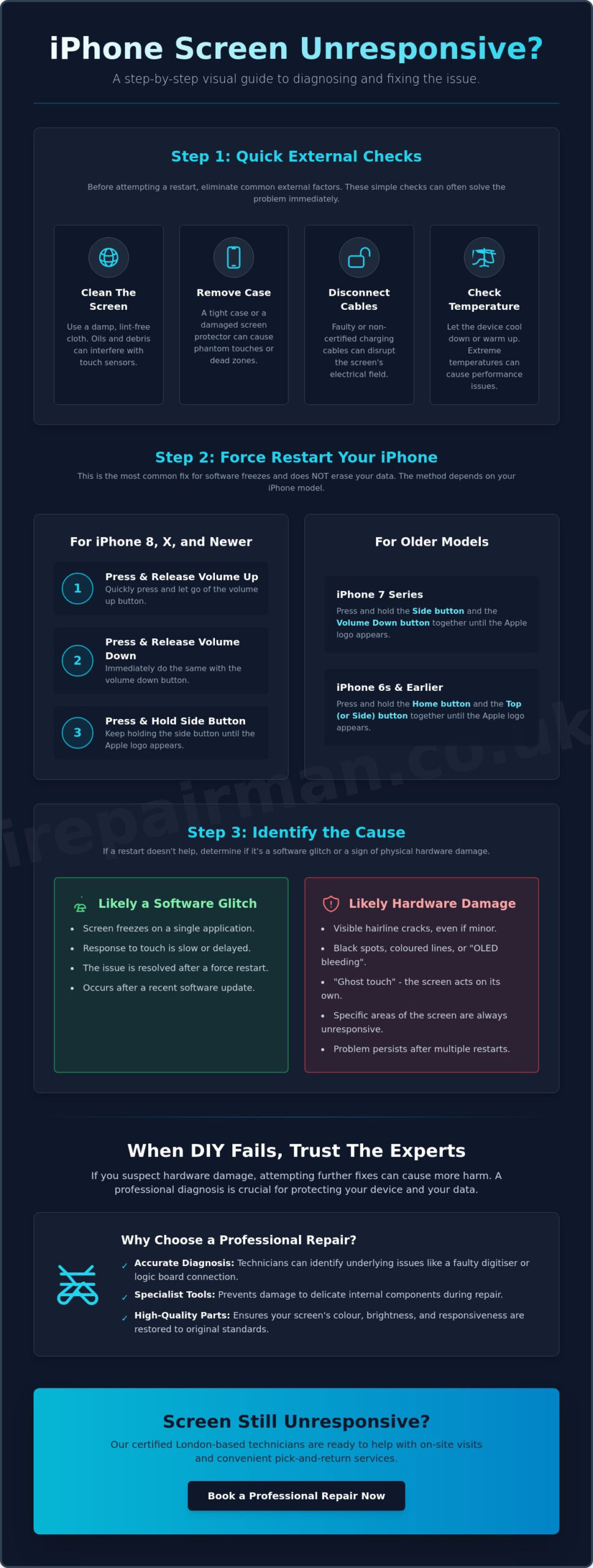
Immediate Fixes: How to Force Restart Your iPhone
When your device locks up, the initial instinct is often one of panic. You might worry about losing access to your schedule or missing a critical business call. However, the most effective solution is frequently the simplest. A force restart acts as a hard reset for the operating system, clearing temporary software hangs that prevent the device from registering your touch. This process is entirely safe; it does not delete your photos, messages, or settings. It simply cuts the power to the processor for a split second, forcing a fresh boot of the latest iOS.
Before you begin, ensure you disconnect any charging cables or accessories. Sometimes, a faulty third-party lightning or USB-C cable can interfere with capacitive screen technology, causing the display to ignore inputs. If you are wondering what to do if iphone screen is unresponsive and the display remains stubbornly black after your first attempt, plug the device into a reliable power source for at least 30 minutes. This allows the battery to reach a minimum threshold before you try the restart sequence again.
iPhone 8, X, 11, 12, 13, 14, 15, and 16 Series
For modern devices, including the latest iPhone 16 series, the process involves a specific rhythm. Quickly press and release the Volume Up button. Immediately follow this by pressing and releasing the Volume Down button. Finally, press and hold the Side button on the right. You must keep holding this button even if the screen remains dark. Only let go when the silver Apple logo appears in the centre of the display. This sequence is designed to be intentional, preventing accidental restarts whilst the phone is in your pocket or bag.
iPhone 7 and Older Models
If you are using an older model, the tactile buttons work differently. For the iPhone 7, you need to hold the Side button and the Volume Down button at the same time. For the iPhone 6s or earlier models, press and hold both the Home button and the Top (or Side) button simultaneously. Maintain your grip on these buttons until the Apple logo emerges. These older mechanical and haptic systems are robust, but they still require this manual override when the software becomes overwhelmed. Knowing what to do if iphone screen is unresponsive starts with these resets, but persistent failure suggests it is time to look at external factors or professional intervention.
External Factors Affecting Screen Responsiveness
Not every frozen display is a sign of motherboard failure or a corrupted operating system. Often, the environment plays a significant role in how your device behaves. In busy UK urban centres, your phone is frequently exposed to humidity, rain, and varying levels of pollution that can coat the glass in a fine layer of conductive residue. This confuses the capacitive sensors, leading to “dead zones” or a total lack of response. Before you Force restart your iPhone for a second time, it is vital to eliminate these external variables. Determining what to do if iphone screen is unresponsive starts with a physical inspection to see if the issue is localised to one corner or affects the entire panel.
Cleaning and Accessory Checks
Debris and oils from fingertips can accumulate quickly, creating a barrier that prevents the screen from registering your touch. Use a slightly damp, lint-free cloth to gently wipe the display from the centre outwards. If you use a protective case, remove it immediately. Some rugged cases apply excessive pressure to the edges of the bezel, which can cause the software to ignore secondary touches as a palm-rejection measure. Similarly, screen protectors that have begun to lift or have trapped air bubbles can create an insulating gap. Peeling back a compromised protector often reveals that the hardware itself is functioning perfectly. If cleaning the glass does not restore function, a professional iPhone screen repair from iRepairMan London may be necessary to address underlying digitiser damage.
Temperature and Charging Issues
Extreme temperatures are a common cause of system throttling in the UK, especially during rare heatwaves or freezing winter mornings. If your iPhone feels uncomfortably warm or ice-cold to the touch, allow it to reach a neutral temperature before attempting a restart. Overheating is particularly prevalent whilst charging. If you notice “touch disease” symptoms, such as flickering or erratic scrolling, check your power source. Using non-certified cables can introduce electrical interference that disrupts the screen’s sensitive electronics. Always ensure you are using an officially certified charging cable to maintain a clean power flow. Knowing what to do if iphone screen is unresponsive involves ruling out these logistical hurdles before assuming the worst about your hardware’s integrity.
Advanced Software Troubleshooting and Data Safety
If your device remains stubborn after a physical clean and a restart, the conflict likely resides within the software architecture itself. Background applications can sometimes enter a “loop” where they consume all available processing power, leaving the display unable to register new commands. It is also a reality that when an iPhone’s internal storage is almost entirely full, the operating system lacks the necessary “swap space” to process touch inputs, which frequently results in a total UI freeze. Understanding what to do if iphone screen is unresponsive during these deep-system failures requires a more methodical approach than a simple button press.
A particularly alarming symptom is “Ghost Touch”, where the screen behaves as if an invisible hand is tapping and swiping. This isn’t just a nuisance; it is a significant security risk. If your phone begins erratic movements, turn it off immediately. If you don’t, the device might “type” the wrong passcode enough times to trigger a permanent lockout, necessitating a full factory wipe that could have been avoided. Taking decisive action here is the best way to protect your data and your peace of mind.
Updating via a Computer
When you cannot interact with the screen to install a patch, your computer becomes your primary interface. Connect your iPhone to a Mac or a PC running the latest version of iTunes or Finder. This connection allows you to bypass the frozen UI and check for iOS updates that may contain specific driver fixes. Crucially, choose the “Update” option rather than “Restore” at this stage. Updating attempts to reinstall the operating system whilst keeping your personal data intact. It is a professional, low-risk first step that often resolves complex software hangs.
Recovery Mode as a Last Resort
Sometimes, a standard connection isn’t enough to hard reset an iPhone that has become completely unresponsive. In these instances, you must enter Recovery Mode. This state allows the computer to communicate with the hardware at a low level, even if the main operating system refuses to boot. You will enter this mode by using the specific button sequences for your model whilst the device is physically connected to your computer. Be aware that if an update fails, a “Restore” is the only remaining software path. This will erase all local data, so ensure your iCloud backups are current before proceeding. If these advanced steps fail, it is a clear indicator that the issue is physical, requiring a specialist to examine the internal components.
Signs of Hardware Damage: When DIY Fails
If software resets and external cleaning haven’t restored function, you must consider the possibility of physical failure. Sometimes the damage is obvious, but often it is invisible to the casual observer. A single hairline crack, even one barely visible to the naked eye, can disable the entire touch digitiser. Internal bleeding, appearing as dark ink-like spots, indicates a compromised OLED or LCD panel that has leaked its liquid crystals. Vertical or horizontal lines across the display often signal a loose internal flex cable connection or a fracture in the display’s gate driver. Knowing what to do if iphone screen is unresponsive becomes a matter of diagnostic triage when physical damage is suspected. Physical pressure in a bag or pocket can damage the internal layers without ever cracking the glass; this “flexing” is a common cause of failure for busy professionals who carry multiple devices on the move.
The Digitiser vs The Glass
The glass you touch is merely a protective shield designed to withstand scratches and minor impacts. Underneath it lies the digitiser, the component responsible for translating your gestures into digital commands. Even if the glass remains perfect, the digitiser underneath can fail from a sharp impact or repeated pressure. This often manifests as ‘dead zones’ where the screen only responds in certain areas whilst ignoring others entirely. Recognising this distinction is vital because a flawless exterior does not guarantee a functional interior. When these zones appear, the hardware’s electrical grid has been ruptured, making a replacement the only viable solution. Testing the screen by dragging an icon across every square centimetre can help you identify these specific failure points. The same principle applies to other devices; those managing a Samsung screen repair will find that OLED digitiser failures present remarkably similar symptoms and require the same level of professional diagnostic precision.
Internal Connection Failures
Dropped phones don’t always result in shattered glass or visible bleeding. Sometimes, the force of an impact is enough to dislodge the internal display connector from the logic board entirely. This mechanical failure prevents the screen from communicating with the processor, leading to a total loss of touch function or a black display. Rectifying this requires a professional opening of the device to reseat and secure the flex cables properly. It is crucial to understand that attempting to open the device yourself will void any remaining Apple warranty and risks damaging the delicate internal sensors, such as Face ID. Seeking a professional iPhone screen repair ensures the job is done with the precision and specialised tools required for modern hardware. A specialist can verify if the cable is simply loose or if the connector itself has been damaged, providing a decisive resolution to your technical downtime. If the impact that caused your screen issues also cracked the rear of your device, understanding your options for iPhone back glass replacement is equally important, as a compromised rear panel threatens your device’s water resistance and structural integrity.
Professional iPhone Repair Solutions in London and the UK
For busy individuals in the capital, time is the most valuable commodity. When DIY fixes fail, knowing what to do if iphone screen is unresponsive shifts from technical curiosity to a logistical necessity. London professionals cannot afford the traditional three to five day turnaround offered by standard high street shops. Our model prioritises immediate resolution, much like how Plumbing & Boilers London addresses urgent home infrastructure needs. We ensure that technical failure doesn’t result in lost revenue or missed opportunities. If you are still stuck on what to do if iphone screen is unresponsive after trying software resets, a physical component failure is the likely culprit that requires expert intervention.
On-site repairs bring the technician directly to you. Whether you are in a boardroom in the City, a coffee shop in Canary Wharf, or at home in Chelsea, the repair happens on your terms. For those located outside the M25, a secure UK-wide pick and return repair service provides the same level of professional reliability. We use tracked, insured logistics to guarantee the safety of your hardware. This is a vital lifeline for corporate clients based in Manchester, Birmingham, or Edinburgh who require a high standard of repair. Your device is collected, repaired by specialists, and returned to your doorstep without you ever needing to leave your desk.
Specialised support extends to educational environments as well. We provide dedicated screen repair services for schools and nurseries, ensuring that educational iPads remain in the hands of students rather than sitting in a storage cupboard. Our technicians understand the specific needs of the education sector, providing durable fixes that stand up to daily classroom use. We focus on keeping your learning tools functional whilst minimising the administrative burden on school staff.
Emergency Airport and London On-Site Support
Travel creates its own set of high-pressure scenarios. We provide emergency iPhone repairs at Heathrow and Stansted airports for travellers who discover their screen has failed just before a long-haul flight. Across the rest of London, our rapid response times aim to fix unresponsive screens within the hour. Throughout the process, professional accountability is our hallmark. We treat your device with the discretion a corporate entity expects. This ensures your data remains private and secure whilst the hardware is restored to peak performance. You don’t have to worry about sensitive emails or personal photos during the process.
Corporate and B2B Device Management
Managing a fleet of devices requires a structured approach. With 13 million smartphone damage incidents occurring in the UK annually, according to recent industry data, the demand for reliable, fast intervention has never been higher. Our Business • Corporate • B2B Phone Repair HUB acts as a central point for companies needing bulk repairs for staff iPhones. This scalable solution is also ideal for schools needing to manage iPad screen replacements efficiently across multiple classrooms. We provide the logistical backbone that keeps your organisation connected and productive. Book your on-site iPhone screen repair in London now to restore your device with minimal disruption and lasting peace of mind.
Restore Your Connection and Peace of Mind
A frozen screen is a temporary setback, not a permanent loss. Whether your device requires a simple force restart to clear a software hang or a new digitiser to resolve physical damage, you now have the professional roadmap to handle the situation. Determining exactly what to do if iphone screen is unresponsive doesn’t have to be a source of anxiety when you understand the difference between a minor glitch and a hardware failure. By following these steps, you protect your data and ensure your device remains a reliable tool for your daily life.
In instances where a repair may not be the most sustainable choice, exploring certified pre-owned options from specialists like BuyApple provides a reliable way to replace your device and maintain your digital connection.
If troubleshooting hasn’t restored function, it is time for professional accountability. Our expert technicians have been reviving devices since 2015, offering rapid on-site repairs across London and UK-wide pick and return logistics for those further afield. We also manage a specialist B2B and school repair HUB to keep corporate fleets and educational iPads in perfect working order. Get your iPhone screen fixed on-site in London today and return to your busy schedule with total confidence and a fully functional device.
Frequently Asked Questions
Why is my iPhone screen unresponsive but the buttons still work?
This situation usually indicates that the software responsible for the user interface has crashed, or the digitiser has failed whilst the physical hardware buttons remain functional. Because the Volume and Side buttons are separate hardware components, they can often still trigger a response even when the display panel ignores touch. If a force restart does not resolve the issue, it is a clear sign of a hardware failure within the screen’s internal layers.
Can a screen protector cause my iPhone to stop responding to touch?
Yes, a poorly fitted or damaged screen protector can interfere with the capacitive sensors. If moisture, grease, or air bubbles become trapped between the protector and the glass, the electrical bridge required for touch registration is broken. Always try removing any accessories first when deciding what to do if iphone screen is unresponsive, as this simple step often reveals that the screen itself is perfectly healthy.
How much does it cost to fix an unresponsive iPhone screen in London?
Repair costs in the UK vary significantly based on your specific iPhone model and the type of display technology used, such as LCD or OLED. Whilst official Apple repairs for newer Pro models can often exceed £300, independent specialists provide a more competitive alternative. Choosing a professional on-site service often saves you the hidden costs of travel and the high price of downtime during a busy working day.
Will I lose my photos if I get my iPhone screen repaired?
A standard screen replacement is a hardware-only procedure that does not involve the logic board or storage chips where your photos are kept. Your data remains untouched during the physical repair process. We maintain a high standard of professional accountability to ensure your privacy is protected, though we always recommend keeping a current iCloud backup as a standard safety precaution for any electronic device.
What is ‘Ghost Touching’ and is it dangerous for my data?
Ghost Touching occurs when a damaged digitiser sends erratic electrical signals to the processor, making the phone act as if it is being tapped by an invisible hand. This is dangerous for your data because the device may “type” incorrect passcodes whilst it is in your pocket. If this continues, your iPhone can become permanently disabled, necessitating a full factory restore that erases all local files and settings.
How long does a professional iPhone screen replacement take?
On-site professional repairs across London are designed for maximum efficiency and typically take between 30 and 60 minutes to complete. Our technicians arrive with all the necessary tools to perform the fix at your location, whether that is an office, home, or airport terminal. This rapid response ensures you aren’t disconnected from your professional or personal life for more than an hour.
My iPhone screen is frozen on the Apple logo, what should I do?
A device stuck on the Apple logo is experiencing a “boot loop,” which is usually a software conflict rather than a screen failure. If you are unsure what to do if iphone screen is unresponsive during start-up, your first step should be a force restart. If the logo persists, connect the device to a computer to attempt an iOS update via Recovery Mode, which can often patch the corrupted system files without erasing your data.
Can I fix an unresponsive screen if I have a cracked back glass?
You can certainly replace the front screen even if the back glass is damaged, though they are separate repairs. A cracked back often indicates that the phone has suffered a significant impact, which may have dislodged internal flex cables or damaged the front digitiser. Our technicians can assess both sides of the device to ensure the internal structure is secure before completing a professional screen replacement. For a full understanding of what a professional iPhone back glass replacement involves, including the latest laser separation techniques and cost considerations, our dedicated guide covers everything you need to know.