

A shattered iPad screen doesn’t automatically mean replacing the whole device. The repair route depends on the model and whether the display still works; for an iPad Pro 12.9-inch 4th-generation, a screen replacement is estimated to take one to two hours. If you’re asking what your options are for a shattered iPad screen, start by identifying the model and checking how the screen behaves.
A crack can make an iPad difficult to use, and it’s natural to want a clear answer on repair time before making plans. Some models may be suitable for glass-only repair if the LCD works properly, while iPad Pro models with laminated displays need the full screen module replaced. This guide explains what affects repair time, which models have repair options, and what to consider if you need to keep using your iPad while the screen is cracked.
Key Takeaways
- Repair time depends on the damage and the iPad model; glass, display and touch problems can point to different repair needs.
- Display construction affects which screen repair options are available, so identify your model before comparing routes.
- If the cracked screen still responds, weigh usability and visible damage before deciding whether to keep using the iPad or arrange a repair.
- Compare repair and replacement by considering the device’s condition, age and how well it meets your needs.
- Find the model number beginning with A in the small text on the back of your iPad to help identify it.
How Long Does iPad Screen Replacement Take – And What’s the Process Step by Step?
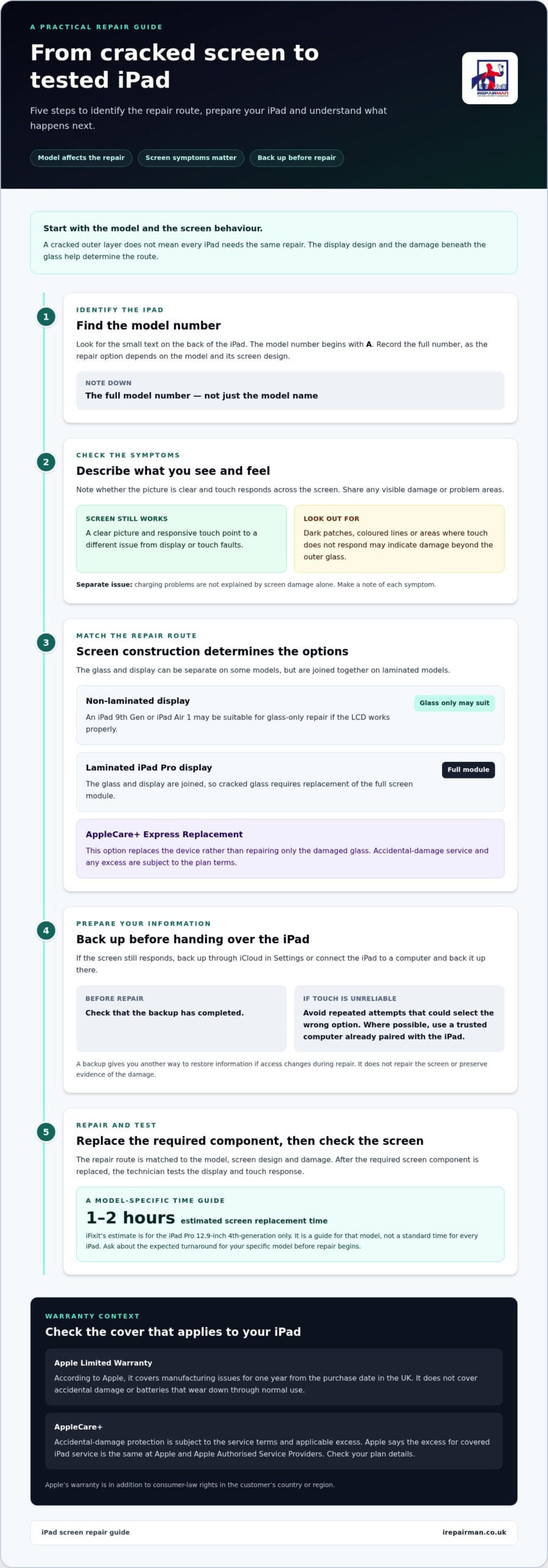
Screen replacement time depends on the iPad model and the damage beneath the glass. iFixit estimates one to two hours for an iPad Pro 12.9-inch 4th-generation screen replacement; that estimate is a guide for that model, not a standard time for every iPad.
Repair scope for glass, display and touch
Screen repairs address cracked glass, display faults and touch problems. The right repair depends on which parts are damaged. A clear picture and responsive touch point to a different issue from black patches, coloured lines or an unresponsive area, which may indicate display or touch damage as well.
This distinction matters because glass-only repair suits only some iPad designs. On models where the glass and display form a combined module, a crack may require replacing the screen assembly. Charging problems are separate: screen damage alone does not explain a charging fault, so note each symptom when arranging a repair.
Backing up before repair
A backup gives you another way to restore your iPad’s information if access to the device changes during repair. If the screen still responds, start an iCloud backup in Settings or connect the iPad to a computer and back it up there.
Before handing over the iPad, check that the backup has completed. If touch is unreliable, avoid repeated attempts that could select the wrong option. Where possible, use a trusted computer already paired with the iPad. A backup protects your files, but it does not repair the screen or preserve evidence of the damage.
Warranty coverage and AppleCare+
Apple’s Limited Warranty covers manufacturing issues for one year from the date of purchase in the UK, according to Apple. It does not cover accidental damage or batteries that wear down through normal use. A drop that cracks the glass is accidental damage, not a manufacturing fault.
AppleCare+ includes protection for accidental damage, subject to its service terms and applicable excess. For iPad service covered by an AppleCare plan, Apple says the excess is the same at Apple and all Apple Authorised Service Providers. Read your plan details to understand the excess that applies.
Common damage and repair stages
Screen damage can include hairline cracks, shattered glass, dark patches, coloured lines and areas where touch no longer responds. Describe what you can see and how touch behaves. These details help distinguish a glass problem from damage to the display module.
The repair process starts by identifying the iPad model and recording the symptoms. The repair route is then matched to the screen design and damage. After replacing the required screen component, the technician tests the display and touch response. Ask about the expected turnaround for your specific model before the repair begins. The one-to-two-hour iFixit estimate applies only to the named iPad Pro model.
Screen replacement availability by iPad model
Screen repair options depend on how the glass and display are built in each iPad model. Identify the model first, then compare glass-only repair, full-screen replacement and an AppleCare service route.
Choosing repair by iPad model
Model-based repair matches the screen option to the iPad’s display design and condition. That matters because a cracked outer layer does not call for the same repair on every generation.
For example, an iPad 9th Gen or iPad Air 1 has a non-laminated display. If its LCD works properly, it may be suitable for glass-only repair. By contrast, iPad Pro models have laminated displays, so cracked glass requires replacement of the entire screen module. Screen construction and symptoms help narrow down the repair route.
If your iPad screen is shattered, start by identifying the model number. It begins with A and appears in small text on the back of the iPad. Record the full number, then note whether the picture is clear and touch responds across the display. These details give a repair discussion a more useful starting point than the model name alone.
Glass-only and full-screen repairs
Glass-only repair replaces the outer glass while keeping a working LCD. Full-screen replacement replaces the complete screen module. The display design determines whether the glass and display can be separated.
On a non-laminated model, glass-only repair may suit an iPad with an intact LCD. If the image is distorted, has dark areas or touch fails, replacing the glass alone will not address every symptom. On laminated iPad Pro models, the glass and display are joined, so a cracked screen requires replacing the screen module.
Your options for a shattered iPad screen also depend on whether the display still works and how it is assembled. A battery fault is separate and does not determine the type of screen repair.
AppleCare+ Express Replacement
AppleCare+ Express Replacement replaces the device rather than repairing only the damaged glass. It may suit someone who would prefer a replacement iPad to having the existing screen repaired. AppleCare service options and accidental-damage excess follow the plan terms. Apple says the excess for covered iPad service is the same at Apple and Apple Authorised Service Providers.
Replacement parts and warranty
Parts must match the iPad model and repair scope. Glass-only repair needs the correct glass, while a laminated display requires a full screen module. Record the model number and symptoms together to help distinguish a glass fault from wider display damage.
Apple’s Limited Warranty covers manufacturing issues, while accidental screen damage falls outside that coverage, according to Apple. Apple also says its warranty is in addition to consumer-law rights in the customer’s country or region. Consider whether the proposed part and service route fit your model and AppleCare terms. For help with iPad repair options, share the model number and screen symptoms.
Using an iPad with a cracked screen
A cracked iPad may still turn on, show a clear picture and respond to touch, but that does not mean every function is working normally. Check the glass, display and touch separately before deciding whether to keep using it. Limit use if the cracks interfere with everyday tasks.
Start with a visual check in good light. Look for loose glass, spreading cracks, dark patches, coloured lines or flickering. Open a familiar app and test touch across the screen, including the corners and keyboard area. Note missed taps or unexpected selections. These observations help distinguish a surface crack from display or touch problems, and give a technician specific symptoms to assess.
If glass is loose or a crack crosses an area you need to tap, put the iPad aside instead of continuing to press the screen. Don’t try to push glass back into place or remove fragments yourself. Keep the device flat and away from items that could press against it, such as books in a crowded bag. A protective case may help prevent movement during storage, but it will not repair the display.
If the screen still responds, reduce unnecessary use and back up important information. For example, save current work in its app, then start an iCloud backup through Settings. If touch is unreliable, avoid repeatedly entering passwords or making important edits on the damaged display. Where possible, use a trusted computer already paired with the iPad to manage a backup.
- Picture: Check whether text and images remain clear, or whether dark areas and lines obscure them.
- Touch: Test typing and swiping in a familiar app, without pressing hard on cracked areas.
- Charging: Note whether the iPad charges normally, but don’t treat a charging fault as proof of screen damage.
- Use: Consider whether the crack affects essential tasks, such as reading a school worksheet or joining a work call.
For a school iPad, tell the responsible staff member which screen areas remain usable and whether touch is affected. For a personal device, avoid lending it if loose glass or missed touches make handling difficult. Keep the model details and a short symptom list ready when arranging a repair. A working screen may allow limited use, but visible cracks or changing display behaviour are reasons to plan the next step rather than rely on the device indefinitely.
Is it better to repair or replace an iPad with a broken screen?
Choose between repair and replacement by looking beyond the crack. The iPad’s model, overall condition, battery performance and role in your daily routine all matter. Screen repair can address isolated glass damage; replacement may suit a device with several problems or limited usefulness.
Start by assessing the iPad’s overall condition. Does it still run the apps you need, hold charge through your usual day and connect reliably? If so, and the screen is the main fault, repair can preserve a familiar device and its existing setup. If poor battery performance or other faults already disrupt work, study or family use, weigh those problems alongside the cracked screen.
Next, match the repair to the model and symptoms. An iPad with a non-laminated display, such as an iPad 9th Gen, may be suitable for glass-only repair if its LCD works properly. An iPad Pro with a laminated display requires a full screen module when the glass is cracked. That difference affects the scope of work, so don’t compare repair and replacement as if every cracked iPad needs the same treatment.
- Repair is more compelling when the picture and touch work, the iPad meets your needs, and the screen is the main fault.
- Replacement deserves consideration when the device has additional faults, struggles with essential tasks, or no longer suits its regular role.
- For a school iPad, consider whether a repaired device can return to classroom use and fit the organisation’s existing setup.
- For personal use, consider whether you rely on saved work, familiar apps and settings that you would need to set up again.
Apple’s Limited Warranty covers manufacturing issues, not accidental screen damage, according to Apple. Apple also says its warranty sits alongside consumer-law rights in the customer’s country or region. If you have AppleCare+, compare the applicable service route with a repair option, and read your plan terms before deciding. An AppleCare service excess is not the same as the total value of replacing your device.
Use a simple decision process: record the iPad model, list every fault, check whether the display and touch work, then compare the repair scope with the device’s remaining usefulness. Include battery performance and any charging problem rather than assuming the screen is the only issue. A responsive iPad with a clear picture and one cracked panel presents a different decision from a device with a damaged display and unreliable charging.
There is no single right choice for every iPad. Repair focuses on restoring the damaged screen; replacement gives you a different device and may mean transferring data and setting up apps again. Base the decision on the model, fault pattern and how well the iPad still serves its purpose.
Your ipad
Finding your iPad’s exact model helps narrow down the screen repair options. The model number begins with A and appears in small text on the back of the device. Use it when describing the damage instead of relying only on the screen size or appearance.
Turn the iPad over and look for the small printed text on its rear casing. Find the code that starts with A and write down the full number, including every digit. “A” alone is not enough to identify the model. If a case covers the text, remove it carefully and check the casing without pressing on cracked glass.
Keep the model number with a short description of the fault. Note whether the glass is cracked, the picture is clear and touch works across the screen. Include any dark patches, lines or unresponsive areas. A technician can use the model and symptoms together to determine the screen construction and repair scope.
Don’t assume two iPads that look alike have the same screen. The iPad 9th Gen and iPad Air 1, for example, are non-laminated models; an iPad Pro has a laminated display. That design difference can change whether a working LCD allows glass-only repair or whether the full screen module needs replacing. A correct model number helps avoid choosing a repair route based only on a familiar product name.
- Record the full A-number: Copy every digit from the small text on the iPad’s back.
- Describe the display: Note clear images, dark patches, coloured lines or flickering.
- Test touch gently: Mention missed taps or areas that don’t respond.
- List other faults separately: For example, note a charging problem as well as screen damage.
If the rear text is worn or difficult to read, check the model information in Settings. On an accessible iPad, open Settings, then General, then About, and record the details shown. Keep the number with the device rather than relying on memory, especially when arranging repairs for several school or work iPads.
If the iPad will not turn on, do not keep pressing cracked areas to find its details. Use the visible rear code if you can read it safely, and describe the power issue alongside the screen damage. If the model is still unclear, share any readable text and describe the iPad when arranging a repair. Accurate identification helps focus the discussion on the right screen option.
IRepairMan London: iPhone Screen Repair
iRepairMan London repairs iPads with cracked screens, display damage and touch faults. Identifying your iPad model and describing the symptoms will help you explain the repair you need and discuss the next step.
For schools and nurseries, iPad screen repairs can help get devices used for lessons and daily activities back into service. Individual owners can also arrange iPad repairs when a cracked screen makes reading, writing or using apps difficult. The repair route depends on the model and damage, so share the model number and any display or touch issues when you get in touch.
If your iPad needs attention, contact iRepairMan London to discuss a repair.
Take the next step with confidence
If you’re deciding what to do about a shattered iPad screen, make the next step practical: keep the model number and a clear note of the symptoms together. This gives you a useful starting point for discussing a repair that suits your device and how you use it.
For a cracked iPad, iRepairMan London provides iPad repairs. The company also repairs iPhone screens and back glass, so you can discuss support for these devices in one place. Share the model details and explain whether the picture, touch response or both are affected.
You’ve already done the essential groundwork by identifying the iPad and its screen behaviour. Now you can move from uncertainty to a clear repair conversation, without making a decision based on the crack alone. Contact iRepairMan London about your iPad repair and take the next step when you’re ready.
Frequently Asked Questions
How much will it cost?
The right repair depends on the exact iPad model and fault. To narrow down the options, provide the model number, describe the damage and say whether the picture and touch controls work. Mention any other faults, such as charging problems, separately. This gives the repair discussion a clear starting point without assuming every cracked iPad needs the same work.
Where can I get a service?
In Central London, iRepairMan London provides iPad repairs, including on-site service. Arrange help at a practical location such as home, work or school. When you get in touch, share your postcode, preferred appointment location and a brief description of the fault. For a school or nursery iPad, include the organisation’s contact details so the repair can be coordinated clearly.
What is the iPad screen repair cost by model in the UK?
The work required varies across the iPad range, so give the repair service the precise model rather than saying only “iPad”. Include the model number and a short fault description, such as a flickering display or unresponsive touch controls. If the device is managed by a school or employer, note who can approve the repair and receive updates. These details help define the work for that specific device.
Can a shattered iPad screen be repaired by an independent UK repair shop?
Yes, independent repair services can repair iPads. iRepairMan London repairs iPads, including devices with screen damage. Before handing over the device, note its identifying details and any included accessories. When it is returned, check that your usual passcode works and your everyday apps open as expected. Keep the repair paperwork with the iPad’s purchase records for future reference.
Does home contents insurance or a retailer warranty cover a shattered iPad screen?
Coverage depends on the wording of your insurance policy or retailer warranty. Read the terms for accidental damage, exclusions, excesses and claim steps before arranging a repair. Keep your proof of purchase and note when and how the damage happened. If the policy sets conditions for repairs or evidence, follow those instructions and retain repair documents for the claim.
Can I keep using an iPad with a cracked screen, and what are the safety risks?
Take care when handling the iPad, especially if it is shared with children or passed between people. A sharp edge or loose fragment can make handling uncomfortable, and a damaged screen can complicate tasks such as typing a password or completing a form. Do not lend it to someone who is unaware of the damage. Keep it in a stable place and avoid using it for tasks where an accidental tap could cause a problem.
How long does iPad screen repair take, and can I get a same-day repair in the UK?
iRepairMan London offers same-day on-site appointments, with on-site repairs usually completed in 20-30 minutes. That duration describes the usual on-site service, not every iPad screen repair. The model, repair work and appointment arrangements affect the practical timing. In Central London, share your location and device details when arranging service, so the appointment can be planned around your day.
What should I check before choosing an iPad screen repair service?
For iPad Repairs with iRepairMan London, note the model, symptoms and a suitable repair location before arranging service. Ask what warranty applies to the specific repair; iRepairMan London offers a 12-month warranty on most repairs. The service also uses an encrypted, no-access data safety protocol. For a school or workplace device, make sure the person responsible for approving repairs can be reached during the arrangement.



