

To fix your phone screen without data loss in London, choose a repair focused on the damaged display, not resetting the handset. A screen replacement is intended to restore the display while leaving stored information untouched. Before handing over your phone, ask what work is planned and whether it requires a reset.
A cracked screen can make everyday tasks difficult, and uncertainty about the repair can add stress. This guide explains how to assess replacement-part descriptions, understand a quote and diagnostic, and ask clear questions about privacy. It also covers what to expect during a screen replacement and how to check the finished repair. Whether you use an iPhone, Samsung or another smartphone, these practical points can help you arrange a repair in Central London or send your device from elsewhere in the UK. Discuss your priorities before approving work, so you can get a usable phone back while treating your personal information with care.
Key Takeaways
- A screen replacement focuses on the display, so your photos, messages and apps generally stay on the phone. A backup adds protection before repair.
- Replacement screens can differ in source and specification; understand which part is proposed and how that choice affects the repair.
- A clear quote should explain the repair work, while any diagnostic fee should be made clear before you proceed.
- Protect your privacy by asking how the repair is handled and whether technicians need access to your device or passcode.
- For a cracked or unresponsive screen, compare repair options based on the damage and choose a service that explains its process and warranty.
Keeping phone data intact during screen repair
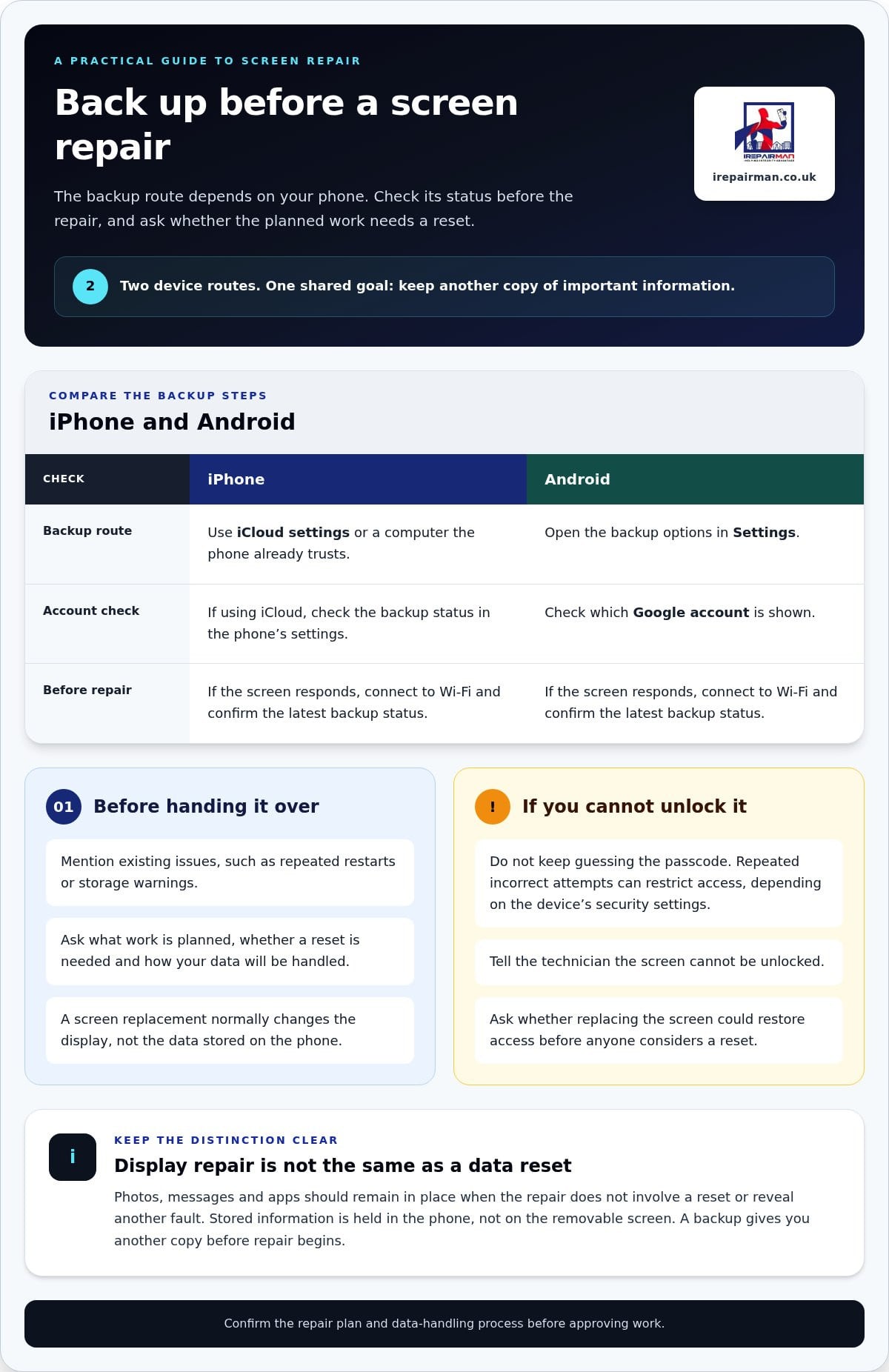
A screen replacement normally changes the display, not the data stored on your phone. Photos, messages and apps should remain in place if the repair does not involve a reset or reveal another fault. Before handing over an iPhone or Android device, mention existing problems such as repeated restarts or storage warnings. Ask whether the planned work requires a reset and how the technician will handle your data.
When comparing an Apple Store with an independent repair service in London, consider the proposed part, repair process, warranty terms and quote. Neither option automatically protects your data. Ask for the work and terms in writing, including whether a diagnostic fee applies, whether a reset is needed and what happens if inspection finds additional damage. Compare the same repair scope, not just the headline quote.
For a London repair, arrange an appointment at a practical location, such as your workplace near Liverpool Street. If you live in Southend or elsewhere in Essex, UK-wide pick-and-return delivery avoids needing to travel to a walk-in counter. Pack the phone securely and retain the booking details. The device is repaired in a London workshop and returned by tracked delivery in around 2-3 working days.
Back up an iPhone through iCloud settings or a computer it already trusts. On Android, use the backup options in Settings and check which Google account is shown. If the screen still responds, connect to Wi-Fi and confirm the latest backup status. A backup gives you another copy of important information before repair begins.
If touch damage prevents you from unlocking or backing up the phone, don’t keep guessing the passcode. Repeated incorrect attempts can restrict access, depending on the device’s security settings. Tell the technician the screen cannot be unlocked and ask whether replacing it could restore access before anyone considers a reset. If the display shows an image, note any visible alerts or unusual behaviour.
In London, Samsung owners can choose between manufacturer repair routes and independent repair services. Ask how each route handles your data, which part is proposed and whether the process includes a factory reset. For a Samsung phone, give the exact model and describe whether the image and touch controls still work.
Screen replacement can affect a phone’s seals, so don’t assume its previous water resistance will remain unchanged. Warranty terms depend on the handset and repair route. Face ID relies on components beyond the glass, so existing damage or work involving those parts may affect its function. Before approving work, ask what the repair covers and how Face ID will be tested afterwards.
Certified or genuine replacement parts
Replacement screens are not all the same. An iPhone screen described as genuine is intended to match the manufacturer’s component, while compatible aftermarket parts come from other suppliers. “Certified” may refer to a supplier’s quality process, so the label alone does not identify who made the screen. Ask for the part type in writing before authorising the repair.
Part choice affects how the display looks and responds. After fitting, test brightness, colour, touch response and the features you use, such as Face ID on an iPhone. On a Samsung device, check scrolling and keyboard input across the full screen. A suitable screen should let you use the phone normally, not merely cover the cracked glass.
Data is held in the phone’s storage, not on the removable screen. Replacing a display should not require transferring photos to a hard drive or erasing the device. However, a reset, damaged internal connectors or an existing storage fault can complicate recovery. Distinguish the screen problem from any storage or battery warnings.
Before the repair, note your phone model and its symptoms. For example, record whether the screen flickers, shows lines or has areas where touch does not work. Share these details when requesting service. They help distinguish a faulty replacement screen from a problem that was already present.
The same questions apply to a tablet, but its screen assembly may differ from a mobile phone’s. Ask whether the repair replaces the glass alone or the full display assembly. This affects which components are handled and helps explain why a tablet with a black display may need a different repair from one with cracked glass but working touch.
Keep a repair record with the handset model, part description and work completed. After collection, compare the fitted screen with the agreed description, then test touch, brightness and front-facing camera functions. If something behaves differently, report it promptly with a specific example, such as Face ID failing after the screen replacement.
Keep your request focused on the handset, and describe any separate symptoms, such as charging problems, clearly. For a clear explanation of the screen option, review the iPhone screen repair details before arranging service. The part choice should be understood alongside the repair scope, data-handling process and warranty terms. That gives you a practical basis for deciding whether the proposed replacement suits your iPhone and daily use.
Upfront quotes and diagnostic fees
Ask for a written quote before approving a screen repair. It should identify your phone model, the display work, the part type and any additional damage found. A quote for an iPhone may differ from one for a Google Pixel or another Android handset because screens and assemblies vary. A clear breakdown lets you compare like with like, rather than relying on a headline figure.
Ask what the diagnostic includes and whether inspection carries a fee. Find out whether you’ll pay if you decline the repair. A diagnostic may check touch response, display output, connectors and signs of impact damage. These checks help distinguish a cracked screen from a fault affecting another component.
Describe the damage precisely when requesting a quote. For example, say whether the glass is cracked, the display shows lines or touch fails near one edge. Share the exact model name from the phone settings or original packaging. “Android phone” is not specific enough, because a Google Pixel and a Samsung model may use different parts.
Before approving the work, ask what could change the quote. The technician may find that impact damage has affected an internal connector or that the phone has a separate battery fault. Any revised work and additional charge should be explained before proceeding. Don’t treat an initial screen-only estimate as approval for unrelated repairs.
For a collection repair, ask how the quote will be confirmed before dispatch and how you’ll approve any changes. Keep the booking reference and written estimate with your device details. When the phone is returned, compare the completed work with the agreed repair description. If the screen still has a fault, record exactly what happens, such as flickering during calls or missed touches while typing.
Discuss data handling as part of the repair. Ask whether the diagnostic requires your passcode, whether a reset is planned and how technicians handle personal information. A screen-only inspection should focus on the fault, not browsing photos or contacts. If the phone cannot be unlocked, explain this before booking because it affects which display tests are possible.
A laptop repair is separate from a phone screen diagnostic, so keep your quote request focused on the handset. Before agreeing, get the repair scope, diagnostic-fee terms, part description and warranty details in writing. This gives you a record if the proposed work changes after inspection and lets you make a decision with the relevant details in front of you.
Data privacy and confidentiality
When choosing a London repair service, read recent reviews for comments about privacy, communication and completed repairs. Read the written warranty terms and ask who can access your iPhone, whether a passcode is needed and how customer data is handled. Specific answers are more useful than a general promise of confidentiality.
Before handing over your phone, remove anything the repair doesn’t require. Take out the SIM card if the repair process allows, disable message previews on the lock screen and note the device’s condition. Don’t share your passcode by message. If access is essential for a test, enter it yourself and stay present where possible.
A screen repair normally concerns the display, not the photos, messages or accounts stored on your phone. However, data recovery can become harder if a separate fault affects storage or the phone needs resetting. Ask for a clear explanation before authorising any step that could erase the device, including a software update or factory reset.
Look for a defined data-handling process, not just a privacy statement. An encrypted, no-access protocol means repair staff don’t browse personal content as part of the repair. The work should focus on the fault, such as checking touch response after fitting a replacement screen. Ask how access is restricted and how the handset is stored between inspection and collection.
For a collection repair, record the handset model, visible damage and any accessories sent with it. Keep the booking confirmation and condition report. When the phone returns, inspect the parcel and device before confirming receipt. If the screen requests a passcode or shows an unfamiliar reset screen, pause and contact customer service before continuing.
Protect your accounts during the repair. If the screen still works, back up important files, sign out of sensitive apps when practical and avoid sharing banking credentials. A repairer should never need your bank password to replace an iPhone display. If you use two-factor authentication, keep access to your trusted number or recovery method.
If the phone has also been wet, don’t charge it or power it on before seeking help. Moisture can cause further internal damage, and switching it on may complicate recovery. If the screen is cracked but the phone has not been exposed to liquid, follow the agreed repair steps and ask for the device to be returned without a reset. Keep the written privacy terms with your repair record.
Phone screen replacement
A cracked smartphone screen can affect more than appearance. Before replacement, note whether the display shows an image, responds to touch or has dark patches. For example, a Samsung phone with visible lines but working touch has different symptoms from one with a blank display. Share these details when booking so the repair can be planned around the actual fault.
During screen replacement, the technician opens the handset and disconnects the display assembly. They fit the agreed replacement, reconnect the phone’s components and check that the screen responds. The repair targets the display and does not normally require moving photos, contacts or apps. A separate fault, such as a damaged internal connector, may affect the work needed.
After fitting, test the whole screen, not just the centre. Open the keyboard and type across each row, scroll through a page, and check the edges for missed touches. Then adjust brightness and view a plain white screen for uneven patches. On an iPhone, test Face ID and the front camera. On Samsung, check calls and on-screen controls.
Battery behaviour is another useful check after the phone is reassembled. Confirm that it charges and stays on during ordinary use. If the battery percentage changes sharply or the device gets unusually warm, stop using it and report the symptom. A screen repair is not a diagnosis of every fault in the phone.
Ask the repair specialist to explain the part fitted and the work completed. The repair record should identify the handset model, replacement screen type and any additional work you approved. Keep that record with the warranty terms. If the display fails later, details such as flickering after a call help distinguish a new screen fault from an earlier symptom.
Convenience matters in Central London. An on-site appointment at home or work can save you carrying a cracked phone across town, while a UK-wide Pick & Return service suits customers elsewhere. Before handing over the device, agree where and when it will be returned and how you’ll receive updates. Keep your SIM, case and accessories unless the repair instructions require them.
A careful handover makes the result easier to assess. Photograph the cracked screen before work, note the phone’s condition, then inspect the replacement before leaving or acknowledging delivery. Confirm touch, display and key features while the technician or customer service team can record any issue. Arrange an iPhone screen repair for a damaged display and keep the agreed repair details with your phone.
IRepairMan London: iPhone Screen Repair
iRepairMan London provides iPhone Screen Repair for cracked or unresponsive displays, with on-site support across London. Its encrypted, no-access data safety protocol is designed to protect your information during the repair, and every repair comes with a 12-month warranty.
Choose iRepairMan London if you want an iPhone screen assessed and repaired without travelling to a repair shop. Share the model and symptoms, such as flickering, unresponsive areas or a blank display, so the repair can be planned around the fault. iRepairMan London also repairs iPhone back glass, iPads and Samsung phones.
Contact iRepairMan London to discuss your screen repair, or visit irepairman.co.uk.
Choose your next repair step with confidence
Before booking, decide what matters most for your phone: restoring a clear display, protecting your personal information or fitting the repair around your day. Write down the fault and any features you rely on, such as touch response or Face ID. This gives the repair team a clear starting point.
To fix your phone screen without data loss in London, share your model and symptoms with iRepairMan London and discuss the repair process before work begins. Its services include iPhone screen and back-glass repairs, iPad repairs and Samsung phone repairs, so you can explain the device issue directly.
A cracked screen doesn’t have to derail your routine. Take the next step when you’re ready, with a clear description of the problem and the questions that matter to you. Contact iRepairMan London to discuss your repair and move towards getting your device back in use.
Frequently Asked Questions
Will I lose my data during the repair?
Replacing a screen usually doesn’t erase the data stored on your phone. To fix a phone screen without data loss in London, tell the repair team if the device has storage errors, restarts unexpectedly or displays a reset prompt. These symptoms may point to a fault beyond the screen. If you can still use the phone, save important files before handing it over and keep your account recovery details accessible.
How long does a phone screen replacement take?
An on-site screen replacement usually takes 20-30 minutes. The exact repair time depends on the handset and the work required, so share its model and screen symptoms when arranging service. If you’re in Central London, an on-site appointment can reduce time away from home or work. Allow time to check the repaired display, touch response and key features before using the phone as usual.
Can I post my device if I can’t visit London?
Yes. iRepairMan London’s UK-wide Pick & Return Repair Service lets you send your device for repair in its London workshop, then receive it by tracked delivery. The total turnaround is 2-3 working days. Keep your booking details, pack the handset securely and follow the collection instructions. This option suits customers outside Central London who can’t attend an on-site appointment.
Do I need an appointment?
Book an on-site repair and provide your location and phone fault so the technician can plan the visit. iRepairMan London offers same-day appointments, subject to scheduling, within its on-site service area. When booking, give the phone model, screen condition and a suitable address, such as your home or office in Central London. This helps the repair team prepare for the visit.
Do you use genuine parts?
iRepairMan London offers genuine parts and high-quality alternatives for phone repairs, so you can choose the part type for your device. Ask for the selected screen to be recorded in the repair details before approving work. This gives you a clear reference for what was fitted and helps you understand the warranty information provided with the repair.
Do you use original parts or high-quality alternatives?
You can choose between genuine parts and high-quality alternatives. The right option depends on your preference and the repair discussed for your model. When arranging an iPhone screen replacement, for example, ask which type is proposed and have your choice recorded before work begins. You can then compare the part description with your repair record when the phone is returned.
How long does a phone repair take?
On-site phone repairs usually take 20-30 minutes. That timing applies to the repair appointment, while a UK-wide Pick & Return repair takes 2-3 working days in total, including return delivery. Tell the team whether the phone has screen damage alone or additional symptoms, such as charging problems. That detail helps them understand the job and plan the right repair route.
Do phone screen repairs in London erase data or require a factory reset?
A screen-only repair doesn’t normally require a factory reset because replacing the display is separate from erasing the phone’s storage. A reset may be relevant if another fault prevents testing or the device needs separate troubleshooting. Before agreeing to additional work, ask what it involves and whether it will erase the handset. Don’t share your passcode unless access is needed and you understand why.



