

How much does it cost to fix a tablet screen? There isn’t one universal answer. The repair depends on your tablet’s make and model, whether the damage is limited to the glass or affects touch and display, and which replacement part is needed. A crack can look minor while hidden damage causes lines, dark patches or an unresponsive screen, so an assessment helps identify what needs attention.
It’s reasonable to want a clear explanation before deciding whether to repair your tablet. Its age, condition and usefulness all matter, as does the type of screen damage. This guide explains what affects the repair, how to compare your options and what to consider when weighing repair against replacement.
In Central London, iRepairMan provides same-day on-site tablet repairs at home, work, school or another suitable location. Most on-site repairs are usually completed in 20-30 minutes. If an on-site appointment does not suit, UK-wide Pick & Drop has a typical total turnaround of 2-3 working days. Most repairs and replacement parts come with a 12-month warranty.
Key Takeaways
- How much does it cost to fix a tablet screen depends on its model, screen design, damage and repair route, so there is no single answer for every repair.
- Cracked glass, display faults and unresponsive touch can point to different screen problems. An assessment helps identify what the tablet needs.
- Weigh repair against replacement by considering your tablet’s condition, usability and how well it meets your needs.
- Prepare the tablet’s model and a clear description of what the screen does to make the assessment more useful.
- Choose a convenient repair option, from a Central London appointment at a suitable location to UK-wide Pick & Drop.
How Much Does It Cost to Fix a Tablet Screen? What Shapes the Quote
There is no single answer for every tablet screen repair. How much does it cost to fix a tablet screen depends on the exact model, how its screen is built, the damage and the repair needed. An assessment is more useful than guessing from a crack, because the visible damage may not show which parts are affected.
Tablet screen repairs vary because devices use different screen assemblies, and visible cracks do not always reveal the full extent of the damage. On some tablets, the outer glass, touch-sensitive layer and image-producing display are joined together. Damage to one area may need a different repair from damage affecting several parts. An assessment helps establish what the device needs and explain the appropriate repair.
Why the tablet model affects the repair assessment
Identifying the exact model makes the assessment specific to your device. Standard, Air, mini and Pro iPads are distinct types, while Samsung Galaxy tablets also vary by model and screen assembly. Their screen designs and replacement requirements can differ. If you are unsure which tablet you have, the model name or number in its settings can help distinguish it from a similar-looking version.
Why a crack does not tell the whole story
A crack may be limited to the outer glass, but the image or touch response can also be affected. Look for lines or dark areas on the display, or parts of the screen that do not respond when tapped. These symptoms can indicate damage beneath the visible surface. They help describe the fault, but an inspection is needed to determine what repair is appropriate.
A photograph or brief description can provide useful context, but it is not a diagnosis. A tablet may still show an image despite touch problems, or respond to touch while the display has visible faults. Note what works and what does not, so the technician has a clearer starting point and does not have to rely on the appearance of the crack alone.
The tablet’s wider condition can also matter. If the screen has separated from the body, the frame appears bent, or you can see other signs of impact, mention them when describing the device. These details may affect the work needed alongside the screen repair. They do not establish the outcome by themselves, but they give a fuller picture than the crack alone.
For background on how tablet computers have developed, see What is a Tablet Computer? For a repair assessment, the practical details are your tablet’s exact model and how it behaves. Together, they help the technician consider your device rather than make a broad assumption about all cracked screens.
What Happens During a Tablet Screen Repair Assessment?
An assessment separates what you can see from what the tablet is doing. The technician checks the device and the symptoms you describe to understand whether the problem appears limited to the glass or also affects the picture or touch response. This gives you a clearer explanation of the fault before a repair plan is discussed. A crack alone cannot confirm which screen components are affected.
Glass, display and touch faults: what is different?
The outer glass can crack while the image beneath it still looks normal. Display faults may show as dark areas, lines or a distorted picture. Touch problems are different: parts of the screen may fail to respond, making ordinary tasks difficult even if the image appears clear. These are useful symptoms to describe, not proof of a particular internal fault.
Note whether the picture is clear across the whole screen, whether any area stays dark, and whether taps or swipes work everywhere. If the tablet behaves differently at different times, mention that too. These observations help the technician focus the assessment, but checks on the device itself are needed to understand the fault.
How technicians assess the tablet before repair
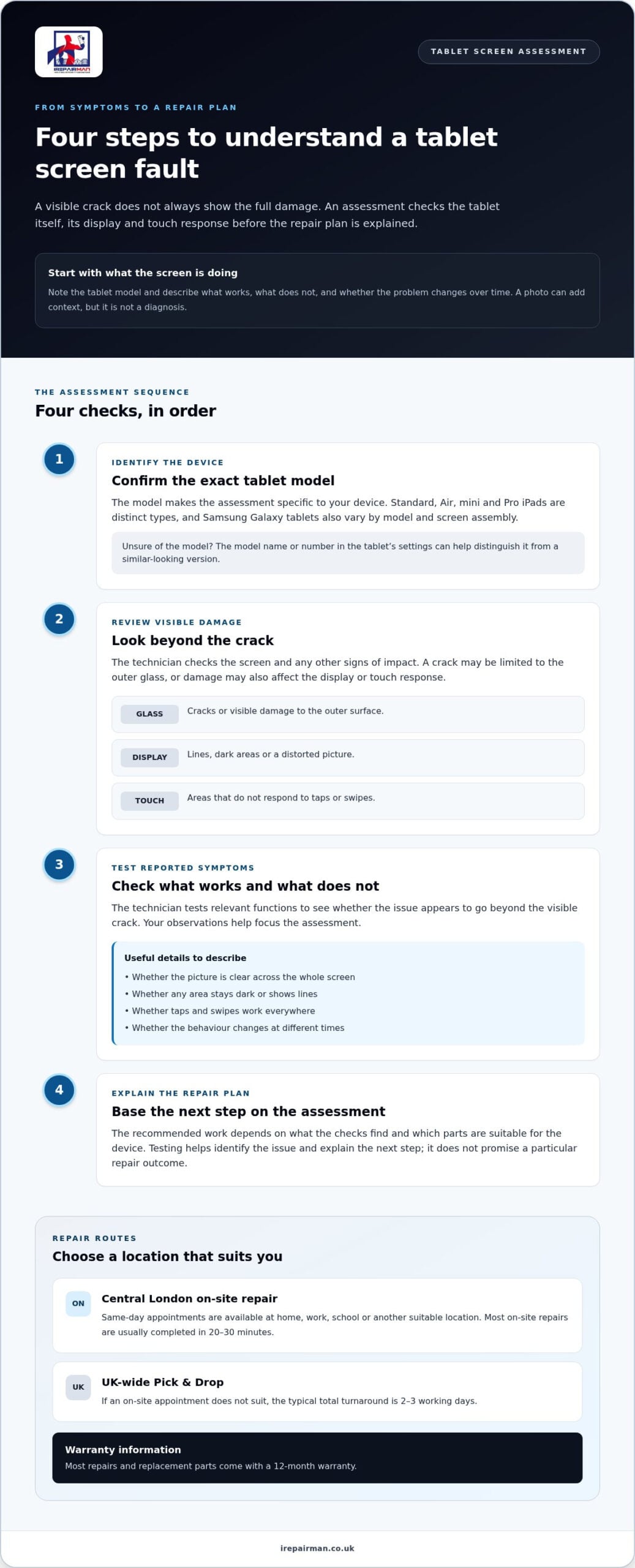
The assessment starts with the tablet’s model, visible screen condition and the symptoms you have reported. The technician can then test relevant functions to see whether the fault goes beyond the obvious crack. This matters because a damaged screen may still display an image, while hidden touch or display problems can affect how usable the tablet is.
A clear sequence keeps the decision grounded in what is found:
- Identify the device. The model helps make the assessment specific to your tablet.
- Review the visible damage. The technician checks the screen’s condition and any other signs of impact.
- Test the reported symptoms. Display and touch behaviour help establish what is working and what is not.
- Explain the repair plan. The recommended work depends on the assessment and the parts suitable for the device.
Testing does not promise that every fault can be resolved in a particular way. It helps identify the issue and explain the next step clearly. If you are wondering, “How much does it cost to fix a tablet screen?”, an assessment moves the answer beyond assumptions based on a photo or visible crack.
To prepare, note the tablet’s model and describe what happens when you use the screen. If a particular area fails to respond or the display changes intermittently, include that detail. iRepairMan repairs iPads and Samsung Galaxy tablets, and can use your observations as a starting point for an assessment. Arrange a tablet screen repair and describe the symptoms you have noticed.
Is Fixing a Tablet Screen Worthwhile Compared with Replacing the Device?
There is no right answer for every tablet. The practical choice depends on whether the device still does its job, how extensive the damage is and what you rely on it for. A tablet with isolated screen damage may be worth assessing, particularly if it otherwise works well. If it has several faults or no longer meets your needs, replacement may be more suitable.
When repairing the screen may suit your needs
Think about how you use the tablet each day. If it still handles work, lessons, reading or video calls reliably, a screen fault may be the main obstacle. Repair can let you keep a familiar device, its settings and your established routine, reducing the disruption of moving to another tablet. That can matter at home, in a classroom or during a busy working week.
Consider the screen issue on its own. If the tablet performs as expected apart from the damaged screen, an assessment can help you understand whether repair is a practical option. If it also struggles with the tasks you need or has other faults, weigh those problems alongside the screen rather than treating the crack as the only factor.
When to consider the tablet’s wider condition
Look beyond the display before making a decision. Does the battery last long enough for your usual day? Does the tablet charge and run reliably? Are there other faults that already affect how you use it? An assessment can help establish whether the screen is the only issue or part of a wider problem, though the best choice still depends on your needs.
Use this simple comparison to organise your thoughts:
- Repair may fit: The tablet meets your everyday, work or school needs, and screen damage appears to be the main problem.
- Consider the wider picture: Battery behaviour, performance or other faults are also affecting your use.
- Replacement may fit: The tablet no longer supports the tasks you need, or multiple issues make it impractical to keep relying on.
These are decision prompts, not a diagnosis. A screen assessment can clarify what is damaged; your daily experience helps determine whether keeping the device makes sense. For example, a tablet used mainly for reading may remain useful despite being older, while one needed for schoolwork may no longer be suitable if it cannot reliably run required tasks. Your priorities matter as much as the visible damage.
Before deciding, write down what works well, what has changed and any problems beyond the screen. This gives you a clearer basis for discussing repair and comparing the tablet’s present usefulness with what you would need from a replacement. Repair is not always preferable, but an informed assessment can make the next step easier to choose.
What Information Should You Prepare Before Requesting a Tablet Screen Repair?
A few details can make arranging an assessment easier and help the technician understand what is happening. You do not need to diagnose the fault yourself. Note the tablet model, describe what you can see and feel on the screen, and mention any changes you noticed after the damage occurred.
The details that help explain your tablet’s screen fault
Before requesting a repair, jot down the information below. A clear description is more useful than guessing which internal part may be damaged.
- Brand and model: Record the tablet’s make and model, such as the iPad type or Samsung Galaxy tablet model.
- Visible symptoms: Note cracks, dark areas, lines, flickering or parts of the display that are difficult to see.
- Touch response: Say whether taps and swipes work across the screen or if some areas do not respond.
- When it happened: Describe when you first noticed the damage and whether display, touch, charging or other functions changed afterwards.
- How you use it: Mention whether it is for personal use, school or work, so the repair can be considered in context.
For example, “the glass cracked yesterday, the picture looks normal, but the right side does not respond to touch” gives a more useful account than “the screen is broken”. If you are unsure of the model, check the device settings or any identifying information you have. Just report what you have observed; the assessment is there to investigate the fault.
Schools arranging support for classroom devices can find relevant information about iPad repair for schools in the UK. For organisations coordinating device support, corporate phone repair in London may also help with planning repairs across a team.
Choosing an appointment or collection route
Consider where it is easiest to have the tablet assessed and repaired. In Central London, an on-site appointment can be arranged at a suitable location such as home, work, school or a café, so you do not need to travel to a repair shop. iRepairMan’s on-site service covers locations within 15-20 miles of Baker Street. Share the location and your preferred appointment details when arranging the service.
If an on-site appointment does not suit, iRepairMan’s UK-wide Pick & Drop service is another option. The tablet is repaired in the London workshop and returned by tracked delivery, with a typical total turnaround of 2-3 working days. This is separate from an on-site appointment, so choose the route that best fits your schedule.
Once you have noted the tablet’s details and chosen a route, you are ready to arrange an assessment. Arrange a tablet screen repair with iRepairMan and share the symptoms you have recorded.
How iRepairMan London Makes Tablet Screen Repair Easier in London and Across the UK
A tablet repair should fit around your day, not add an unnecessary journey. iRepairMan provides on-site tablet repairs in Central London and within 15-20 miles of Baker Street, with appointments at a suitable place such as home, work, school or a café. If you are elsewhere in the UK, Pick & Drop provides a workshop-based alternative. Choose the route that fits your location and how you can manage without the tablet.
On-site tablet repairs at a convenient location
An on-site appointment can help if you need to stay at home, keep working at the office or avoid disrupting a school day. iRepairMan offers same-day appointments, and most on-site repairs are usually completed in 20-30 minutes. Share the tablet’s location and screen symptoms when arranging the visit, so the technician has a practical starting point and you can plan around the repair.
For Central London residents and teams, arranging a repair at a suitable address means there is no need to travel to a repair shop. The assessment determines what work is appropriate, so the repair plan reflects the tablet’s condition rather than an assumption based on its appearance.
UK-wide Pick & Drop for tablet repairs
If you are outside the London on-site service area, Pick & Drop lets you arrange a workshop repair from elsewhere in the UK. The tablet is collected, repaired at iRepairMan’s London workshop and returned by tracked delivery. The typical total turnaround is 2-3 working days. This route suits people who prefer collection and return rather than an on-site appointment.
Whichever option you choose, sharing the exact tablet model and a clear description of its symptoms helps get the repair process started. iRepairMan provides tablet repair support for individuals, schools and businesses, with an on-site or Pick & Drop service to suit your location.
Arrange a tablet repair with iRepairMan and choose the option that works for you.
Take the Next Step Towards a Tablet Repair
Before making a decision, consider what you need your tablet to do and whether its current faults are getting in the way. If you are still asking, “How much does it cost to fix a tablet screen?”, focus on an assessment based on your specific device and its symptoms, rather than relying on the appearance of the crack alone.
iRepairMan can assess your tablet and explain the repair option, so you can decide what fits your needs and routine. A clear picture of the fault makes it easier to plan what comes next.
Book an on-site tablet repair in Central London or choose UK-wide Pick & Drop to arrange your assessment.
Frequently Asked Questions
How much does it cost to fix a tablet screen?
There is no single answer for every tablet screen repair. The device model, screen design, damage and parts required all affect the repair. An assessment helps identify what your tablet needs. Have its make and model ready, and describe what you can see and how the screen responds, so the repair can be considered for your specific device.
What affects the cost of replacing a tablet screen?
The tablet’s model and the screen parts required are key factors. Some devices have screen layers joined together, which can affect what needs replacing. The damage may also extend beyond the visible glass. Mention related problems, such as a damaged frame or unresponsive touch, so the assessment can consider the tablet as a whole before a repair plan is discussed.
Can a tablet screen be repaired if the display still works?
A working display does not necessarily mean the screen is undamaged. The glass may be cracked while the image remains clear, and touch response can still be faulty. Note whether every part of the screen responds to taps and swipes, and whether the crack affects comfortable use. An assessment can help establish the issue; a visible image alone cannot confirm the screen’s full condition.
Is it worth fixing a cracked tablet screen?
It may be worth considering if the tablet still supports the tasks you need it for. Think about whether you rely on it for reading, video calls, schoolwork or work, and whether other faults already interrupt those activities. A tablet that remains useful apart from its damaged screen may be worth assessing. If it no longer meets your needs, consider its wider condition before choosing a repair.
How long does a tablet screen repair take?
Most on-site repairs are usually completed in 20-30 minutes. The total time for Pick & Drop, including collection, workshop repair and return delivery, is typically 2-3 working days. If you rely on the tablet for lessons, meetings or daily tasks, consider which route best fits your schedule.
Can iRepairMan London repair a tablet screen at my home or workplace in London?
Yes, iRepairMan provides on-site tablet repairs at suitable locations in Central London and within 15-20 miles of Baker Street, including homes and workplaces. Same-day appointments are available, and most on-site repairs are usually completed in 20-30 minutes. When arranging the visit, provide the address and any access details the technician may need, along with the tablet’s model and a short description of the fault.
Does iRepairMan London offer UK-wide tablet screen repair?
Yes, iRepairMan offers UK-wide Pick & Drop tablet repair. The device is collected, repaired in the London workshop and returned by tracked delivery, with a typical total turnaround of 2-3 working days. It gives individuals, schools and businesses across the UK a way to arrange tablet repair without travelling to London.



