

If you’re searching for “iPad touch screen not working London”, your display may look fine while taps and swipes fail. It can be difficult to tell whether the cause is a smudge, a case or a screen fault. When you rely on your iPad for work, school or everyday plans, a few safe checks may help you identify a simple cause.
This guide explains what to try without risking further damage, what persistent touch problems may indicate and when a professional assessment is the sensible next step. Cleaning the screen, removing a case or protector and restarting the iPad can help narrow down the issue.
If the screen still won’t respond reliably, iRepairMan London provides on-site iPad repairs across Central London. Arrange help at home, work, school or a nearby café instead of travelling to a repair shop. Same-day availability can reduce disruption, although repair time depends on the fault and parts required. Every repair includes a 12-month warranty, and repairs follow an encrypted, no-access data-safety protocol.
Key Takeaways
- Try a few safe checks before arranging a repair, and avoid anything that could cause further damage.
- Notice when and where touch response changes. These patterns can help a technician assess the iPad, but they cannot confirm the cause by themselves.
- If the problem keeps returning, repeating basic checks may not resolve it. A professional assessment can help identify the next step.
- For an iPad touch screen not working in London, share the iPad model and symptoms when arranging a convenient Central London appointment.
- On-site iPad repair brings professional tools and a microscope to your chosen location, reducing travel and disruption.
IPad Touch Screen Not Working? Safe Checks to Try First
An iPad that stops responding to taps can interrupt work, study or everyday tasks. If you have an iPad touch screen not working in London, rule out simple obstructions before arranging a repair. Try these checks gently. They may reveal a basic cause, but they cannot diagnose an internal fault. Stop if the screen is visibly damaged or the checks do not help.
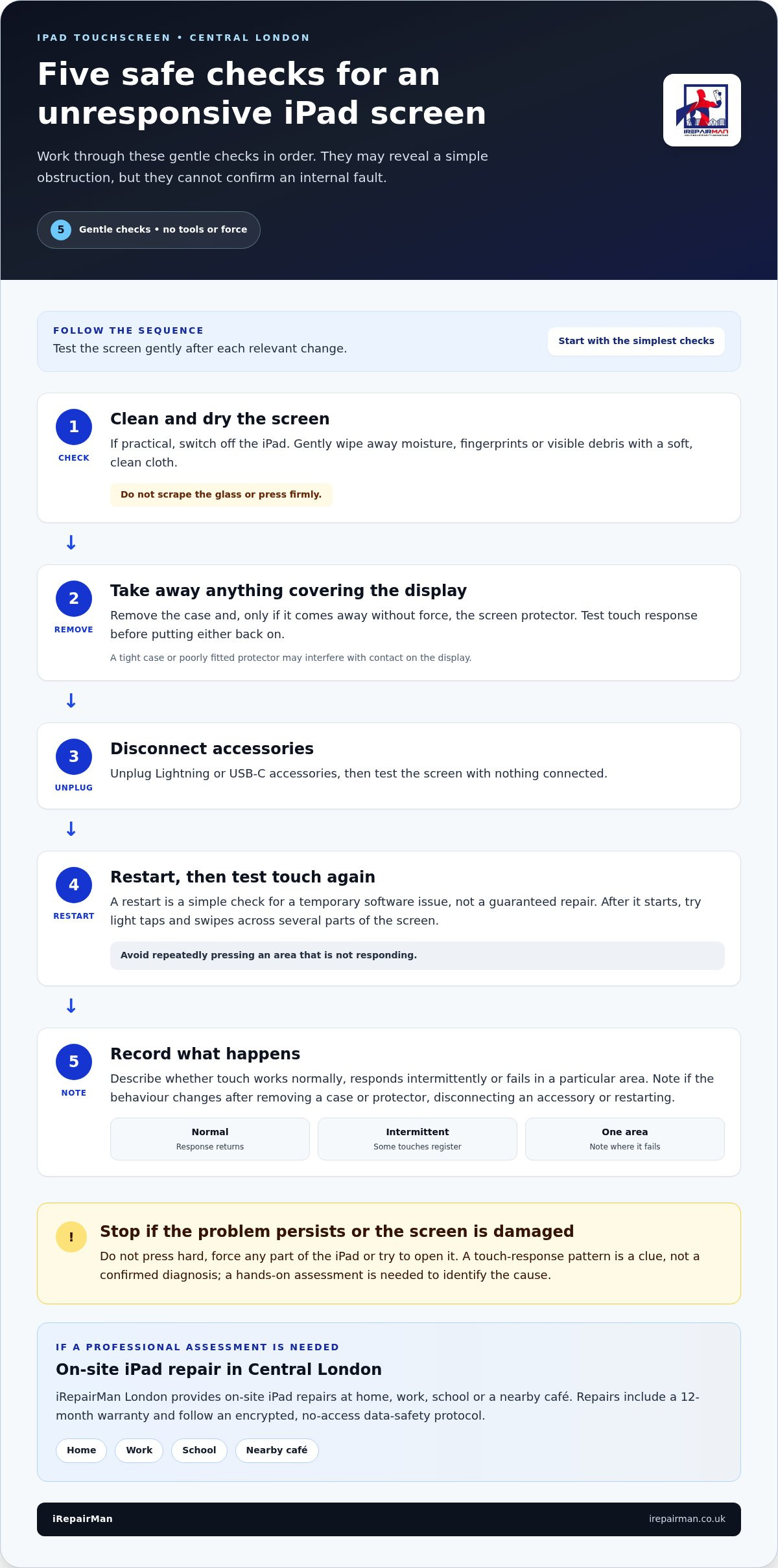
Work through the checks in order. Do not press hard or force any part of the device:
- Clean and dry the screen. If practical, switch off the iPad, then gently wipe away moisture, fingerprints or visible debris with a soft, clean cloth. Do not scrape the glass or press firmly.
- Remove anything covering the display. Take off the case and, if it comes away without force, the screen protector. Test the screen before putting either back on.
- Disconnect accessories. Unplug Lightning or USB-C accessories, then test the screen with nothing connected.
- Restart the iPad. A restart is a simple check for a temporary software issue, not a guaranteed repair. Once the iPad starts again, try light taps and swipes across several parts of the screen.
- Note what happens. Record whether touch works normally, responds intermittently or fails in a particular area. This information can help a technician if the issue continues.
Check the screen, case, and connected accessories
Test the iPad on a dry, clear surface, holding it comfortably and using light taps. Moisture, debris, a tight case or a poorly fitted protector may interfere with contact on the display. If practical, remove accessories one at a time and check whether touch response changes after each one is removed.
Touchscreens register contact across the display. You can read more about how touchscreens work to understand why a clean, unobstructed surface matters. These checks may reveal an obvious obstruction, but they cannot confirm whether the iPad has an internal fault.
Restart the iPad and test touch response again
After restarting, try light taps and swipes in different parts of the display, including areas where you noticed a problem. Do not repeatedly press a patch that is not responding or attempt to open the iPad. Note whether response returns fully, improves temporarily or remains unreliable during ordinary use.
If the screen still does not respond reliably, or you can see cracks or other damage, stop troubleshooting. Repeating the same checks is unlikely to resolve every persistent fault. For an iPad touch screen not working in London, iRepairMan London provides on-site iPad repairs in Central London. Arrange a professional assessment at a convenient location instead of travelling with a difficult-to-use device.
What iPad Touchscreen Symptoms Can Tell You
Touch problems can appear in different ways. The screen might respond after a delay, miss some taps, react unpredictably or fail to register touch at all. The pattern helps describe the problem, but it cannot identify the cause by itself. A technician needs to assess the iPad to determine what is behind the symptoms.
A touch-response symptom is a clue, not a confirmed diagnosis. Use what you observe to explain the issue, rather than to decide which part has failed. If you’re arranging iPad repair in Central London, describe when the fault happens and which parts of the display are affected. This gives the technician a clearer starting point for the assessment.
Intermittent, delayed, or overly sensitive touch
Intermittent response means some touches register and others do not. Delayed response means the screen reacts after a pause, while a screen that never responds is a different pattern. Note whether the behaviour affects the whole display or stays in one area. Also record whether it changes after removing a case or protector, or disconnecting an accessory. Those observations add useful context.
Keep your notes straightforward. For example, describe taps being missed near one edge, response dropping in and out across the display, or touch seeming unusually sensitive. If the problem appears only in a particular app, mention that too. These details do not prove a software or hardware fault, but they give a technician a clearer account than “the screen is playing up”.
Touch failure after visible screen damage
If touch problems start alongside visible damage, arrange a professional assessment rather than investigating the screen yourself. Do not press hard on cracked areas or try to lift or separate screen layers, as this could worsen the damage. When booking, describe what you can see, which areas no longer respond and whether touch behaviour changed after the damage appeared.
Note when you first noticed the issue and whether it happens continuously or comes and goes. If response changes during ordinary use, describe what you were doing at the time without repeatedly testing or pressing a problem area. This is particularly useful when the fault does not happen on every attempt.
If you have an iPad touch screen not working in London, these notes can make arranging help more straightforward while leaving diagnosis to a hands-on assessment. iRepairMan London provides on-site iPad repair in Central London, with appointments at home, work or school. If the problem persists, you can arrange on-site iPad repair without planning a trip to a repair shop.
When iPad Touchscreen Troubleshooting Is Not Enough
A restart or removing an accessory may resolve a temporary issue, but repeating basic checks will not fix every persistent fault. If touch response returns briefly and then fails again, or remains unreliable after the checks, move from troubleshooting to a professional assessment. This does not confirm a particular fault. It means the issue needs a closer look.
Arrange a professional assessment when touch failure persists after safe checks or visible damage is present. You do not need to keep testing the screen to prove that something is wrong.
Signs it is time to arrange a professional assessment
Arrange help if the iPad still will not respond, touch interruptions keep returning or one or more areas remain difficult to use after the basic checks. Visible cracks or other screen damage are another reason to stop. Do not press on the affected area or continue testing it if that risks worsening the damage.
When booking, tell the technician what you have already tried and what happened afterwards. For instance, explain whether removing a case changed the response, a restart helped temporarily or the problem stayed in the same area. Include any visible damage and when you first noticed the issue. This gives the assessment a useful starting point.
A temporary improvement is worth mentioning, but it is not the same as a lasting resolution. If the screen works briefly and then becomes unreliable again, describe both parts of that pattern. If it never responds, say so clearly. These details explain the disruption without requiring you to diagnose the cause yourself.
What happens during an iPad repair assessment
A technician assesses the iPad’s reported touch behaviour and visible condition, then identifies an appropriate repair route. The model matters because different iPads may require different repair work. The device’s condition matters too. The assessment considers what is visible and how the screen behaves, rather than relying on one symptom alone.
A description given before the appointment cannot confirm the fault or determine the repair outcome. The assessment helps establish what work may be appropriate. The model, condition and parts required can affect the next steps. Sharing the model and a clear account of the symptoms when arranging your appointment helps the technician prepare to assess the right device.
If your iPad touch screen is not working in London and the problem keeps returning, iRepairMan London provides professional iPad repair in Central London. Arrange an on-site appointment at a convenient location to avoid unnecessary travel with a device that is difficult to use.
Arrange Convenient iPad Touchscreen Repair in Central London
You do not need to add a journey to a repair shop to an already busy day. iRepairMan London provides on-site iPad repairs in Central London, with appointments arranged at a location that suits you. Share the iPad model, describe the touchscreen problem and choose where you would like the technician to meet you.
If your iPad touch screen is not working in London, arrange support at home, work, school or another suitable Central London location. iRepairMan London operates seven days a week, and same-day availability may be offered. Availability and repair completion depend on the device assessment and parts required, so a same-day appointment does not mean every repair will be finished that day.
Prepare useful details before booking
Have the iPad model or model number ready if you can. Explain whether touch fails across the display, comes and goes, responds slowly or stops working in a particular area. If you are unsure of the model, share the information you do have so the booking can get underway.
Describe any visible damage and the checks you have already tried, such as restarting the iPad or removing its case. Mention whether those checks changed the response, even temporarily. For an iPad touch screen not working in London appointment, these observations help the technician understand what you have experienced, although the fault itself needs assessment.
Choose a repair location that suits your day
Choose a practical meeting point in Central London, such as your home, workplace, school or a café. An on-site appointment can reduce travel and limit disruption to work, lessons or other plans. The technician comes to your chosen location, so you do not have to organise a separate trip with an iPad that may be difficult to use.
For schools arranging support for pupil or staff devices, see the iPad repair for schools UK guide. If the iPad is part of a workplace-managed device setup, corporate phone repair in London may help with wider team requirements.
To arrange an appointment, share the model, describe the touch issue and any visible damage, and note the checks you have tried. Then choose a convenient location. Arrange your iPad repair with iRepairMan London in Central London.
What to Expect from iRepairMan London iPad Repair in London
If your iPad is difficult to use, arranging professional help should not mean losing more time to travel. iRepairMan London provides on-site iPad repairs in Central London, bringing the technician and working setup to a location that suits you. Arrange an appointment at home, work, school or another suitable Central London location.
The technician assesses the iPad’s model, condition and reported symptoms to identify an appropriate repair route. The work required depends on that assessment, so a booking description alone cannot confirm the fault or outcome. Sharing what the screen is doing and where you have noticed the problem gives the technician a useful starting point.
Professional work with clear safeguards
Technicians use a mobile workstation equipped with professional tools and a microscope. This provides a dedicated setup for assessing and working on the iPad at your chosen location. iRepairMan London also uses vetted technicians and controlled handling to support a clear, professional process for a device you rely on each day.
After repair, the iPad undergoes safety testing. The assessment identifies the work required, while the model and device condition can affect the repair route. You can discuss the proposed work and understand the next steps before proceeding.
Book an on-site iPad repair appointment
To arrange support, provide your iPad model or model number if available, then describe the touchscreen symptoms. Mention whether touch fails across the display, behaves intermittently or stops responding in one area. Include any visible damage and the checks you have already tried, so the technician has useful context before assessing the device.
Choose a convenient appointment location in Central London, such as your home, workplace, school or a café. On-site service brings repair support to you and can reduce disruption to your day.
If your iPad touch screen is still unreliable, share the model and symptoms and choose a suitable location. Arrange your iPad repair with iRepairMan London.
Take the Next Step Towards Reliable Touch Response
If you have completed the safe checks and touch problems continue, avoid letting repeated tests take more time from your day. A clear account of what is happening gives the technician a useful place to start. Note your iPad model and symptoms, then choose a convenient time and place for an assessment.
For an iPad touch screen not working in London, an on-site appointment makes professional support easier to fit around your routine. iRepairMan London’s repair safeguards include a 12-month warranty, an encrypted, no-access data-safety protocol and post-repair safety testing. The assessment establishes a suitable repair route for your device without assuming the cause or outcome in advance.
Choose an appointment at home, work or school in Central London and take the next step. Arrange your iPad repair with iRepairMan London for practical support without adding an unnecessary journey to your day.
Frequently Asked Questions
Can I use my iPad if only part of the touch screen works?
Possibly, if the controls you need still respond, but how useful the iPad is depends on which areas work and what you need to do. Avoid pressing on any damaged part of the screen. If practical, save important work and back up the iPad while you can access it. If the fault continues or worsens, arrange an assessment rather than relying on limited touch response.
Will an iPad touchscreen repair delete my data?
A touchscreen repair is intended to address the device hardware, but no repair should be treated as a promise that your data will remain accessible. Back up the iPad beforehand if you are able to. iRepairMan follows an encrypted, no-access data-safety protocol, meaning technicians do not access personal data as part of the repair process. This safeguard cannot make data loss impossible, so a backup remains a sensible precaution.
Can a screen protector make an iPad stop responding to touch?
Removing the screen protector is a useful troubleshooting check. Apple also recommends trying the iPad without its case or protector. Remove the accessory gently, then test the display with light taps and swipes. Do not force or bend the screen. If touch problems continue without the protector, it may not be the cause, and a professional assessment can help identify the next step.
How quickly can iRepairMan repair an iPad in Central London?
Same-day availability may be offered, and you can arrange an appointment at a convenient Central London location. Availability and completion depend on the iPad’s condition, the repair required and parts. An appointment may be available the same day without every repair being completed then. Share the model and symptoms when booking so the team has useful details before arranging the visit.
Can I arrange an iPad repair at my workplace or school in London?
Yes. iRepairMan provides on-site phone and tablet repairs, so you can arrange an appointment at a suitable workplace or school in Central London. When booking, share the iPad model, describe the touch problem and give your preferred location. If you are arranging help for a school’s devices, the school iPad repair guide explains support for education settings.
What should I tell the technician when booking an iPad touchscreen repair?
Share the iPad model or model number, whether touch is completely unresponsive or intermittent, and which areas are affected. Mention visible damage and any checks you have tried, such as restarting the iPad or removing accessories. These details help the team understand what you have observed and plan the appointment, but they cannot confirm the cause before the device is assessed. For an iPad touch screen not working in London, a clear description helps get the booking started.
Does iPad repair from iRepairMan include a warranty?
Yes. iRepairMan provides a 12-month warranty on every repair, covering the repair work. This gives you documented support after the service without suggesting that unrelated faults are covered. When arranging an appointment for a touchscreen issue, share the iPad model and symptoms and discuss the specific repair with the team. The warranty offers reassurance once the repair route has been assessed and agreed.



