

You’re in the middle of a busy morning in the City when your iPhone 17 Pro slips, meeting the pavement with a sharp, unmistakable crack. It isn’t just the sight of the shattered glass that stings; it’s the immediate worry about your data, the danger of glass splinters, and the sheer inconvenience of finding time for a broken iPhone screen repair. When your device is your primary tool for business and personal connection, a compromised display feels like a total halt to your productivity.
We understand that you need a solution that’s fast, discreet, and doesn’t require a trek across London. You shouldn’t have to choose between your digital security and your busy schedule. This guide walks you through the essential steps to take the moment your screen breaks to prevent further internal motherboard damage. You’ll discover how to choose a repair route that prioritises your privacy and offers the convenience of a same-day restoration at your office, ensuring your device returns to peak performance with all your data perfectly intact.
Key Takeaways
- Learn how to use the “sticky tape hack” to stabilise a shattered display and prevent glass splinters from damaging your phone’s internal components.
- Understand the technical differences between glass, LCD, and OLED panels to ensure you select the correct replacement for newer iPhone models.
- Compare the risks of DIY fixes against the efficiency of a professional broken iPhone screen repair to avoid “bricking” your device.
- Discover how to use iOS “Repair Mode” to keep your personal data secure and why you should never share your passcode with a technician.
- Explore the benefits of on-site restoration services that bring expert repairs directly to your London home, office, or even major UK airports.
Immediate First Aid for a Broken iPhone Screen
The moment your iPhone hits the ground, the initial shock is often followed by a frantic check of the display. If you see a spiderweb of cracks, you need to act quickly to stabilise the device. Even though modern displays use advanced Gorilla Glass technology, once the structural integrity is compromised, the glass becomes a hazard to both your fingers and the internal hardware.
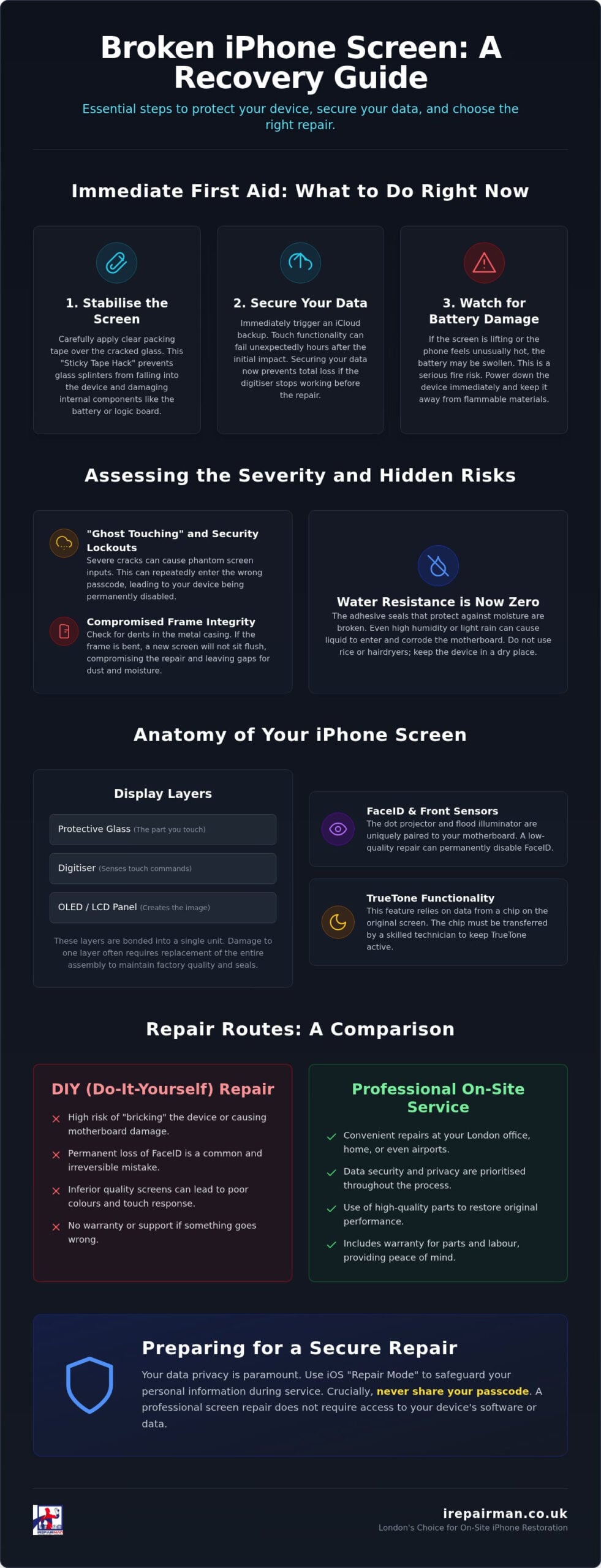
First, perform the “Sticky Tape Hack”. Carefully apply a layer of clear packing tape over the entire front panel. This prevents tiny glass splinters from falling out or entering the chassis, where they can puncture the delicate battery or damage the logic board. Once the surface is secure, trigger an immediate iCloud backup. Touch-screen functionality often fails hours after the initial impact. Securing your data now prevents a total loss if the digitiser dies before you can arrange a broken iPhone screen repair.
Watch for warning signs of battery failure. If the screen is lifting away from the frame or the phone feels unusually hot, the battery may have been compromised during the drop. A swollen battery is a serious fire risk. If you notice these signs, power down the device immediately and keep it away from flammable materials until a professional can inspect it.
Assessing the Severity of the Damage
Not all cracks are created equal. A single hairline fracture might seem like a minor cosmetic issue, but it often conceals deeper structural weaknesses. More severe shattering often leads to “ghost touching,” where the phone registers phantom inputs. This behaviour can be disastrous. It may repeatedly enter the wrong passcode whilst the phone is in your pocket, leading to a permanent security lockout. Check the corners of the frame as well. If the metal casing is dented, a new screen won’t sit flush. A professional assessment ensures the frame is reshaped before the new display is fitted during your broken iPhone screen repair.
The Risk of Liquid Ingress
Your iPhone’s water resistance rating is now effectively zero. The adhesive seals that keep out moisture are broken the second the glass cracks. Even high humidity in a bathroom or a light drizzle can allow water vapour to seep inside, causing rapid corrosion on the motherboard. Avoid the temptation to use DIY adhesives or “rice hacks.” These methods provide no protection against moisture and can introduce dust into the internal components. Never use a hair dryer to “clean” the screen; the excessive heat can melt internal seals and permanently damage the pixels. Keep the device in a dry, room-temperature environment until it’s professionally restored.
Understanding Your Screen: Glass, LCD, and OLED Explained
When you look at your device, you’re actually seeing a complex stack of technology fused into a single unit. The outer layer is the protective glass, followed by the digitiser, which translates your touch into digital commands. Beneath these sits the display panel, the component responsible for every pixel you see. Since the iPhone 12, every flagship model uses an OLED panel, which is significantly thinner and more sensitive to static discharge and pressure than older LCD versions. The “black spot” of death is actually an ink-like pool of liquid or air that signifies the display panel has been physically breached, meaning the screen is slowly dying from the inside out. TrueTone is the ambient light sensing technology that adjusts your display’s colour temperature to match your surroundings, a feature that frequently vanishes during a budget broken iPhone screen repair if the technician fails to transfer the original screen’s unique data chip.
Cracked Glass vs. Damaged LCD/OLED
If your phone still responds to touch and shows a clear image despite the cracks, you’ve likely only damaged the top glass. However, because modern screens are vacuum-bonded, the entire assembly usually needs replacing to maintain factory standards. Visual cues like vertical green lines, flickering, or a total blackout indicate that the underlying OLED or LCD panel is failing. Touch-response failure is the most critical symptom; if the digitiser is damaged, the phone may begin “ghost touching,” which can lead to your device being permanently disabled. If you’re unsure which layer is damaged, our specialists can provide a professional diagnostic at your doorstep to prevent further data loss.
FaceID and Sensor Complications
The relationship between your screen and the front-facing sensors is incredibly delicate. The FaceID system relies on a flood illuminator and a dot projector that are paired specifically to your motherboard at the factory. A clumsy DIY attempt or a low-quality repair often leads to a permanent “FaceID Not Available” error because these sensors are easily knocked out of alignment. The FTC report on repair restrictions highlights how these software-linked components make independent fixes more difficult for those without the right tools. To maintain full functionality, a technician must carefully transfer the original IC chip and sensor array to the new screen. This level of precision is what separates a professional restoration from a temporary fix that leaves your biometric security useless.
Repair Routes: DIY, High Street, or Professional On-Site?
Choosing how to handle a broken iPhone screen repair often comes down to a trade-off between cost, speed, and reliability. DIY kits are widely available online, but they rarely include the high-grade adhesive seals or the calibration software required for a perfect finish. One slip of a prying tool can pierce the battery or sever the display cable, turning a simple screen swap into a total hardware failure. A Consumer Reports survey found that whilst many support the right to repair, the technical hurdles of modern electronics often lead to frustration. If you lack specialised tools like heat mats and precision drivers, the hidden cost of a botched DIY attempt can far exceed the price of a professional fix.
The Apple Genius Bar provides the security of manufacturer parts, but the logistical hurdles are significant. You must often wait days for an appointment, travel to a specific location, and potentially lose access to your device for 48 hours or more. High-street shops offer a quicker alternative, yet the quality of their third-party components varies wildly. A professional on-site service bridges this gap. It provides the high-end parts and technical mastery of a specialist without the downtime of a traditional shop. Always check the warranty; a reputable provider should offer a robust guarantee that covers both the part and the labour, giving you lasting peace of mind.
The Logistics of a London Repair
For those working in the heart of the City or Canary Wharf, time is the most valuable commodity. Shop-based repairs are inherently slow because they rely on you doing the legwork. If you are located outside the immediate reach of a mobile technician, our iPhone repair pick and return UK service ensures you still receive premium care. This model provides nationwide coverage, allowing you to organise a secure collection from your doorstep and a swift return once the restoration is complete. It’s a decisive resolution for busy individuals who cannot justify a trip to a high-street centre.
B2B and Educational Fleet Support
Managing a large number of devices requires a different level of logistical precision. Schools and nurseries cannot afford to have educational tools out of commission for long periods. We provide specialised iPad repair for schools UK, focusing on bulk maintenance that fits around the academic calendar. For our corporate clients, the corporate phone repair London hub offers a streamlined B2B management system. This ensures that your team stays connected with minimal disruption to your daily operations. We act as a proactive partner, treating every corporate device with the individual care it deserves whilst maintaining the efficiency of a modern logistics operation.
Preparing Your iPhone for a Secure Screen Repair
Before handing over your device for a broken iPhone screen repair, your primary concern should be digital security. A professional technician should never ask for your passcode to complete a screen replacement. Providing access to an unlocked phone exposes your messages, banking apps, and personal photos unnecessarily. Instead, modern iOS versions now include a dedicated “Repair Mode” or “Service Mode” that allows technicians to run essential hardware diagnostics without accessing your private files. This ensures your digital life remains strictly confidential whilst the work is carried out. Professional technicians use specialised anti-static equipment, such as ESD-safe mats and wrist straps, to prevent electrostatic discharge from permanently frying the logic board’s micro-components during the disassembly process.
You should also run through a final security checklist. Remove your SIM card if you need to use it in a spare device, and ensure you know your Apple ID credentials. Whilst some official channels require you to disable “Find My” before a repair can begin, independent specialists can often work around this, though having it ready to toggle is good practice. These steps transform a stressful technical failure into a controlled, professional logistics exercise.
Backing Up Your Life
Whilst section one touched on the urgency of a backup, the method you choose matters for sensitive data. iCloud is convenient for daily use, but a local encrypted backup to a computer via Finder or iTunes is often more robust for large photo libraries or corporate data. If your screen is completely unresponsive, you may still be able to trigger a backup by connecting your iPhone to a previously “trusted” computer or by using a Lightning-to-USB adapter to plug in a standard computer mouse to navigate the menus. Don’t forget your Two-Factor Authentication (2FA) settings. If your iPhone is your only 2FA device, ensure you have a secondary method, such as a trusted iPad or a physical security key, to log back into your accounts once the repair is finished.
Physical Preparation
Help your technician by removing third-party cases, screen protectors, and any accessories like MagSafe wallets before they arrive. A clean device isn’t just about aesthetics; it ensures that the new adhesive seal bonds perfectly to the frame without being compromised by dust or debris. Take a moment to document the current state of your phone. Clear photos of any existing scratches or dents on the frame serve as a record for your own peace of mind. To ensure your device is handled with this level of professional care, book your secure on-site repair today. Preparing your device properly ensures that your broken iPhone screen repair is as efficient and secure as possible, getting you back to your routine without delay.
Why iRepairMan is Londons Choice for iPhone Restoration
iRepairMan has redefined the logistics of device maintenance by placing the customer’s schedule at the heart of every operation. Our “We Come To You” philosophy isn’t just about convenience; it’s a commitment to eliminating the downtime that costs London professionals valuable time and money. Whether you are in a boardroom in the City or at home in Kensington, a specialist arrives equipped to handle your broken iPhone screen repair on-site. This eliminates the need for high-street travel and ensures your device never leaves your sight. Our expertise extends beyond the display, offering precision iPhone back glass replacement to restore the structural integrity of your device. Since our founding in 2015, we have focused on building long-term trust through professional accountability and discreet service for both individual users and our B2B HUB corporate partners.
Emergency Airport Assistance
Technical failure doesn’t wait for a convenient time. It often strikes at the worst possible moment, such as the hour before an international flight when you are navigating a crowded terminal. We provide dedicated emergency phone repair Heathrow airport services, alongside rapid coverage for travellers at Stansted and Luton. Our technicians understand the high stakes of travel. We prioritise speed to ensure your digital boarding pass, hotel confirmations, and travel documents are accessible before you reach the gate. This proactive alternative to traditional repair models ensures that a shattered screen doesn’t derail your business trip or holiday. We meet you exactly where you are, providing a calming solution in a high-pressure environment.
The iRepairMan Quality Standard
We maintain a high standard of excellence by using premium parts that mirror factory specifications. Cheap replacements often suffer from dull colours or sluggish touch sensitivity, but our components preserve the vivid OLED performance you expect. Restoring the back glass is equally critical; a cracked rear panel compromises the internal seal and leaves the motherboard vulnerable to humidity. Every restoration concludes with a thorough quality assurance check to verify that FaceID and TrueTone sensors are fully operational. This methodical approach ensures that your device doesn’t just look new but performs with original reliability. We provide transparent pricing and a commitment to data security that high-street competitors often overlook. Book your on-site iPhone screen repair with iRepairMan today.
Restore Your Device and Your Peace of Mind
A shattered display is more than a cosmetic nuisance; it’s a disruption to your professional and personal life. By stabilising the glass early and choosing a secure, on-site broken iPhone screen repair, you ensure your data stays private whilst your phone returns to factory standards. Whether you are managing a large fleet via our dedicated B2B HUB for schools or need urgent assistance at the airport, the solution should always prioritise your convenience and security.
iRepairMan brings over 10 years of London repair expertise directly to your door. We understand the high stakes of technical failure, which is why we offer emergency airport services at Heathrow and Stansted to keep travellers connected. Our technicians combine technical mastery with a commitment to professional accountability, treating every device with individual care. Don’t let a cracked screen slow your momentum. Get a Quote for On-Site iPhone Screen Repair in London and experience a seamless, high-end restoration today.
Frequently Asked Questions
How much does a broken iPhone screen repair cost in London?
Costs vary significantly based on your specific model and the technology used in the display panel. Flagship models with advanced OLED panels generally command a higher price than older LCD units due to the complexity of the components. Whilst we don’t provide fixed quotes here, you should consider that professional on-site services save you the hidden costs of travel and downtime. For an accurate quote tailored to your device, it’s best to contact a specialist directly.
Can I still use my iPhone if the screen is cracked but the touch works?
You can, but it’s a significant risk to both your safety and the device’s internal health. Small glass splinters can cause skin irritation or enter the chassis, potentially puncturing the battery. Moisture ingress through the cracks also leads to rapid motherboard corrosion. We recommend stabilising the display with clear tape immediately and booking a professional repair before the digitiser fails completely and locks you out of your device.
Will a third-party screen repair void my Apple warranty?
Under current UK consumer law, a third-party repair doesn’t automatically void your entire warranty, but the manufacturer may refuse to cover future issues specifically related to the screen or damage caused during the fix. However, many independent specialists provide their own robust warranties on parts and labour. This gives you a level of security that often matches the peace of mind offered by manufacturer-only service routes.
How long does an on-site iPhone screen replacement take?
Most on-site screen replacements are completed in approximately 30 to 45 minutes. Our technicians arrive with all the necessary precision tools and anti-static equipment to perform the work at your home, office, or even at the airport terminal. This rapid turnaround is designed to minimise your downtime, allowing you to return to your daily routine without the inconvenience of leaving your device at a high-street shop for several days.
Do I need to back up my data before a screen repair?
Yes, you should always perform a full iCloud or local backup before any hardware intervention. Whilst a standard broken iPhone screen repair doesn’t typically involve data loss, the process of opening the device carries a small inherent risk. Securing your files ensures that your messages, photos, and corporate data remain safe regardless of any unforeseen technical complications. It’s a vital step for maintaining your digital security and peace of mind.
Can you fix an iPhone screen if the display is completely black?
A completely black display usually indicates that the underlying OLED or LCD panel has failed, which is a common result of a heavy impact. This is a standard part of a broken iPhone screen repair, as the entire display assembly is replaced during the process. As long as your phone still vibrates or makes sounds when charging, it’s likely the motherboard is intact and only the screen requires professional replacement.
What is the difference between an OLED and an LCD screen repair?
OLED screens are thinner and offer better colour accuracy and deeper blacks compared to LCDs. Most iPhones from the 12 series onwards use OLED technology, which requires more delicate handling during the repair process. Replacing an OLED with a cheaper LCD can lead to reduced battery life and a thicker display profile. We always recommend using the panel type that matches your device’s original factory specifications to preserve performance.
Do you offer screen repairs for iPads and Samsung phones as well?
We provide comprehensive repair services for a wide range of mobile hardware, including iPad and Samsung phone repairs. Our specialists are trained to handle the unique structural requirements of larger tablets and the specific display technologies used by other major manufacturers. From managing corporate iPad fleets to individual Samsung devices, we apply the same high standard of precision and on-site convenience across all our professional service offerings.



